

- Posts: 2
- Thank you received: 0
Bloque de imagen ampliada del producto
12 years 8 months ago #145778
by cynney
Bloque de imagen ampliada del producto was created by cynney
Hola que tal
no acostumbro a consultar en foros ya que generalmente descubro la solucion ..pero en este caso no tengo mucho tiempo y necesito resolver esto ....Me sucede lo siguiente todo en Hikashop me funciona y lo configuro como quiero pero me sucede que no se porque motivo las imagenes de los productos, me refiero a cuando ingresas a la pagina del producto y haces click para ampliar la imagen, esta se ve estirada (adjunto una imagen para mostrar) . . es algo que no se como sucedió ya que antes se veian perfectas.
Obviamente mi conclusión fue q había tocado algo en la configuración con respecto a las medidas de las imágenes pero no, luego probé cambiar los tamaños de como se van a mostrar, pero afectan solo a las miniaturas y la imagen ampliada se sigue viendo mal ... no se como solucionarlo y no se tampoco xq sucede esto
Me podrian ayudar?
Muchas gracias
Yenny Casserini
Argentina
no acostumbro a consultar en foros ya que generalmente descubro la solucion ..pero en este caso no tengo mucho tiempo y necesito resolver esto ....Me sucede lo siguiente todo en Hikashop me funciona y lo configuro como quiero pero me sucede que no se porque motivo las imagenes de los productos, me refiero a cuando ingresas a la pagina del producto y haces click para ampliar la imagen, esta se ve estirada (adjunto una imagen para mostrar) . . es algo que no se como sucedió ya que antes se veian perfectas.
Obviamente mi conclusión fue q había tocado algo en la configuración con respecto a las medidas de las imágenes pero no, luego probé cambiar los tamaños de como se van a mostrar, pero afectan solo a las miniaturas y la imagen ampliada se sigue viendo mal ... no se como solucionarlo y no se tampoco xq sucede esto
Me podrian ayudar?
Muchas gracias
Yenny Casserini
Argentina
Please Log in or Create an account to join the conversation.

Less
More
- Posts: 12953
- Thank you received: 1778
12 years 8 months ago #145841
by Mohamed Thelji
Replied by Mohamed Thelji on topic Bloque de imagen ampliada del producto
Hi,
I didn't totally understood your issue, but can you give me more information through some screenshots for example so that i can fully understand it ?
Thanks .
.
I didn't totally understood your issue, but can you give me more information through some screenshots for example so that i can fully understand it ?
Thanks
. Please Log in or Create an account to join the conversation.
12 years 8 months ago #145920
by cynney
Replied by cynney on topic Bloque de imagen ampliada del producto
Hi, thanks for replying !
I'll try to explain better ... what happens to me is this:
So far everything in HikaShop works for me and I can set up the way I want but it happens , not what is the reason , pictures of products, those that are extended on each page of the product (zoom ) by clicking on the thumbnail to look is in its larger size , it happens that the image looks stretched zoom ( I attached a picture to show ) . . No how or why this happened as before , wanting to enlarge ( zoom) the image of the product, they looked perfect with normal tamañao of 720px x 720px
Obviously my conclusion was that maybe I had hit something in the configuration with respect to the measures of the images but then I tried to change sizes as to display, but affect only the thumbnails and continuous enlarged image ( zoom) seeing themselves not as bad ... and not fix it either happens xq
I could help ?
You can see the component and the problem at hand via the following link intermobili.com.ar/index.php/catalogo/es...pejo-circular-bronce
there when they want to give zoom image thumbnail will see that it looks bad
thank you very much
Yenny Casserini
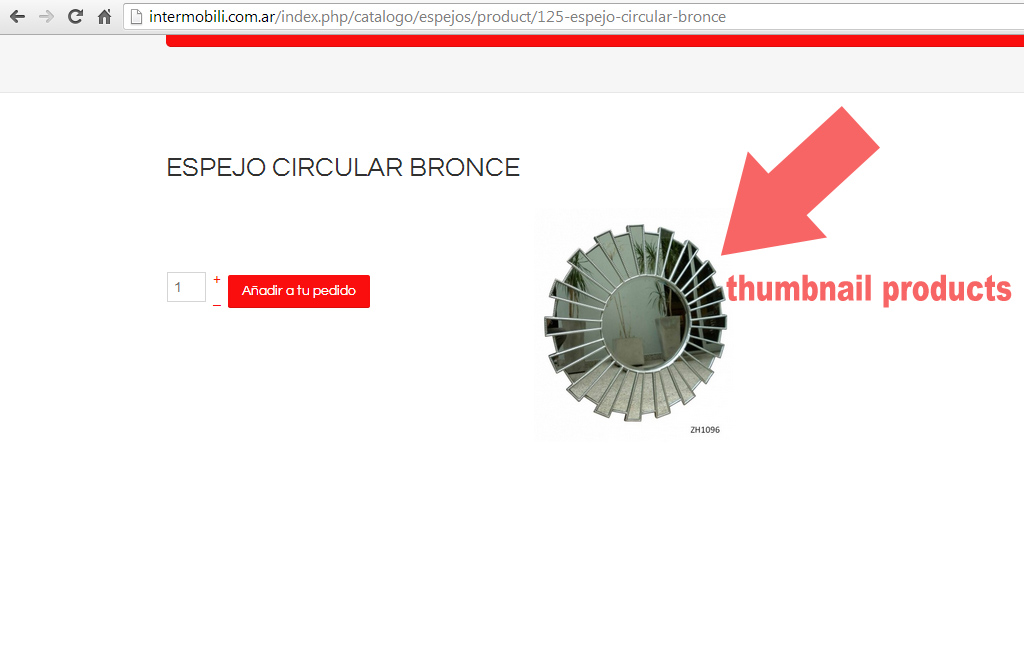
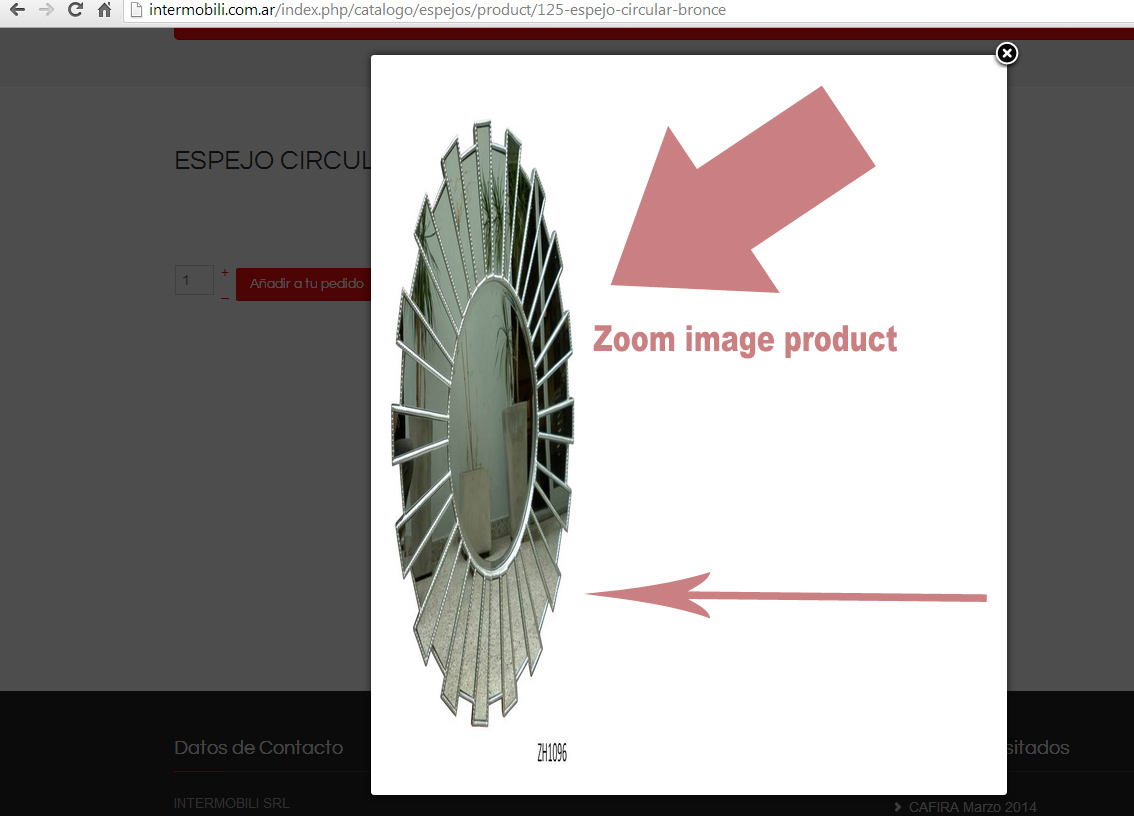
I'll try to explain better ... what happens to me is this:
So far everything in HikaShop works for me and I can set up the way I want but it happens , not what is the reason , pictures of products, those that are extended on each page of the product (zoom ) by clicking on the thumbnail to look is in its larger size , it happens that the image looks stretched zoom ( I attached a picture to show ) . . No how or why this happened as before , wanting to enlarge ( zoom) the image of the product, they looked perfect with normal tamañao of 720px x 720px
Obviously my conclusion was that maybe I had hit something in the configuration with respect to the measures of the images but then I tried to change sizes as to display, but affect only the thumbnails and continuous enlarged image ( zoom) seeing themselves not as bad ... and not fix it either happens xq
I could help ?
You can see the component and the problem at hand via the following link intermobili.com.ar/index.php/catalogo/es...pejo-circular-bronce
there when they want to give zoom image thumbnail will see that it looks bad
thank you very much
Yenny Casserini
Please Log in or Create an account to join the conversation.

12 years 8 months ago #145928
by Xavier
Replied by Xavier on topic Bloque de imagen ampliada del producto
Hi,
There is a css properties which override ours css properties.
Thanks to try the following line in the hikashop frontend css file or in your template file directly:
There is a css properties which override ours css properties.
Thanks to try the following line in the hikashop frontend css file or in your template file directly:
Code:
.sbox-content img{ width: 100% !important; }
Please Log in or Create an account to join the conversation.
Time to create page: 0.288 seconds