

- Posts: 29
- Thank you received: 2
Move product listing from category page to article
12 years 8 months ago #145980
by sorin1z
Move product listing from category page to article was created by sorin1z
-- url of the page with the problem -- :
mywebsite.com/mypage
-- Joomla version -- : 2.5.8
-- Browser(s) name and version -- : Mozilla 26.0
I want to move the product listing in my site from category page (witch contains subcategories listing but i don't want to take those too) to an article page that i've created.
I've made some printscreens for an easy comprehention.
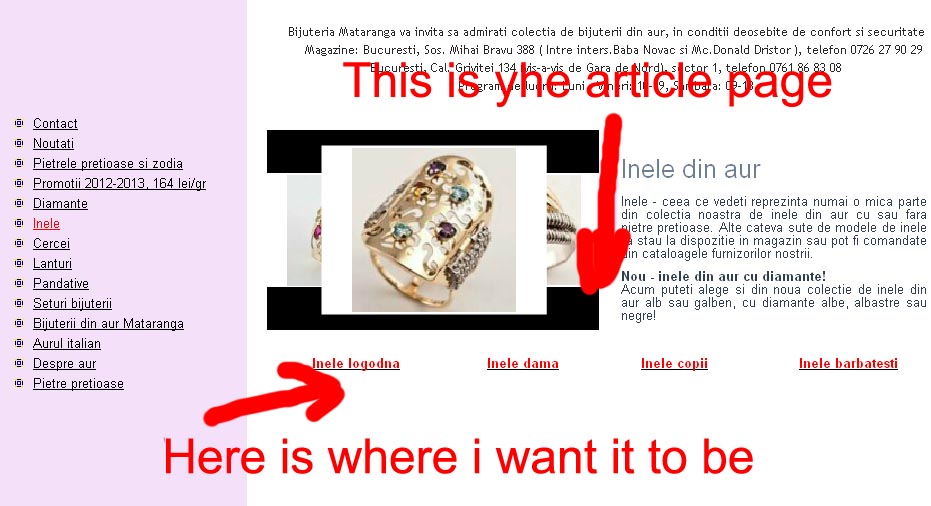
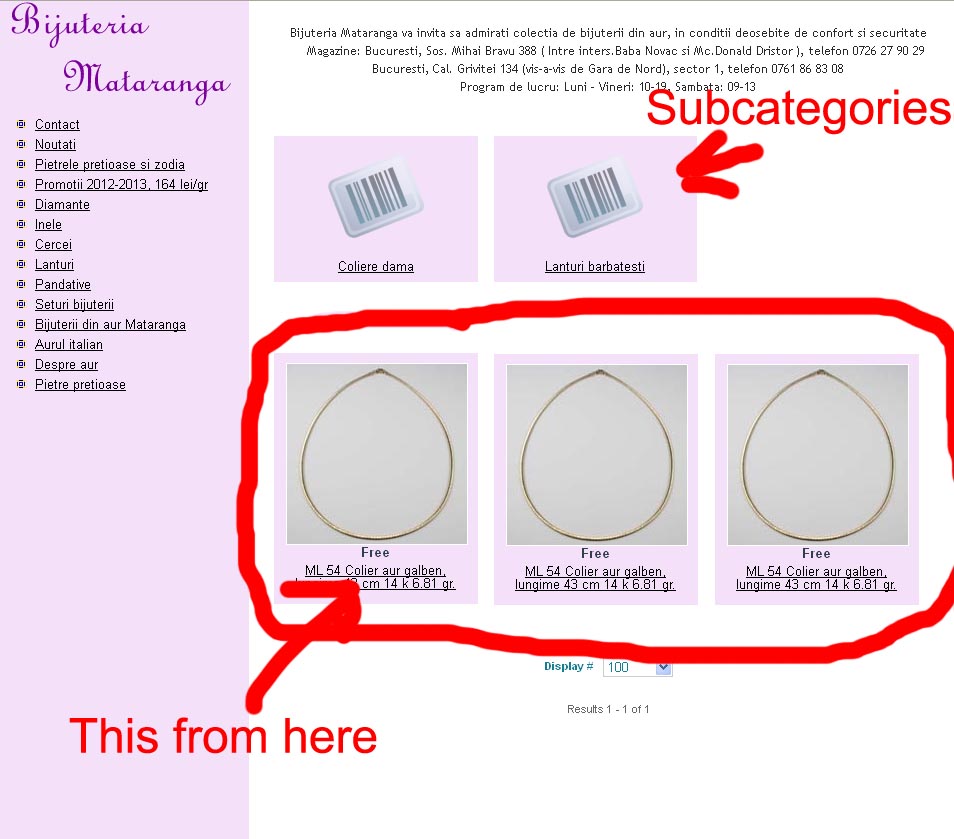
-- Joomla version -- : 2.5.8
-- Browser(s) name and version -- : Mozilla 26.0
I want to move the product listing in my site from category page (witch contains subcategories listing but i don't want to take those too) to an article page that i've created.
I've made some printscreens for an easy comprehention.
Please Log in or Create an account to join the conversation.

Less
More
- Posts: 12953
- Thank you received: 1778
12 years 8 months ago #146022
by Mohamed Thelji
Replied by Mohamed Thelji on topic Move product listing from category page to article
Hi,
I don't think that you'll be able to do that without some code customization or some joomla extension, but note that you can also use that method .
I don't think that you'll be able to do that without some code customization or some joomla extension, but note that you can also use that method .
Please Log in or Create an account to join the conversation.
12 years 8 months ago #146046
by sorin1z
Replied by sorin1z on topic Move product listing from category page to article
Thank you very much. I tried the method but i dont get a product galery looking like thingy. I't just a product with almost no styling.
Here is how it looks
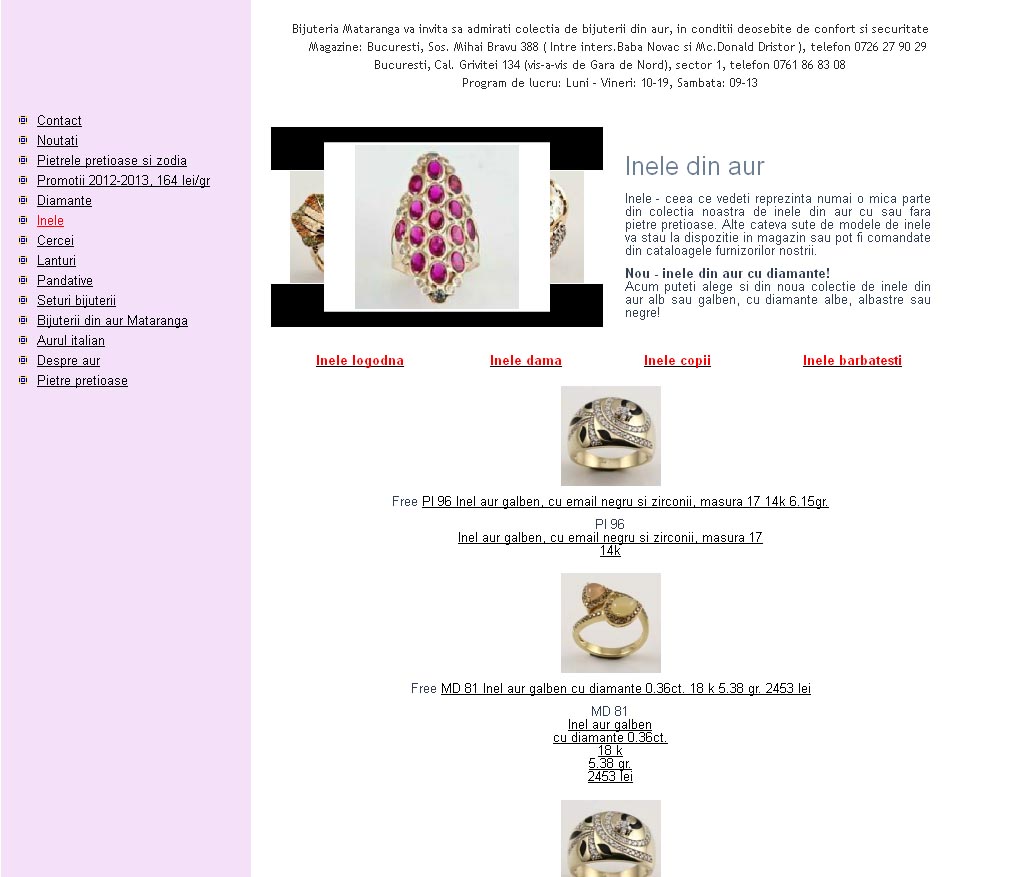
Here is how it looks
Please Log in or Create an account to join the conversation.
12 years 8 months ago - 12 years 7 months ago #146053
by sorin1z
Replied by sorin1z on topic Move product listing from category page to article
I'm thinking that there are 2 php files involved in my dilema. I don't know where there are located. I don't know where my article is and i don't know where the category page is (containing subcategories listing and product listing).
I found some code in Components -> HikaShop -> Display -> product / listing.php is this the code for category page?
I found some code in Components -> HikaShop -> Display -> product / listing.php is this the code for category page?
Code:
<?php
/**
* @package HikaShop for Joomla!
* @version 2.2.3
* @author hikashop.com
* @copyright (C) 2010-2013 HIKARI SOFTWARE. All rights reserved.
* @license GNU/GPLv3 http://www.gnu.org/licenses/gpl-3.0.html
*/
defined('_JEXEC') or die('Restricted access');
?><?php
if(!$this->module && isset($this->element->category_canonical) && !empty($this->element->category_canonical)){
$canonicalUrl = hikashop_cleanURL($this->element->category_canonical);
$doc = JFactory::getDocument();
$doc->addCustomTag( '<link rel="canonical" href="'.$canonicalUrl.'" />' );
}
if(hikashop_level(2) && JRequest::getVar('hikashop_front_end_main',0) && JRequest::getVar('task')=='listing' && $this->params->get('show_compare')) {?>
<script type="text/javascript">
<!--
var compare_list = {length: 0};
function setToCompareList(product_id,name,elem) {
var compareBtn = document.getElementById('hikashop_compare_button');
if( compare_list[product_id] ) {
var old = compare_list[product_id];
compare_list[product_id] = null;
compare_list.length--;
if( elem == null ) elem = old.elem;
var nn = elem.nodeName.toLowerCase();
if( nn == 'a' )
elem.innerHTML = "<?php echo JText::_('ADD_TO_COMPARE_LIST');?>";
else if( nn == 'input' )
elem.checked = false;
} else {
if(compare_list.length < <?php echo $this->config->get('compare_limit',5); ?> ) {
compare_list[product_id] = {name: name, elem: elem};
compare_list.length++;
var nn = elem.nodeName.toLowerCase();
if( nn == 'a' )
elem.innerHTML = "<?php echo JText::_('REMOVE_FROM_COMPARE_LIST');?>";
else if( nn == 'input' )
elem.checked = true;
} else {
alert("<?php echo JText::_('COMPARE_LIMIT_REACHED');?>");
elem.checked = false;
}
}
if(compare_list.length == 0 ) {
compareBtn.style.display = 'none';
} else {
compareBtn.style.display = '';
}
return false;
}
function compareProducts() {
var url = '';
for(var k in compare_list) {
if( compare_list[k] != null && k != 'length' ) {
if( url == '' )
url = 'cid[]=' + k;
else
url += '&cid[]=' + k;
}
}
window.location = "<?php
$u = hikashop_completeLink('product&task=compare'.$this->itemid,false,true);
if( strpos($u,'?') === false ) {
echo $u.'?';
} else {
echo $u.'&';
}
?>" + url;
return false;
}
window.addEvent('domready', function() {
$$('input.hikashop_compare_checkbox').each(function(el){
el.checked = false;
});
});
//-->
</script>
<?php }
ob_start();
if(version_compare(JVERSION,'1.6','<')){
$title = 'show_page_title';
}else{
$title = 'show_page_heading';
}
$titleType = 'h1';
if($this->module){
$title = 'showtitle';
$titleType = 'h2';
}
if($this->params->get($title) && JRequest::getVar('hikashop_front_end_main',0) && (!$this->module || $this->pageInfo->elements->total)){
$name = $this->params->get('page_title');
if($this->module){
$name = $this->params->get('title');
}elseif($this->params->get('page_heading')){
$name = $this->params->get('page_heading');
}
?>
<<?php echo $titleType; ?>>
<?php echo $name; ?>
</<?php echo $titleType; ?>>
<?php
}
if(($this->params->get('show_image') && !empty($this->element->file_path))|| ($this->params->get('show_description',!$this->module)&&!empty($this->element->category_description))){
?>
<div class="hikashop_category_description">
<?php
if($this->params->get('show_image') && !empty($this->element->file_path)){
jimport('joomla.filesystem.file');
if(JFile::exists($this->image->getPath($this->element->file_path,false))){
?>
<img src="<?php echo $this->image->getPath($this->element->file_path); ?>" class="hikashop_category_image"/>
<?php
}
}
if($this->params->get('show_description',!$this->module)&&!empty($this->element->category_description)){
?>
<div class="hikashop_category_description_content">
<?php echo JHTML::_('content.prepare',$this->element->category_description); ?>
</div>
<?php
}
?></div><?php
}
if(!empty($this->fields)){?>
<div id="hikashop_category_custom_info_main" class="hikashop_category_custom_info_main">
<h4><?php echo JText::_('CATEGORY_ADDITIONAL_INFORMATION');?></h4>
<table width="100%">
<?php
$this->fieldsClass->prefix = '';
foreach($this->fields as $fieldName => $oneExtraField) {
if(!empty($this->element->$fieldName)){ ?>
<tr class="hikashop_category_custom_<?php echo $oneExtraField->field_namekey;?>_line">
<td class="key">
<span id="hikashop_category_custom_name_<?php echo $oneExtraField->field_id;?>" class="hikashop_category_custom_name">
<?php echo $this->fieldsClass->getFieldName($oneExtraField);?>
</span>
</td>
<td>
<span id="hikashop_category_custom_value_<?php echo $oneExtraField->field_id;?>" class="hikashop_category_custom_value">
<?php echo $this->fieldsClass->show($oneExtraField,$this->element->$fieldName); ?>
</span>
</td>
</tr>
<?php }
}?>
</table>
</div>
<?php }
$mainInfo = ob_get_clean();
ob_start();
$display_filters = $this->params->get('display_filters', -1);
if($display_filters=='-1'){
$config =& hikashop_config();
$display_filters=$config->get('show_filters');
}
if(hikashop_level(2) && JRequest::getVar('hikashop_front_end_main',0) && JRequest::getVar('task','listing')=='listing' && $display_filters=='1'){
$this->setLayout('filter');
$htmlFilter = $this->loadTemplate();
}
if(!empty($htmlFilter)&&@$_GET['task']!='category') echo $htmlFilter;
$filter_type = (int)$this->params->get('filter_type');
$layout_type = $this->params->get('layout_type');
if(empty($layout_type)) $layout_type = 'div';
if($filter_type !== 3) {
$this->setLayout('listing');
$html = $this->loadTemplate($layout_type);
if(!$this->module) echo $mainInfo;
if(!empty($html)){
if($this->module) echo $mainInfo;
if(!empty($htmlFilter) && @$_GET['task']=='category')
echo $htmlFilter;
?>
<div class="hikashop_products_listing">
<?php
if(JRequest::getVar('hikashop_front_end_main',0) && JRequest::getVar('task')=='listing' && $this->params->get('show_compare')) {
?>
<div id="hikashop_compare_zone" class="hikashop_compare_zone">
<?php
$empty='';
$params = new HikaParameter($empty);
echo $this->cart->displayButton(JText::_('COMPARE_PRODUCTS'),'compare_button',$params,'#','compareProducts();return false;','style="display:none;" id="hikashop_compare_button"',0,1,' hikashop_compare_button');
?>
</div>
<?php
}
echo $html;
?>
</div>
<?php
}
$html = ob_get_clean();
if(!empty($html)) {
?>
<div id="<?php echo $this->params->get('main_div_name');?>" class="hikashop_category_information hikashop_products_listing_main"><?php echo $html; ?></div>
<?php
}
} else if(!empty($this->rows) && !empty($this->categories)) {
$allrows = $this->rows;
$pagination = '';
if((!$this->module || JRequest::getVar('hikashop_front_end_main',0)) && $this->pageInfo->elements->total) {
$pagination = $this->config->get('pagination','bottom');
$this->config->set('pagination', '');
}
if((!empty($allrows) || !$this->module || JRequest::getVar('hikashop_front_end_main',0)) && in_array($pagination, array('top','both')) && $this->params->get('show_limit') && $this->pageInfo->elements->total) {
$this->pagination->form = '_top';
?>
<form action="<?php echo hikashop_currentURL(); ?>" method="post" name="adminForm_<?php echo $this->params->get('main_div_name').$this->category_selected;?>_top">
<div class="hikashop_products_pagination hikashop_products_pagination_top">
<?php echo $this->pagination->getListFooter($this->params->get('limit')); ?>
<span class="hikashop_results_counter"><?php echo $this->pagination->getResultsCounter(); ?></span>
</div>
<input type="hidden" name="filter_order_<?php echo $this->params->get('main_div_name').$this->category_selected;?>" value="<?php echo $this->pageInfo->filter->order->value; ?>" />
<input type="hidden" name="filter_order_Dir_<?php echo $this->params->get('main_div_name').$this->category_selected;?>" value="<?php echo $this->pageInfo->filter->order->dir; ?>" />
<?php echo JHTML::_( 'form.token' ); ?>
</form>
<?php
}
$main_div_name = $this->params->get('main_div_name');
foreach($this->categories as $category) {
if(empty($category['products']))
continue;
$this->rows = array();
foreach($allrows as $p) {
if(in_array($p->product_id, $category['products']))
$this->rows[] = $p;
}
$this->params->set('main_div_name', $main_div_name.'_'.$category['category']->category_id);
$this->setLayout('listing');
$html = $this->loadTemplate($layout_type);
if(!empty($html)) {
if(!empty($htmlFilter) && @$_GET['task']=='category')
echo $htmlFilter;
?>
<h2><?php echo $category['category']->category_name; ?></h2>
<div class="hikashop_products_listing">
<?php
if(JRequest::getVar('hikashop_front_end_main',0) && JRequest::getVar('task')=='listing' && $this->params->get('show_compare')) {
?>
<div id="hikashop_compare_zone" class="hikashop_compare_zone">
<?php
$empty='';
$params = new HikaParameter($empty);
echo $this->cart->displayButton(JText::_('COMPARE_PRODUCTS'),'compare_button',$params,'#','compareProducts();return false;','style="display:none;" id="hikashop_compare_button"',0,1,' hikashop_compare_button');
?>
</div>
<?php
}
echo $html;
?>
</div>
<?php
}
}
$this->params->set('main_div_name', $main_div_name);
$this->config->set('pagination', $pagination);
if((!empty($allrows) || !$this->module || JRequest::getVar('hikashop_front_end_main',0)) && in_array($pagination,array('bottom','both')) && $this->params->get('show_limit') && $this->pageInfo->elements->total) {
$this->pagination->form = '_bottom';
?>
<form action="<?php echo hikashop_currentURL(); ?>" method="post" name="adminForm_<?php echo $this->params->get('main_div_name').$this->category_selected;?>_bottom">
<div class="hikashop_products_pagination hikashop_products_pagination_bottom">
<?php echo $this->pagination->getListFooter($this->params->get('limit')); ?>
<span class="hikashop_results_counter"><?php echo $this->pagination->getResultsCounter(); ?></span>
</div>
<input type="hidden" name="filter_order_<?php echo $this->params->get('main_div_name').$this->category_selected;?>" value="<?php echo $this->pageInfo->filter->order->value; ?>" />
<input type="hidden" name="filter_order_Dir_<?php echo $this->params->get('main_div_name').$this->category_selected;?>" value="<?php echo $this->pageInfo->filter->order->dir; ?>" />
<?php echo JHTML::_( 'form.token' ); ?>
</form>
<?php }
$html = ob_get_clean();
if(!empty($html)) {
?>
<div id="<?php echo $this->params->get('main_div_name');?>" class="hikashop_category_information hikashop_products_listing_main"><?php echo $html; ?></div>
<?php
}
}
if(!$this->module){
?>
<div class="hikashop_submodules" style="clear:both">
<?php
if(!empty($this->modules)){
jimport('joomla.application.module.helper');
foreach($this->modules as $module) {
echo JModuleHelper::renderModule($module);
}
}
?>
</div>
<?php
}
Last edit: 12 years 7 months ago by Eliot.
Please Log in or Create an account to join the conversation.
12 years 8 months ago #146057
by sorin1z
Replied by sorin1z on topic Move product listing from category page to article
I"m thinking of taking the last part from <div class="hikashop_products_listing"> until the end of source and insert it in article php file.
Is it posible or is not so simple?
Is it posible or is not so simple?
Please Log in or Create an account to join the conversation.

12 years 8 months ago #146109
by Xavier
Replied by Xavier on topic Move product listing from category page to article
Hi,
I think that the easiest way to do what you need is to use/create a position of your template under the article part.
And at this position use a module. This can be done thanks to the joomla module settings.
The module to create is a category listing one, then you just have to configure it as wanted.
I think that the easiest way to do what you need is to use/create a position of your template under the article part.
And at this position use a module. This can be done thanks to the joomla module settings.
The module to create is a category listing one, then you just have to configure it as wanted.
Please Log in or Create an account to join the conversation.
12 years 8 months ago #146117
by sorin1z
Replied by sorin1z on topic Move product listing from category page to article
it was a great idea and it works. Now i'm trying to figure out how to put different content to this module in function of the accesed page.
Please Log in or Create an account to join the conversation.
12 years 8 months ago #146131
by Xavier
Replied by Xavier on topic Move product listing from category page to article
You can create one module per article and restrict the display of the desired module on the desired article (so a specific menu).
Please Log in or Create an account to join the conversation.
12 years 7 months ago #147064
by sorin1z
Replied by sorin1z on topic Move product listing from category page to article
Here is how it looks now and until a point it works
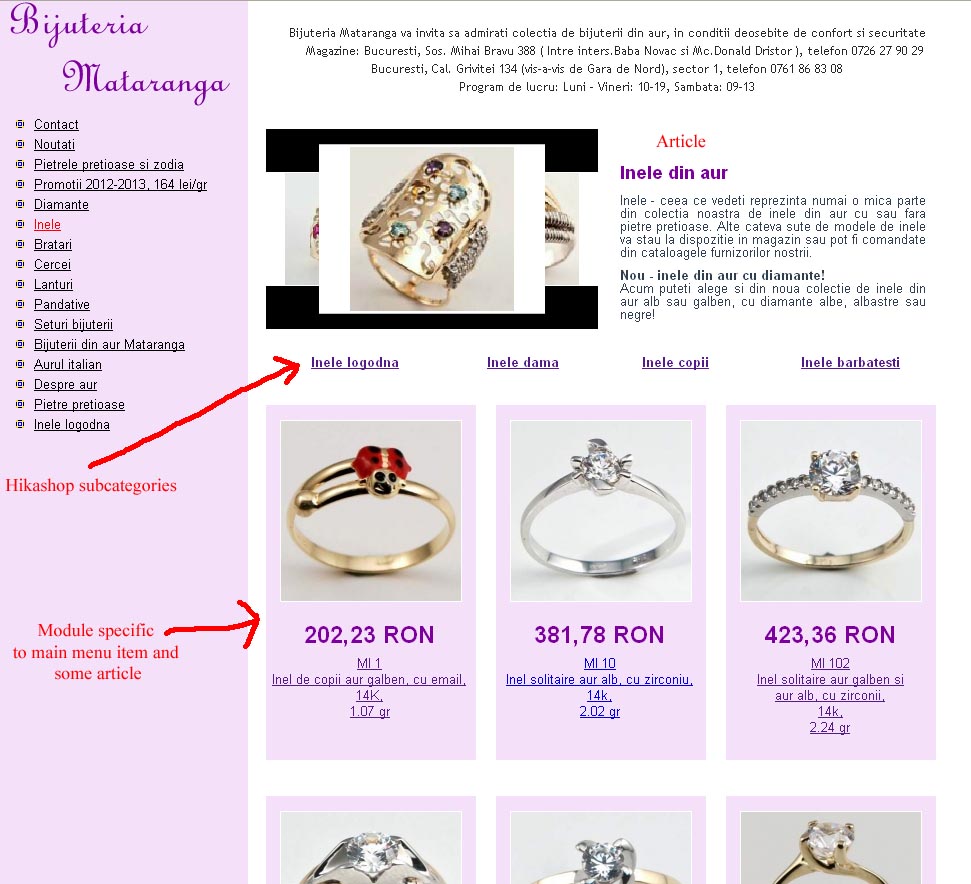
The hikashop subcategory links open product listing of a specific subcategory
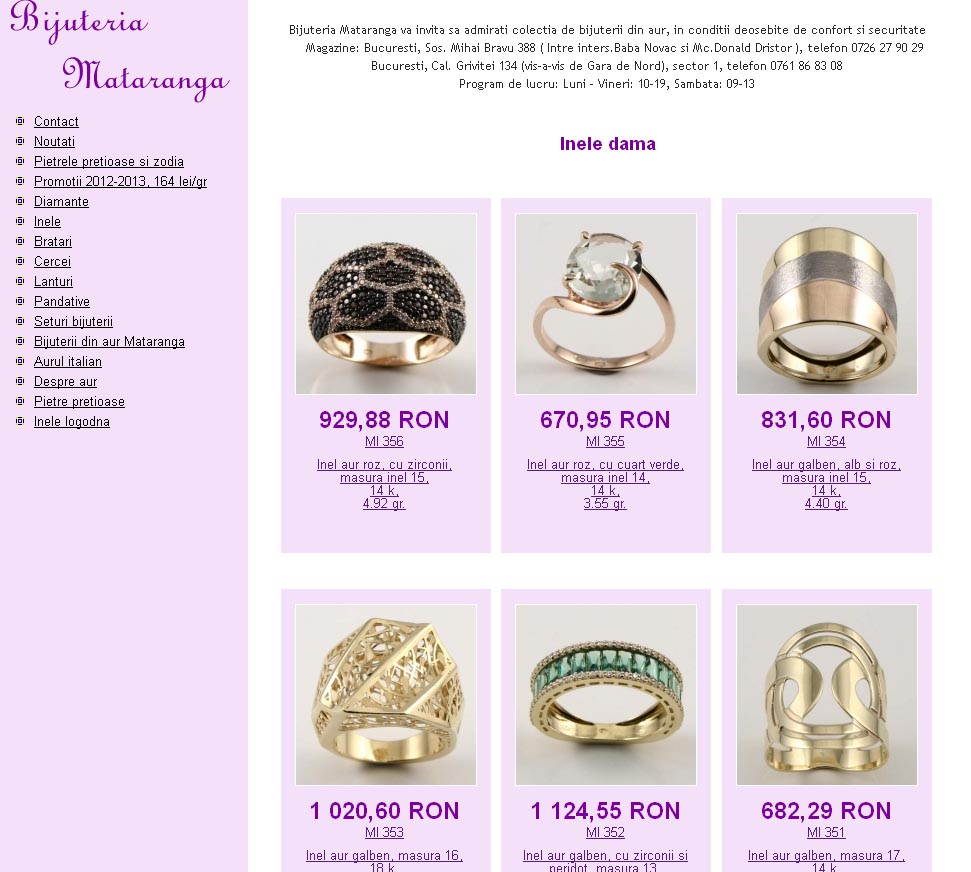
So i've done another article for the subcategory to put on the top of this subpage and a module to try to substitut the product listing of this subcategory so the second page could look like the first.
I've conected the module for the subpage to the right link in the menu
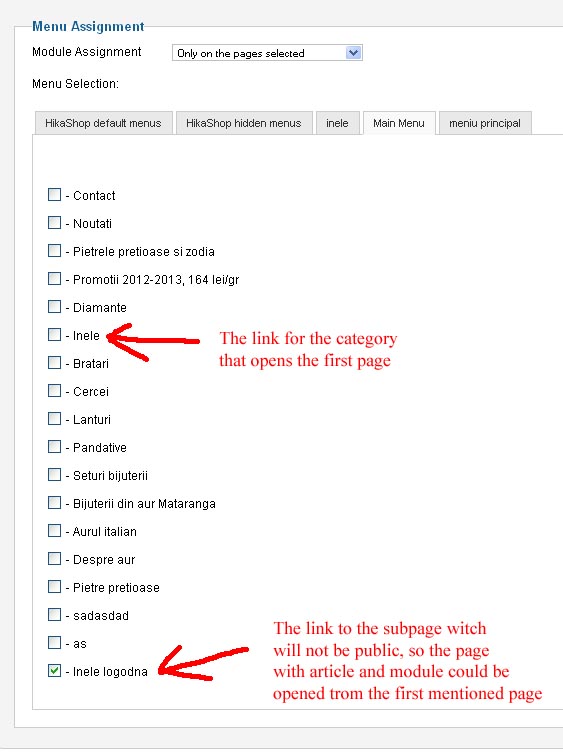
"inele logodna" is a hikashop subcategory of "inele"
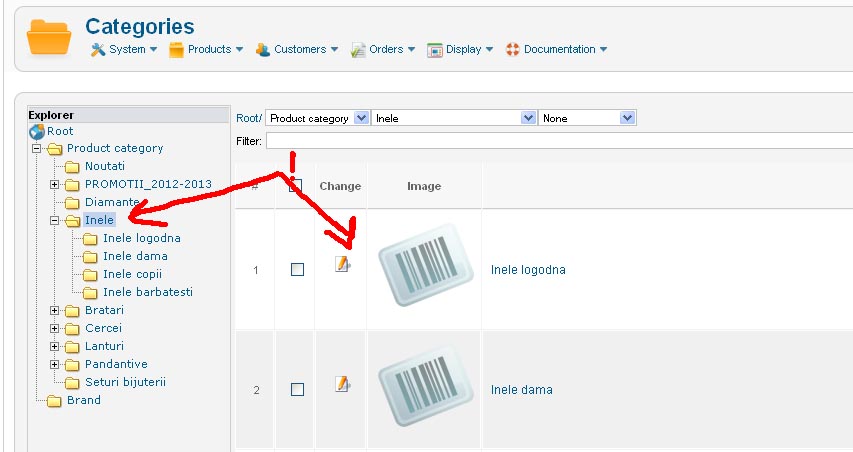
So here i come to a problem:
When i come to the subpage "Inele logodna"the right article apears but the wrong module, the module from the Inele page.
In Module manager for the subpage when i press Hikashop options i noticed that at the associated category I select the necesary subcategory from the list but the number of elements shown afterwords is the number of the entire parent category
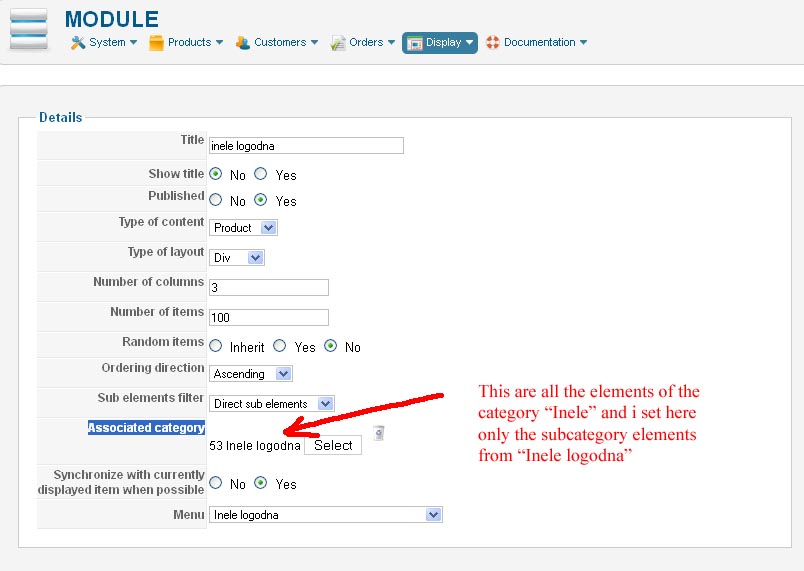
How can i select in this module the product listing of the subcategory, not the whole category.
Maybe i have to imput the category id manualy in the database butt i do not know where.
The hikashop subcategory links open product listing of a specific subcategory
So i've done another article for the subcategory to put on the top of this subpage and a module to try to substitut the product listing of this subcategory so the second page could look like the first.
I've conected the module for the subpage to the right link in the menu
"inele logodna" is a hikashop subcategory of "inele"
So here i come to a problem:
When i come to the subpage "Inele logodna"the right article apears but the wrong module, the module from the Inele page.
In Module manager for the subpage when i press Hikashop options i noticed that at the associated category I select the necesary subcategory from the list but the number of elements shown afterwords is the number of the entire parent category
How can i select in this module the product listing of the subcategory, not the whole category.
Maybe i have to imput the category id manualy in the database butt i do not know where.
Please Log in or Create an account to join the conversation.

12 years 7 months ago #147513
by Jerome
Jerome - Obsidev.com
HikaMarket & HikaSerial developer / HikaShop core dev team.
Replied by Jerome on topic Move product listing from category page to article
Hi,
When you change the category in a category listing, you are still in the same menu id.
So the same modules will be displayed.
At this moment, I will recommend you to base the module on the category, using some PHP code in the HikaShop views or using other component like "advance module manager".
Regards,
When you change the category in a category listing, you are still in the same menu id.
So the same modules will be displayed.
At this moment, I will recommend you to base the module on the category, using some PHP code in the HikaShop views or using other component like "advance module manager".
Regards,
Jerome - Obsidev.com
HikaMarket & HikaSerial developer / HikaShop core dev team.
Please Log in or Create an account to join the conversation.
Time to create page: 0.190 seconds