

- Posts: 29
- Thank you received: 2
Space between pos 17 and 12
12 years 7 months ago #147300
by sorin1z
Space between pos 17 and 12 was created by sorin1z
I have my site on
www.uragan.ro/php
.
The space between position 17 (main menu) and position 12 and 22 (content) varies in these 2 links. I for 3 days i've been trying to find out why:
www.uragan.ro/php/index.php/2014-02-10-13-44-21
www.uragan.ro/php/index.php/hikashop-men...tegory/50-inele-gogo
In the first at the position 12 is a article with a module under it at the position 22 and is the way it should look because this is the distance in the hole site.
In the second is a category page with product listing and even the spaces between columns and rows is wrong.
How can i find how to repaire it. Is it in frontend.css or template.css? Where? How can i find out?
The space between position 17 (main menu) and position 12 and 22 (content) varies in these 2 links. I for 3 days i've been trying to find out why:
www.uragan.ro/php/index.php/2014-02-10-13-44-21
www.uragan.ro/php/index.php/hikashop-men...tegory/50-inele-gogo
In the first at the position 12 is a article with a module under it at the position 22 and is the way it should look because this is the distance in the hole site.
In the second is a category page with product listing and even the spaces between columns and rows is wrong.
How can i find how to repaire it. Is it in frontend.css or template.css? Where? How can i find out?
Please Log in or Create an account to join the conversation.

12 years 7 months ago - 12 years 7 months ago #147318
by Jerome
Jerome - Obsidev.com
HikaMarket & HikaSerial developer / HikaShop core dev team.
Replied by Jerome on topic Space between pos 17 and 12
Hi,
Your problem is linked to the CSS apply to the article you put.
The h1 in the table have big margin/padding.
You should check directly the CSS of your template.
To see the real position in your web page, use the "tp=1" parameter.
www.uragan.ro/php/index.php/2014-02-10-13-44-21?tp=1
This documentation page can help you to understand some part of the CSS customization.
www.hikashop.com/support/support/documen...ize-the-display.html
Regards,
Your problem is linked to the CSS apply to the article you put.
The h1 in the table have big margin/padding.
You should check directly the CSS of your template.
To see the real position in your web page, use the "tp=1" parameter.
www.uragan.ro/php/index.php/2014-02-10-13-44-21?tp=1
This documentation page can help you to understand some part of the CSS customization.
www.hikashop.com/support/support/documen...ize-the-display.html
Regards,
Jerome - Obsidev.com
HikaMarket & HikaSerial developer / HikaShop core dev team.
Last edit: 12 years 7 months ago by Jerome.
The following user(s) said Thank You: sorin1z
Please Log in or Create an account to join the conversation.
12 years 7 months ago - 12 years 7 months ago #147400
by sorin1z
Replied by sorin1z on topic Space between pos 17 and 12
I've done the ?tp=1 trick and is very interesting but i sgtill don't know how to make the distace disapear
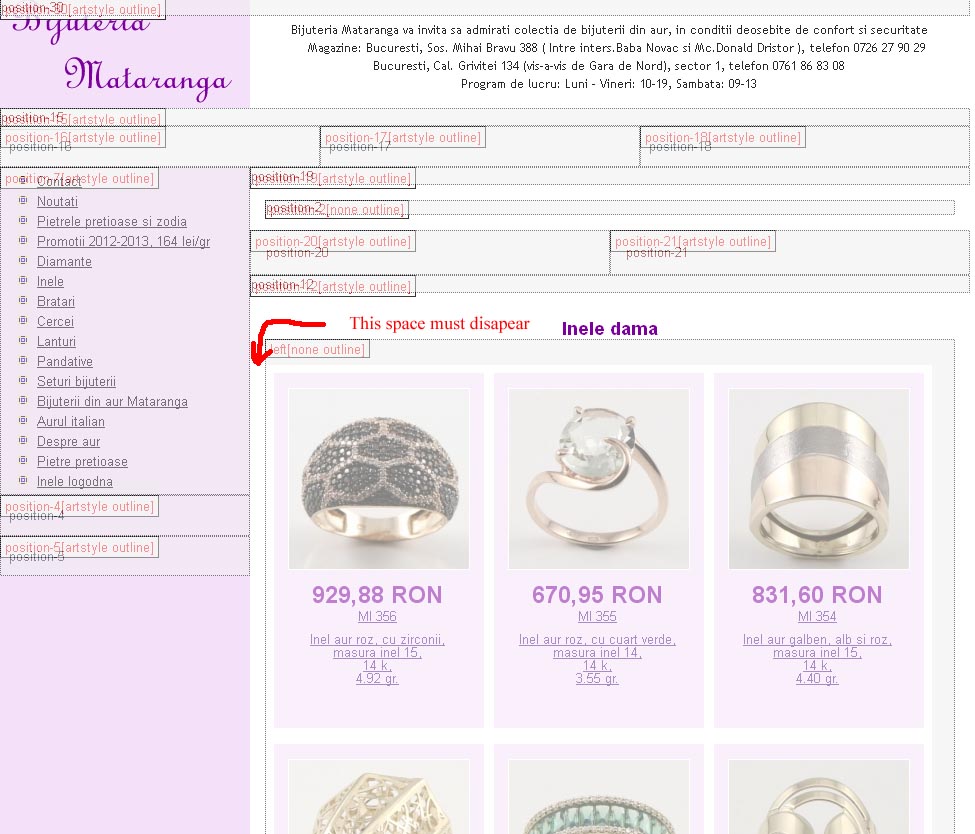 so how do i align the galery left? And what position22 [artistyle lineout] means? What is this artistyle lineout?
The h1 you mentioned about si in the category product page or the module page?
And how can i change the colors of the unvisited link on the module? I've changed all the links' colors on product listing page, and the visited on the module, but i cannot find where i could modify the simple link' color
The h1 you mentioned about si in the category product page or the module page?
And how can i change the colors of the unvisited link on the module? I've changed all the links' colors on product listing page, and the visited on the module, but i cannot find where i could modify the simple link' color
Last edit: 12 years 7 months ago by sorin1z.
Please Log in or Create an account to join the conversation.
12 years 7 months ago #147405
by Jerome
Jerome - Obsidev.com
HikaMarket & HikaSerial developer / HikaShop core dev team.
Replied by Jerome on topic Space between pos 17 and 12
Hi,
I don't want to be impolite or rude but your problem is not related to HikaShop and this space is generated by your template itself.
We provide support about HikaShop, how to use it, to configure it and help as we can for the customization (of HikaShop).
We are developers, not designers.
Please read the documentation I gave you about the CSS customization.
I have to recommend you to follow some tutorials about CSS and web design but we can't do this kind of job for you.
You will see that the margin/padding are set on the "art-post", nothing related to HikaShop and the support we can provide.
Regards,
I don't want to be impolite or rude but your problem is not related to HikaShop and this space is generated by your template itself.
We provide support about HikaShop, how to use it, to configure it and help as we can for the customization (of HikaShop).
We are developers, not designers.
Please read the documentation I gave you about the CSS customization.
I have to recommend you to follow some tutorials about CSS and web design but we can't do this kind of job for you.
You will see that the margin/padding are set on the "art-post", nothing related to HikaShop and the support we can provide.
Regards,
Jerome - Obsidev.com
HikaMarket & HikaSerial developer / HikaShop core dev team.
The following user(s) said Thank You: sorin1z
Please Log in or Create an account to join the conversation.
12 years 7 months ago #147480
by sorin1z
Replied by sorin1z on topic Space between pos 17 and 12
I thank you and i apologise if i have exagerated.
I had some inspiration last night and solved the problem somehow, is not how i wanted it but is not as bed as it was
I had some inspiration last night and solved the problem somehow, is not how i wanted it but is not as bed as it was
The following user(s) said Thank You: Jerome
Please Log in or Create an account to join the conversation.
12 years 7 months ago #147495
by Jerome
Jerome - Obsidev.com
HikaMarket & HikaSerial developer / HikaShop core dev team.
Replied by Jerome on topic Space between pos 17 and 12
Hi,
No problem
Good to know that your problem is solved.
Regards,
No problem
Good to know that your problem is solved.
Regards,
Jerome - Obsidev.com
HikaMarket & HikaSerial developer / HikaShop core dev team.
Please Log in or Create an account to join the conversation.
Time to create page: 0.100 seconds