
- Posts: 43
- Thank you received: 1
Ordering custom fields
- markespositi
-
 Topic Author
- Offline
Less
More
12 years 7 months ago #148563
by markespositi
Ordering custom fields was created by markespositi
Hi.
In the product page, is there a way to chose the order in which custom fields appear?
In the product page, is there a way to chose the order in which custom fields appear?
Please Log in or Create an account to join the conversation.

Less
More
- Posts: 12953
- Thank you received: 1778
12 years 7 months ago #148567
by Mohamed Thelji
Replied by Mohamed Thelji on topic Ordering custom fields
Hi,
Note that you'll be able to do that through "Hikashop->Display->Custom Fields" by using the options of the "Order" column.
Note that you'll be able to do that through "Hikashop->Display->Custom Fields" by using the options of the "Order" column.
Please Log in or Create an account to join the conversation.
- markespositi
-
Topic Author
- Offline
Less
More
- Posts: 43
- Thank you received: 1
12 years 7 months ago #148648
by markespositi
Replied by markespositi on topic Ordering custom fields
Yes, that's true.
However, suppose to have the following:
- product P1 assigned to category C1
- product P2 assigned to category C2
- custom field CF1 assigned to category C1 and C2
- custom field CF2 assigned to category C1 and C2
- in the product page P1 the two custom fileds CF1 and CF2 will be ordered in the same way, even if I would like to have different ordering. For example CF1 and then CF2 in the product page P1; CF2 and CF1 in the product page P2
One suggestion, for future Hika version, could be to add a specific field as in the following image:
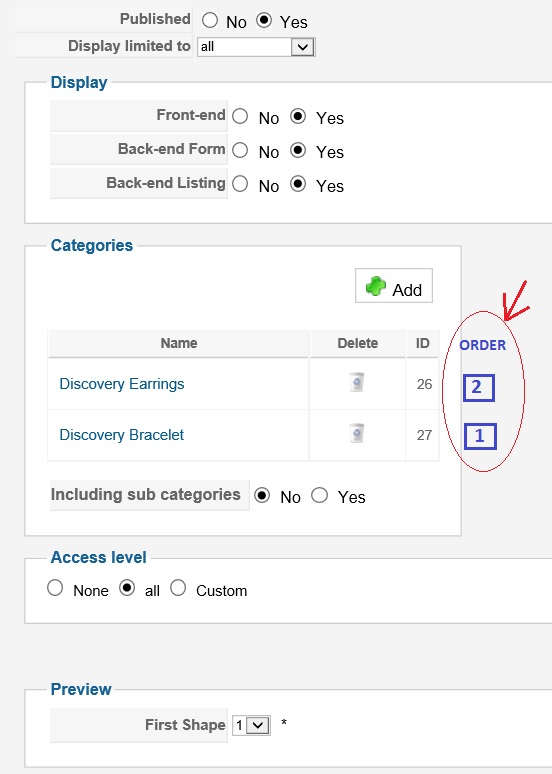
However, suppose to have the following:
- product P1 assigned to category C1
- product P2 assigned to category C2
- custom field CF1 assigned to category C1 and C2
- custom field CF2 assigned to category C1 and C2
- in the product page P1 the two custom fileds CF1 and CF2 will be ordered in the same way, even if I would like to have different ordering. For example CF1 and then CF2 in the product page P1; CF2 and CF1 in the product page P2
One suggestion, for future Hika version, could be to add a specific field as in the following image:
Please Log in or Create an account to join the conversation.

12 years 7 months ago #148666
by Jerome
Jerome - Obsidev.com
HikaMarket & HikaSerial developer / HikaShop core dev team.
Replied by Jerome on topic Ordering custom fields
Hi,
I understand your point of view but the "order" column in this particular place won't be understandable.
User will think that the "order" is the ordering for the categories, to change the sorting of the categories in this particular listing.
It won't be understandable that it is the sorting of the custom field depending on the category..
And more than that, I don't think it will be something easy to configure because you won't be able to see the sorting for a specific category.. And the global sorting value might be wrong in the custom field listing view.
The interface will be too complicated and not very user friendly.
If you want to change the order of the custom field depending a category, I will recommend you to use a view override for the product page. So you can change the ordering of the custom fields before their display.
Regards,
I understand your point of view but the "order" column in this particular place won't be understandable.
User will think that the "order" is the ordering for the categories, to change the sorting of the categories in this particular listing.
It won't be understandable that it is the sorting of the custom field depending on the category..
And more than that, I don't think it will be something easy to configure because you won't be able to see the sorting for a specific category.. And the global sorting value might be wrong in the custom field listing view.
The interface will be too complicated and not very user friendly.
If you want to change the order of the custom field depending a category, I will recommend you to use a view override for the product page. So you can change the ordering of the custom fields before their display.
Regards,
Jerome - Obsidev.com
HikaMarket & HikaSerial developer / HikaShop core dev team.
Please Log in or Create an account to join the conversation.

12 years 2 weeks ago #175448
by solia
Replied by solia on topic Ordering custom fields
Hi Mohammad: I have the same question regarding ordering of custom fields. If you will note this link on one of my client's sites:
www.alifinstitute.org/index.php/contact/...-diamond-sponsorship
The client is selling tickets to a dinner. You will see that we added a custom field to the item, in which the purchaser can designate what they want for dinner. I would like the custom field to appear AFTER the product description on the linked page.
Can you guide me? With kind regards, Nadine.
The client is selling tickets to a dinner. You will see that we added a custom field to the item, in which the purchaser can designate what they want for dinner. I would like the custom field to appear AFTER the product description on the linked page.
Can you guide me? With kind regards, Nadine.
Please Log in or Create an account to join the conversation.

12 years 2 weeks ago #175462
by Xavier
Replied by Xavier on topic Ordering custom fields
Hi,
To place the custom fields after the description you have to edit the view "product / show_default" and move the custom fields part after the description part, so move:
After:
To place the custom fields after the description you have to edit the view "product / show_default" and move the custom fields part after the description part, so move:
Code:
if (!$this->params->get('catalogue') && ($this->config->get('display_add_to_cart_for_free_products') || !empty ($this->element->prices))) {
if (!empty ($this->itemFields)) {
$form = ',\'hikashop_product_form\'';
if ($this->config->get('redirect_url_after_add_cart', 'stay_if_cart') == 'ask_user') {
?>
<input type="hidden" name="popup" value="1"/>
<?php
}
//LAYOUT show_block_custom_item
$this->setLayout('show_block_custom_item');
echo $this->loadTemplate();
}
}
Code:
echo JHTML::_('content.prepare',preg_replace('#<hr *id="system-readmore" */>#i','',$this->element->product_description));
The following user(s) said Thank You: solia
Please Log in or Create an account to join the conversation.
12 years 2 weeks ago #175554
by solia
Replied by solia on topic Ordering custom fields
I answered my own question, and edited the "show_default" view. 
Please Log in or Create an account to join the conversation.
12 years 2 weeks ago #175556
by solia
Replied by solia on topic Ordering custom fields
Thank you very much Xavier! I had just figured that out as you posted the answer. All is well. You guys are GREAT.
Please Log in or Create an account to join the conversation.
Time to create page: 0.114 seconds