

- Posts: 8
- Thank you received: 0
Information Note before Payment
12 years 6 months ago - 12 years 6 months ago #151405
by timbae
Information Note before Payment was created by timbae
Dear all,
My shop is almost done.
As I need my customers to let them pay by credit card, I use Paypal as transaction method.
I know if you only have the "Paypal" option to buy it redirects you on the final page to Paypal and you have to log in with you account. If you then don't have a Paypal account you must select the bottom option "Don't have a PayPal account?" to buy by credit card.
To make sure the visitors don't miss the second option i want to give on the page at the final step "Status" a note (or warning message) to assure they will use the option "Don't have a PayPal account?"
I think to have the message above or below the Status where it says:
You chose the shipping method: POST PAKET-VERSAND
You chose the payment method: PayPal / Kreditkarte
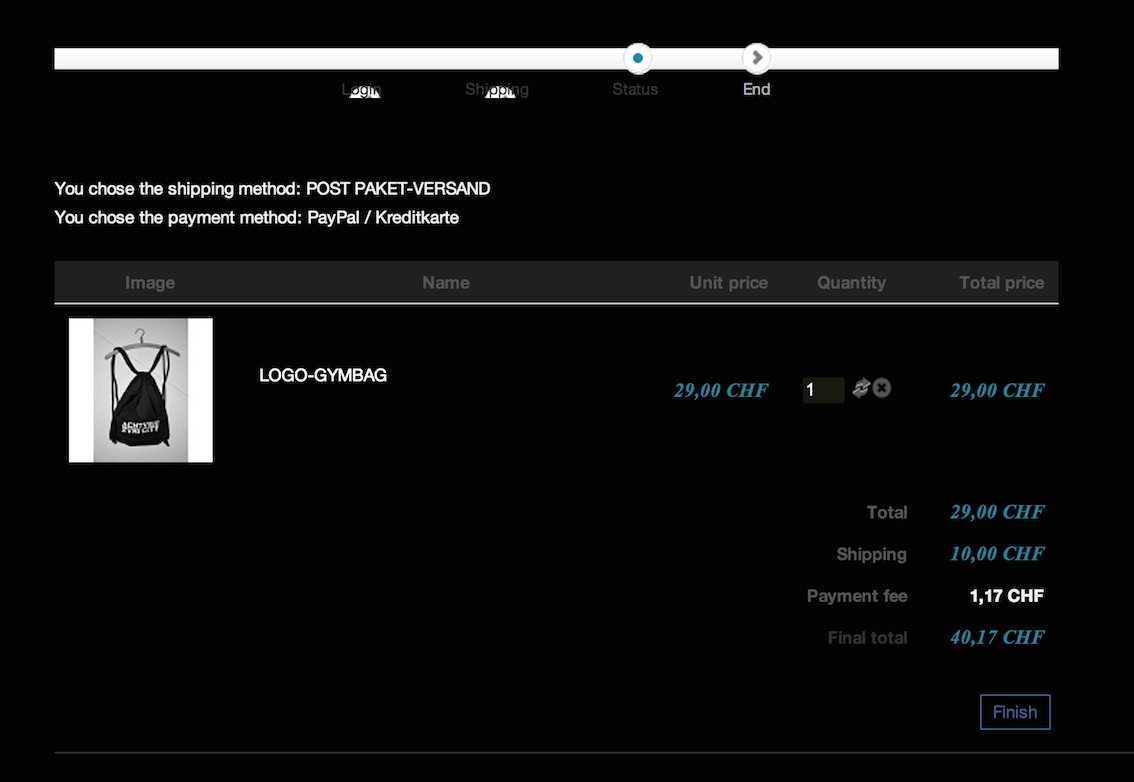
Does anyone has a concrete idea of how to show up an information note before they're redirected to Paypal ?
appreciate your post,
tim
My shop is almost done.
As I need my customers to let them pay by credit card, I use Paypal as transaction method.
I know if you only have the "Paypal" option to buy it redirects you on the final page to Paypal and you have to log in with you account. If you then don't have a Paypal account you must select the bottom option "Don't have a PayPal account?" to buy by credit card.
To make sure the visitors don't miss the second option i want to give on the page at the final step "Status" a note (or warning message) to assure they will use the option "Don't have a PayPal account?"
I think to have the message above or below the Status where it says:
You chose the shipping method: POST PAKET-VERSAND
You chose the payment method: PayPal / Kreditkarte
Does anyone has a concrete idea of how to show up an information note before they're redirected to Paypal ?
appreciate your post,
tim
Last edit: 12 years 6 months ago by timbae.
Please Log in or Create an account to join the conversation.

12 years 6 months ago #151457
by Xavier
Replied by Xavier on topic Information Note before Payment
Hi,
So you just have to edit the view "checkout / status" via the menu Display > Views and add your custom content.
So you just have to edit the view "checkout / status" via the menu Display > Views and add your custom content.
Please Log in or Create an account to join the conversation.
12 years 3 months ago #163271
by timbae
Replied by timbae on topic Information Note before Payment
Xavier,
Can you tell me where i can edit the message that appears after creating an account when you have to confirm the email Address.?
"YOUR ACCOUNT HAS BEEN CREATED AND AN ACTIVATION LINK HAS BEEN SENT TO THE E-MAIL ADDRESS YOU ENTERED. NOTE THAT YOU MUST ACTIVATE THE ACCOUNT BY CLICKING ON THE ACTIVATION LINK IN THE E-MAIL THAT YOU RECEIVE BEFORE YOU CAN LOGIN.
UPON CLICKING ON THE ACTIVATION LINK, YOUR ACCOUNT WILL BE ACTIVATED AND YOU WILL BE ABLE TO CONTINUE YOUR ORDER"
Thanks for your reply
Can you tell me where i can edit the message that appears after creating an account when you have to confirm the email Address.?
"YOUR ACCOUNT HAS BEEN CREATED AND AN ACTIVATION LINK HAS BEEN SENT TO THE E-MAIL ADDRESS YOU ENTERED. NOTE THAT YOU MUST ACTIVATE THE ACCOUNT BY CLICKING ON THE ACTIVATION LINK IN THE E-MAIL THAT YOU RECEIVE BEFORE YOU CAN LOGIN.
UPON CLICKING ON THE ACTIVATION LINK, YOUR ACCOUNT WILL BE ACTIVATED AND YOU WILL BE ABLE TO CONTINUE YOUR ORDER"
Thanks for your reply
Please Log in or Create an account to join the conversation.
12 years 3 months ago #163275
by Xavier
Replied by Xavier on topic Information Note before Payment
Hi,
The first part of the message is a Joomla text string, in HikaShop we only add the second part.
In both cases, you can go to Joomla Extensions > Language manager and do translation overrides.
The first part of the message is a Joomla text string, in HikaShop we only add the second part.
In both cases, you can go to Joomla Extensions > Language manager and do translation overrides.
Please Log in or Create an account to join the conversation.
Time to create page: 0.216 seconds