

- Posts: 20
- Thank you received: 0
display category image in cart
12 years 6 months ago #152746
by Gerard
display category image in cart was created by Gerard
-- url of the page with the problem -- :
www.ijzerwarenmarkt.nl
-- HikaShop version -- : 2.3.0
-- Joomla version -- : 3.2
-- PHP version -- : 5
-- Browser(s) name and version -- :
-- Error-message(debug-mod must be tuned on) -- :
hi,
i have a question about the layout of the cart.
default the cart shows the product-image when there is one.
Is it possible to show the image from the category in the shopping cart?
In one category there are several products who all use the same image: the category-image.
i hop my question is clear,
thank you
greetings, Gerard
-- HikaShop version -- : 2.3.0
-- Joomla version -- : 3.2
-- PHP version -- : 5
-- Browser(s) name and version -- :
-- Error-message(debug-mod must be tuned on) -- :
hi,
i have a question about the layout of the cart.
default the cart shows the product-image when there is one.
Is it possible to show the image from the category in the shopping cart?
In one category there are several products who all use the same image: the category-image.
i hop my question is clear,
thank you
greetings, Gerard
Please Log in or Create an account to join the conversation.

Less
More
- Posts: 12953
- Thank you received: 1778
12 years 6 months ago #152750
by Mohamed Thelji
Replied by Mohamed Thelji on topic display category image in cart
Hello Gerard,
If you really want to add your product category image through your cart module, the solution will be edit the code of the "cart" file of the "product" view of your front-end template via "Hikshop->Display->Views".
But the best solution will probably be to set the same image for your products through your product configuration page, and if you have too much product the solution will be to :
- Use the "Export" button of your product listing page.
- Edit the CSV and add the same image for the products which are in your category
- Import the CSV file back.
If you really want to add your product category image through your cart module, the solution will be edit the code of the "cart" file of the "product" view of your front-end template via "Hikshop->Display->Views".
But the best solution will probably be to set the same image for your products through your product configuration page, and if you have too much product the solution will be to :
- Use the "Export" button of your product listing page.
- Edit the CSV and add the same image for the products which are in your category
- Import the CSV file back.
The following user(s) said Thank You: Gerard
Please Log in or Create an account to join the conversation.
12 years 6 months ago - 12 years 6 months ago #154098
by Gerard
Replied by Gerard on topic display category image in cart
hello Mohamed,
thank you for your answer.
I would like to ask another question:
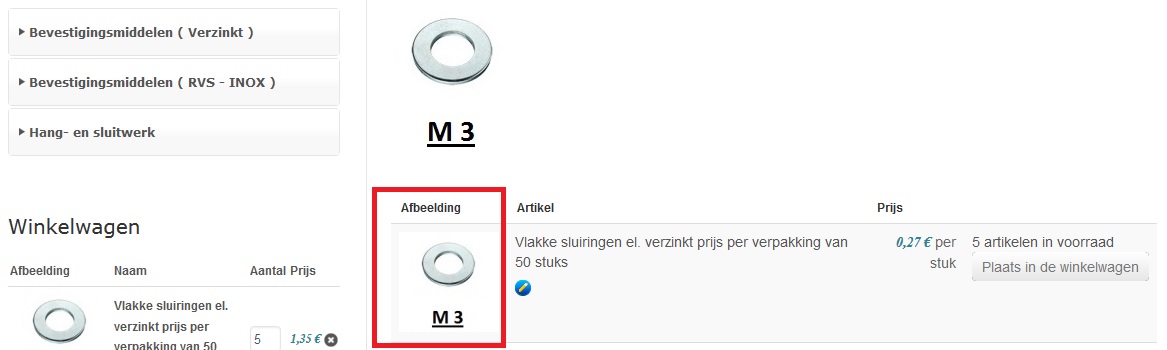
it is about the product page. On top of the page there is a category image. Beneath that all the products are shown
(see attachment).
How can i hide the column with the image? I have tried several configuration settings, but did not find the right thing.
Can you tell me how to achieve this?
regards, Gerard
thank you for your answer.
I would like to ask another question:
it is about the product page. On top of the page there is a category image. Beneath that all the products are shown
(see attachment).
How can i hide the column with the image? I have tried several configuration settings, but did not find the right thing.
Can you tell me how to achieve this?
regards, Gerard
Last edit: 12 years 6 months ago by Gerard. Reason: new attachment
Please Log in or Create an account to join the conversation.

12 years 6 months ago - 12 years 6 months ago #154111
by Xavier
Replied by Xavier on topic display category image in cart
Hi,
You will have to edit the view "Product / listing_table" via the menu Display > Views.
And remove the desired columns, it require some HTML knowledge.
Here is some documentation:
hikashop.com/support/documentation/153-c...ize-the-display.html
You will have to edit the view "Product / listing_table" via the menu Display > Views.
And remove the desired columns, it require some HTML knowledge.
Here is some documentation:
hikashop.com/support/documentation/153-c...ize-the-display.html
Last edit: 12 years 6 months ago by Xavier.
The following user(s) said Thank You: Gerard
Please Log in or Create an account to join the conversation.
Time to create page: 0.116 seconds