
- Posts: 20
- Thank you received: 0
event registration
- branchoutwebsites
-
 Topic Author
- Offline
Less
More
12 years 6 months ago #153606
by branchoutwebsites
event registration was created by branchoutwebsites
-- url of the page with the problem -- :
mywebsite.com/mypage
-- HikaShop version -- : x.x.x
-- Joomla version -- : x.x
-- PHP version -- : x.x.x
-- Browser(s) name and version -- : XXXXX x.x.x
-- Error-message(debug-mod must be tuned on) -- : Error_message
I have been using your useful tutorial here: www.hikashop.com/support/support/documen...5-entry-listing.html
I have created various form fields. Now, as I understand it, I need to asign them to products so that when the form as been filled out, the form data is added to the cart with a product.
So I think I need to use the 'correspond to the product' option. When I click on this I need to select an item for the list. I do this and click add. I actually want to multi select here, because I have 4 separate events.
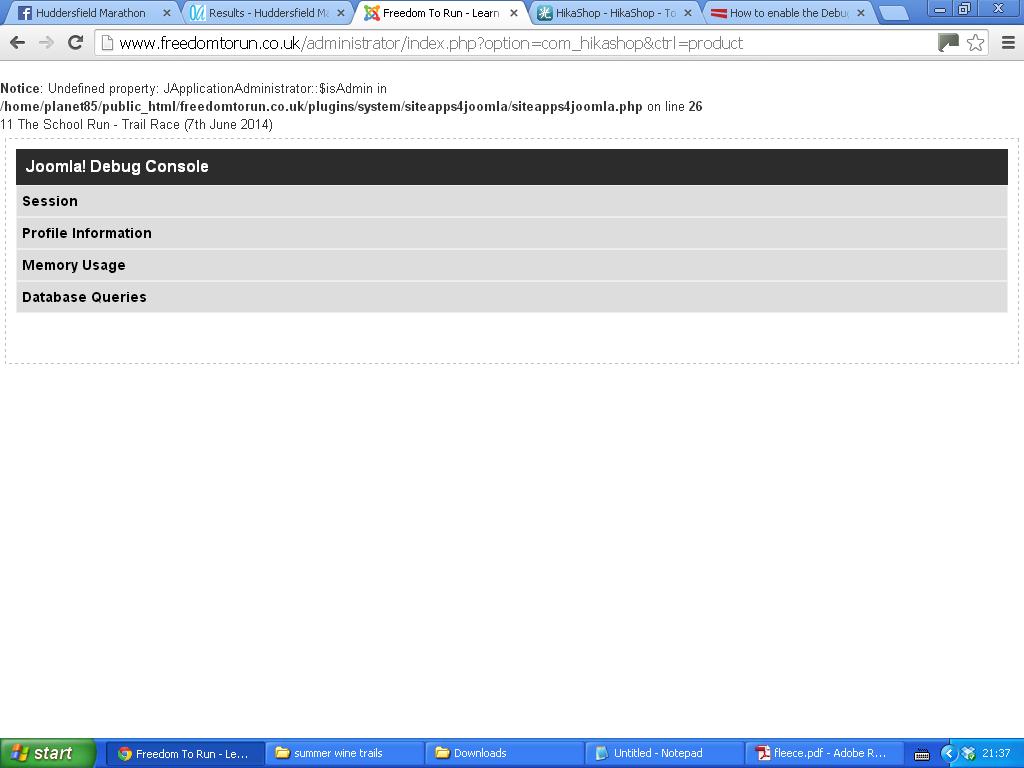
If I click on one event or all four, I get an error as in the following screenshot and it will not add the product to the form field.

This is a very important part of the component for me, please help me resolve this as a matter of urgency as I have just upgraded to business edition specifically for this feature.
-- HikaShop version -- : x.x.x
-- Joomla version -- : x.x
-- PHP version -- : x.x.x
-- Browser(s) name and version -- : XXXXX x.x.x
-- Error-message(debug-mod must be tuned on) -- : Error_message
I have been using your useful tutorial here: www.hikashop.com/support/support/documen...5-entry-listing.html
I have created various form fields. Now, as I understand it, I need to asign them to products so that when the form as been filled out, the form data is added to the cart with a product.
So I think I need to use the 'correspond to the product' option. When I click on this I need to select an item for the list. I do this and click add. I actually want to multi select here, because I have 4 separate events.
If I click on one event or all four, I get an error as in the following screenshot and it will not add the product to the form field.
This is a very important part of the component for me, please help me resolve this as a matter of urgency as I have just upgraded to business edition specifically for this feature.
Please Log in or Create an account to join the conversation.

12 years 6 months ago #153617
by nicolas
Replied by nicolas on topic event registration
Hi,
This error could be either :
1. A fatal error with no error message displayed. Please try again with the error reporting and debug mode options of the Joomla configuration turned on and see if you get any error.
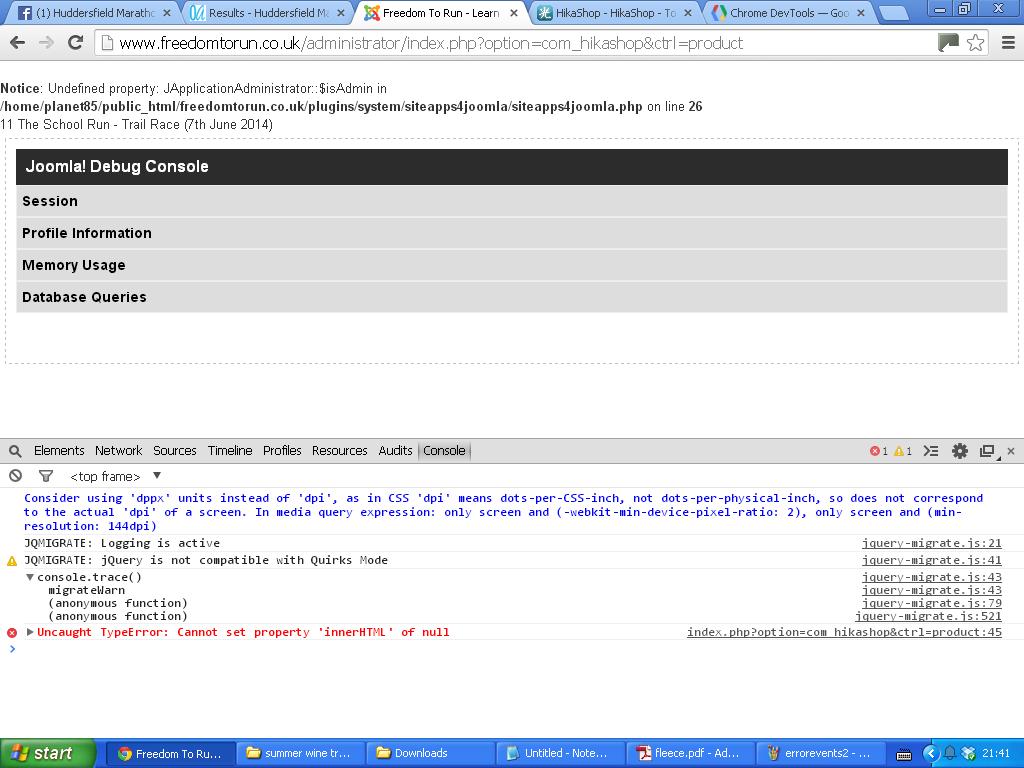
2. A javascript error on your backend preventing the javascript of the 'correspond to the product' option to work properly. Look at the javascript console error log of your browser while on the custom field edition page and see if you get any javascript error.
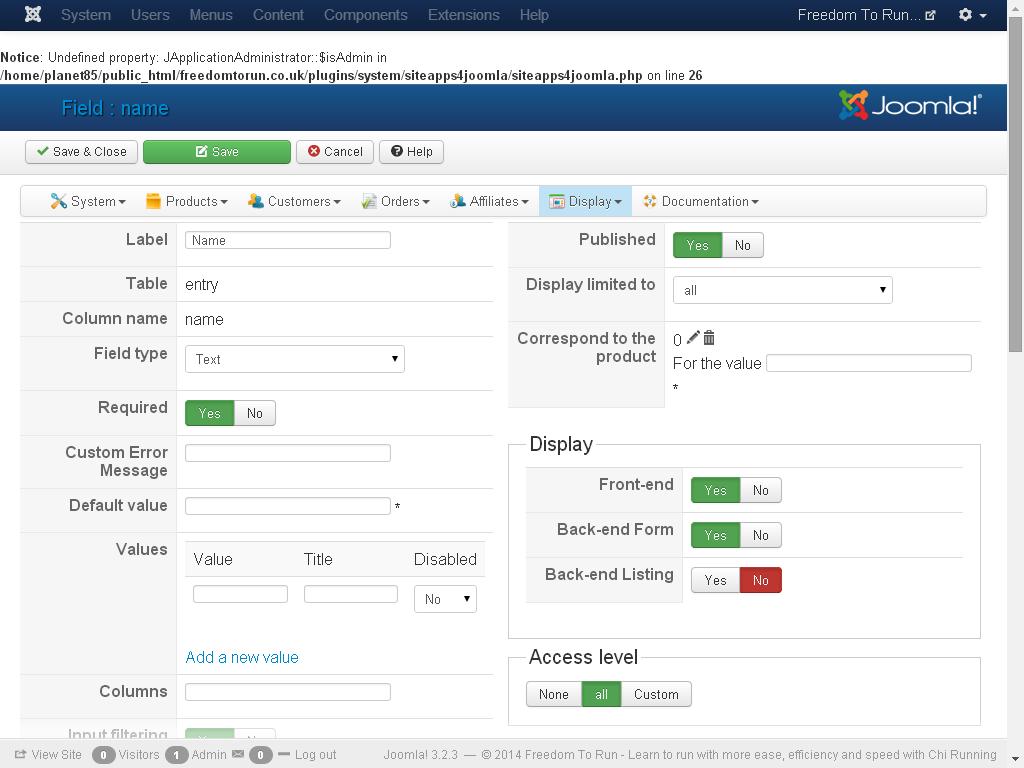
Also, please provide a screenshot of the field options page before configuring that option so that we can see what you have.
This error could be either :
1. A fatal error with no error message displayed. Please try again with the error reporting and debug mode options of the Joomla configuration turned on and see if you get any error.
2. A javascript error on your backend preventing the javascript of the 'correspond to the product' option to work properly. Look at the javascript console error log of your browser while on the custom field edition page and see if you get any javascript error.
Also, please provide a screenshot of the field options page before configuring that option so that we can see what you have.
Please Log in or Create an account to join the conversation.
- branchoutwebsites
-
Topic Author
- Offline
Less
More
- Posts: 20
- Thank you received: 0
12 years 5 months ago #153917
by branchoutwebsites
Replied by branchoutwebsites on topic event registration
OK please see attached my screen before adding products to fields, the error I get when I click in debug mode and also the javascript error.
Thanks,
Thanks,
Please Log in or Create an account to join the conversation.
- branchoutwebsites
-
Topic Author
- Offline
Less
More
- Posts: 20
- Thank you received: 0
12 years 5 months ago #153918
by branchoutwebsites
Replied by branchoutwebsites on topic event registration
OK please see attached my screen before adding products to fields, the error I get when I click in debug mode and also the javascript error.
Thanks,
Thanks,
Please Log in or Create an account to join the conversation.
- branchoutwebsites
-
Topic Author
- Offline
Less
More
- Posts: 20
- Thank you received: 0
12 years 5 months ago - 12 years 5 months ago #153919
by branchoutwebsites
Replied by branchoutwebsites on topic event registration
OK please see attached my screen before adding products to fields, the error I get when I click in debug mode and also the javascript error.
Thanks,
Thanks,
Last edit: 12 years 5 months ago by branchoutwebsites.
Please Log in or Create an account to join the conversation.
12 years 5 months ago #153934
by nicolas
Replied by nicolas on topic event registration
Hi,
So the problem is the javascript error.
Probably a system plugin which is loading something it shouldn't in the backend.
You have two things you can try:
1. replace the file administrator/components/com_hikashop/types/limitparent.php with the one in the archive below:
2. install and configure the plugin jquery easy for joomla:
extensions.joomla.org/extensions/core-en...jquery-scripts/18327
So the problem is the javascript error.
Probably a system plugin which is loading something it shouldn't in the backend.
You have two things you can try:
1. replace the file administrator/components/com_hikashop/types/limitparent.php with the one in the archive below:
This attachment is hidden for guests.
Please log in or register to see it.
Please log in or register to see it.
2. install and configure the plugin jquery easy for joomla:
extensions.joomla.org/extensions/core-en...jquery-scripts/18327
Please Log in or Create an account to join the conversation.
- branchoutwebsites
-
Topic Author
- Offline
Less
More
- Posts: 20
- Thank you received: 0
12 years 5 months ago #154145
by branchoutwebsites
Replied by branchoutwebsites on topic event registration
I've installed and enabled the plugin.
I can't see where to upload the .php file - there doesn't seem to be a folder called /types/ in that location.
I still get a white screen as before with this error:
11 The School Run - Trail Race (7th June 2014)
I can't see where to upload the .php file - there doesn't seem to be a folder called /types/ in that location.
I still get a white screen as before with this error:
11 The School Run - Trail Race (7th June 2014)
Please Log in or Create an account to join the conversation.
12 years 5 months ago #154159
by nicolas
Replied by nicolas on topic event registration
There is a folder types in that location. You can upload it via FTP in the folder administrator/components/com_hikashop/types
It's not possible that you don't have that folder on your website or HikaShop wouldn't be able to work at all.
It's not possible that you don't have that folder on your website or HikaShop wouldn't be able to work at all.
Please Log in or Create an account to join the conversation.
- branchoutwebsites
-
Topic Author
- Offline
Less
More
- Posts: 20
- Thank you received: 0
12 years 5 months ago #154200
by branchoutwebsites
Replied by branchoutwebsites on topic event registration
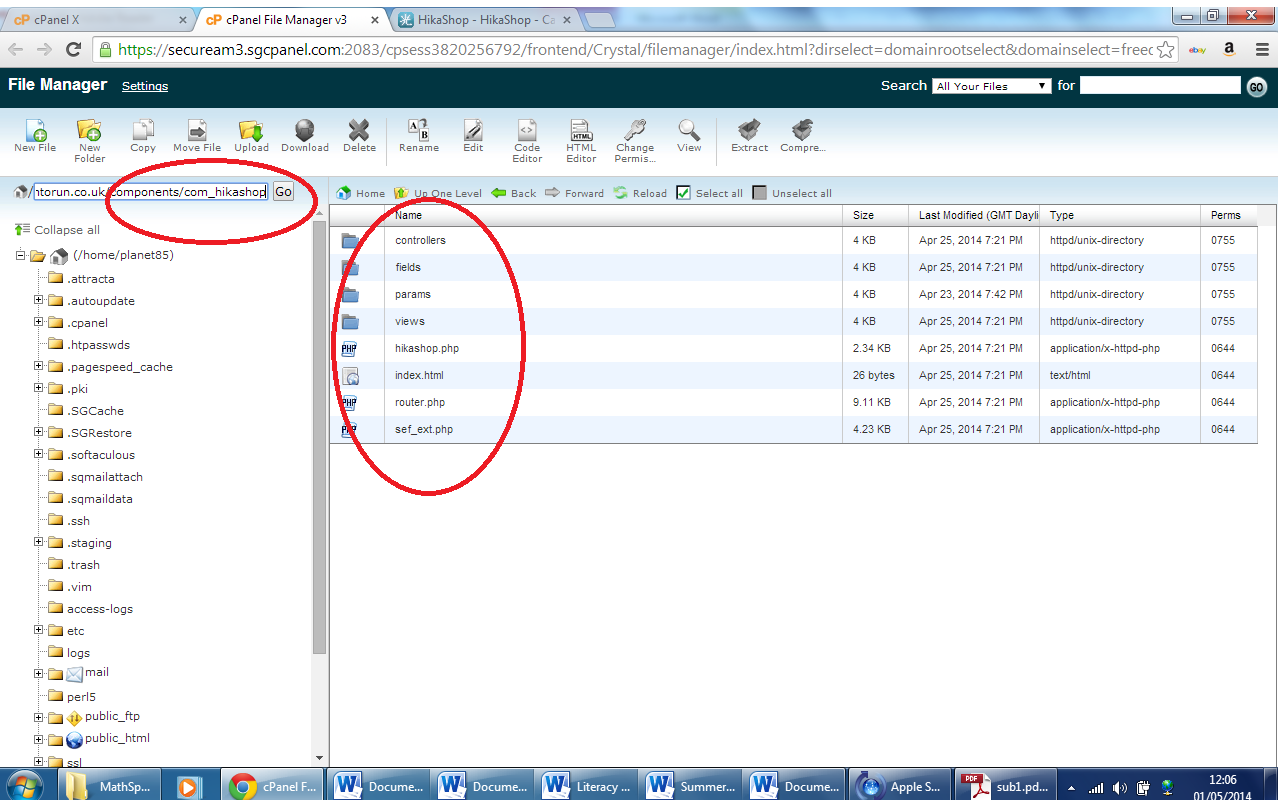
As you can see from the screenshot the folder is absent. Is this why Hikashop is not working properly?
Should I create the folder manually?
Should I create the folder manually?
Please Log in or Create an account to join the conversation.
- branchoutwebsites
-
Topic Author
- Offline
Less
More
- Posts: 20
- Thank you received: 0
12 years 5 months ago #154221
by branchoutwebsites
Replied by branchoutwebsites on topic event registration
My host confirm there is no such folder in existence, or in a previous backup.
Please Log in or Create an account to join the conversation.
12 years 5 months ago #154204
by nicolas
Replied by nicolas on topic event registration
You're looking at the folder components/com_hikashop and not at the folder administrator/components/com_hikashop as I said in my previous messages.
Please Log in or Create an account to join the conversation.
- branchoutwebsites
-
Topic Author
- Offline
Less
More
- Posts: 20
- Thank you received: 0
12 years 5 months ago #154335
by branchoutwebsites
Replied by branchoutwebsites on topic event registration
Thanks,
I don't get an error when I try to apply the custom field to specific products now.
I uploaded the new .php file - thanks!
I have created a event entry menu item (only visible to registered users.)
When the menu item is selected, I add in name and age, my two custom fields.
Then instead of the two events I wish to enter, I get my full shop displayed twice.
Ii also says 'cart is empty' at the top and will not accept adding any items to the cart.
Please explain what to do next.
Thanks for your help
I don't get an error when I try to apply the custom field to specific products now.
I uploaded the new .php file - thanks!
I have created a event entry menu item (only visible to registered users.)
When the menu item is selected, I add in name and age, my two custom fields.
Then instead of the two events I wish to enter, I get my full shop displayed twice.
Ii also says 'cart is empty' at the top and will not accept adding any items to the cart.
Please explain what to do next.
Thanks for your help
Please Log in or Create an account to join the conversation.
12 years 5 months ago #154339
by nicolas
Replied by nicolas on topic event registration
In your custom entry fields, you need to set the "Correspond to the product" option so that the corresponding product is added to the crt when the custom field has a specific value.
I would recommend to follow our tutorial on creating an event registration page which explains that:
www.hikashop.com/support/support/documen...5-entry-listing.html
I would recommend to follow our tutorial on creating an event registration page which explains that:
www.hikashop.com/support/support/documen...5-entry-listing.html
Please Log in or Create an account to join the conversation.
- branchoutwebsites
-
Topic Author
- Offline
Less
More
- Posts: 20
- Thank you received: 0
12 years 5 months ago #154379
by branchoutwebsites
Replied by branchoutwebsites on topic event registration
I've done that. I followed the tutorial before I started this thread. I don't think the correspond to the product is working properly, or somehow I'm misunderstanding the procedure.
Please Log in or Create an account to join the conversation.
12 years 5 months ago #154426
by nicolas
Replied by nicolas on topic event registration
Please provide a screenshot of the options of your custom entry field. You must be missing something in it.
Please Log in or Create an account to join the conversation.
Time to create page: 0.368 seconds