

- Posts: 71
- Thank you received: 0
Change "Add to cart" button to icon
12 years 5 months ago - 12 years 5 months ago #156250
by bmichu
Change "Add to cart" button to icon was created by bmichu
Hi,
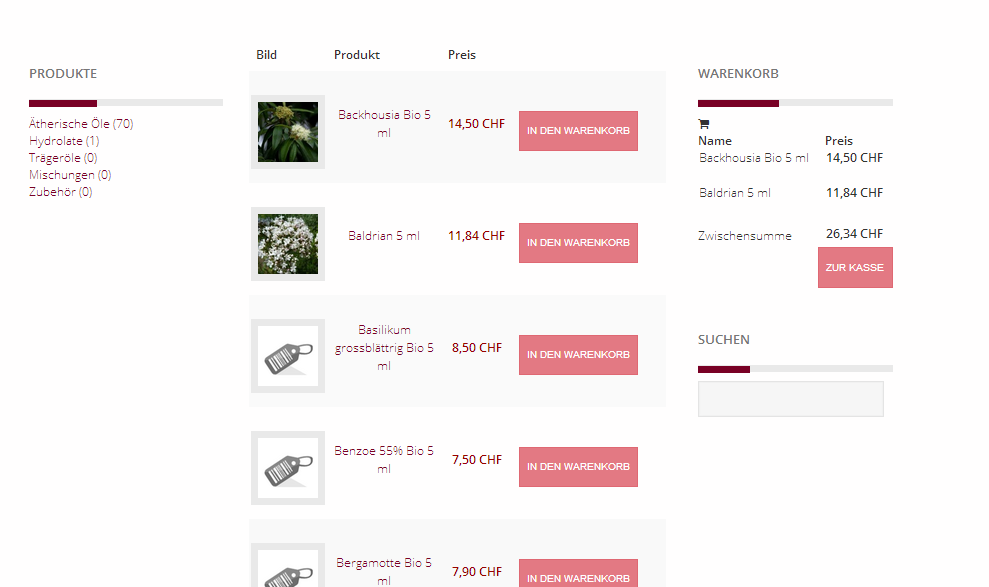
As you can see from the screenshot attached, the add to cart button ("In den Warenkorb") takes up too much space in the product listing of a category (table list). So I'd like to change it to a small cart Icon with a + symbol. How can I achieve this?
Thanks!
Michel
As you can see from the screenshot attached, the add to cart button ("In den Warenkorb") takes up too much space in the product listing of a category (table list). So I'd like to change it to a small cart Icon with a + symbol. How can I achieve this?
Thanks!
Michel
Last edit: 12 years 5 months ago by bmichu.
Please Log in or Create an account to join the conversation.

12 years 5 months ago #156257
by nicolas
Replied by nicolas on topic Change "Add to cart" button to icon
Hi,
It's a matter of CSS styling.
For example, on our demo website we uses that CSS to personnalize the add to cart buttons:
demo.hikashop.com/index.php?option=com_h...ra-cabriolet&lang=en
Here is some documentation which explains how to add/edit your HikaShop CSS:
www.hikashop.com/support/support/documen...ize-the-display.html
It's a matter of CSS styling.
For example, on our demo website we uses that CSS to personnalize the add to cart buttons:
Code:
.hikashop_product_quantity_main .hikashop_product_stock .button {
color: #167e93 !important;
font-weight: bold;
background-image: url(../images/add_cart.png);
background-repeat: no-repeat;
background-position: right;
height: 32px;
padding-right: 40px !important;
background-color: transparent;
cursor: pointer;
}
Here is some documentation which explains how to add/edit your HikaShop CSS:
www.hikashop.com/support/support/documen...ize-the-display.html
Please Log in or Create an account to join the conversation.
12 years 4 months ago #158820
by makles
Replied by makles on topic Change "Add to cart" button to icon
Hi,
I was trying to do the same thing. Would be possible to eliminate the label 'Add to cart' leaving just the image? I have to change any other file?
Thanks
I was trying to do the same thing. Would be possible to eliminate the label 'Add to cart' leaving just the image? I have to change any other file?
Thanks
Please Log in or Create an account to join the conversation.
12 years 4 months ago #158861
by nicolas
Replied by nicolas on topic Change "Add to cart" button to icon
Hi,
set the color to "transparent" in that CSS and you won't see the text, just the image.
set the color to "transparent" in that CSS and you won't see the text, just the image.
Please Log in or Create an account to join the conversation.
12 years 4 months ago #158935
by makles
Replied by makles on topic Change "Add to cart" button to icon
Done.
Thank you for your help
Thank you for your help
Please Log in or Create an account to join the conversation.
8 years 7 months ago #289973
by FrankIes
Replied by FrankIes on topic Change "Add to cart" button to icon
as an an example - in file /components/com_hikashop/views/product/tmpl/add_to_cart_ajax.php
Find and change below:
TO BELOW:
add your icon to ROOT/images/ICON-ADD-TO-CART.png > width:20px; height:20px;
Find and change below:
Code:
if($add_to_cart && !$has_options && !$global_on_listing) {
?>
<a class="<?php echo $css_button . ' ' . $css_button_cart; ?>" rel="nofollow" href="<?php echo hikashop_completeLink($classical_url); ?>" onclick="if(window.hikashop.addToCart) { return window.hikashop.addToCart(this); }" data-addToCart="<?php echo $this->row->product_id; ?>" data-addTo-div="<?php echo $this->params->get('main_div_name'); ?>"<?php if(!empty($extra_div_name)){ echo ' data-addTo-extra="' . $extra_div_name. '"'; } ?> data-addTo-class="add_in_progress" title="<?php echo JText::_('HIKA_DELETE'); ?>"><span><img src="<?php echo HIKASHOP_IMAGES . 'delete2.png';?>" style="max-width:inherit;" border="0" alt="<?php echo JText::_('HIKA_DELETE'); ?>" /><?php
if(!empty($this->row->product_addtocart_message))
echo JText::_($this->row->product_addtocart_message);
else
echo JText::_('ADD_TO_CARTT');
?></span></a>
<?php
}
Code:
if($add_to_cart && !$has_options && !$global_on_listing) {
?>
<a class="<?php echo $css_button . ' ' . $css_button_cart; ?>" rel="nofollow" href="<?php echo hikashop_completeLink($classical_url); ?>" onclick="if(window.hikashop.addToCart) { return window.hikashop.addToCart(this); }" data-addToCart="<?php echo $this->row->product_id; ?>" data-addTo-div="<?php echo $this->params->get('main_div_name'); ?>"<?php if(!empty($extra_div_name)){ echo ' data-addTo-extra="' . $extra_div_name. '"'; } ?> data-addTo-class="add_in_progress" title="<?php echo JText::_('ADD_TO_CART'); ?>"><span><img src="<?php echo $this->baseurl ?>/images/base/ICON-ADD-TO-CART.png" style="width:20px; height:20px;" border="0" alt="<?php echo JText::_('ADD_TO_CART'); ?>" /><?php
if(!empty($this->row->product_addtocart_message))
echo JText::_($this->row->product_addtocart_message);
else
echo JText::_('');
?></span></a>
<?php
}
Please Log in or Create an account to join the conversation.
Time to create page: 0.080 seconds