

- Posts: 30
- Thank you received: 0
description and specification tabs- how to remove?
12 years 4 months ago #160199
by tombreen
description and specification tabs- how to remove? was created by tombreen
-- url of the page with the problem -- :
wedding-cakes-glasgow.co.uk/wedding-cake...-cake-in-three-tiers
-- HikaShop version -- : x.x.x
-- Joomla version -- : 3.2
-- PHP version -- : x.x.x
-- Browser(s) name and version -- : XXXXX x.x.x
-- Error-message(debug-mod must be tuned on) -- : Error_message
Hi, two tabs have appeared on the product page, with headings description and specifications. Can you advise how to remove these?
thanks.
-- HikaShop version -- : x.x.x
-- Joomla version -- : 3.2
-- PHP version -- : x.x.x
-- Browser(s) name and version -- : XXXXX x.x.x
-- Error-message(debug-mod must be tuned on) -- : Error_message
Hi, two tabs have appeared on the product page, with headings description and specifications. Can you advise how to remove these?
thanks.
Please Log in or Create an account to join the conversation.

12 years 4 months ago #160212
by lousyfool
Need help with customisations of layouts, style or other site development? PM me!
(Don't forget to turn on "E-mail notification of new messages" )
Replied by lousyfool on topic description and specification tabs- how to remove?
Yup, those tabs appear when you select the tabular layout for the product page in the system configuration. To make them disappearing again, pick the default layout again. In the HikaShop backend, go to -> System -> Configuration -> Display tab, and there under "Default parameters for products" you'll find it.
Need help with customisations of layouts, style or other site development? PM me!
(Don't forget to turn on "E-mail notification of new messages" )
The following user(s) said Thank You: nicolas
Please Log in or Create an account to join the conversation.
12 years 4 months ago #160366
by tombreen
Replied by tombreen on topic description and specification tabs- how to remove?
Hi again, tried changing the setting in configuration -display- default parameters for products- layout on product page, tried all 3 options, saved, updated product psge in browser but nothing seems to change I.e. The tabs are still there. Could you offer any suggestions? Thanks.
Please Log in or Create an account to join the conversation.
12 years 4 months ago #160394
by lousyfool
Need help with customisations of layouts, style or other site development? PM me!
(Don't forget to turn on "E-mail notification of new messages" )
Replied by lousyfool on topic description and specification tabs- how to remove?
Oh?
Unless you had some - very stubborn? - cache on your site (disable all cache you might have enabled and delete cached files if any are left!), it can almost only be an override of the view preventing configuration changes to be effective.
Have you, or has your JSN template added a view override?
Once you went through the aforementioned things but still don't see a change in the frontend, even with a new product added, please make sure the layout config is definitely "default", then get back here again.
Unless you had some - very stubborn? - cache on your site (disable all cache you might have enabled and delete cached files if any are left!), it can almost only be an override of the view preventing configuration changes to be effective.
Have you, or has your JSN template added a view override?
Once you went through the aforementioned things but still don't see a change in the frontend, even with a new product added, please make sure the layout config is definitely "default", then get back here again.
Need help with customisations of layouts, style or other site development? PM me!
(Don't forget to turn on "E-mail notification of new messages" )
Please Log in or Create an account to join the conversation.
12 years 4 months ago #160438
by tombreen
Replied by tombreen on topic description and specification tabs- how to remove?
Hi again, caching is disabled on the site at the moment, so don't this this is the issue? also pretty sure that I have not changed any view settings, since this seems to involve php which I am not confident about (yet 
Please Log in or Create an account to join the conversation.
12 years 4 months ago - 12 years 4 months ago #160447
by lousyfool
Need help with customisations of layouts, style or other site development? PM me!
(Don't forget to turn on "E-mail notification of new messages" )
Replied by lousyfool on topic description and specification tabs- how to remove?
Hmm, and you have the layout set to "Default" now? Sure nothing has changed, indeed...
Well, then I'd blame it on your template. Not sure how familiar you are with the file structure of it so you could find (and possibly fix) the culprit. Another simple way to verify what your template does and what not, is you changing the Joomla template to the "classic" Protostar. If your HikaShop product page layout is set to "Default" and then the tabs are gone, the JSN template is the cause, obviously.
(Side note: The description tab is not empty, it's only white text on white background.)
Well, then I'd blame it on your template. Not sure how familiar you are with the file structure of it so you could find (and possibly fix) the culprit. Another simple way to verify what your template does and what not, is you changing the Joomla template to the "classic" Protostar. If your HikaShop product page layout is set to "Default" and then the tabs are gone, the JSN template is the cause, obviously.
(Side note: The description tab is not empty, it's only white text on white background.)
Need help with customisations of layouts, style or other site development? PM me!
(Don't forget to turn on "E-mail notification of new messages" )
Last edit: 12 years 4 months ago by lousyfool.
Please Log in or Create an account to join the conversation.

12 years 4 months ago #160440
by Xavier
Replied by Xavier on topic description and specification tabs- how to remove?
Hi,
Thanks to check the view settings in the category edition page, and product edition page.
You have maybe selected the tabular view at this place.
Thanks to check the view settings in the category edition page, and product edition page.
You have maybe selected the tabular view at this place.
Please Log in or Create an account to join the conversation.
12 years 4 months ago #160512
by tombreen
Replied by tombreen on topic description and specification tabs- how to remove?
Hi again, changed template but the tabs still showing...
Please Log in or Create an account to join the conversation.
12 years 4 months ago #160513
by tombreen
Replied by tombreen on topic description and specification tabs- how to remove?
Hi, could you help with this- not sure how to edit settings for category edition page. Thanks...
Please Log in or Create an account to join the conversation.

Less
More
- Posts: 12953
- Thank you received: 1778
12 years 4 months ago #160515
by Mohamed Thelji
Replied by Mohamed Thelji on topic description and specification tabs- how to remove?
Hello,
Can you show me through some screenshots how did you configured the tab "Default parameters for products" of the page "Hikashop->System->Configuration->Display" ?
Thanks.
Can you show me through some screenshots how did you configured the tab "Default parameters for products" of the page "Hikashop->System->Configuration->Display" ?
Thanks.
Please Log in or Create an account to join the conversation.
12 years 4 months ago #160693
by lousyfool
Need help with customisations of layouts, style or other site development? PM me!
(Don't forget to turn on "E-mail notification of new messages" )
Replied by lousyfool on topic description and specification tabs- how to remove?
Kumigy,
It's not at all nice to hijack someone else's thread with a completely different matter. I wish you'd start a new topic, and a moderator deleted your post (and mine here, too).
It's not at all nice to hijack someone else's thread with a completely different matter. I wish you'd start a new topic, and a moderator deleted your post (and mine here, too).
Need help with customisations of layouts, style or other site development? PM me!
(Don't forget to turn on "E-mail notification of new messages" )
Please Log in or Create an account to join the conversation.
12 years 4 months ago #160703
by tombreen
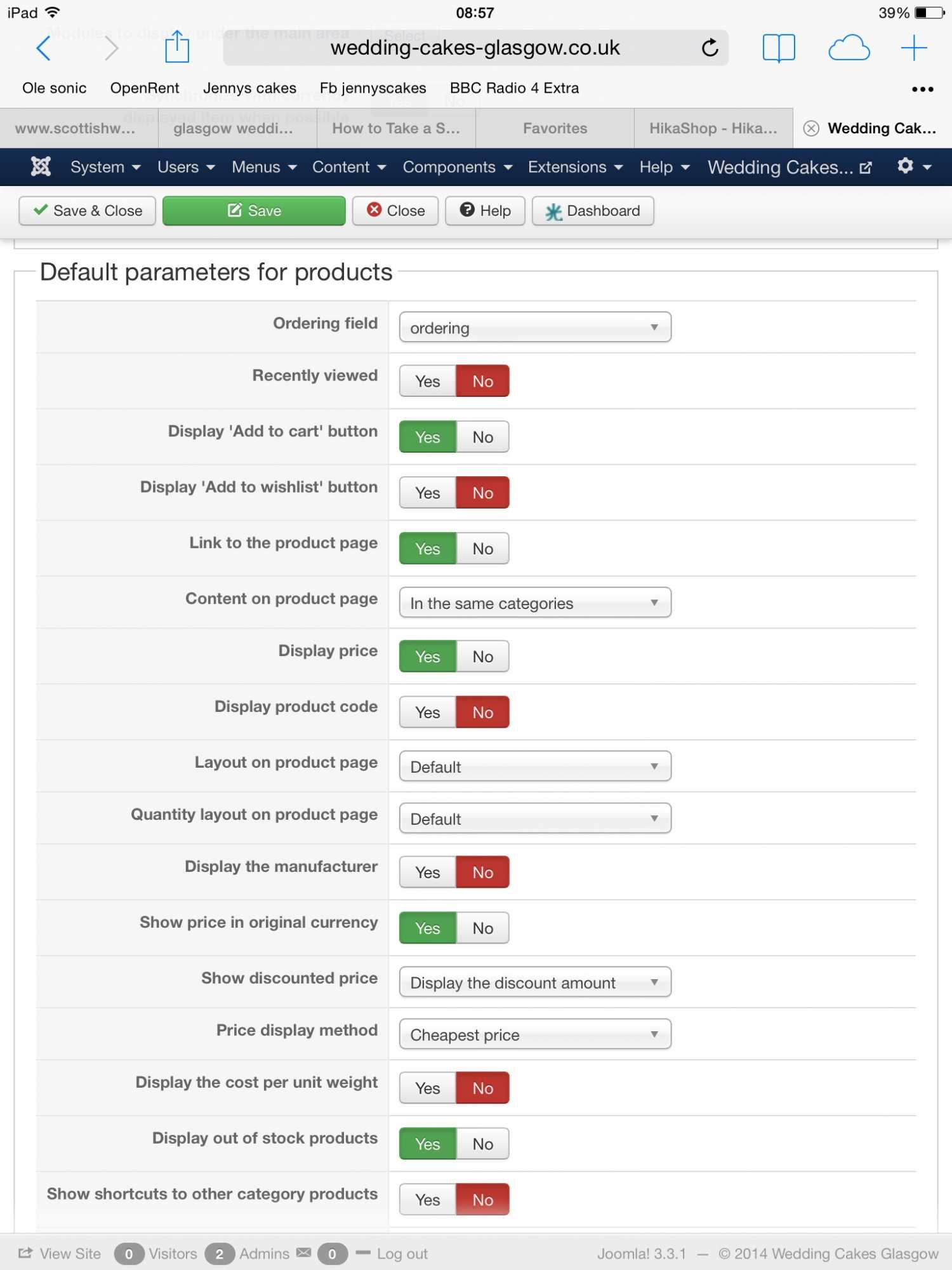
Using ipad, hope the screenshot is visible... Thanks!
Replied by tombreen on topic description and specification tabs- how to remove?
Using ipad, hope the screenshot is visible... Thanks!
Please Log in or Create an account to join the conversation.
12 years 4 months ago #160716
by Xavier
Replied by Xavier on topic description and specification tabs- how to remove?
Hi,
Thanks to give us a backend access to your website via private message with a link to that topic.
Just to be sure, you don't want the tabular view but the default one, right ?
Thanks to give us a backend access to your website via private message with a link to that topic.
Just to be sure, you don't want the tabular view but the default one, right ?
Please Log in or Create an account to join the conversation.
12 years 4 months ago #160906
by tombreen
Replied by tombreen on topic description and specification tabs- how to remove?
Hi, have pmed the login info, and just to confirm that I do not want the tabular layout. Thanks.
Please Log in or Create an account to join the conversation.
12 years 4 months ago #160920
by Xavier
Replied by Xavier on topic description and specification tabs- how to remove?
Hi,
The problem was that you selected the "tabular" layout in the product edition page (page reached when editing a product in backend).
The problem was that you selected the "tabular" layout in the product edition page (page reached when editing a product in backend).
The following user(s) said Thank You: tombreen
Please Log in or Create an account to join the conversation.
12 years 4 months ago #161136
by tombreen
Replied by tombreen on topic description and specification tabs- how to remove?
many thanks!!!
Please Log in or Create an account to join the conversation.
12 years 1 week ago - 12 years 1 week ago #176091
by dezign-it
Replied by dezign-it on topic description and specification tabs- how to remove?
Hi
I have disabled Tabular in Configuration + Product + Category but I still I have Tabular showing , I just need to Take out Specification ?
I have disabled Tabular in Configuration + Product + Category but I still I have Tabular showing , I just need to Take out Specification ?
Last edit: 12 years 1 week ago by dezign-it. Reason: updated
Please Log in or Create an account to join the conversation.

12 years 1 week ago #176166
by nicolas
Replied by nicolas on topic description and specification tabs- how to remove?
Hi,
You must still have tabular selected in the "layout on product page" option of something in your HikaShop. But the best is to edit your product and force it to "default".
You must still have tabular selected in the "layout on product page" option of something in your HikaShop. But the best is to edit your product and force it to "default".
Please Log in or Create an account to join the conversation.
12 years 6 days ago #176788
by at36
Replied by at36 on topic description and specification tabs- how to remove?
Guys I have the same problem, I think that if you are using a template maybe someone has used a views overide, in the HTML folder.
The only thing is I know that you can disble it but beacause there is customisation that has been done it throws the whole template.
So my next best guess is that you delete the following line, just use Firebug to locate
<li id="hikashop_show_tabular_specification_li" class="" onclick="displayTab('hikashop_show_tabular_specification');">Specifications</li>
?? What do you think
The only thing is I know that you can disble it but beacause there is customisation that has been done it throws the whole template.
So my next best guess is that you delete the following line, just use Firebug to locate
<li id="hikashop_show_tabular_specification_li" class="" onclick="displayTab('hikashop_show_tabular_specification');">Specifications</li>
?? What do you think
Please Log in or Create an account to join the conversation.
12 years 5 days ago #176893
by nicolas
Replied by nicolas on topic description and specification tabs- how to remove?
Hi,
If you want to remove the specification tab, yes, you can just remove that line of code.
If you want to remove the specification tab, yes, you can just remove that line of code.
Please Log in or Create an account to join the conversation.
Time to create page: 0.158 seconds