

- Posts: 34
- Thank you received: 0
change class button
12 years 4 months ago #161569
by upedown
change class button was created by upedown
-- url of the page with the problem -- :
mywebsite.com/mypage
-- HikaShop version -- : 2.3.1
-- Joomla version -- : 2.5
-- PHP version -- : x.x.x
-- Browser(s) name and version -- : XXXXX x.x.x
-- Error-message(debug-mod must be tuned on) -- : Error_message
Goodmorning!
I need to change the class button of the hikashop_product_quantity_field_2 (like I see in html/firebug) but I don't know where I can find this part of code.
I need to this to have a different color from standar "add to cart button".
Any suggestion?
Thank you in advance!
-- HikaShop version -- : 2.3.1
-- Joomla version -- : 2.5
-- PHP version -- : x.x.x
-- Browser(s) name and version -- : XXXXX x.x.x
-- Error-message(debug-mod must be tuned on) -- : Error_message
Goodmorning!
I need to change the class button of the hikashop_product_quantity_field_2 (like I see in html/firebug) but I don't know where I can find this part of code.
I need to this to have a different color from standar "add to cart button".
Any suggestion?
Thank you in advance!
Please Log in or Create an account to join the conversation.

Less
More
- Posts: 12953
- Thank you received: 1778
12 years 4 months ago #161572
by Mohamed Thelji
Replied by Mohamed Thelji on topic change class button
Hello,
The solution will probably be to use the ".hikashop_cart_input_button" CSS class to change the display of your add to cart button.
Also ,reading that documentation will probably help you : www.hikashop.com/support/documentation/1...ize-the-display.html
The solution will probably be to use the ".hikashop_cart_input_button" CSS class to change the display of your add to cart button.
Also ,reading that documentation will probably help you : www.hikashop.com/support/documentation/1...ize-the-display.html
Please Log in or Create an account to join the conversation.
12 years 4 months ago - 12 years 4 months ago #161745
by upedown
Replied by upedown on topic change class button
Thank you for answer!
I don't think that this way can resolve my problem because if I change ".hikashop_cart_input_button" I change both the buttons!
Maybe I'm wrong but this is the reason whereby I have to change the class in the html.
I've attached two pictures. The first is the situation that I have now, the second is what I have to do.
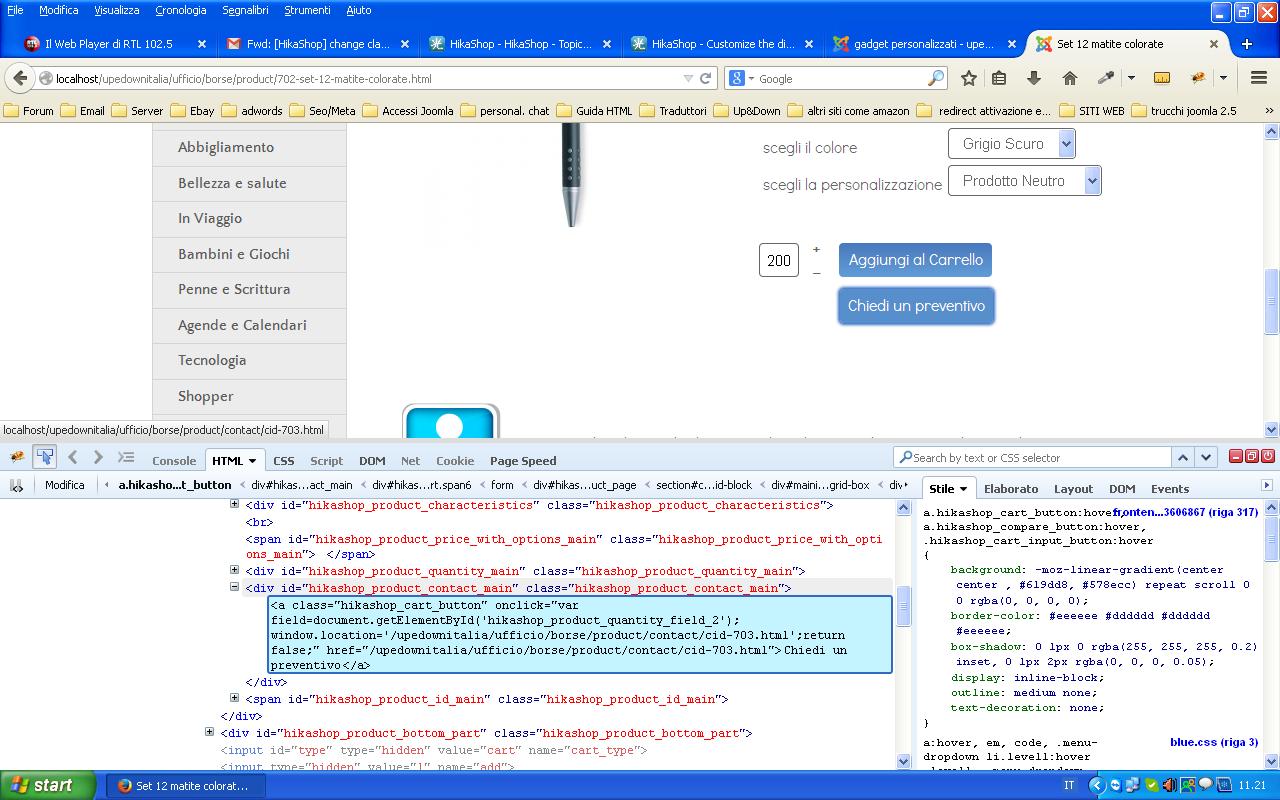
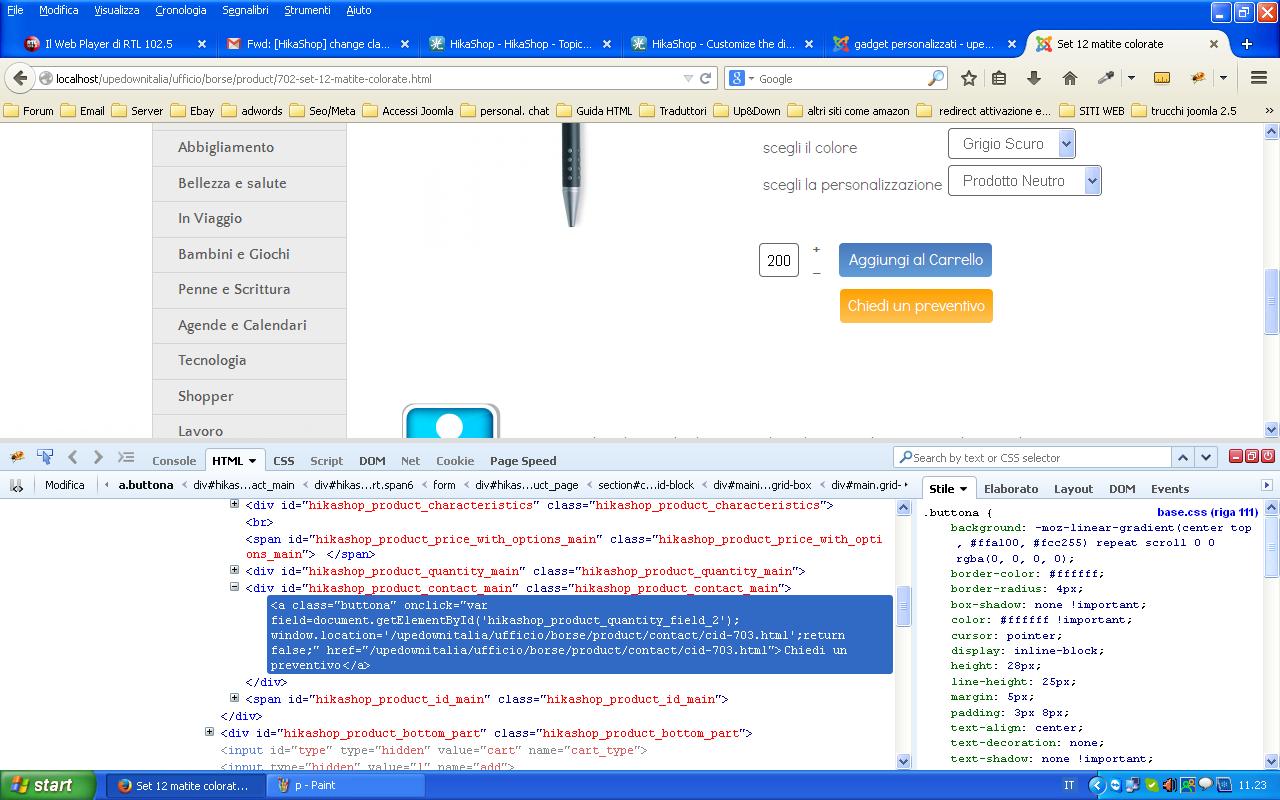
I don't think that this way can resolve my problem because if I change ".hikashop_cart_input_button" I change both the buttons!
Maybe I'm wrong but this is the reason whereby I have to change the class in the html.
I've attached two pictures. The first is the situation that I have now, the second is what I have to do.
Last edit: 12 years 4 months ago by upedown.
Please Log in or Create an account to join the conversation.

12 years 4 months ago #161749
by Xavier
Replied by Xavier on topic change class button
Hi,
To change the look only for the second button, you have to use this kind of css property:
To change the look only for the second button, you have to use this kind of css property:
Code:
.hikashop_product_contact_main .hikashop_cart_button{ background-color : #ccc;}
The following user(s) said Thank You: upedown
Please Log in or Create an account to join the conversation.
12 years 4 months ago #161915
by upedown
Replied by upedown on topic change class button
Hi Xavier!
Thank you so much! This is the right way to solve my problem!
Now I have the second button with different color!
Last question is:
I've tried to insert this code for the Hover effect
but I can't see the change...
still have the hover effect of the original button with this code
How can I set an hover effect just for the second button? Thank you again!
Thank you so much! This is the right way to solve my problem!
Now I have the second button with different color!
Last question is:
I've tried to insert this code for the Hover effect
Code:
.hikashop_product_contact_main .hikashop_cart_button {
text-decoration:none;
color: #FFFFFF !important;
cursor: pointer;
display: inline-block;
line-height: 25px;
margin: 5px;
padding: 3px 8px;
text-align: center;
box-shadow:none !important;
text-shadow:none !important;
border:;
border-color: #FFFFFF #FFFFFF #FFFFFF #FFFFFF;
border-radius:4px;
background-color: #eee;
background: -webkit-gradient(linear, left top, left bottom, from(#ffffff), to(#eee));
background: -webkit-linear-gradient(top, #ffa100, #ffcc255);
background: -moz-linear-gradient(top, #ffa100, #ffcc255);
background: -o-linear-gradient(top, #ffa100, #ffcc255);
background: linear-gradient(top, #ffa100, #ffcc255);
width: 137px;
height: 28px;
}
.hikashop_product_contact_main .hikashop_cart_button:Hover {
text-decoration:none;
color: #FFFFFF !important;
cursor: pointer;
display: inline-block;
line-height: 25px;
margin: 5px;
padding: 3px 8px;
text-align: center;
box-shadow:none !important;
text-shadow:none !important;
border:;
border-color: #FFFFFF #FFFFFF #FFFFFF #FFFFFF;
border-radius:4px;
background-color: #eee;
background: -webkit-linear-gradient(top, #ffcc255, #ffa100);
background: -moz-linear-gradient(top, #ffcc255, #ffa100);
background: -o-linear-gradient(top, #ffcc255, #ffa100);
background: linear-gradient(top, #ffcc255, #ffa100);
width: 137px;
height: 28px;
}
but I can't see the change...
still have the hover effect of the original button with this code
Code:
a.hikashop_cart_button:hover, a.hikashop_compare_button:hover, .hikashop_cart_input_button:hover{
box-shadow: 0 1px 0 rgba(255, 255, 255, 0.2) inset, 0 1px 2px rgba(0, 0, 0, 0.05);
display: inline-block;
outline: none;
border:;
border-color: #EEEEEE #DDDDDD #DDDDDD #EEEEEE;
text-decoration:none;
background-color: #f8f8f8;
background: -webkit-gradient(linear, left top, left bottom, from(#ffffff), to(#f8f8f8));
background: -webkit-linear-gradient(center, #619dd8, #578ECC);
background: -moz-linear-gradient(center, #619dd8, #578ECC);
background: -o-linear-gradient(center, #619dd8, #578ECC);
background: linear-gradient(top, #619dd8, #578ECC);
transition: background-position 0.1s linea 0s;
}
How can I set an hover effect just for the second button? Thank you again!
Please Log in or Create an account to join the conversation.

12 years 4 months ago #161920
by lousyfool
Need help with customisations of layouts, style or other site development? PM me!
(Don't forget to turn on "E-mail notification of new messages" )
Replied by lousyfool on topic change class button
You have a syntax error in your 'new' CSS:
Make it "hover" in lowercase, and it should work.
P.S.: You don't need to repeat all selectors in the CSS block for hover. The ones that are to change will be enough. Saves you loading a few bytes...
Code:
..._button:Hover {
Make it "hover" in lowercase, and it should work.
P.S.: You don't need to repeat all selectors in the CSS block for hover. The ones that are to change will be enough. Saves you loading a few bytes...
Need help with customisations of layouts, style or other site development? PM me!
(Don't forget to turn on "E-mail notification of new messages" )
The following user(s) said Thank You: upedown
Please Log in or Create an account to join the conversation.
12 years 4 months ago #161930
by upedown
Replied by upedown on topic change class button
Lousyfool thanks for your precious support!
Please Log in or Create an account to join the conversation.
Time to create page: 0.274 seconds