

- Posts: 4
- Thank you received: 0
"Add to Cart" button is cut off
12 years 4 months ago #161652
by kgregor
"Add to Cart" button is cut off was created by kgregor
-- url of the page with the problem -- :
vendor.gokwag.com/index.php/hikashop-men...ng/product/1-craft-1
-- HikaShop version -- : 2.3.1
-- Joomla version -- : 3.3.1
-- PHP version -- : 5.3.28
-- Browser(s) name and version -- : Chrome 35.0.1916.153 m
The "Add to Cart" button is not displaying properly.
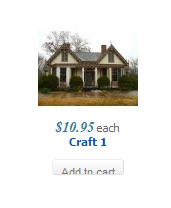
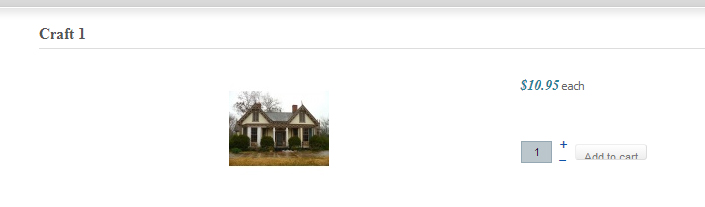
-- HikaShop version -- : 2.3.1
-- Joomla version -- : 3.3.1
-- PHP version -- : 5.3.28
-- Browser(s) name and version -- : Chrome 35.0.1916.153 m
The "Add to Cart" button is not displaying properly.
Please Log in or Create an account to join the conversation.

12 years 4 months ago - 12 years 4 months ago #161673
by lousyfool
Need help with customisations of layouts, style or other site development? PM me!
(Don't forget to turn on "E-mail notification of new messages" )
Replied by lousyfool on topic "Add to Cart" button is cut off
Your template CSS sets the height of "input" (= relevant for the add to cart button) and "button" to 16px. So it happens in your template.css file around line 32.
You can override it for this button by adding this CSS:
You can override it for this button by adding this CSS:
Code:
.hikashop_cart_input_button {height: auto !important;}
Need help with customisations of layouts, style or other site development? PM me!
(Don't forget to turn on "E-mail notification of new messages" )
Last edit: 12 years 4 months ago by lousyfool.
The following user(s) said Thank You: kgregor
Please Log in or Create an account to join the conversation.

12 years 4 months ago #161674
by nicolas
Replied by nicolas on topic "Add to Cart" button is cut off
Hi,
That's because of the CSS code:
of the file
vendor.gokwag.com/templates/siteground-j16-45/css/template.css
of your joomla template.
Remove that code from that file and you won't have the problem.
That's because of the CSS code:
Code:
input, button {
background: none repeat scroll 0 0 #BBC6CC;
border: 1px solid #95A8B3;
color: #0B1B24;
font-size: 11px;
height: 16px;
line-height: 15px;
padding: 2px 10px;
}
Remove that code from that file and you won't have the problem.
Please Log in or Create an account to join the conversation.
12 years 4 months ago #161808
by kgregor
Replied by kgregor on topic "Add to Cart" button is cut off
Yay! That fixed it! Thanks!
Please Log in or Create an account to join the conversation.
Time to create page: 0.224 seconds