
- Posts: 9
- Thank you received: 0
Display first Image from product
- hanibaltrs
-
 Topic Author
- Offline
Less
More
12 years 3 months ago - 12 years 3 months ago #163811
by hanibaltrs
Display first Image from product was created by hanibaltrs
-- HikaShop version -- : 2.2
-- Joomla version -- : 2.5.22
Hi,
is there any shortcut from product listing list view to have the first image from the product ??
because i wanna make a drop down with the products (already did) and wanna have displayed the first product image next to the selected product.. so far i have:
which does the drop down, once the product is selected it should have the image displayed (coding part i will make..only need the shortcut like "php echo $this->row->firstimage" ??
is there any variable i can call to have this first image ?
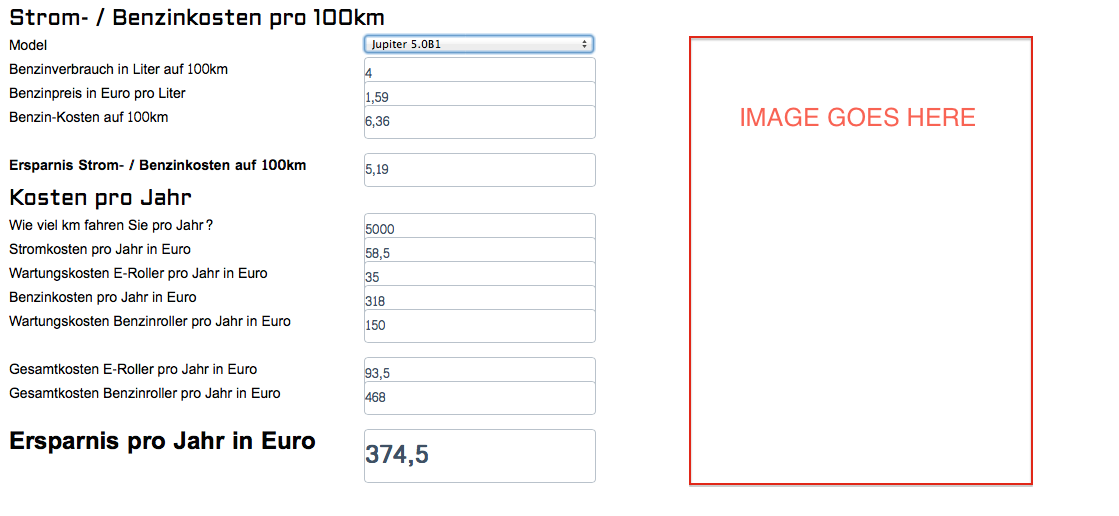
array for the foreach loop is also fine to have a better point of view image is attached (it's a calculator based on the custom values & products which are in the shop it calculates via js/php
-- Joomla version -- : 2.5.22
Hi,
is there any shortcut from product listing list view to have the first image from the product ??
because i wanna make a drop down with the products (already did) and wanna have displayed the first product image next to the selected product.. so far i have:
Code:
<select id="model2" name="model2" onchange="ersparnis();">
<?php foreach($this->rows as $row){
$this->row =& $row;?>
<option value="<?php echo $this->row->verbrauchauf100km022kwh;?>"><?php echo $row->product_name;?></option><?php } ?></select>
is there any variable i can call to have this first image ?
array for the foreach loop is also fine to have a better point of view image is attached (it's a calculator based on the custom values & products which are in the shop it calculates via js/php
Last edit: 12 years 3 months ago by Jerome. Reason: [code] is nice !!
Please Log in or Create an account to join the conversation.

12 years 3 months ago #163814
by Jerome
Jerome - Obsidev.com
HikaMarket & HikaSerial developer / HikaShop core dev team.
Replied by Jerome on topic Display first Image from product
Hi,
I do not understand your question.
Some product listing, like "listing_img_title" display the image of the product.. A lot of listing allow you to display the image of the product.
You can simply re-use the existing code in order to do the same.
Regards,
I do not understand your question.
Some product listing, like "listing_img_title" display the image of the product.. A lot of listing allow you to display the image of the product.
You can simply re-use the existing code in order to do the same.
Code:
$image_options = array('default' => true,'forcesize'=>$this->config->get('image_force_size',true),'scale'=>$this->config->get('image_scale_mode','inside'));
$img = $this->image->getThumbnail(@$this->row->file_path, array('width' => $this->image->main_thumbnail_x, 'height' => $this->image->main_thumbnail_y), $image_options);
if($img->success) {
echo '<img class="hikashop_product_listing_image" title="'.$this->escape(@$this->row->file_description).'" alt="'.$this->escape(@$this->row->file_name).'" src="'.$img->url.'"/>';
}
Jerome - Obsidev.com
HikaMarket & HikaSerial developer / HikaShop core dev team.
The following user(s) said Thank You: hanibaltrs
Please Log in or Create an account to join the conversation.
- hanibaltrs
-
Topic Author
- Offline
Less
More
- Posts: 9
- Thank you received: 0
12 years 3 months ago #163977
by hanibaltrs
Replied by hanibaltrs on topic Display first Image from product
great, thanks for hit, works perfectly.. looks like this..
Please Log in or Create an account to join the conversation.
Time to create page: 0.181 seconds