

- Posts: 7
- Thank you received: 0
Category Image Not Displayed
12 years 3 months ago #164899
by bjcasey
Category Image Not Displayed was created by bjcasey
-- url of the page with the problem -- :
mywebsite.com/mypage
-- HikaShop version -- : x.x.x
-- Joomla version -- : x.x
-- PHP version -- : x.x.x
-- Browser(s) name and version -- : XXXXX x.x.x
-- Error-message(debug-mod must be tuned on) -- : Error_message
I'm using the latest Business version of HikaShop. I have added an image to be displayed for a category and it displays fine in the backend, but when I browse to that category on the front end the image is not displayed at all.
Backend:

Frontend:

-- HikaShop version -- : x.x.x
-- Joomla version -- : x.x
-- PHP version -- : x.x.x
-- Browser(s) name and version -- : XXXXX x.x.x
-- Error-message(debug-mod must be tuned on) -- : Error_message
I'm using the latest Business version of HikaShop. I have added an image to be displayed for a category and it displays fine in the backend, but when I browse to that category on the front end the image is not displayed at all.
Backend:
Frontend:
Please Log in or Create an account to join the conversation.

Less
More
- Posts: 12953
- Thank you received: 1778
12 years 3 months ago #164937
by Mohamed Thelji
Replied by Mohamed Thelji on topic Category Image Not Displayed
Hello,
Can you give us a link to the page where you are having your issue, so that we can directly check it ?
Thanks.
Can you give us a link to the page where you are having your issue, so that we can directly check it ?
Thanks.
Please Log in or Create an account to join the conversation.
12 years 3 months ago #165193
by bjcasey
Replied by bjcasey on topic Category Image Not Displayed
Please Log in or Create an account to join the conversation.

12 years 3 months ago #165302
by nicolas
Replied by nicolas on topic Category Image Not Displayed
Hi,
This indicates that the system was not able to generate the thumbnail for the frontend listing.
Please check the permissions of all the folders and sub folders inside media/com_hikashop/upload and make sure that your web server can write in them all and it should then work.
This indicates that the system was not able to generate the thumbnail for the frontend listing.
Please check the permissions of all the folders and sub folders inside media/com_hikashop/upload and make sure that your web server can write in them all and it should then work.
Please Log in or Create an account to join the conversation.
Less
More
- Posts: 9
- Thank you received: 0
12 years 2 months ago - 12 years 2 months ago #166021
by tatjanabinder
Replied by tatjanabinder on topic Category Image Not Displayed
Hi, i have some Problem with Category Image.
i can it download in category but when I browse to that category on the front end the image is not displayed at all, only the Category Name to see and it said : Der Ordner /media/com_hikashop/upload/thumbnails/0x0fsO ist nicht beschreibbar
in the folder /media/com_hikashop/upload/thumbnails/ the order 0x0fs exist nicht!
i had contacted web server but it doesn't work
what yet? shoud i'll install hikashop new?
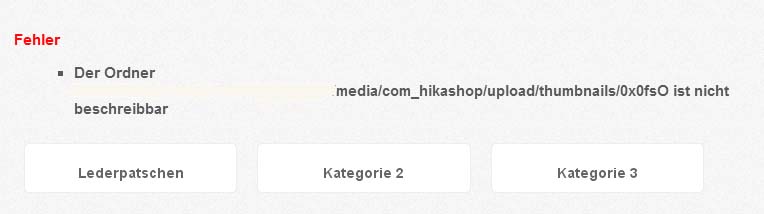
i can it download in category but when I browse to that category on the front end the image is not displayed at all, only the Category Name to see and it said : Der Ordner /media/com_hikashop/upload/thumbnails/0x0fsO ist nicht beschreibbar
in the folder /media/com_hikashop/upload/thumbnails/ the order 0x0fs exist nicht!
i had contacted web server but it doesn't work
what yet? shoud i'll install hikashop new?
Last edit: 12 years 2 months ago by tatjanabinder.
Please Log in or Create an account to join the conversation.
12 years 2 months ago #166037
by nicolas
Replied by nicolas on topic Category Image Not Displayed
Hi,
Installing HikaShop again won't help.
This indicates that you entered 0 for both the width and height options of your categories listing menu.
Go in the menu Display->Content menus, edition your menu and make sure that you have values in the width/height fields there.
Installing HikaShop again won't help.
This indicates that you entered 0 for both the width and height options of your categories listing menu.
Go in the menu Display->Content menus, edition your menu and make sure that you have values in the width/height fields there.
Please Log in or Create an account to join the conversation.
Less
More
- Posts: 9
- Thank you received: 0
12 years 2 months ago #166086
by tatjanabinder
Replied by tatjanabinder on topic Category Image Not Displayed
Thanks!
it's work now
Best regards
it's work now
Best regards
Please Log in or Create an account to join the conversation.
Time to create page: 0.322 seconds