
- Posts: 100
- Thank you received: 1
Limit reached. You can't add the product
- paddyrolls
-
 Topic Author
- Offline
Less
More
12 years 2 months ago #167219
by paddyrolls
Limit reached. You can't add the product was created by paddyrolls
-- HikaShop version -- : 2.3.2
-- Joomla version -- : 3.3.3
-- PHP version -- : 5.3.15
HI
I have setup a product called "Stretch Band". I have setup 1 characteristic called "size" with the following values:
Please Select
Small
Medium
Large
I have added this characteristic to the "Stretch Band" product and created 4 variant products.
In the variant product for "Please Select" I have set Quantity to "0" and no price. (this prevents the variant from being added to the cart. However, how can I prevent the message "Limit reached. You can't add the product: Stretch Band: Please Select"
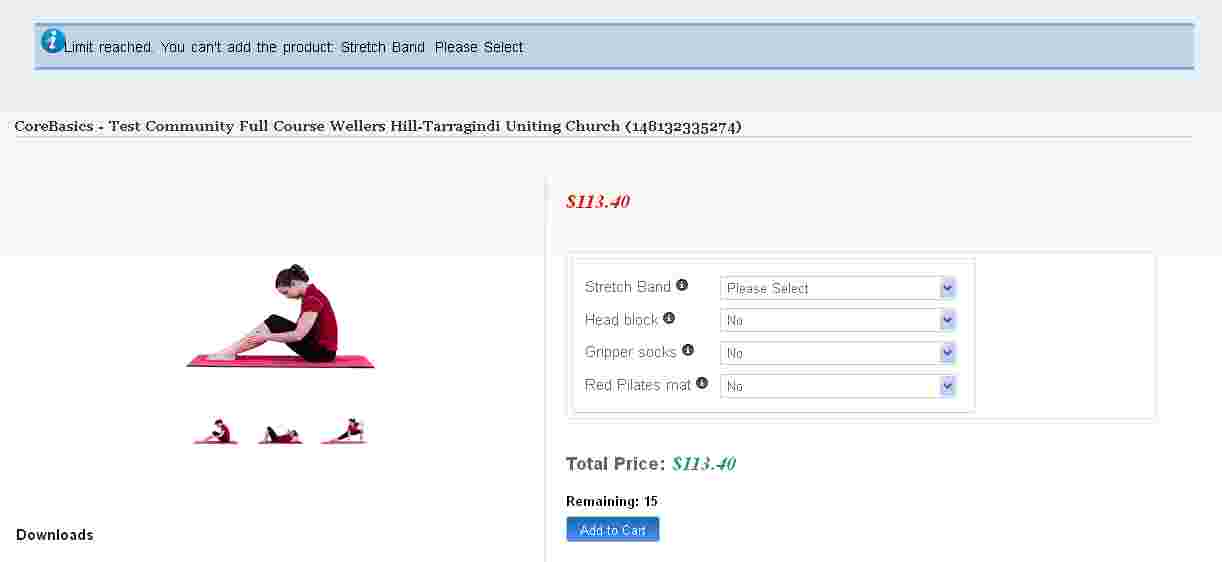
Thanks
Patrick
-- Joomla version -- : 3.3.3
-- PHP version -- : 5.3.15
HI
I have setup a product called "Stretch Band". I have setup 1 characteristic called "size" with the following values:
Please Select
Small
Medium
Large
I have added this characteristic to the "Stretch Band" product and created 4 variant products.
In the variant product for "Please Select" I have set Quantity to "0" and no price. (this prevents the variant from being added to the cart. However, how can I prevent the message "Limit reached. You can't add the product: Stretch Band: Please Select"
Thanks
Patrick
Please Log in or Create an account to join the conversation.

Less
More
- Posts: 12953
- Thank you received: 1778
12 years 2 months ago #167231
by Mohamed Thelji
Replied by Mohamed Thelji on topic Limit reached. You can't add the product
Hello Patrick,
The solution will probably be to :
- Go to your product configuration page
- Use the "Manage Variants" button of the "Characteristics" tab
- Set the quantity of all variants a "Please Select" value to 0
The solution will probably be to :
- Go to your product configuration page
- Use the "Manage Variants" button of the "Characteristics" tab
- Set the quantity of all variants a "Please Select" value to 0
Please Log in or Create an account to join the conversation.
- paddyrolls
-
Topic Author
- Offline
Less
More
- Posts: 100
- Thank you received: 1
12 years 2 months ago #167348
by paddyrolls
Replied by paddyrolls on topic Limit reached. You can't add the product
Hi
For all variants that have "Please Select" , the quantity has been set to 0.
However, it is still trying to add this product when the variants are added as "options" to a main product.
thanks
Patrick
For all variants that have "Please Select" , the quantity has been set to 0.
However, it is still trying to add this product when the variants are added as "options" to a main product.
thanks
Patrick
Please Log in or Create an account to join the conversation.
Less
More
- Posts: 12953
- Thank you received: 1778
12 years 2 months ago #167397
by Mohamed Thelji
Replied by Mohamed Thelji on topic Limit reached. You can't add the product
Hi,
Can you give me a temporary access to your back-end so that I can directly check how you configured your product and test it ?
Thanks.
Can you give me a temporary access to your back-end so that I can directly check how you configured your product and test it ?
Thanks.
Please Log in or Create an account to join the conversation.
- paddyrolls
-
Topic Author
- Offline
Less
More
- Posts: 100
- Thank you received: 1
12 years 2 months ago #167419
by paddyrolls
Replied by paddyrolls on topic Limit reached. You can't add the product
Hi
Details sent to you via private message.
thanks
Patrick
Details sent to you via private message.
thanks
Patrick
Please Log in or Create an account to join the conversation.

12 years 2 months ago #167470
by Jerome
Jerome - Obsidev.com
HikaMarket & HikaSerial developer / HikaShop core dev team.
Replied by Jerome on topic Limit reached. You can't add the product
Hi,
I suggest you to do like we did in our demo website for the computer product:
demo.hikashop.com/index.php?option=com_h...ow&Itemid=91&lang=en
The way that you restrict the selection of the options using a special variant is not the best one.
Because HikaShop will try to add the product and the options too ; and it will add the product but it will block on the addition of this specific option (and it will result the error message).
I think we have something to improve during the check in order to display a more appropriate message but the finality is the same.
If you really want to not pre-select a value for the options, the best will be to modify the dropdown directly and add some checks in order to refuse to continue (when pressing the "add to cart" button) using some javascript.
It's the best way I see.
I'll update the HikaShop TODO list in order to note that could be improved in HikaShop ; maybe adding an option can be a good thing in HikaShop (but I won't be able to give you any schedule for this implementation, we have a lot of tasks in our TODO list).
Regards,
I suggest you to do like we did in our demo website for the computer product:
demo.hikashop.com/index.php?option=com_h...ow&Itemid=91&lang=en
The way that you restrict the selection of the options using a special variant is not the best one.
Because HikaShop will try to add the product and the options too ; and it will add the product but it will block on the addition of this specific option (and it will result the error message).
I think we have something to improve during the check in order to display a more appropriate message but the finality is the same.
If you really want to not pre-select a value for the options, the best will be to modify the dropdown directly and add some checks in order to refuse to continue (when pressing the "add to cart" button) using some javascript.
It's the best way I see.
I'll update the HikaShop TODO list in order to note that could be improved in HikaShop ; maybe adding an option can be a good thing in HikaShop (but I won't be able to give you any schedule for this implementation, we have a lot of tasks in our TODO list).
Regards,
Jerome - Obsidev.com
HikaMarket & HikaSerial developer / HikaShop core dev team.
Please Log in or Create an account to join the conversation.
- paddyrolls
-
Topic Author
- Offline
Less
More
- Posts: 100
- Thank you received: 1
12 years 2 months ago #167491
by paddyrolls
Replied by paddyrolls on topic Limit reached. You can't add the product
HI Jerome
Thanks for the suggestion. I can work with this and change the "Please select" to "without"....
Regards
Patrick
Thanks for the suggestion. I can work with this and change the "Please select" to "without"....
Regards
Patrick
Please Log in or Create an account to join the conversation.
Time to create page: 0.098 seconds