

- Posts: 9
- Thank you received: 0
Disable Scroll to top after add to cart button
12 years 2 months ago #167887
by Multi555
Disable Scroll to top after add to cart button was created by Multi555
-- HikaShop version -- : 2.2.0
-- Joomla version -- : 2.5
Hi!
I use Business edition of hikashop (2.2.0).
I want to disable browser scrolling to top, after pushing add to cart button on product listing.
Now when I push the add to cart button the pop up window show (its fine), then scroll up to top of the page.
Is it possible to disbale this function? (I try to modify the custom css trought display, but with no lucky) Thank's for answer, and for a very good shopping cart system.
-- Joomla version -- : 2.5
Hi!
I use Business edition of hikashop (2.2.0).
I want to disable browser scrolling to top, after pushing add to cart button on product listing.
Now when I push the add to cart button the pop up window show (its fine), then scroll up to top of the page.
Is it possible to disbale this function? (I try to modify the custom css trought display, but with no lucky) Thank's for answer, and for a very good shopping cart system.
Please Log in or Create an account to join the conversation.

12 years 2 months ago #167889
by Xavier
Replied by Xavier on topic Disable Scroll to top after add to cart button
Hi,
You have to enable the option "Use AJAX button when possible" in Configuration > Main > Advanced.
This way the page will not be reloaded and it will stay at the same position.
You have to enable the option "Use AJAX button when possible" in Configuration > Main > Advanced.
This way the page will not be reloaded and it will stay at the same position.
Please Log in or Create an account to join the conversation.
12 years 2 months ago #167944
by Multi555
Replied by Multi555 on topic Disable Scroll to top after add to cart button
Hi Xavier!
Thank's for answer, but it was alredy enabled, with or without this option page is reloading.
In privat message I give you access to front end. Maybe you can figure out something.
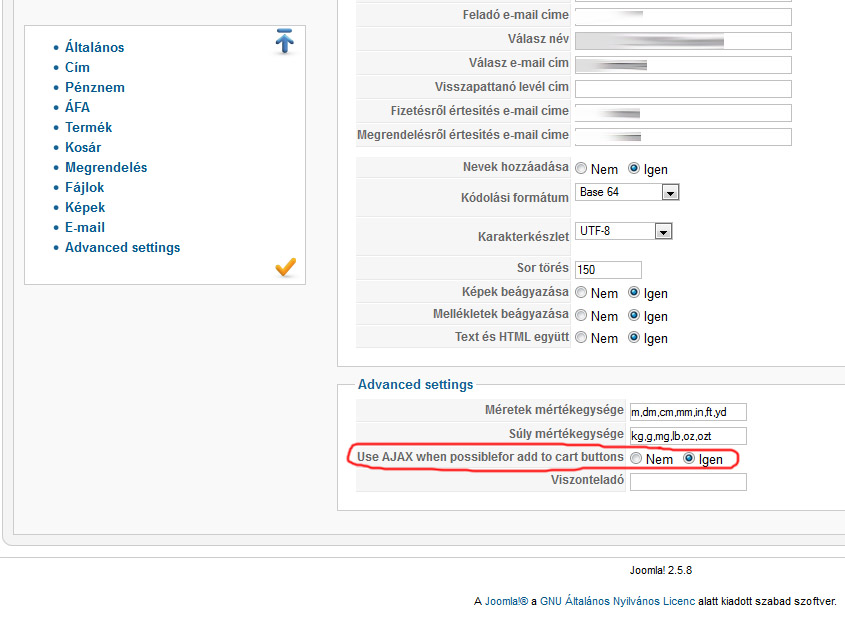
Thank's for answer, but it was alredy enabled, with or without this option page is reloading.
In privat message I give you access to front end. Maybe you can figure out something.
Please Log in or Create an account to join the conversation.

12 years 2 months ago #167946
by nicolas
Replied by nicolas on topic Disable Scroll to top after add to cart button
Hi,
Then there is no way to disable that.
It's not really a "scroll to top". It's that the full page is refreshed and thus the browser puts you back at the top of the page since it's a new page being displayed. It is necessary in order to send the add to cart data to the web server. With the AJAX option turned on, HikaShop will use an AJAX process to send the data when possible, and in such cases, the page won't have to be refreshed. But it's not always possible to do it, and sicne it doesn't change the behavior on your website, it means that you're not in a case where the AJAX process can be used.
Then there is no way to disable that.
It's not really a "scroll to top". It's that the full page is refreshed and thus the browser puts you back at the top of the page since it's a new page being displayed. It is necessary in order to send the add to cart data to the web server. With the AJAX option turned on, HikaShop will use an AJAX process to send the data when possible, and in such cases, the page won't have to be refreshed. But it's not always possible to do it, and sicne it doesn't change the behavior on your website, it means that you're not in a case where the AJAX process can be used.
The following user(s) said Thank You: Multi555
Please Log in or Create an account to join the conversation.
12 years 1 month ago #169732
by Multi555
Replied by Multi555 on topic Disable Scroll to top after add to cart button
Hi Nicolas!
Only one more try, then I will give up "fighting" with AJAX.
After a lot of testing, I found the problem what causing: add to cart button with ajax not working.
On product listing I use custom "item" field (sometimes my customers need to add comments to product, color, type of pruduct ect.)
- When this custom "item" field is publised (turned on), the "add to cart ajax process" is not working.
- When I unpublish (turn off) custom "item" field, the "add to cart ajax process" working perfectly.
Custom item fields, and AJAX is a great funkction, but not working together. Unfortunately my customers realy need both function, thats why I trying to find solution for my problem.
Is it possible to make this two function work together?
Only one more try, then I will give up "fighting" with AJAX.
After a lot of testing, I found the problem what causing: add to cart button with ajax not working.
On product listing I use custom "item" field (sometimes my customers need to add comments to product, color, type of pruduct ect.)
- When this custom "item" field is publised (turned on), the "add to cart ajax process" is not working.
- When I unpublish (turn off) custom "item" field, the "add to cart ajax process" working perfectly.
Custom item fields, and AJAX is a great funkction, but not working together. Unfortunately my customers realy need both function, thats why I trying to find solution for my problem.
Is it possible to make this two function work together?
Please Log in or Create an account to join the conversation.

12 years 1 month ago #169734
by Jerome
Jerome - Obsidev.com
HikaMarket & HikaSerial developer / HikaShop core dev team.
Replied by Jerome on topic Disable Scroll to top after add to cart button
Hi,
Without a re-factoring of the system it won't be possible.
The custom item fields allow the user to enter some specific data ; but it can be a text, a checkbox or something more complicated like an upload of file;
That's why the ajax is not compatible with the custom item fields, it can't know if the custom item field will be compatible with the "ajax call" so it always make a classical form submission where there is a custom item field.
We introduced the "ajax file" and "ajax image" in HikaShop, our goal is to have compatible custom fields for ajax and let the "add to cart" detect if it can work or not.
But it is something in our TODO list, we are currently on other big developments ; so the improvement of the "add to cart" will be done but not in a short delay.
Regards,
Without a re-factoring of the system it won't be possible.
The custom item fields allow the user to enter some specific data ; but it can be a text, a checkbox or something more complicated like an upload of file;
That's why the ajax is not compatible with the custom item fields, it can't know if the custom item field will be compatible with the "ajax call" so it always make a classical form submission where there is a custom item field.
We introduced the "ajax file" and "ajax image" in HikaShop, our goal is to have compatible custom fields for ajax and let the "add to cart" detect if it can work or not.
But it is something in our TODO list, we are currently on other big developments ; so the improvement of the "add to cart" will be done but not in a short delay.
Regards,
Jerome - Obsidev.com
HikaMarket & HikaSerial developer / HikaShop core dev team.
The following user(s) said Thank You: Multi555
Please Log in or Create an account to join the conversation.
12 years 1 month ago #169811
by Multi555
Replied by Multi555 on topic Disable Scroll to top after add to cart button
Hi Jerome!
OK, I understand, and thank's for your answer.
Best regards,
OK, I understand, and thank's for your answer.
Best regards,
Please Log in or Create an account to join the conversation.
Time to create page: 0.300 seconds