

- Posts: 16
- Thank you received: 0
Sales and Category mode in same screen
12 years 2 months ago #167894
by Fascias
Sales and Category mode in same screen was created by Fascias
-- HikaShop version -- : business
-- Joomla version -- : 2.5
Hi,
I have been trying to figure out a definitive answer to this question, but cannot find a solution that works from other threads in the forum.
I am trying to have Hikashop run in sales mode with the 'add to cart button' for some categories while other categories (in the same menu) remaining in catalogue mode without the 'add to cart button'.
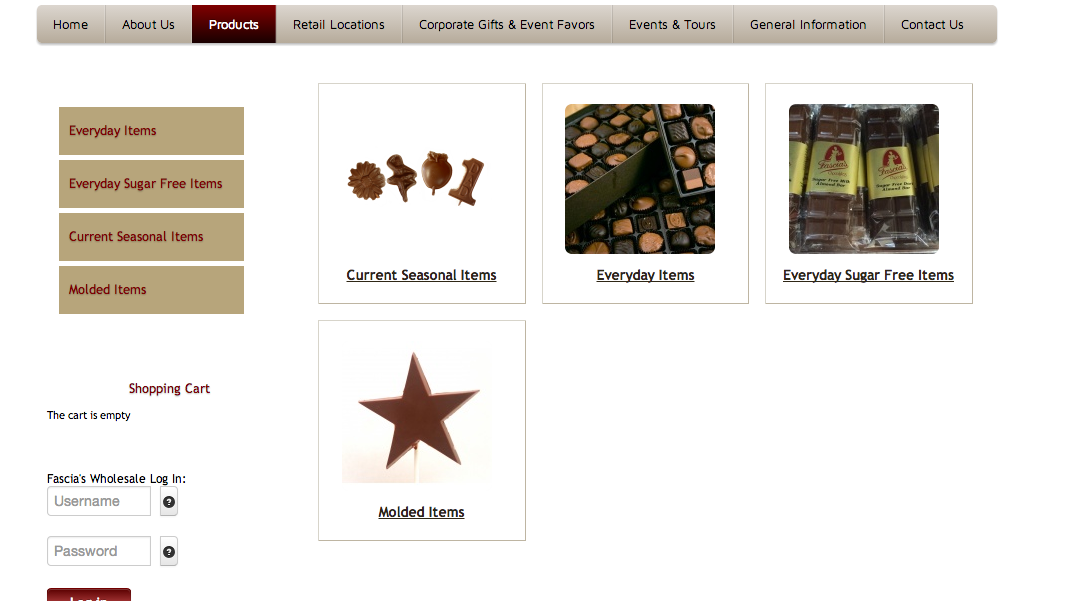
I have attached a screenshot photo to show you what I mean. In the photo I want the category 'current seasonal items' to run in sales mode so people can add the products in the cart, however the category 'molded items' I want to be in catalogue mode so it looks the same layout wise, but people cannot add the products to their shopping cart.
I hope this makes sense.
-- Joomla version -- : 2.5
Hi,
I have been trying to figure out a definitive answer to this question, but cannot find a solution that works from other threads in the forum.
I am trying to have Hikashop run in sales mode with the 'add to cart button' for some categories while other categories (in the same menu) remaining in catalogue mode without the 'add to cart button'.
I have attached a screenshot photo to show you what I mean. In the photo I want the category 'current seasonal items' to run in sales mode so people can add the products in the cart, however the category 'molded items' I want to be in catalogue mode so it looks the same layout wise, but people cannot add the products to their shopping cart.
I hope this makes sense.
Please Log in or Create an account to join the conversation.

12 years 2 months ago #167896
by nicolas
Replied by nicolas on topic Sales and Category mode in same screen
Hi,
What you can do is this:
Have the "Display add to cart button for free products" option of the configuration turned off and don't set the price for the products for which you don't want the add to cart button.
You can always display the price within the description of the product or via a custom product field if you need to for the products without the add to cart buttons.
An alternative could be to create a copy of the show_default view file via the menu Display>Views and remove the display of the quantity layout from it and then select different layouts in your products based on whether they need to add to cart button or not.
What you can do is this:
Have the "Display add to cart button for free products" option of the configuration turned off and don't set the price for the products for which you don't want the add to cart button.
You can always display the price within the description of the product or via a custom product field if you need to for the products without the add to cart buttons.
An alternative could be to create a copy of the show_default view file via the menu Display>Views and remove the display of the quantity layout from it and then select different layouts in your products based on whether they need to add to cart button or not.
Please Log in or Create an account to join the conversation.
12 years 2 months ago #168028
by Fascias
Replied by Fascias on topic Sales and Category mode in same screen
Thanks for your response.
Right now I have some products that don't have prices but you can still 'add to cart' which I want to keep, so the other way you mentioned was to create a copy of the show_default file and taking out the quantity. Can you explain this more? How would it get rid of the 'add to cart' button and how do I apply this to certain products/categories?
Thanks again!
Right now I have some products that don't have prices but you can still 'add to cart' which I want to keep, so the other way you mentioned was to create a copy of the show_default file and taking out the quantity. Can you explain this more? How would it get rid of the 'add to cart' button and how do I apply this to certain products/categories?
Thanks again!
Please Log in or Create an account to join the conversation.
12 years 2 months ago #168034
by nicolas
Replied by nicolas on topic Sales and Category mode in same screen
Hi,
Taking out the add to cart button from the show_default view file can be done by just removing the code:
$this->setLayout('quantity');
echo $this->loadTemplate();
make sure that you change the name of the file when you edit it in order to get the modification in a copy of the view file.
Then, in your categories/products you'll be able to select the layout you want with the "layout on product page" option.
Taking out the add to cart button from the show_default view file can be done by just removing the code:
$this->setLayout('quantity');
echo $this->loadTemplate();
make sure that you change the name of the file when you edit it in order to get the modification in a copy of the view file.
Then, in your categories/products you'll be able to select the layout you want with the "layout on product page" option.
Please Log in or Create an account to join the conversation.
Time to create page: 0.112 seconds