

- Posts: 3
- Thank you received: 0
Upload secure folder
12 years 1 month ago #170696
by ehoward
Upload secure folder was created by ehoward
-- url of the page with the problem -- : n/a
-- HikaShop version -- : 2.3.2
-- Joomla version -- : 3.3.3
-- PHP version -- : 5.4.29
-- Browser(s) name and version -- : Firefox 31.0
-- Error-message(debug-mod must be tuned on) -- : n/a
I can't figure out the difference between "Upload secure folder" and "Upload folder." I'm configuring the shopping cart in System > Configuration > Main Tab: Files. In the documentation I read: Upload secure folder : Folder in which the products files will be uploaded to. Does that include product image files?
-- HikaShop version -- : 2.3.2
-- Joomla version -- : 3.3.3
-- PHP version -- : 5.4.29
-- Browser(s) name and version -- : Firefox 31.0
-- Error-message(debug-mod must be tuned on) -- : n/a
I can't figure out the difference between "Upload secure folder" and "Upload folder." I'm configuring the shopping cart in System > Configuration > Main Tab: Files. In the documentation I read: Upload secure folder : Folder in which the products files will be uploaded to. Does that include product image files?
Please Log in or Create an account to join the conversation.

12 years 1 month ago #170707
by Jerome
Jerome - Obsidev.com
HikaMarket & HikaSerial developer / HikaShop core dev team.
Replied by Jerome on topic Upload secure folder
Hi,
The secure folder is secured, it means that you can't access of files into.
That's why the images are not in that folder, otherwise you won't be able to see the images ; but the product files should be secured, specially when you just want people who buy a product to be able to download that file.
Regards,
The secure folder is secured, it means that you can't access of files into.
That's why the images are not in that folder, otherwise you won't be able to see the images ; but the product files should be secured, specially when you just want people who buy a product to be able to download that file.
Regards,
Jerome - Obsidev.com
HikaMarket & HikaSerial developer / HikaShop core dev team.
Please Log in or Create an account to join the conversation.
11 years 9 months ago - 11 years 9 months ago #185956
by panefs
Replied by panefs on topic Upload secure folder
Hello.
How exactly do I change the location of the Upload secure folder, so that it's outside the Joomla installation folder?
Here's what I have done:
I created a folder called "products" in the root directory of my site (outside the public_html folder where the Joomla files are stored).
Now I need to change the default path in the configuration settings:
media/com_hikashop/upload/safe/
What exactly do I enter here?
Also, is there anything I should do / check to make sure everything will work OK (permissions exact status, etc)
Thanks
Panos
How exactly do I change the location of the Upload secure folder, so that it's outside the Joomla installation folder?
Here's what I have done:
I created a folder called "products" in the root directory of my site (outside the public_html folder where the Joomla files are stored).
Now I need to change the default path in the configuration settings:
media/com_hikashop/upload/safe/
What exactly do I enter here?
Also, is there anything I should do / check to make sure everything will work OK (permissions exact status, etc)
Thanks
Panos
Last edit: 11 years 9 months ago by panefs.
Please Log in or Create an account to join the conversation.

11 years 9 months ago #185963
by nicolas
Replied by nicolas on topic Upload secure folder
Hi,
You can use that path: ../products/
Two dots means go up one level in the folder hierarchy and the default folder is the root of the website (in the public_html folder in your case).
You can use that path: ../products/
Two dots means go up one level in the folder hierarchy and the default folder is the root of the website (in the public_html folder in your case).
Please Log in or Create an account to join the conversation.
11 years 9 months ago #186072
by panefs
Replied by panefs on topic Upload secure folder
Thank you Nicolas.
Should I create a "Deny from all" .htaccess file and add it to my "products" folder,
or this is not necessary since this folder is located outside public_html ?
Should I create a "Deny from all" .htaccess file and add it to my "products" folder,
or this is not necessary since this folder is located outside public_html ?
Please Log in or Create an account to join the conversation.
11 years 9 months ago #186088
by nicolas
Replied by nicolas on topic Upload secure folder
There is no need to since it is outside of the public_html folder.
Please Log in or Create an account to join the conversation.
Less
More
- Posts: 6
- Thank you received: 0
10 years 10 months ago #222853
by breathwork
Replied by breathwork on topic Upload secure folder
Can you also use ~/products/
The reason I ask is that I am using a test environment which is like this ROOT/public_html/test and products is in ROOT
Thanks
The reason I ask is that I am using a test environment which is like this ROOT/public_html/test and products is in ROOT
Thanks
Please Log in or Create an account to join the conversation.
10 years 10 months ago #222856
by nicolas
Replied by nicolas on topic Upload secure folder
No, the ~ character won't be accepted.
Please Log in or Create an account to join the conversation.
2 years 8 months ago - 2 years 8 months ago #359150
by joomleb
Replied by joomleb on topic Upload secure folder
Hi Nicolas,
PHP 8.1.27 + Joomla 4.4.2 + HikaShop 5.0.3
Secure folder
Public_html/aaaaa/bbbJoomlaInstallationbbb/media/com_hikashop/upload/safe
Let me say we are going to move it to
Public_html/safe
Being that "...Two dots means go up one level in the folder hierarchy...", Please, How can we input Secure Folder in HS setting ?
We have not to copy in the new Secure folder the .../safe/.htaccess file because the new Secure folder is not into the Joomla folder installation, Right ?
PHP 8.1.27 + Joomla 4.4.2 + HikaShop 5.0.3
Secure folder
Public_html/aaaaa/bbbJoomlaInstallationbbb/media/com_hikashop/upload/safe
Let me say we are going to move it to
Public_html/safe
Being that "...Two dots means go up one level in the folder hierarchy...", Please, How can we input Secure Folder in HS setting ?
We have not to copy in the new Secure folder the .../safe/.htaccess file because the new Secure folder is not into the Joomla folder installation, Right ?
Last edit: 2 years 8 months ago by joomleb.
Please Log in or Create an account to join the conversation.
2 years 7 months ago #359155
by nicolas
Replied by nicolas on topic Upload secure folder
Hi,
I suppose it should be:
And yes, if the folder is outside the web server root, you don't need the htaccess. Note that you can still have it. It won't change anything and it can come in handy in the future if you move the folder inside the web server root so that you don't forget to add the htaccess at that time.
I suppose it should be:
Code:
../../safe
Please Log in or Create an account to join the conversation.
2 years 7 months ago #359183
by joomleb
Replied by joomleb on topic Upload secure folder
Hi Nicolas,
Thank you very much.
...and, Do we have to copy in the new Secure folder also the "logs" subfolder and it's content ?
Thank you very much.
...and, Do we have to copy in the new Secure folder also the "logs" subfolder and it's content ?
Please Log in or Create an account to join the conversation.
2 years 7 months ago #359186
by nicolas
Replied by nicolas on topic Upload secure folder
Hi,
No, you don't have to. The logs folder is for the "payment log file" and the cron task report. So you can have them wherever you want regardless of the secure folder location. It's just that we have them in there by default.
No, you don't have to. The logs folder is for the "payment log file" and the cron task report. So you can have them wherever you want regardless of the secure folder location. It's just that we have them in there by default.
Please Log in or Create an account to join the conversation.
2 years 7 months ago #359208
by joomleb
Replied by joomleb on topic Upload secure folder
Hi,
"...So you can have them wherever you want..."
www.hikashop.com/support/documentation/5...nfig.html#main_files
I see. Thank you.
But, What is the best behaviour suggestion for them ?
I mean, Is it better to treat them as the "secure folder" and to move that position outside the Joomla installation as you suggested for files ?
"...So you can have them wherever you want..."
www.hikashop.com/support/documentation/5...nfig.html#main_files
I see. Thank you.
But, What is the best behaviour suggestion for them ?
I mean, Is it better to treat them as the "secure folder" and to move that position outside the Joomla installation as you suggested for files ?
Please Log in or Create an account to join the conversation.
2 years 7 months ago #359213
by nicolas
Replied by nicolas on topic Upload secure folder
Hi,
Yes, it would be better to move them to another folder if you plan on deleting the media/com_hikashop/upload/safe folder.
Yes, it would be better to move them to another folder if you plan on deleting the media/com_hikashop/upload/safe folder.
Please Log in or Create an account to join the conversation.
2 years 7 months ago - 2 years 7 months ago #359827
by joomleb
Replied by joomleb on topic Upload secure folder
Hi Nicolas,
PHP 8.1.27 + Joomla 4.4.3 + HikaShop 5.0.3
By adding into the configuration "Upload secure folder" and / or "Payment log file" an URL with "../../", saving it, I have back a 404 Page Error, I add here an image for you with details.
Please, What am I missing ?
PHP 8.1.27 + Joomla 4.4.3 + HikaShop 5.0.3
By adding into the configuration "Upload secure folder" and / or "Payment log file" an URL with "../../", saving it, I have back a 404 Page Error, I add here an image for you with details.
Please, What am I missing ?
Last edit: 2 years 7 months ago by joomleb.
Please Log in or Create an account to join the conversation.
2 years 7 months ago #359835
by nicolas
Replied by nicolas on topic Upload secure folder
Hi,
That error page says that the current URL doesn't exist. I don't think it has anything to do with these two options.
I think that Joomla is trying to display an error page, but there is some extension / template trying to display a custom error page for it and it's not valid anymore for some reason which leads to the 404 error. So it's actually a double error.
What is the URL of that page ?
That error page says that the current URL doesn't exist. I don't think it has anything to do with these two options.
I think that Joomla is trying to display an error page, but there is some extension / template trying to display a custom error page for it and it's not valid anymore for some reason which leads to the 404 error. So it's actually a double error.
What is the URL of that page ?
Please Log in or Create an account to join the conversation.
2 years 7 months ago #359865
by joomleb
Replied by joomleb on topic Upload secure folder
Hi,
the URL of the 404 page error is mysite.com/administrator/index.php?optio...hikashop&ctrl=config
That should be the right one.
PS - it is happening only when saving if I input (for ex.) ../../mysecurefolder
While it is saved with success (same URL) if I input ../mysecurefolder OR mysecurefolder
the URL of the 404 page error is mysite.com/administrator/index.php?optio...hikashop&ctrl=config
That should be the right one.
PS - it is happening only when saving if I input (for ex.) ../../mysecurefolder
While it is saved with success (same URL) if I input ../mysecurefolder OR mysecurefolder
Please Log in or Create an account to join the conversation.
2 years 7 months ago #359866
by nicolas
Replied by nicolas on topic Upload secure folder
Hi,
I think it might be linked to some security mechanism on your website (like RSFirewall) or web server (like mod_security) which sees the ../../ in the POST of the HTTP request and empty the parameter to prevent any hack attempt.
Using ../../ is a common way for hackers to try to access things they are not supposed to access.
Instead of doing this, what you could do is to provide the absolute path of the folder. That way, the security system wouldn't flag the parameter as potentially harmful.
For example, if your Joomla website is in the folder /home/websiteuser/web/www/ and you want to store the secure files in /home/websiteuser/mysecurefolder, instead of entering ../../mysecurefolder to point at this folder, you could enter /home/websiteuser/mysecurefolder
I think it might be linked to some security mechanism on your website (like RSFirewall) or web server (like mod_security) which sees the ../../ in the POST of the HTTP request and empty the parameter to prevent any hack attempt.
Using ../../ is a common way for hackers to try to access things they are not supposed to access.
Instead of doing this, what you could do is to provide the absolute path of the folder. That way, the security system wouldn't flag the parameter as potentially harmful.
For example, if your Joomla website is in the folder /home/websiteuser/web/www/ and you want to store the secure files in /home/websiteuser/mysecurefolder, instead of entering ../../mysecurefolder to point at this folder, you could enter /home/websiteuser/mysecurefolder
Please Log in or Create an account to join the conversation.
2 years 5 months ago - 2 years 5 months ago #360546
by joomleb
Replied by joomleb on topic Upload secure folder
Hi Nicolás,
"some security mechanism" = maybe, I'm using Admin Tools.
Anyway, Are you sure? I'm asking because:
- with "../mysecurefolder" saved in configuration
- I installed HS 5.0.4 over the 5.0.3
- and I had back this info message (I suppose from HS)
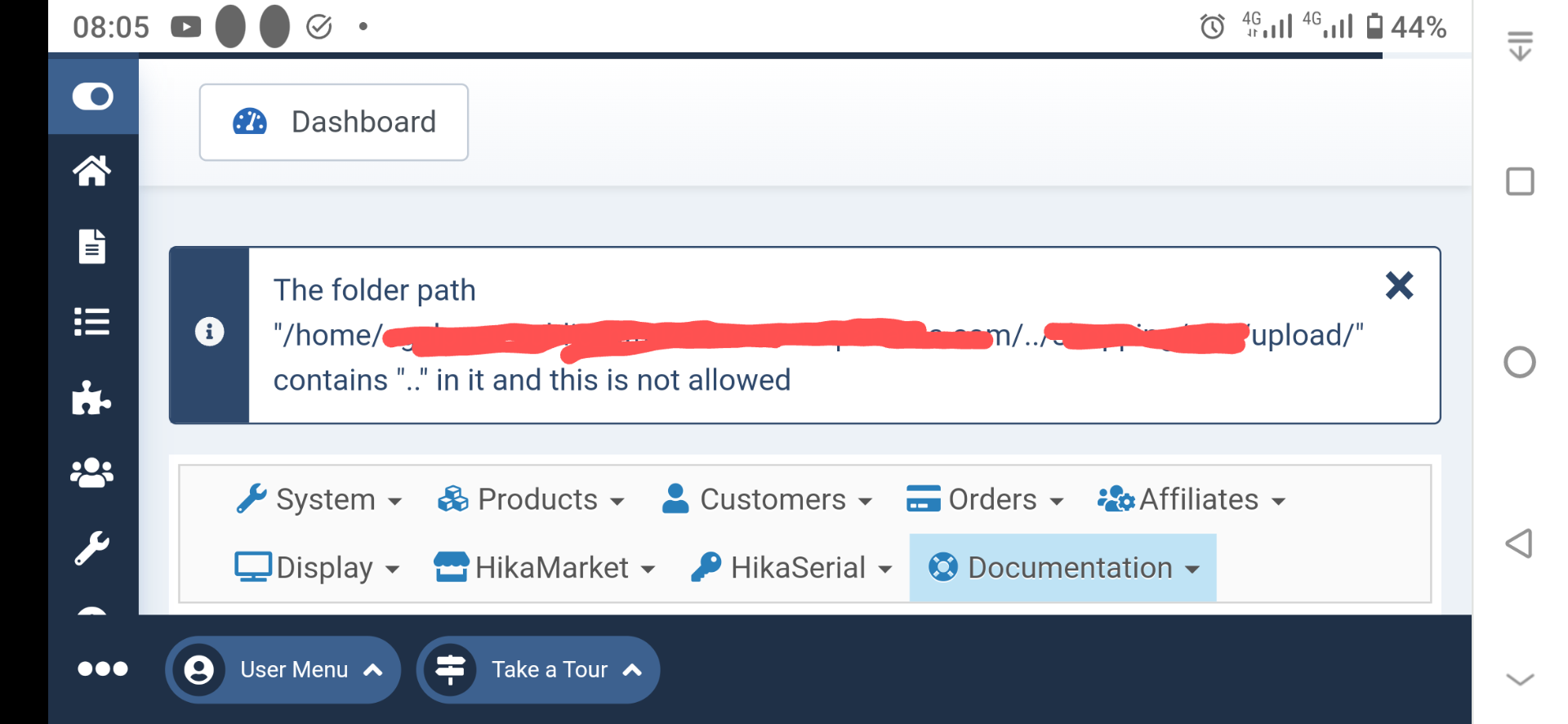
"Absolute path" = Okay. Please, Has it to begin with "/", like "/home/..." or just without it like "home/..." ?
"some security mechanism" = maybe, I'm using Admin Tools.
Anyway, Are you sure? I'm asking because:
- with "../mysecurefolder" saved in configuration
- I installed HS 5.0.4 over the 5.0.3
- and I had back this info message (I suppose from HS)
"Absolute path" = Okay. Please, Has it to begin with "/", like "/home/..." or just without it like "home/..." ?
Last edit: 2 years 5 months ago by joomleb.
Please Log in or Create an account to join the conversation.
2 years 5 months ago #360550
by nicolas
Replied by nicolas on topic Upload secure folder
Hi,
The 404 error you had before was not caused by HikaShop.
However, this new error message does come from HikaShop.
You can't use .. in paths anymore for security reasons.
If you need to provide a path outside the root folder of the website, you need to provide the absolute path. That's what I was recommending already in my previous message.
The 404 error you had before was not caused by HikaShop.
However, this new error message does come from HikaShop.
You can't use .. in paths anymore for security reasons.
If you need to provide a path outside the root folder of the website, you need to provide the absolute path. That's what I was recommending already in my previous message.
Please Log in or Create an account to join the conversation.
Time to create page: 0.247 seconds