

- Posts: 17
- Thank you received: 1
multilingual product listing menu not work - FIXED
12 years 1 month ago - 12 years 1 month ago #170837
by mindman
multilingual product listing menu not work - FIXED was created by mindman
-- HikaShop version -- : essential 2.3.2
-- Joomla version -- : 3.3.3
-- PHP version -- : 5.3
-- Browser(s) name and version -- : ff 29 mac
-- Error-message(debug-mod must be tuned on) -- : no message
Hi
I have just upgraded to essential and enabled falang and multi linugal content the switching between languages is fine and the traslation is under way... BUT
my default lang is EN
my second lang it PT
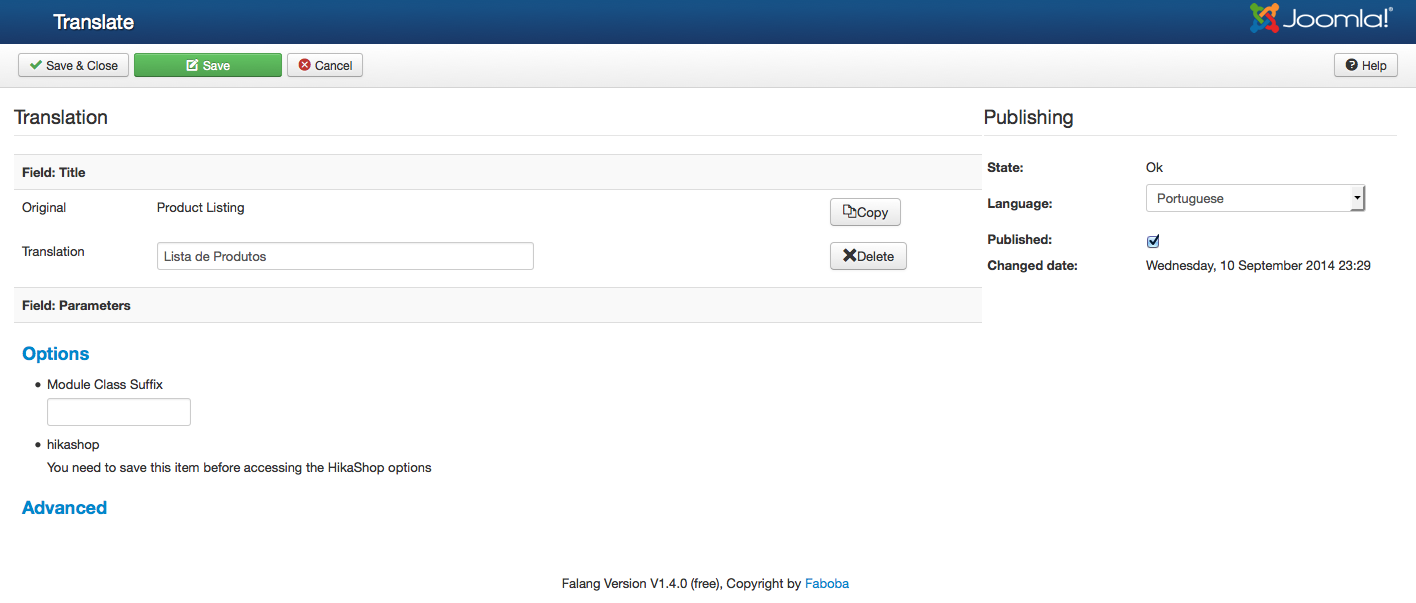
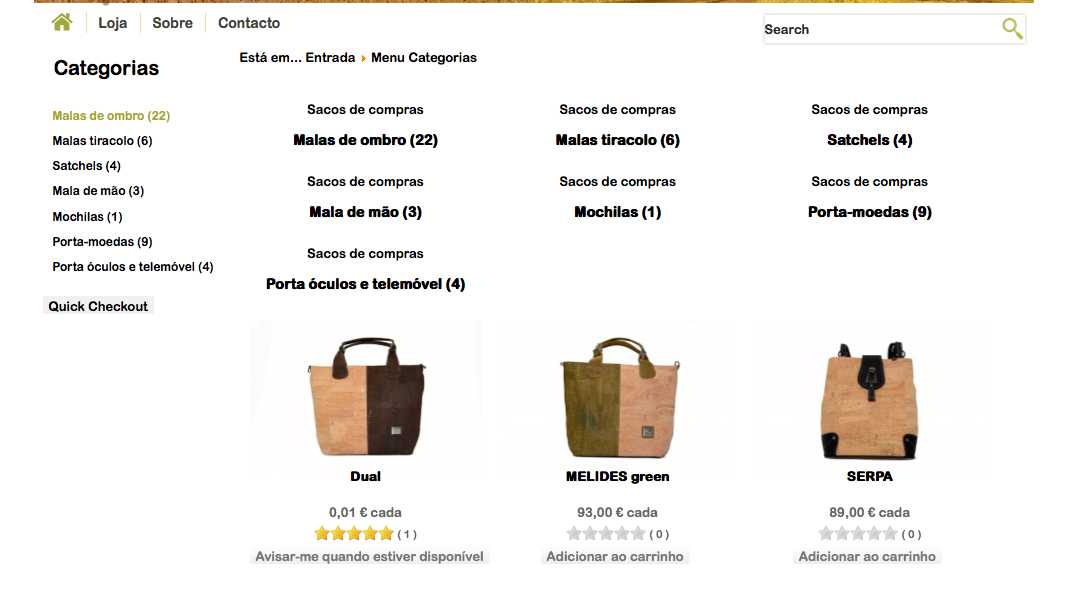
I have a MENU of categories that display a product listing, in EN it is ok, but when i click the PT flag the product listing changes and above my products it is now displaying all the sub categories, I don'0t want the sub categories to be displayed, so I went into falang to check the menu tranlsation only to find that the HIKASHOP OPTIONS section says "You need to save this item before accessing the HikaShop options." SEE SCREENSHOT BELOW.
the second screenshot shows the product listing with the bad categories above it.
why is this happening?
-- Joomla version -- : 3.3.3
-- PHP version -- : 5.3
-- Browser(s) name and version -- : ff 29 mac
-- Error-message(debug-mod must be tuned on) -- : no message
Hi
I have just upgraded to essential and enabled falang and multi linugal content the switching between languages is fine and the traslation is under way... BUT
my default lang is EN
my second lang it PT
I have a MENU of categories that display a product listing, in EN it is ok, but when i click the PT flag the product listing changes and above my products it is now displaying all the sub categories, I don'0t want the sub categories to be displayed, so I went into falang to check the menu tranlsation only to find that the HIKASHOP OPTIONS section says "You need to save this item before accessing the HikaShop options." SEE SCREENSHOT BELOW.
the second screenshot shows the product listing with the bad categories above it.
why is this happening?
Last edit: 12 years 1 month ago by mindman.
Please Log in or Create an account to join the conversation.

12 years 1 month ago #170924
by nicolas
Replied by nicolas on topic multilingual product listing menu not working ok
Hi,
The HikaShop options for a menu are the same regardless of the current language, which is why you can't edit the options in Falang.
Which means that the display should be the same.
For the look of it, it could be that you configured a categories listing module to be displayed on that menu in that position and only for that language.
If you could give the link to that page, we could tell you if that's the case and what to do exactly.
The HikaShop options for a menu are the same regardless of the current language, which is why you can't edit the options in Falang.
Which means that the display should be the same.
For the look of it, it could be that you configured a categories listing module to be displayed on that menu in that position and only for that language.
If you could give the link to that page, we could tell you if that's the case and what to do exactly.
Please Log in or Create an account to join the conversation.
12 years 1 month ago #170928
by mindman
Replied by mindman on topic multilingual product listing menu not working ok
hi the site is locked. can i pm the deatils to you?
Please Log in or Create an account to join the conversation.

12 years 1 month ago #170986
by Jerome
Jerome - Obsidev.com
HikaMarket & HikaSerial developer / HikaShop core dev team.
Replied by Jerome on topic multilingual product listing menu not working ok
Hi,
You can use PM or "contact us" page.
Please indicate in your message the url of this thread, it will help us.
Regards,
You can use PM or "contact us" page.
Please indicate in your message the url of this thread, it will help us.
Regards,
Jerome - Obsidev.com
HikaMarket & HikaSerial developer / HikaShop core dev team.
Please Log in or Create an account to join the conversation.
12 years 1 month ago #171201
by mindman
Replied by mindman on topic multilingual product listing menu not working ok
Hi
I have sent the details to your contact us page.
Please let me know what to do next.
Thanks
Ken
I have sent the details to your contact us page.
Please let me know what to do next.
Thanks
Ken
Please Log in or Create an account to join the conversation.
12 years 1 month ago #172314
by mindman
Replied by mindman on topic multilingual product listing menu not working ok
Hello.
Any news on this issue? I have checked and don't have any modules activated only for that language.
I sent the detials for the site, has support team had a look?
My client wants to open the site on sunday, we need to get this fixed.
Thanks
Ken
Any news on this issue? I have checked and don't have any modules activated only for that language.
I sent the detials for the site, has support team had a look?
My client wants to open the site on sunday, we need to get this fixed.
Thanks
Ken
Please Log in or Create an account to join the conversation.
12 years 1 month ago #172315
by nicolas
Replied by nicolas on topic multilingual product listing menu not working ok
Hi,
Edit your left module (id 147) via the menu Display>Content modules in HikaShop and in the "menu" option select your "shop" menu and that should help.
Edit your left module (id 147) via the menu Display>Content modules in HikaShop and in the "menu" option select your "shop" menu and that should help.
Please Log in or Create an account to join the conversation.
12 years 1 month ago #172317
by mindman
Replied by mindman on topic multilingual product listing menu not working ok
hi.
no, now when i clck the menu items in he left module, i dont get the product listing
no, now when i clck the menu items in he left module, i dont get the product listing
Please Log in or Create an account to join the conversation.
12 years 1 month ago #172318
by mindman
Replied by mindman on topic multilingual product listing menu not working ok
its really wierd.
in the portuguese language not all menu items from the categories menu on the left are working.
some display the subcategory list which i dont want i only want the product listing for the categories, like in the english language.
and some menu items bounce me back to the homepage (i suppose, because there are no sub categories)
i dont understand.
in the portuguese language not all menu items from the categories menu on the left are working.
some display the subcategory list which i dont want i only want the product listing for the categories, like in the english language.
and some menu items bounce me back to the homepage (i suppose, because there are no sub categories)
i dont understand.
Please Log in or Create an account to join the conversation.
12 years 1 month ago #172323
by nicolas
Replied by nicolas on topic multilingual product listing menu not working ok
Try to turn off the "remove products and categories ids from URLs" in the configuration of HikaShop. That should help.
The following user(s) said Thank You: mindman
Please Log in or Create an account to join the conversation.
12 years 1 month ago #172350
by mindman
Replied by mindman on topic multilingual product listing menu not working ok
Thnks nicolas, the REMOVE PRODUCTS AND CATEGORY IDS IN URLS option in Hikashop/Config/FEATURES/SEF did the trick.
Please Log in or Create an account to join the conversation.
Time to create page: 0.382 seconds