

- Posts: 47
- Thank you received: 0
Add tab on product page
12 years 2 weeks ago #171103
by nijan
Add tab on product page was created by nijan
-- HikaShop version -- : HikaShop [1407241754]
-- Joomla version -- : 3.3.3
Hi all,
I would like to add 2 or 3 tabs right next the description tab.
Can you help me ? What files should I change ?
Kind regards !
-- Joomla version -- : 3.3.3
Hi all,
I would like to add 2 or 3 tabs right next the description tab.
Can you help me ? What files should I change ?
Kind regards !
Please Log in or Create an account to join the conversation.

12 years 2 weeks ago #171132
by Xavier
Replied by Xavier on topic Add tab on product page
Hi,
Then you have to edit the view "product / show_tabular" and add a <li> entry for the tab as the already existings, and add a <div> for the content.
For example add:
To add another one, just replace "custom1" by your desired value.
Then you have to edit the view "product / show_tabular" and add a <li> entry for the tab as the already existings, and add a <div> for the content.
For example add:
Code:
// The tab part
<li id="hikashop_show_tabular_custom1_li" class="hikashop_tabs_li ui-corner-top"><a onclick="displayTab('hikashop_show_tabular_custom1');" href="javascript:void(0);">My custom tab 1</a></li>
// And the content part
<div class="hikashop_tabs_content" id="hikashop_show_tabular_custom1">
// Your content
</div>
To add another one, just replace "custom1" by your desired value.
Please Log in or Create an account to join the conversation.
12 years 1 week ago #171230
by nijan
Replied by nijan on topic Add tab on product page
Hi,
Thank you for your reply ... il will try it probably today.
Another question :
The content will be the same for all products ? I would like to have a different content per product.
For example a Tab "Technical Specification" with content "AAAAA" for product A and with content "BBBBB" for product B.
Is it possible ?
Kind regards !
Thank you for your reply ... il will try it probably today.
Another question :
Code:
<div class="hikashop_tabs_content" id="hikashop_show_tabular_custom1">
// Your content
</div>
For example a Tab "Technical Specification" with content "AAAAA" for product A and with content "BBBBB" for product B.
Is it possible ?
Kind regards !
Please Log in or Create an account to join the conversation.

Less
More
- Posts: 12953
- Thank you received: 1778
12 years 1 week ago #171233
by Mohamed Thelji
Replied by Mohamed Thelji on topic Add tab on product page
Hello,
Sure, but you'll have to use some custom fields to do that, like ""AAAAAA" or "BBBBB" custom fields that you'll restrict to only some products by using the "category" restriction.
Sure, but you'll have to use some custom fields to do that, like ""AAAAAA" or "BBBBB" custom fields that you'll restrict to only some products by using the "category" restriction.
Please Log in or Create an account to join the conversation.
11 years 11 months ago #177240
by nijan
Replied by nijan on topic Add tab on product page
Hello,
I'm not sure to understand your answer.
For example I have 2 tabs : "Description" and "Additionnal information".
The "Description" tab I can fill the content from the backend (Admin Joomla). Is it possible to fill the "Additionnal information" tab content in the backend (Admin Joomla) ? If not the second tab has no sense for the customer.
Kind regards !
I'm not sure to understand your answer.
For example I have 2 tabs : "Description" and "Additionnal information".
The "Description" tab I can fill the content from the backend (Admin Joomla). Is it possible to fill the "Additionnal information" tab content in the backend (Admin Joomla) ? If not the second tab has no sense for the customer.
Kind regards !
Please Log in or Create an account to join the conversation.

11 years 11 months ago #177251
by nicolas
Replied by nicolas on topic Add tab on product page
Hi,
Yes, it's possible.
First, you need to create custom fields of the table "product" via the menu Display>Custom fields.
Then, when you edit your products, you'll see these fields at the bottom of the product edition page, and you'll also see them in the additional information tab of the product details page of the frontend.
Yes, it's possible.
First, you need to create custom fields of the table "product" via the menu Display>Custom fields.
Then, when you edit your products, you'll see these fields at the bottom of the product edition page, and you'll also see them in the additional information tab of the product details page of the frontend.
Please Log in or Create an account to join the conversation.
11 years 10 months ago #177400
by nijan
Replied by nijan on topic Add tab on product page
Hi,
Super. I created a custom field (zone text) called test.
In the show_tabular view I found the following code
<li id="hikashop_show_tabular_description_li" class="hikashop_tabs_li ui-corner-top"><a onclick="displayTab('hikashop_show_tabular_description');" href="javascript:void(0);"><?php echo JText::_('PRODUCT_DESCRIPTION');?></a></li>
I suppose I need to replace id=hikashop_show_tabular_description_li by id=test ? I tried it but the tab isn't displayed.
Do I something wrong ?
Thanks !
Super. I created a custom field (zone text) called test.
In the show_tabular view I found the following code
<li id="hikashop_show_tabular_description_li" class="hikashop_tabs_li ui-corner-top"><a onclick="displayTab('hikashop_show_tabular_description');" href="javascript:void(0);"><?php echo JText::_('PRODUCT_DESCRIPTION');?></a></li>
I suppose I need to replace id=hikashop_show_tabular_description_li by id=test ? I tried it but the tab isn't displayed.
Do I something wrong ?
Thanks !
Please Log in or Create an account to join the conversation.

11 years 10 months ago #177408
by Jerome
Jerome - Obsidev.com
HikaMarket & HikaSerial developer / HikaShop core dev team.
Also helping the HikaShop support team when having some time or couldn't sleep.
By the way, do not send me private message, use the "contact us" form instead.
Replied by Jerome on topic Add tab on product page
Hi,
As explained in the Xavier's reply, the tab is composed of two elements ; one "li" for the tab text and one "div" for the tab content.
www.hikashop.com/forum/product-category-...uct-page.html#171132
You can use the given content without specific modification or you can replace the text "hikashop_show_tabular_custom1" everywhere.
Regards,
As explained in the Xavier's reply, the tab is composed of two elements ; one "li" for the tab text and one "div" for the tab content.
www.hikashop.com/forum/product-category-...uct-page.html#171132
You can use the given content without specific modification or you can replace the text "hikashop_show_tabular_custom1" everywhere.
Regards,
Jerome - Obsidev.com
HikaMarket & HikaSerial developer / HikaShop core dev team.
Also helping the HikaShop support team when having some time or couldn't sleep.
By the way, do not send me private message, use the "contact us" form instead.
Please Log in or Create an account to join the conversation.
11 years 10 months ago #177501
by nijan
Replied by nijan on topic Add tab on product page
Hi,
It is ok now (I understand).
But I stay with a strange problem. I changed the show_tabular view for my template and it has no effect ?! How is it possible ?
To be sure I changed it in the 3 templates where the show_tabular view is defined.
Is it possible I need to customize other parameter or view ?
Thanks !
It is ok now (I understand).
But I stay with a strange problem. I changed the show_tabular view for my template and it has no effect ?! How is it possible ?
To be sure I changed it in the 3 templates where the show_tabular view is defined.
Is it possible I need to customize other parameter or view ?
Thanks !
Please Log in or Create an account to join the conversation.
Less
More
- Posts: 12953
- Thank you received: 1778
11 years 10 months ago #177536
by Mohamed Thelji
Replied by Mohamed Thelji on topic Add tab on product page
Hello,
Are you sure that the "Layout on product page" option is set the "Tabular" through "Hikashop->System->Configuration->Display"
Are you sure that the "Layout on product page" option is set the "Tabular" through "Hikashop->System->Configuration->Display"
Please Log in or Create an account to join the conversation.
11 years 10 months ago #177643
by nijan
Replied by nijan on topic Add tab on product page
Hello,
You'll find here a screenshot of my configuration.
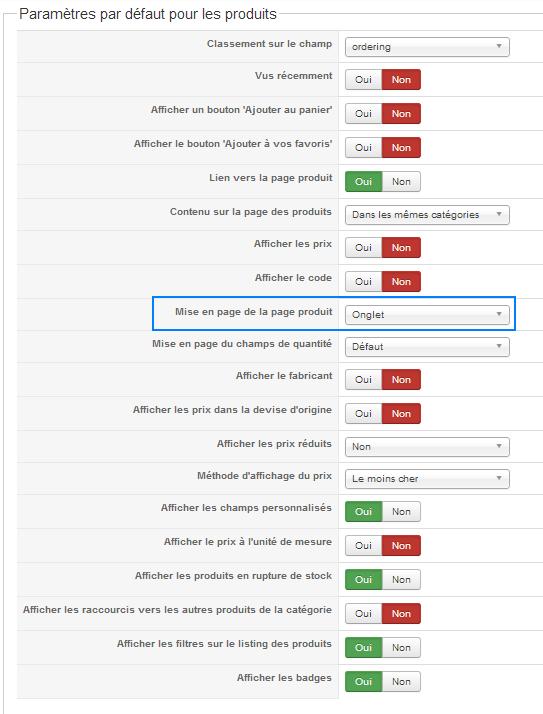
Cheers !
You'll find here a screenshot of my configuration.
Cheers !
Please Log in or Create an account to join the conversation.
Less
More
- Posts: 12953
- Thank you received: 1778
11 years 10 months ago #177662
by Mohamed Thelji
Replied by Mohamed Thelji on topic Add tab on product page
Hello,
Can you also add a small text at the top of the "Show_tabular" file of the "Product" view of your front-end template via "Hikashop->Display->Views"
Can you also add a small text at the top of the "Show_tabular" file of the "Product" view of your front-end template via "Hikashop->Display->Views"
Please Log in or Create an account to join the conversation.
11 years 10 months ago #177754
by nijan
Replied by nijan on topic Add tab on product page
Hello,
I add the following line in the show_tabular view but nothing is displayed :
defined('_JEXEC') or die('Restricted access');
?><?php
echo 'Test Johan';
....
Thanks !
I add the following line in the show_tabular view but nothing is displayed :
defined('_JEXEC') or die('Restricted access');
?><?php
echo 'Test Johan';
....
Thanks !
Please Log in or Create an account to join the conversation.
11 years 10 months ago #177760
by Jerome
Jerome - Obsidev.com
HikaMarket & HikaSerial developer / HikaShop core dev team.
Also helping the HikaShop support team when having some time or couldn't sleep.
By the way, do not send me private message, use the "contact us" form instead.
Replied by Jerome on topic Add tab on product page
Hi,
It means that you're not editing the view for the right template.
www.hikashop.com/support/support/documen...ize-the-display.html
If you can provide a link to the product page, it would be helpful.
Regards,
It means that you're not editing the view for the right template.
www.hikashop.com/support/support/documen...ize-the-display.html
If you can provide a link to the product page, it would be helpful.
Regards,
Jerome - Obsidev.com
HikaMarket & HikaSerial developer / HikaShop core dev team.
Also helping the HikaShop support team when having some time or couldn't sleep.
By the way, do not send me private message, use the "contact us" form instead.
Please Log in or Create an account to join the conversation.
11 years 10 months ago #177825
by nijan
Replied by nijan on topic Add tab on product page
Hello,
In fact I have only 3 views for show_tabular and I adapt the code in the 3 views with no effect .
.
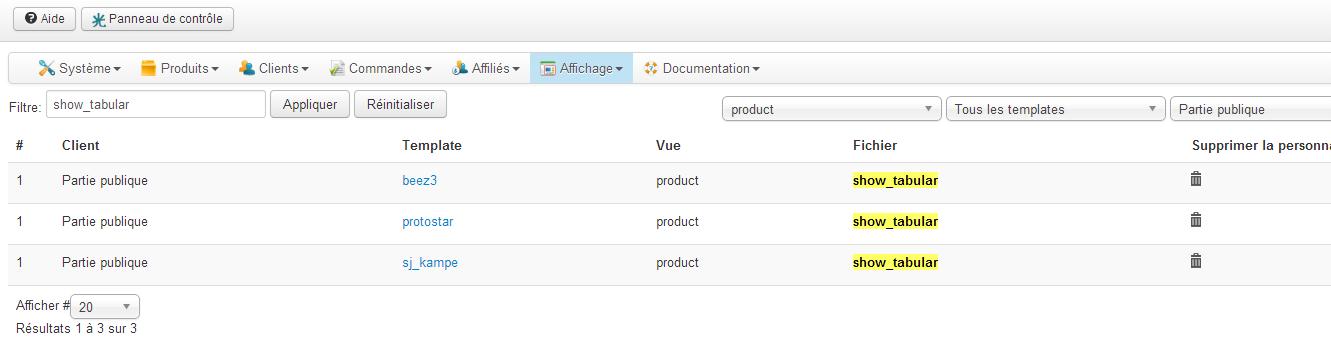
I really don't understand why I have the problem.
Cheers
In fact I have only 3 views for show_tabular and I adapt the code in the 3 views with no effect
.I really don't understand why I have the problem.
Cheers
Please Log in or Create an account to join the conversation.
11 years 10 months ago #177833
by nijan
Replied by nijan on topic Add tab on product page
Hi,
Additionnal information. In fact the template I'm using work with the show_default.php file.
Her is the content :
I tried to change this code and I see the changes in my product page BUT I can't add tabs.
Can you help ?
Additionnal information. In fact the template I'm using work with the show_default.php file.
Her is the content :
Code:
<div id="hikashop_product_bottom_part" class="hikashop_product_bottom_part">
<?php
if(!empty($this->element->extraData->bottomBegin))
echo implode("\r\n",$this->element->extraData->bottomBegin);
?>
<div id="hikashop_product_description_main" class="hikashop_product_description_main">
<h3 class="productpage-title"><span><?php echo JText::_('Description'); ?></span></h3>
<?php
echo JHTML::_('content.prepare',preg_replace('#<hr *id="system-readmore" */>#i','',$this->element->product_description));
?>
</div>
<span id="hikashop_product_url_main" class="hikashop_product_url_main">
<?php
if (!empty ($this->element->product_url)) {
echo JText :: sprintf('MANUFACTURER_URL', '<a href="' . $this->element->product_url . '" target="_blank">' . $this->element->product_url . '</a>');
}
?>
</span>
<?php
$this->setLayout('show_block_product_files');
echo $this->loadTemplate();
?>
<?php
if(!empty($this->element->extraData->bottomMiddle))
echo implode("\r\n",$this->element->extraData->bottomMiddle);
?>
<?php
if(!empty($this->element->extraData->bottomEnd))
echo implode("\r\n",$this->element->extraData->bottomEnd);
?>
</div>
I tried to change this code and I see the changes in my product page BUT I can't add tabs
.Can you help ?
Please Log in or Create an account to join the conversation.
11 years 10 months ago #177847
by nicolas
Replied by nicolas on topic Add tab on product page
In each product/category and in the HikaShop configuration, you'll find an option "layout on product page" which define whether the show_default or the show_tabular view file will be used. If you want to have tabs generated and use the show_tabular view, then you need to select the "tabular" option in these options.
Please Log in or Create an account to join the conversation.
11 years 10 months ago #178026
by nijan
Replied by nijan on topic Add tab on product page
Hello,
Can you send me a screenshot where I can find this parameter ?
I don't see it (I'm working with the french version).
Here is the configuration I think I need to have (but I don't see show_default or show_tabular).
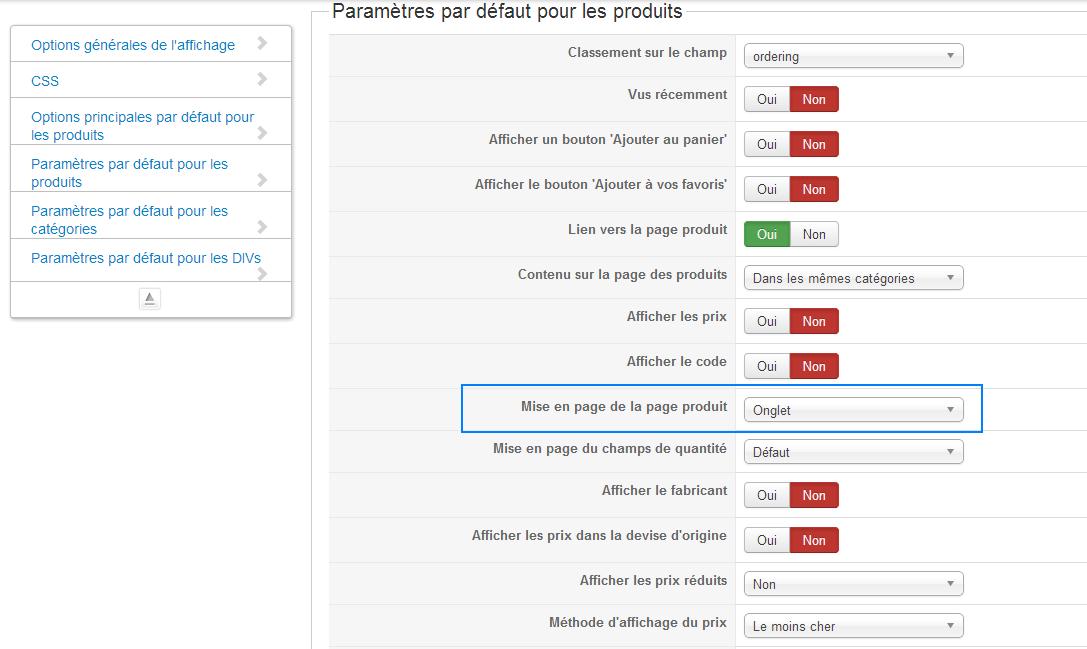
Thanks !
Can you send me a screenshot where I can find this parameter ?
I don't see it (I'm working with the french version).
Here is the configuration I think I need to have (but I don't see show_default or show_tabular).
Thanks !
Please Log in or Create an account to join the conversation.
11 years 10 months ago #178044
by nicolas
Replied by nicolas on topic Add tab on product page
Hi,
It's that option yes. And onglet means tabular in english, so you have it configured like you want.
Now, as I said, you will find that option in each category and product and you want to check that option there too.
It's that option yes. And onglet means tabular in english, so you have it configured like you want.
Now, as I said, you will find that option in each category and product and you want to check that option there too.
The following user(s) said Thank You: nijan
Please Log in or Create an account to join the conversation.
11 years 10 months ago #178169
by nijan
Replied by nijan on topic Add tab on product page
Hello,
Super ! It works now but I have another problem.
I have the "Description" tab and the "Specifications" tab (I can create other tab) It works.
But the content is not displayed ?! If I used the show_default, the description content is displayed. If I use the show_tabular, I have my differents tabs but without content.
Any idea ?
Many thanks !
Super ! It works now but I have another problem.
I have the "Description" tab and the "Specifications" tab (I can create other tab) It works.
But the content is not displayed ?! If I used the show_default, the description content is displayed. If I use the show_tabular, I have my differents tabs but without content.
Any idea ?
Many thanks !
Please Log in or Create an account to join the conversation.
Time to create page: 0.384 seconds