
- Posts: 100
- Thank you received: 1
Display Joomla Group Names on Product Show Pages
- paddyrolls
-
 Topic Author
- Offline
Less
More
12 years 2 weeks ago - 12 years 2 weeks ago #176101
by paddyrolls
Display Joomla Group Names on Product Show Pages was created by paddyrolls
-- HikaShop version -- : 2.3.3
-- Joomla version -- : 3.3.6
-- PHP version -- : 5.4
HI
I am using akeeba subscription to manage subscriptions as I am not sure if Hikashop can do this. However, when an akeeba subcription expires it removes the user from the Joomla user group and so the user is not assigned to any group. So to overcome this issue when a user is removed from a group, I set the user to belong to 2 groups - Non Subsciber and Subscriber.
I have assigned 2 different prices when setting up a product. Is it possible to display the user group before the prices eg
Common Price: $120
Non Subscriber: -10% $120
Subscriber: -10% $110
At the moment it just displays
Common Price: $120
Your price: -10% $120
-10% $110
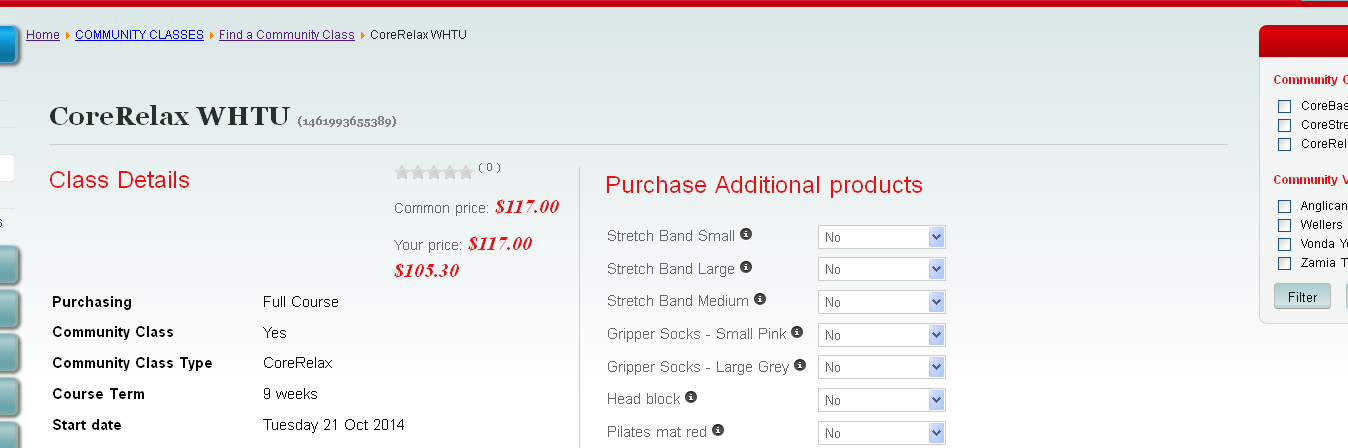
Thanks
Patrick
-- Joomla version -- : 3.3.6
-- PHP version -- : 5.4
HI
I am using akeeba subscription to manage subscriptions as I am not sure if Hikashop can do this. However, when an akeeba subcription expires it removes the user from the Joomla user group and so the user is not assigned to any group. So to overcome this issue when a user is removed from a group, I set the user to belong to 2 groups - Non Subsciber and Subscriber.
I have assigned 2 different prices when setting up a product. Is it possible to display the user group before the prices eg
Common Price: $120
Non Subscriber: -10% $120
Subscriber: -10% $110
At the moment it just displays
Common Price: $120
Your price: -10% $120
-10% $110
Thanks
Patrick
Last edit: 12 years 2 weeks ago by paddyrolls.
Please Log in or Create an account to join the conversation.

12 years 2 weeks ago #176118
by nicolas
Replied by nicolas on topic Display Joomla Group Names on Product Show Pages
Hi,
Your can use such translation overrides:
PRICE_BEGINNING_0="Non Subscriber"
PRICE_BEGINNING_1="Subscriber"
hikashop.com/download/languages.html#modify
Your can use such translation overrides:
PRICE_BEGINNING_0="Non Subscriber"
PRICE_BEGINNING_1="Subscriber"
hikashop.com/download/languages.html#modify
Please Log in or Create an account to join the conversation.
- paddyrolls
-
Topic Author
- Offline
Less
More
- Posts: 100
- Thank you received: 1
12 years 2 weeks ago #176168
by paddyrolls
Replied by paddyrolls on topic Display Joomla Group Names on Product Show Pages
Hi Nicolas
Thank you for your suggestion. This works well if i only have 2 price groups, but unfortunately I have 4 price groups.
Would it be possible to check which ACL group the PRICE_BEGINNING_0, PRICE_BEGINNING_1 etc. I can then use a conditional if statement on the Show_Default view.
Thanks
Patrick
Thank you for your suggestion. This works well if i only have 2 price groups, but unfortunately I have 4 price groups.
Would it be possible to check which ACL group the PRICE_BEGINNING_0, PRICE_BEGINNING_1 etc. I can then use a conditional if statement on the Show_Default view.
Thanks
Patrick
Please Log in or Create an account to join the conversation.
12 years 2 weeks ago #176170
by nicolas
Replied by nicolas on topic Display Joomla Group Names on Product Show Pages
Hi,
If you need more complex price display customization, then you want to edit the file "listing_price" of the view "product" via the menu Display>Views.
If you need more complex price display customization, then you want to edit the file "listing_price" of the view "product" via the menu Display>Views.
Please Log in or Create an account to join the conversation.
Time to create page: 0.071 seconds