

- Posts: 6
- Thank you received: 0
Double product list
11 years 11 months ago #177790
by soxa
Double product list was created by soxa
-- HikaShop version -- : 2.3.4
-- Joomla version -- : 3.4
-- PHP version -- : 5.3
-- Browser(s) name and version -- : Google
Hi
I have double product list. I tried like is explained others
"Go to Hikashop->Display->Content menus
- Edit the content menu
- Remove the Associated module"
But it doesn't work for me. Please can you check my website.
Best regards
Soxa
-- Joomla version -- : 3.4
-- PHP version -- : 5.3
-- Browser(s) name and version -- : Google
Hi
I have double product list. I tried like is explained others
"Go to Hikashop->Display->Content menus
- Edit the content menu
- Remove the Associated module"
But it doesn't work for me. Please can you check my website.
Best regards
Soxa
Please Log in or Create an account to join the conversation.

11 years 11 months ago #177820
by nicolas
Replied by nicolas on topic Double product list
Hi,
That's indeed the correct solution to your problem.
So if that doesn't work, it means that you're not removing the associated module in the correct way.
Here is how to do it:
click on the "select" button of the "associated modules" option and that will open a popup.
in the popup, disable the module which is enabled and click on the ok button at the top of the popup
finally, click on the save button of the menu and that should do it.
That's indeed the correct solution to your problem.
So if that doesn't work, it means that you're not removing the associated module in the correct way.
Here is how to do it:
click on the "select" button of the "associated modules" option and that will open a popup.
in the popup, disable the module which is enabled and click on the ok button at the top of the popup
finally, click on the save button of the menu and that should do it.
The following user(s) said Thank You: soxa
Please Log in or Create an account to join the conversation.
11 years 11 months ago #178752
by soxa
Replied by soxa on topic [SOLVED] Double product list
Thank you very much. That is right solution
All best
Soxa
All best
Soxa
Please Log in or Create an account to join the conversation.
11 years 9 months ago #185362
by okynnor
Replied by okynnor on topic Double product list
I followed these instructions. There is no "OK" button in the popup. There is also no ability to remove a list.
So I am not sure what I am missing here.
Every time I click on the Trashbin, and then save, the product category always comes back.
My site is www.bityard.com . there you can see the double product list.
I hope you can help me out.
So I am not sure what I am missing here.
Every time I click on the Trashbin, and then save, the product category always comes back.
My site is www.bityard.com . there you can see the double product list.
I hope you can help me out.
Please Log in or Create an account to join the conversation.
11 years 9 months ago #185363
by okynnor
Replied by okynnor on topic Remove Content Module from other pages
How can I make the content module display only on the front page of my site? My site is
www.bityard.com
.
I have used Advanced Module Manager to tell the module not display but only in the home page. The other modules such as SP Smart Slider, it works as it should by only displaying in the home but not in the other pages.
What should I do with HikaShop Content module???
I have used Advanced Module Manager to tell the module not display but only in the home page. The other modules such as SP Smart Slider, it works as it should by only displaying in the home but not in the other pages.
What should I do with HikaShop Content module???
Please Log in or Create an account to join the conversation.

11 years 9 months ago #185375
by Xavier
Replied by Xavier on topic Remove Content Module from other pages
Hi,
For the first issue I believe that a recent fix has been made, please download again the latest package from our website and install it over the current install.
For the hikashop content modules, you can manage their options in the Joomla module interface as any other module in order to restrict it to one page.
For the first issue I believe that a recent fix has been made, please download again the latest package from our website and install it over the current install.
For the hikashop content modules, you can manage their options in the Joomla module interface as any other module in order to restrict it to one page.
The following user(s) said Thank You: okynnor
Please Log in or Create an account to join the conversation.
11 years 9 months ago #185458
by okynnor
Replied by okynnor on topic Remove Content Module from other pages
Hi,
For the first issue, I had already downloaded and installed the latest version, which is version 2.3.5.
Yet, the Content Module still appear on all pages (those without IDs and not those pages which were in the Menu already).
I used Advanced Module Manager to successfully fix the SP Smart Slider. But the Hikashop Content Module is to no avail.
What else would you suggest I try?
For the first issue, I had already downloaded and installed the latest version, which is version 2.3.5.
Yet, the Content Module still appear on all pages (those without IDs and not those pages which were in the Menu already).
I used Advanced Module Manager to successfully fix the SP Smart Slider. But the Hikashop Content Module is to no avail.
What else would you suggest I try?
Please Log in or Create an account to join the conversation.
11 years 9 months ago #185494
by Xavier
Replied by Xavier on topic Remove Content Module from other pages
Hi,
I think that you issue come from your Advanced module manager settings.
Please give us screenshot of you related module (ID: 102) options (HikaShop and Joomla settings).
It seems that a position is set in the Joomla settings and advanced module manager add it in another position.
I think that you issue come from your Advanced module manager settings.
Please give us screenshot of you related module (ID: 102) options (HikaShop and Joomla settings).
It seems that a position is set in the Joomla settings and advanced module manager add it in another position.
Please Log in or Create an account to join the conversation.
11 years 9 months ago #185613
by okynnor
Replied by okynnor on topic Remove Content Module from other pages
As per your request, I have attached three screenshot with the Advanced Module Manager for the HS Content Module settings.
Please Log in or Create an account to join the conversation.
11 years 9 months ago #185637
by nicolas
Replied by nicolas on topic Remove Content Module from other pages
Hi,
There is no screenshot of the HikaShop options of the module (that you can access by editing it via the menu Display>Content modules of the HikaShop backend).
For the problem on having twice the module displayed on your home page, I can say that the module is displayed twice by the template. Once in the "action" position, and once in the "feature" position of your template.
So there must be something in the configuration of the module in the Joomla modules manager which tells the template to display it in two different positions. Or there is some kind of bug in the template.
For the modules being displayed on other pages of your website, I checked your website but I don't see it anywhere besides your home page. So maybe I didn't understand what you want here ?
There is no screenshot of the HikaShop options of the module (that you can access by editing it via the menu Display>Content modules of the HikaShop backend).
For the problem on having twice the module displayed on your home page, I can say that the module is displayed twice by the template. Once in the "action" position, and once in the "feature" position of your template.
So there must be something in the configuration of the module in the Joomla modules manager which tells the template to display it in two different positions. Or there is some kind of bug in the template.
For the modules being displayed on other pages of your website, I checked your website but I don't see it anywhere besides your home page. So maybe I didn't understand what you want here ?
Please Log in or Create an account to join the conversation.
11 years 9 months ago #185678
by okynnor
Replied by okynnor on topic Remove Content Module from other pages
I'm sorry I didn't understand your request at first. Here are the screenshot of the HS Content Module.
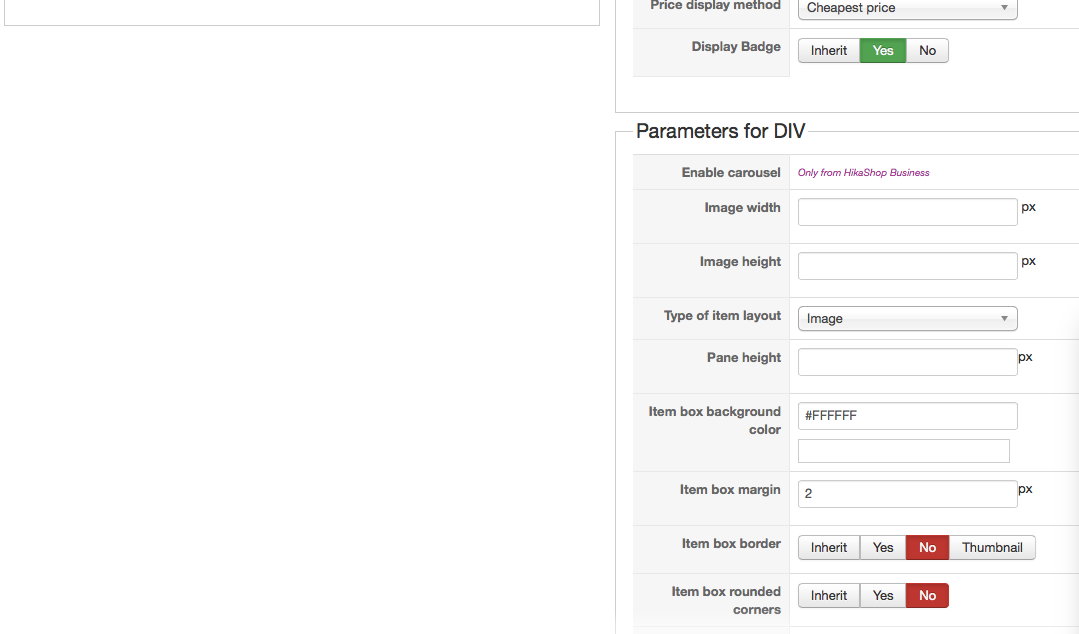
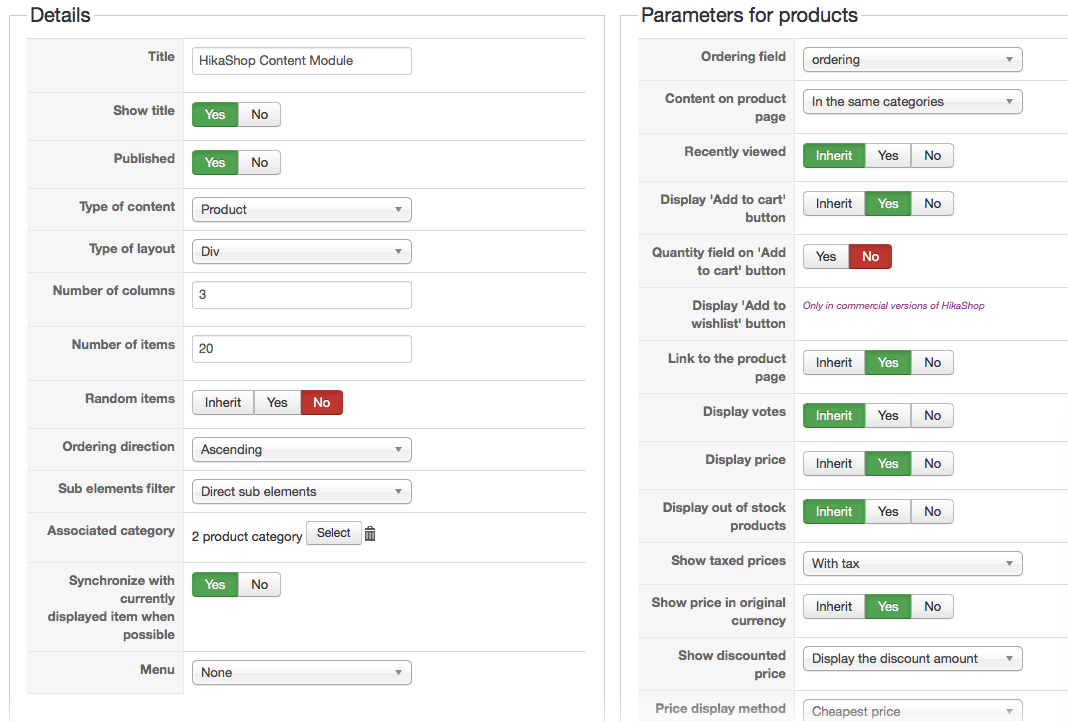
I've also attached an image of how the module looks like. As you can see, there is only one module in the "action" section of the template. After seeing this, do you assess that it really a bug in the Joomshaper template?
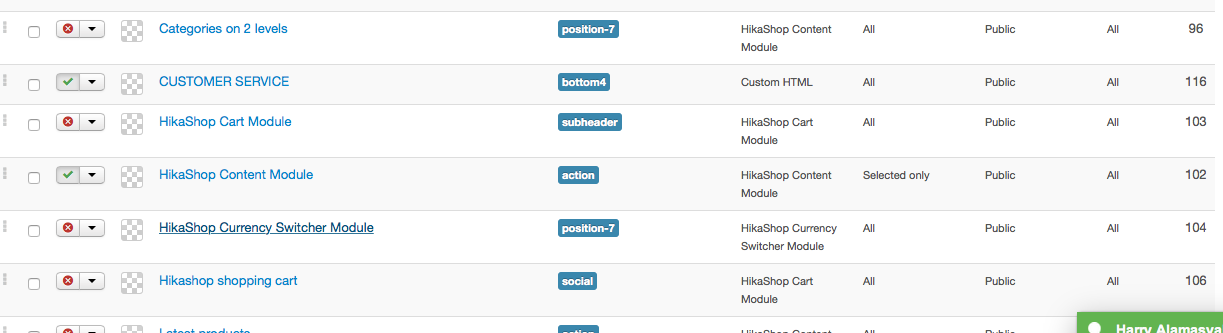
I've also attached an image of how the module looks like. As you can see, there is only one module in the "action" section of the template. After seeing this, do you assess that it really a bug in the Joomshaper template?
Please Log in or Create an account to join the conversation.
11 years 9 months ago #185692
by Xavier
Replied by Xavier on topic Remove Content Module from other pages
Hi,
Regarding the settings, if there is no modules in the feature position so yes it looks like a bug in the Joomshaper template.
Regarding the settings, if there is no modules in the feature position so yes it looks like a bug in the Joomshaper template.
Please Log in or Create an account to join the conversation.
Time to create page: 0.589 seconds