

- Posts: 20
- Thank you received: 0
Shopping Cart quantity field too wide
11 years 10 months ago #182206
by tandreas6
Shopping Cart quantity field too wide was created by tandreas6
-- url of the page with the problem -- :
tam.tadesign.co/
-- HikaShop version -- : Essential 2.3.4
-- Joomla version -- : 3.3.6
Hi -
The Quantity text field is much too wide on my website, in the sidebar shopping cart. How/where do I edit this to make it smaller? Thank you!
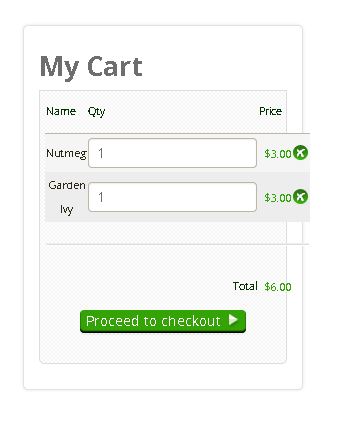
-- HikaShop version -- : Essential 2.3.4
-- Joomla version -- : 3.3.6
Hi -
The Quantity text field is much too wide on my website, in the sidebar shopping cart. How/where do I edit this to make it smaller? Thank you!
Please Log in or Create an account to join the conversation.

11 years 10 months ago #182239
by lousyfool
Need help with customisations of layouts, style or other site development? PM me!
(Don't forget to turn on "E-mail notification of new messages" )
Replied by lousyfool on topic Shopping Cart quantity field too wide
Hi,
Your template is overriding the HikaShop CSS. To avoid it for this field, edit your HikaShop frontend_custom.css:
Around line 115, replace
with
Your template is overriding the HikaShop CSS. To avoid it for this field, edit your HikaShop frontend_custom.css:
Around line 115, replace
Code:
.hikashop_product_quantity_field {
width: 25px;
}
with
Code:
.hikashop_product_quantity_field {
width: 25px !important;
}
Need help with customisations of layouts, style or other site development? PM me!
(Don't forget to turn on "E-mail notification of new messages" )
Please Log in or Create an account to join the conversation.

11 years 10 months ago #182209
by nicolas
Replied by nicolas on topic Shopping Cart quantity field too wide
That's because of the CSS:
of your template. Remove the line width: auto; in that CSS code of your template and it will display normally.
Code:
textarea, input, input[type="text"], input[type="password"], input[type="datetime"], input[type="datetime-local"], input[type="date"], input[type="month"], input[type="time"], input[type="week"], input[type="number"], input[type="email"], input[type="url"], input[type="search"], input[type="tel"], input[type="color"] {
color: #6e6e6e;
background-color: #ffffff;
border: 1px solid #d5d5d5;
border-radius: 4px;
padding: 4px 8px;
margin: 0;
vertical-align: middle;
width: auto;
}
Please Log in or Create an account to join the conversation.
11 years 10 months ago #182307
by tandreas6
Replied by tandreas6 on topic Shopping Cart quantity field too wide
Thank you! That has fixed the problem.
Please Log in or Create an account to join the conversation.
Time to create page: 0.056 seconds