

- Posts: 10
- Thank you received: 0
Add custom »Layout on Product Page«
11 years 9 months ago #182989
by philipp
Add custom »Layout on Product Page« was created by philipp
-- HikaShop version -- : 2.3.4
-- Joomla version -- : 3.3.6
-- PHP version -- : 5.5.40
-- Browser(s) name and version -- : Firefox 34.0
Hello Everybody,
as the title suggests, I am searching for a way to add a custom layout for a single Product on the Product page. I would like to have it appear in the dropdown list, shown on the screenshot attached.
How can I do that?
Thanks in ahead!
-- Joomla version -- : 3.3.6
-- PHP version -- : 5.5.40
-- Browser(s) name and version -- : Firefox 34.0
Hello Everybody,
as the title suggests, I am searching for a way to add a custom layout for a single Product on the Product page. I would like to have it appear in the dropdown list, shown on the screenshot attached.
How can I do that?
Thanks in ahead!
Please Log in or Create an account to join the conversation.

11 years 9 months ago #182996
by lousyfool
Need help with customisations of layouts, style or other site development? PM me!
(Don't forget to turn on "E-mail notification of new messages" )
Replied by lousyfool on topic Add custom »Layout on Product Page«
Hi,
Go to editing a product layout similar to the new customized one you want to create, for example "show_default". When open for editing, you can change its name and save it under that new name. It'll then be displayed in the dropdown list of available layouts for a product, both in the default product settings as well as for the individual product.
Needless to say that you can customize that layout then any way you want.
Go to editing a product layout similar to the new customized one you want to create, for example "show_default". When open for editing, you can change its name and save it under that new name. It'll then be displayed in the dropdown list of available layouts for a product, both in the default product settings as well as for the individual product.
Needless to say that you can customize that layout then any way you want.
Need help with customisations of layouts, style or other site development? PM me!
(Don't forget to turn on "E-mail notification of new messages" )
The following user(s) said Thank You: Jerome
Please Log in or Create an account to join the conversation.
11 years 9 months ago #183009
by philipp
Replied by philipp on topic Add custom »Layout on Product Page«
Thanks a lot @lousyfool! Have not thought that way! In the meantime I had a look at the source (administrator/components/com_hikashop/types/productdisplay.php), where a getLayout() method is defined.
Looking at that method just showed me that each file in:
templates/<each folder>/html/com_hikashop/<each folder>/
whose name starts with "show_", or "show_quantity_" and ends with ".php" will be used in the list, either as layout, or layout for the quantity…
In short, and I hope to help others with this: If you need a new »Layout on a Product Page«, just create File in a Folder as explained above and call it "show_<whatevernameyoulike>.php", or "show_quantity_<whatevernameyoulike>.php" and it will appear in the list.
Looking at that method just showed me that each file in:
templates/<each folder>/html/com_hikashop/<each folder>/
whose name starts with "show_", or "show_quantity_" and ends with ".php" will be used in the list, either as layout, or layout for the quantity…
In short, and I hope to help others with this: If you need a new »Layout on a Product Page«, just create File in a Folder as explained above and call it "show_<whatevernameyoulike>.php", or "show_quantity_<whatevernameyoulike>.php" and it will appear in the list.
Please Log in or Create an account to join the conversation.
11 years 9 months ago #183015
by lousyfool
Need help with customisations of layouts, style or other site development? PM me!
(Don't forget to turn on "E-mail notification of new messages" )
Replied by lousyfool on topic Add custom »Layout on Product Page«
Yes, and the fact that the "show_" part is already given if you use the view edition method in the HikaShop backend, so you only need to worry about a new name behind it, makes the whole thing almost "fool-proof"... can't do much wrong, really... 
Need help with customisations of layouts, style or other site development? PM me!
(Don't forget to turn on "E-mail notification of new messages" )
Please Log in or Create an account to join the conversation.

Less
More
- Posts: 640
- Thank you received: 16
11 years 9 months ago #184277
by PeterChain
Replied by PeterChain on topic Add custom »Layout on Product Page«
Please NOTE that you must creat the show_ file only inside a template override folder structure.
This would be:
templates/you_template/html/com_hikashop/product/ show_your_file_here.php
DON'T MAKE THE MISTAKE of cloning your show_xxx.php file in the same folder of the original file, this is
components/com_hikashop/views/product/...
it won't add to the list.
As for the template, if you have three different tempaltes with different show_ files all them will be listed in the product form.
This would be:
templates/you_template/html/com_hikashop/product/ show_your_file_here.php
DON'T MAKE THE MISTAKE of cloning your show_xxx.php file in the same folder of the original file, this is
components/com_hikashop/views/product/...
it won't add to the list.
As for the template, if you have three different tempaltes with different show_ files all them will be listed in the product form.
Please Log in or Create an account to join the conversation.
Less
More
- Posts: 640
- Thank you received: 16
11 years 8 months ago - 11 years 8 months ago #185714
by PeterChain
Replied by PeterChain on topic Add custom »Layout on Product Page«
This feature of adding extra product layouts should be also applied for single menus, not only single products.
I mean if I have a product menu for listing a certain brand or category I would like to have apart form Table, DIv, and List also those custom product layouts available at Type of layout Dropdownlist
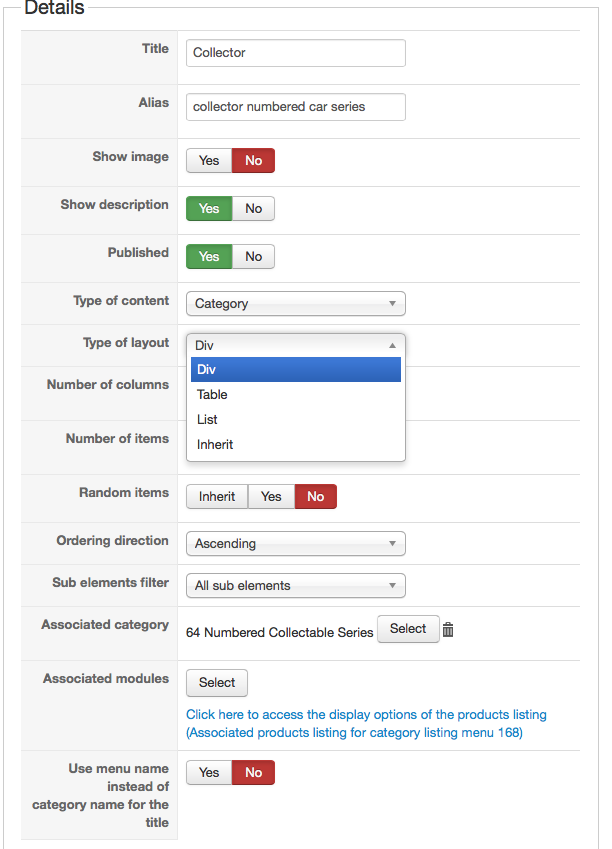
In the pictures is for Category Type of Content but the feature should be appliable for both Category and Product.
I mean if I have a product menu for listing a certain brand or category I would like to have apart form Table, DIv, and List also those custom product layouts available at Type of layout Dropdownlist
In the pictures is for Category Type of Content but the feature should be appliable for both Category and Product.
Last edit: 11 years 8 months ago by PeterChain.
Please Log in or Create an account to join the conversation.

11 years 8 months ago #185730
by Xavier
Replied by Xavier on topic Add custom »Layout on Product Page«
Hi,
I add this idea on our TODO list.
I add this idea on our TODO list.
Please Log in or Create an account to join the conversation.
10 years 10 months ago #221010
by Jovian
Replied by Jovian on topic Add custom »Layout on Product Page«
Any update on this? Making it possible to create new layouts for "Type of content" would be great!
Please Log in or Create an account to join the conversation.

10 years 10 months ago #221035
by nicolas
Replied by nicolas on topic Add custom »Layout on Product Page«
Hi,
It's not possible yet easily.
But you can always edit the ones already available and use different code in them based on the current global $Itemid (which is the id of the current menu item) of the page. And thus reach the same function. It's just a bit less practical.
It's not possible yet easily.
But you can always edit the ones already available and use different code in them based on the current global $Itemid (which is the id of the current menu item) of the page. And thus reach the same function. It's just a bit less practical.
Please Log in or Create an account to join the conversation.

10 years 9 months ago #224149
by huwhuw
Replied by huwhuw on topic Add custom »Layout on Product Page«
Hi anyone using UIKIT / Yoo templates here is a nice layout I made with instructions - this is for the Product Page "components>com_hikashop>views>tmpl>show_default.php"
1. Open components>com_hikashop>views>tmpl>show_default.php
2. Copy the file to "/templates/yourtemplate/html/com_hikashop/product
3. The layout shown puts the product image on the left and the description and add to cart on the right .You can see in the code that i changed the hika classes to match the uikit grid class
With this method there is no css changes to make you can let the uikit handle the layout - enjoy!
1. Open components>com_hikashop>views>tmpl>show_default.php
2. Copy the file to "/templates/yourtemplate/html/com_hikashop/product
3. The layout shown puts the product image on the left and the description and add to cart on the right .You can see in the code that i changed the hika classes to match the uikit grid class
With this method there is no css changes to make you can let the uikit handle the layout - enjoy!
Code:
<?php
/**
* @package HikaShop for Joomla!
* @version 2.6.0
* @author hikashop.com
* @copyright (C) 2010-2015 HIKARI SOFTWARE. All rights reserved.
* @license GNU/GPLv3 http://www.gnu.org/licenses/gpl-3.0.html
*/
defined('_JEXEC') or die('Restricted access');
?>
<!-- top div -->
<div class ="uk-grid">
<div id="hikashop_product_top_part" class="uk-width-1-1">
<?php if(!empty($this->element->extraData->topBegin)) { echo implode("\r\n",$this->element->extraData->topBegin); } ?>
<h1>
<span id="hikashop_product_name_main" class="hikashop_product_name_main">
<?php
if (hikashop_getCID('product_id')!=$this->element->product_id && isset ($this->element->main->product_name))
echo $this->element->main->product_name;
else
echo $this->element->product_name;
?>
</span>
<?php if ($this->config->get('show_code')) { ?>
<span id="hikashop_product_code_main" class="hikashop_product_code_main">
<?php
echo $this->element->product_code;
?>
</span>
<?php } ?>
</h1>
<?php if(!empty($this->element->extraData->topEnd)) { echo implode("\r\n",$this->element->extraData->topEnd); } ?>
<?php
$this->setLayout('show_block_social');
echo $this->loadTemplate();
?>
</div>
</div>
<!--end -->
<div class ="uk-grid">
<div id="hikashop_product_left_part" class="uk-width-medium-1-2">
<?php
if(!empty($this->element->extraData->leftBegin)) { echo implode("\r\n",$this->element->extraData->leftBegin); }
$this->row = & $this->element;
$this->setLayout('show_block_img');
echo $this->loadTemplate();
if(!empty($this->element->extraData->leftEnd)) { echo implode("\r\n",$this->element->extraData->leftEnd); }
?>
</div>
<!-- start right-->
<div id="hikashop_product_right_part" class="uk-width-medium-1-2">
<?php
if(!empty($this->element->extraData->rightBegin))
echo implode("\r\n",$this->element->extraData->rightBegin);
?>
<div id="hikashop_product_description_main" class="hikashop_product_description_main">
<?php
echo JHTML::_('content.prepare',preg_replace('#<hr *id="system-readmore" */>#i','',$this->element->product_description));
?>
</div>
<div id="hikashop_product_vote_mini" class="hikashop_product_vote_mini">
<?php
$config =& hikashop_config();
if($this->params->get('show_vote_product') == '-1'){
$this->params->set('show_vote_product',$config->get('show_vote_product'));
}
if($this->params->get('show_vote_product')){
$js = '';
$this->params->set('vote_type','product');
if(isset($this->element->main)){
$product_id = $this->element->main->product_id;
}else{
$product_id = $this->element->product_id;
}
$this->params->set('vote_ref_id',$product_id);
echo hikashop_getLayout('vote', 'mini', $this->params, $js);
}
?>
</div>
<span id="hikashop_product_price_main" class="hikashop_product_price_main">
<?php
if ($this->params->get('show_price')) {
$this->row = & $this->element;
$this->setLayout('listing_price');
echo $this->loadTemplate();
}
?>
</span>
<?php
if(!empty($this->element->extraData->rightMiddle))
echo implode("\r\n",$this->element->extraData->rightMiddle);
?>
<?php
$this->setLayout('show_block_dimensions');
echo $this->loadTemplate();
?><br />
<?php
if($this->params->get('characteristic_display') != 'list') {
$this->setLayout('show_block_characteristic');
echo $this->loadTemplate();
?>
<br />
<?php
}
$form = ',0';
if (!$this->config->get('ajax_add_to_cart', 1)) {
$form = ',\'hikashop_product_form\'';
}
if (hikashop_level(1) && !empty ($this->element->options)) {
?>
<div id="hikashop_product_options" class="hikashop_product_options">
<?php
$this->setLayout('option');
echo $this->loadTemplate();
?>
</div>
<br />
<?php
$form = ',\'hikashop_product_form\'';
if ($this->config->get('redirect_url_after_add_cart', 'stay_if_cart') == 'ask_user') {
?>
<input type="hidden" name="popup" value="1"/>
<?php
}
}
if (!$this->params->get('catalogue') && ($this->config->get('display_add_to_cart_for_free_products') || ($this->config->get('display_add_to_wishlist_for_free_products', 1) && hikashop_level(1) && $this->params->get('add_to_wishlist') && $config->get('enable_wishlist', 1)) || !empty($this->element->prices))) {
if (!empty ($this->itemFields)) {
$form = ',\'hikashop_product_form\'';
if ($this->config->get('redirect_url_after_add_cart', 'stay_if_cart') == 'ask_user') {
?>
<input type="hidden" name="popup" value="1"/>
<?php
}
$this->setLayout('show_block_custom_item');
echo $this->loadTemplate();
}
}
$this->formName = $form;
if($this->params->get('show_price')){ ?>
<span id="hikashop_product_price_with_options_main" class="hikashop_product_price_with_options_main">
</span>
<?php }
if(empty ($this->element->characteristics) || $this->params->get('characteristic_display')!='list'){ ?>
<div id="hikashop_product_quantity_main" class="hikashop_product_quantity_main">
<?php
$this->row = & $this->element;
$this->ajax = 'if(hikashopCheckChangeForm(\'item\',\'hikashop_product_form\')){ return hikashopModifyQuantity(\'' . $this->row->product_id . '\',field,1' . $form . ',\'cart\'); } else { return false; }';
$this->setLayout('quantity');
echo $this->loadTemplate();
?>
</div>
<?php } ?>
<div id="hikashop_product_contact_main" class="hikashop_product_contact_main">
<?php
$contact = $this->config->get('product_contact',0);
if (hikashop_level(1) && ($contact == 2 || ($contact == 1 && !empty ($this->element->product_contact)))) {
$empty = '';
$params = new HikaParameter($empty);
global $Itemid;
$url_itemid='';
if(!empty($Itemid)){
$url_itemid='&Itemid='.$Itemid;
}
echo $this->cart->displayButton(JText :: _('CONTACT_US_FOR_INFO'), 'contact_us', $params, hikashop_completeLink('product&task=contact&cid=' . $this->element->product_id.$url_itemid), 'window.location=\'' . hikashop_completeLink('product&task=contact&cid=' . $this->element->product_id.$url_itemid) . '\';return false;');
}
?>
</div>
<?php
if(!empty($this->fields)){
$this->setLayout('show_block_custom_main');
echo $this->loadTemplate();
}
if(HIKASHOP_J30) {
$this->setLayout('show_block_tags');
echo $this->loadTemplate();
}
?>
<span id="hikashop_product_id_main" class="hikashop_product_id_main">
<input type="hidden" name="product_id" value="<?php echo $this->element->product_id; ?>" />
</span>
<?php
if(!empty($this->element->extraData->rightEnd))
echo implode("\r\n",$this->element->extraData->rightEnd);
?>
</div>
</div>
<!--end right-->
<div id="hikashop_product_bottom_part" class="hikashop_product_bottom_part">
<?php
if(!empty($this->element->extraData->bottomBegin))
echo implode("\r\n",$this->element->extraData->bottomBegin);
?>
<span id="hikashop_product_url_main" class="hikashop_product_url_main">
<?php
if (!empty ($this->element->product_url)) {
echo JText :: sprintf('MANUFACTURER_URL', '<a href="' . $this->element->product_url . '" target="_blank">' . $this->element->product_url . '</a>');
}
?>
</span>
<?php
$this->setLayout('show_block_product_files');
echo $this->loadTemplate();
?>
<?php
if(!empty($this->element->extraData->bottomMiddle))
echo implode("\r\n",$this->element->extraData->bottomMiddle);
?>
<?php
if(!empty($this->element->extraData->bottomEnd))
echo implode("\r\n",$this->element->extraData->bottomEnd);
?>
</div>
Please Log in or Create an account to join the conversation.
10 years 7 months ago #229470
by iq-guru
Replied by iq-guru on topic Add custom »Layout on Product Page«
Hi,
thanks for sharing this!
I also use a yootheme template with warp7 so i used your product display mod. Unfortunately this seems to make a littel bit trouble if i use shortcodes within my product description that worked otherwise well. So are there any constrains so that shortcodes e.g. a nonumbers accordeon slider does not display correct anymore?
you can see the result here:
dev.iq-guru.com/angebote/iq-guru-shop/pr...alten#webinar-ablauf
i integrated the slider on the very bottom of the description text but it also shows up in the first collum as you can see.
Any help highly apriciated!
thanks
carsten
thanks for sharing this!
I also use a yootheme template with warp7 so i used your product display mod. Unfortunately this seems to make a littel bit trouble if i use shortcodes within my product description that worked otherwise well. So are there any constrains so that shortcodes e.g. a nonumbers accordeon slider does not display correct anymore?
you can see the result here:
dev.iq-guru.com/angebote/iq-guru-shop/pr...alten#webinar-ablauf
i integrated the slider on the very bottom of the description text but it also shows up in the first collum as you can see.
Any help highly apriciated!
thanks
carsten
Please Log in or Create an account to join the conversation.
10 years 7 months ago #229480
by nicolas
Replied by nicolas on topic Add custom »Layout on Product Page«
Hi,
Can you provide a screenshot of the settings of your product and a screenshot of the change you made in the show_default view ?
Can you provide a screenshot of the settings of your product and a screenshot of the change you made in the show_default view ?
Please Log in or Create an account to join the conversation.
10 years 7 months ago #229559
by iq-guru
Replied by iq-guru on topic Add custom »Layout on Product Page«
Hi,
thanks for answering. Yes sure i can provide these screenshots. I attach theme here and the code of my show_default.php is this (just a copy of the code of huwhuw as i use also a yootheme template.
Thanks in advance for your help!
Regards
Carsten
thanks for answering. Yes sure i can provide these screenshots. I attach theme here and the code of my show_default.php is this (just a copy of the code of huwhuw as i use also a yootheme template.
Code:
<?php
/**
* @package HikaShop for Joomla!
* @version 2.6.0
* @author hikashop.com
* @copyright (C) 2010-2015 HIKARI SOFTWARE. All rights reserved.
* @license GNU/GPLv3 http://www.gnu.org/licenses/gpl-3.0.html
*/
defined('_JEXEC') or die('Restricted access');
?>
<!-- top div -->
<div class ="uk-grid">
<div id="hikashop_product_top_part" class="uk-width-1-1">
<?php if(!empty($this->element->extraData->topBegin)) { echo implode("\r\n",$this->element->extraData->topBegin); } ?>
<h1>
<span id="hikashop_product_name_main" class="hikashop_product_name_main">
<?php
if (hikashop_getCID('product_id')!=$this->element->product_id && isset ($this->element->main->product_name))
echo $this->element->main->product_name;
else
echo $this->element->product_name;
?>
</span>
<?php if ($this->config->get('show_code')) { ?>
<span id="hikashop_product_code_main" class="hikashop_product_code_main">
<?php
echo $this->element->product_code;
?>
</span>
<?php } ?>
</h1>
<?php if(!empty($this->element->extraData->topEnd)) { echo implode("\r\n",$this->element->extraData->topEnd); } ?>
<?php
$this->setLayout('show_block_social');
echo $this->loadTemplate();
?>
</div>
</div>
<!--end -->
<div class ="uk-grid">
<div id="hikashop_product_left_part" class="uk-width-medium-1-2">
<?php
if(!empty($this->element->extraData->leftBegin)) { echo implode("\r\n",$this->element->extraData->leftBegin); }
$this->row = & $this->element;
$this->setLayout('show_block_img');
echo $this->loadTemplate();
if(!empty($this->element->extraData->leftEnd)) { echo implode("\r\n",$this->element->extraData->leftEnd); }
?>
</div>
<!-- start right-->
<div id="hikashop_product_right_part" class="uk-width-medium-1-2">
<?php
if(!empty($this->element->extraData->rightBegin))
echo implode("\r\n",$this->element->extraData->rightBegin);
?>
<div id="hikashop_product_description_main" class="hikashop_product_description_main">
<?php
echo JHTML::_('content.prepare',preg_replace('#<hr *id="system-readmore" */>#i','',$this->element->product_description));
?>
</div>
<div id="hikashop_product_vote_mini" class="hikashop_product_vote_mini">
<?php
$config =& hikashop_config();
if($this->params->get('show_vote_product') == '-1'){
$this->params->set('show_vote_product',$config->get('show_vote_product'));
}
if($this->params->get('show_vote_product')){
$js = '';
$this->params->set('vote_type','product');
if(isset($this->element->main)){
$product_id = $this->element->main->product_id;
}else{
$product_id = $this->element->product_id;
}
$this->params->set('vote_ref_id',$product_id);
echo hikashop_getLayout('vote', 'mini', $this->params, $js);
}
?>
</div>
<span id="hikashop_product_price_main" class="hikashop_product_price_main">
<?php
if ($this->params->get('show_price')) {
$this->row = & $this->element;
$this->setLayout('listing_price');
echo $this->loadTemplate();
}
?>
</span>
<?php
if(!empty($this->element->extraData->rightMiddle))
echo implode("\r\n",$this->element->extraData->rightMiddle);
?>
<?php
$this->setLayout('show_block_dimensions');
echo $this->loadTemplate();
?><br />
<?php
if($this->params->get('characteristic_display') != 'list') {
$this->setLayout('show_block_characteristic');
echo $this->loadTemplate();
?>
<br />
<?php
}
$form = ',0';
if (!$this->config->get('ajax_add_to_cart', 1)) {
$form = ',\'hikashop_product_form\'';
}
if (hikashop_level(1) && !empty ($this->element->options)) {
?>
<div id="hikashop_product_options" class="hikashop_product_options">
<?php
$this->setLayout('option');
echo $this->loadTemplate();
?>
</div>
<br />
<?php
$form = ',\'hikashop_product_form\'';
if ($this->config->get('redirect_url_after_add_cart', 'stay_if_cart') == 'ask_user') {
?>
<input type="hidden" name="popup" value="1"/>
<?php
}
}
if (!$this->params->get('catalogue') && ($this->config->get('display_add_to_cart_for_free_products') || ($this->config->get('display_add_to_wishlist_for_free_products', 1) && hikashop_level(1) && $this->params->get('add_to_wishlist') && $config->get('enable_wishlist', 1)) || !empty($this->element->prices))) {
if (!empty ($this->itemFields)) {
$form = ',\'hikashop_product_form\'';
if ($this->config->get('redirect_url_after_add_cart', 'stay_if_cart') == 'ask_user') {
?>
<input type="hidden" name="popup" value="1"/>
<?php
}
$this->setLayout('show_block_custom_item');
echo $this->loadTemplate();
}
}
$this->formName = $form;
if($this->params->get('show_price')){ ?>
<span id="hikashop_product_price_with_options_main" class="hikashop_product_price_with_options_main">
</span>
<?php }
if(empty ($this->element->characteristics) || $this->params->get('characteristic_display')!='list'){ ?>
<div id="hikashop_product_quantity_main" class="hikashop_product_quantity_main">
<?php
$this->row = & $this->element;
$this->ajax = 'if(hikashopCheckChangeForm(\'item\',\'hikashop_product_form\')){ return hikashopModifyQuantity(\'' . $this->row->product_id . '\',field,1' . $form . ',\'cart\'); } else { return false; }';
$this->setLayout('quantity');
echo $this->loadTemplate();
?>
</div>
<?php } ?>
<div id="hikashop_product_contact_main" class="hikashop_product_contact_main">
<?php
$contact = $this->config->get('product_contact',0);
if (hikashop_level(1) && ($contact == 2 || ($contact == 1 && !empty ($this->element->product_contact)))) {
$empty = '';
$params = new HikaParameter($empty);
global $Itemid;
$url_itemid='';
if(!empty($Itemid)){
$url_itemid='&Itemid='.$Itemid;
}
echo $this->cart->displayButton(JText :: _('CONTACT_US_FOR_INFO'), 'contact_us', $params, hikashop_completeLink('product&task=contact&cid=' . $this->element->product_id.$url_itemid), 'window.location=\'' . hikashop_completeLink('product&task=contact&cid=' . $this->element->product_id.$url_itemid) . '\';return false;');
}
?>
</div>
<?php
if(!empty($this->fields)){
$this->setLayout('show_block_custom_main');
echo $this->loadTemplate();
}
if(HIKASHOP_J30) {
$this->setLayout('show_block_tags');
echo $this->loadTemplate();
}
?>
<span id="hikashop_product_id_main" class="hikashop_product_id_main">
<input type="hidden" name="product_id" value="<?php echo $this->element->product_id; ?>" />
</span>
<?php
if(!empty($this->element->extraData->rightEnd))
echo implode("\r\n",$this->element->extraData->rightEnd);
?>
</div>
</div>
<!--end right-->
<div id="hikashop_product_bottom_part" class="hikashop_product_bottom_part">
<?php
if(!empty($this->element->extraData->bottomBegin))
echo implode("\r\n",$this->element->extraData->bottomBegin);
?>
<span id="hikashop_product_url_main" class="hikashop_product_url_main">
<?php
if (!empty ($this->element->product_url)) {
echo JText :: sprintf('MANUFACTURER_URL', '<a href="' . $this->element->product_url . '" target="_blank">' . $this->element->product_url . '</a>');
}
?>
</span>
<?php
$this->setLayout('show_block_product_files');
echo $this->loadTemplate();
?>
<?php
if(!empty($this->element->extraData->bottomMiddle))
echo implode("\r\n",$this->element->extraData->bottomMiddle);
?>
<?php
if(!empty($this->element->extraData->bottomEnd))
echo implode("\r\n",$this->element->extraData->bottomEnd);
?>
</div>
Thanks in advance for your help!
Regards
Carsten
Please Log in or Create an account to join the conversation.
10 years 7 months ago #229569
by nicolas
Replied by nicolas on topic Add custom »Layout on Product Page«
The problem is linked to how you add the module to the description.
Normally, you're supposed to use a module or a position content tag:
docs.joomla.org/How_do_you_put_a_module_inside_an_article%3F
These are compatible with the social networks plugin but it seems that you're doing it differently and it's not taken into account by the social networks plugin.
Normally, you're supposed to use a module or a position content tag:
docs.joomla.org/How_do_you_put_a_module_inside_an_article%3F
These are compatible with the social networks plugin but it seems that you're doing it differently and it's not taken into account by the social networks plugin.
Please Log in or Create an account to join the conversation.
10 years 7 months ago #229789
by iq-guru
Replied by iq-guru on topic Add custom »Layout on Product Page«
Thanks Nicolas,
i adressed this issue to peter the developer from nonumbers plugins. He investigated it further and told me this
"The issue is caused by the pinterest social button, which is placing the {slider} tags inside it's link."
So i went back to the documentation of hikashop and searched how to remove the pinterest share button and found an article that integration with social networks is done via a plugin. I digged around but did not find wich plugin this is.
So my question is if it is a problem with the sliders plugin as it merges with the socal plugin or if it is a problem with my view template that mashes up things?
Thanks again for your help!
regards
carsten
i adressed this issue to peter the developer from nonumbers plugins. He investigated it further and told me this
"The issue is caused by the pinterest social button, which is placing the {slider} tags inside it's link."
So i went back to the documentation of hikashop and searched how to remove the pinterest share button and found an article that integration with social networks is done via a plugin. I digged around but did not find wich plugin this is.
So my question is if it is a problem with the sliders plugin as it merges with the socal plugin or if it is a problem with my view template that mashes up things?
Thanks again for your help!
regards
carsten
Please Log in or Create an account to join the conversation.
10 years 7 months ago #229793
by nicolas
Replied by nicolas on topic Add custom »Layout on Product Page«
Hi,
The problem is a conflict between the social networks plugin and the slider tag plugin you're using.
The social networks plugin adds the description of the product in the pinterest button as it is a necessary information in order to create the button.
But the slider tag plugin yo'ure using replaces the slider tag not only in the normal description display of the product page but also inside the pinterest button and thus it breaks the button.
As I said, the social networks plugin only handle loadmodule and loadposition tags and no other tag so it's normal that it does that.
We can potentially add a rule to trim out the tag you're using before adding the description to the pinterest button, but for that, we would need that you provide the exact tag you're using so that we know how to trim it out.
The problem is a conflict between the social networks plugin and the slider tag plugin you're using.
The social networks plugin adds the description of the product in the pinterest button as it is a necessary information in order to create the button.
But the slider tag plugin yo'ure using replaces the slider tag not only in the normal description display of the product page but also inside the pinterest button and thus it breaks the button.
As I said, the social networks plugin only handle loadmodule and loadposition tags and no other tag so it's normal that it does that.
We can potentially add a rule to trim out the tag you're using before adding the description to the pinterest button, but for that, we would need that you provide the exact tag you're using so that we know how to trim it out.
Please Log in or Create an account to join the conversation.
10 years 7 months ago - 10 years 7 months ago #229869
by iq-guru
Replied by iq-guru on topic Add custom »Layout on Product Page«
Hi Nicolas,
first thanks for your patience! Now i understand. Ok the tag for the slider is documented here:
www.nonumber.nl/extensions/sliders
So as nonumbers plugins are often used plugins while it is very easy with them to structure a product description with sliders and tabs ( www.nonumber.nl/extensions/tabs ) it would be great if it would be possible to use them right in the product description without first building a html module and then inserting this via loadmodule.
I would be very happy if you could strip out those tags.
Thanks a lot in advance!
have a good weekend!
carsten
If you need anything else from me please let me know!
first thanks for your patience! Now i understand. Ok the tag for the slider is documented here:
www.nonumber.nl/extensions/sliders
So as nonumbers plugins are often used plugins while it is very easy with them to structure a product description with sliders and tabs ( www.nonumber.nl/extensions/tabs ) it would be great if it would be possible to use them right in the product description without first building a html module and then inserting this via loadmodule.
I would be very happy if you could strip out those tags.
Thanks a lot in advance!
have a good weekend!
carsten
If you need anything else from me please let me know!
Last edit: 10 years 7 months ago by iq-guru. Reason: add info
Please Log in or Create an account to join the conversation.
10 years 7 months ago - 10 years 7 months ago #229888
by nicolas
Replied by nicolas on topic Add custom »Layout on Product Page«
Hi,
Thank you for the explanations.
I've modified the social networks plugin to handle these tags.
Install it via the Joomla installer and let us know how it goes.
Thank you for the explanations.
I've modified the social networks plugin to handle these tags.
Install it via the Joomla installer and let us know how it goes.
This attachment is hidden for guests.
Please log in or register to see it.
Please log in or register to see it.
Last edit: 10 years 7 months ago by nicolas.
The following user(s) said Thank You: iq-guru
Please Log in or Create an account to join the conversation.
10 years 7 months ago #229900
by iq-guru
Replied by iq-guru on topic Add custom »Layout on Product Page«
Hi Nicolas,
first thanks for your work. I just updated the plugin and cleared all caches. Unfortunately it changed only a bit. Now the text in the accordeon that is shown in the social bar is the right on and the style was correct as well. But still the accordeon is shown in the social bar where it is missplaced mirrored
You can check this here:
dev.iq-guru.com/angebote/iq-guru-shop/pr...ten#webinar-ablauf-2
Thanks in advance for your work! Hope you have a sunny day!
regards
carsten
first thanks for your work. I just updated the plugin and cleared all caches. Unfortunately it changed only a bit. Now the text in the accordeon that is shown in the social bar is the right on and the style was correct as well. But still the accordeon is shown in the social bar where it is missplaced mirrored
You can check this here:
dev.iq-guru.com/angebote/iq-guru-shop/pr...ten#webinar-ablauf-2
Thanks in advance for your work! Hope you have a sunny day!
regards
carsten
Please Log in or Create an account to join the conversation.
10 years 7 months ago - 10 years 7 months ago #229927
by nicolas
Replied by nicolas on topic Add custom »Layout on Product Page«
Hi,
Please try again with this package:
Please try again with this package:
This attachment is hidden for guests.
Please log in or register to see it.
Please log in or register to see it.
Last edit: 10 years 7 months ago by nicolas.
Please Log in or Create an account to join the conversation.
Time to create page: 0.403 seconds