

- Posts: 16
- Thank you received: 0
Dropdown table when using characteristics ?
11 years 9 months ago #184543
by Arno
Dropdown table when using characteristics ? was created by Arno
-- HikaShop version -- : Free version
-- Joomla version -- : 3.3.6
Dear,
I have a problem with Hikashop, free version. I have an article which is sold in quantities of 12, 24, 36, etc. This is working perfect with the dropdown table. When I add characteristics for this article (7-S, 8-M, 9-L, etc). The dropdown table is changed into quantity 12 with + and - 1 pcs. See enclosed pics.
Is it not possible to have a dropdown table when using characteristics ???
Thanks for your help,
Regards,
Arno
-- Joomla version -- : 3.3.6
Dear,
I have a problem with Hikashop, free version. I have an article which is sold in quantities of 12, 24, 36, etc. This is working perfect with the dropdown table. When I add characteristics for this article (7-S, 8-M, 9-L, etc). The dropdown table is changed into quantity 12 with + and - 1 pcs. See enclosed pics.
Is it not possible to have a dropdown table when using characteristics ???
Thanks for your help,
Regards,
Arno
Please Log in or Create an account to join the conversation.

11 years 9 months ago #184575
by nicolas
Replied by nicolas on topic Dropdown table when using characteristics ?
Hi,
It should be possible. Please make sure that you're using HikaShop 2.3.5 and not a previous version.
If that doesn't help, please provide a link to the product page so that we can look at the issue.
It should be possible. Please make sure that you're using HikaShop 2.3.5 and not a previous version.
If that doesn't help, please provide a link to the product page so that we can look at the issue.
Please Log in or Create an account to join the conversation.
11 years 9 months ago #184631
by Arno
Replied by Arno on topic Dropdown table when using characteristics ?
Hello Nicolas,
I have installed the latest version 2.3.5, but still the same problem.
Regards,
Arno
I have installed the latest version 2.3.5, but still the same problem.
Regards,
Arno
Please Log in or Create an account to join the conversation.

11 years 9 months ago #184649
by Xavier
Replied by Xavier on topic Dropdown table when using characteristics ?
Hi,
Please edit the file "components/com_hikashop/views/product/view.html.php" and add:
Before:
Please edit the file "components/com_hikashop/views/product/view.html.php" and add:
Code:
if($element->product_parent_id != 0){
$element->product_quantity_layout = $element->main->product_quantity_layout;
}
Code:
if(!empty($element->product_quantity_layout) && $element->product_quantity_layout != 'inherit'){
$qLayout = $element->product_quantity_layout;
}elseif(!empty($categoryQuantityLayout) && $categoryQuantityLayout != 'inherit'){
$qLayout = $categoryQuantityLayout;
}else{
$qLayout = $config->get('product_quantity_display','show_default');
}
JRequest::setVar('quantitylayout',$qLayout);
Please Log in or Create an account to join the conversation.
11 years 9 months ago #184729
by Arno
Replied by Arno on topic Dropdown table when using characteristics ?
Hello Xavier,
Thanks for your message.
I can not find the file "components/com_hikashop/views/product/view.html.php".
Is this file also available in the free version or only in the business version ?
Regards,
Arno
Thanks for your message.
I can not find the file "components/com_hikashop/views/product/view.html.php".
Is this file also available in the free version or only in the business version ?
Regards,
Arno
Please Log in or Create an account to join the conversation.
11 years 9 months ago #184730
by Xavier
Replied by Xavier on topic Dropdown table when using characteristics ?
Hi,
No this file is present in all the versions of HikaShop, I just checked again and the given path is correct.
You have to edit this file via a FTP client
We made many changes about this issue on our local, and this will be present in a future release of HikaShop.
No this file is present in all the versions of HikaShop, I just checked again and the given path is correct.
You have to edit this file via a FTP client
We made many changes about this issue on our local, and this will be present in a future release of HikaShop.
Please Log in or Create an account to join the conversation.
11 years 9 months ago #185428
by Arno
Replied by Arno on topic Dropdown table when using characteristics ?
Hi,
I have tried several times to add:
if($element->product_parent_id != 0){
$element->product_quantity_layout = $element->main->product_quantity_layout;
}
to the file "components/com_hikashop/views/product/view.html.php" via FTP, just like you wrote.
But without success.
If I add this to the file, I got a complete white screen in my webshop.
Am I doing something wrong ??
When will the next release be available ??
Regards,
Arno
I have tried several times to add:
if($element->product_parent_id != 0){
$element->product_quantity_layout = $element->main->product_quantity_layout;
}
to the file "components/com_hikashop/views/product/view.html.php" via FTP, just like you wrote.
But without success.
If I add this to the file, I got a complete white screen in my webshop.
Am I doing something wrong ??
When will the next release be available ??
Regards,
Arno
Please Log in or Create an account to join the conversation.
11 years 9 months ago #185439
by Xavier
Replied by Xavier on topic Dropdown table when using characteristics ?
Hi,
Could you try with:
ps: all these modifications will be present in the next version of HikaShop.
Could you try with:
Code:
if($element->product_parent_id != 0 && isset($element->main->product_quantity_layout)){
$element->product_quantity_layout = $element->main->product_quantity_layout;
}
ps: all these modifications will be present in the next version of HikaShop.
Please Log in or Create an account to join the conversation.
11 years 9 months ago - 11 years 9 months ago #185627
by Arno
Replied by Arno on topic Dropdown table when using characteristics ?
Hi Xavier,
It is working !
The problem is solved on the product page. In the checkout it is still possible to change the quantity to f.i. 13. How can I solve the problem in the checkout that only a dropdown table (12, 24, 36,....) is available ??
Thanks for your reply,
Regards,
Arno
It is working !
The problem is solved on the product page. In the checkout it is still possible to change the quantity to f.i. 13. How can I solve the problem in the checkout that only a dropdown table (12, 24, 36,....) is available ??
Thanks for your reply,
Regards,
Arno
Last edit: 11 years 9 months ago by Arno. Reason: Typing error
Please Log in or Create an account to join the conversation.
11 years 9 months ago #185686
by Xavier
Replied by Xavier on topic Dropdown table when using characteristics ?
Hi,
As I said previously, there is many places to edit. The product page, the checkout page, the cart display page, the cart module, etc.
A new package has been released, still on 2.3.5 but with minor fixes, so please download it and install it over your current version. This should solve your issue
As I said previously, there is many places to edit. The product page, the checkout page, the cart display page, the cart module, etc.
A new package has been released, still on 2.3.5 but with minor fixes, so please download it and install it over your current version. This should solve your issue
Please Log in or Create an account to join the conversation.
11 years 9 months ago #188103
by Arno
Replied by Arno on topic Dropdown table when using characteristics ?
Hi Xavier,
I have updated the new package (2.3.5 with minor fixes), but it seems there is something not working properly. See enclosed two screen shots.
On the product page it is working correct (12, 24, 36, ....)
In the checkout, the dropdown table is (1,2,3,4,......) but this should be using the minimum of 12 to have a dropdown table of 12, 24, 36,..
If I add 24 pcs in the cart; the quantity in the checkout shows 1. However the orderline value is correct (24 pcs * € 2,90).
Regards,
Arno
I have updated the new package (2.3.5 with minor fixes), but it seems there is something not working properly. See enclosed two screen shots.
On the product page it is working correct (12, 24, 36, ....)
In the checkout, the dropdown table is (1,2,3,4,......) but this should be using the minimum of 12 to have a dropdown table of 12, 24, 36,..
If I add 24 pcs in the cart; the quantity in the checkout shows 1. However the orderline value is correct (24 pcs * € 2,90).
Regards,
Arno
Please Log in or Create an account to join the conversation.
11 years 9 months ago #188155
by Xavier
Replied by Xavier on topic Dropdown table when using characteristics ?
Hi,
I just tried on my end and I don't have this kind of issue, so I think that you have a view override on the view "checkout / cart".
Please backup this view, remove the override and test again.
I just tried on my end and I don't have this kind of issue, so I think that you have a view override on the view "checkout / cart".
Please backup this view, remove the override and test again.
Please Log in or Create an account to join the conversation.
11 years 9 months ago #188324
by Arno
Replied by Arno on topic Dropdown table when using characteristics ?
Hi Xavier,
I went back to basics by removing the override of view checkout-cart and by updating Hikashop with the latest version. The problem still exists. Pls. note that it is not working properly only in case I use variants/characteristics in the product.
Regards,
Arno
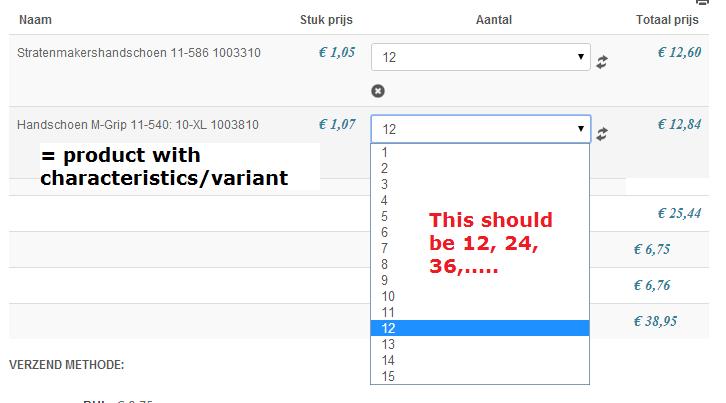
I went back to basics by removing the override of view checkout-cart and by updating Hikashop with the latest version. The problem still exists. Pls. note that it is not working properly only in case I use variants/characteristics in the product.
Regards,
Arno
Please Log in or Create an account to join the conversation.
11 years 8 months ago #188485
by Xavier
Replied by Xavier on topic Dropdown table when using characteristics ?
Hi,
We have indeed an issue, I corrected it on your end directly.
In the view "product / cart" and "checkout / cart" I added the code:
To get the settings of the parent product. Please confirm that it is working as expected now.
We will improve that part for the next release.
We have indeed an issue, I corrected it on your end directly.
In the view "product / cart" and "checkout / cart" I added the code:
Code:
if($row->product_parent_id != 0){
$parent = $productClass->get($row->product_parent_id);
$row->product_min_per_order = $parent->product_min_per_order;
$row->product_max_per_order = $parent->product_max_per_order;
}
We will improve that part for the next release.
Please Log in or Create an account to join the conversation.
11 years 8 months ago #188615
by Arno
Replied by Arno on topic Dropdown table when using characteristics ?
Hi Xavier,
Thanks, it is working as it schould be !
How to have a dropdown table on the small cart on the right ? Now it is still possible to change manual to 25 by overwritting the 24.
Hope this is possible so this topic is solved.
Many Thanks,
Arno
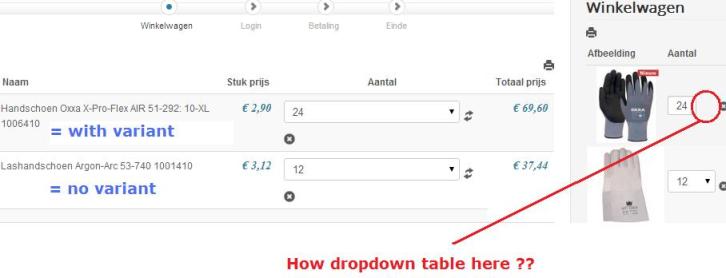
Thanks, it is working as it schould be !
How to have a dropdown table on the small cart on the right ? Now it is still possible to change manual to 25 by overwritting the 24.
Hope this is possible so this topic is solved.
Many Thanks,
Arno
Please Log in or Create an account to join the conversation.
11 years 8 months ago #188662
by Xavier
Replied by Xavier on topic Dropdown table when using characteristics ?
Hi,
Ok problem solved, the variant was getting the default value for the quantity display instead of the value of its parent product.
We will correct that on our end.
Ok problem solved, the variant was getting the default value for the quantity display instead of the value of its parent product.
We will correct that on our end.
The following user(s) said Thank You: Arno
Please Log in or Create an account to join the conversation.
Time to create page: 0.563 seconds