

- Posts: 33
- Thank you received: 0
Catergory/Product Description
11 years 9 months ago #186467
by ibextrex
Catergory/Product Description was created by ibextrex
-- url of the page with the problem -- :
www.joeysdiner.co.uk/index.php/2014-08-05-11-51-2
-- HikaShop version -- : 2.3.5
-- Joomla version -- : 3.3.6
How can I get the description of the product below the title in a smaller font? Also how to get the category description below the category title?
Struggling!!
What I need is attached
-- HikaShop version -- : 2.3.5
-- Joomla version -- : 3.3.6
How can I get the description of the product below the title in a smaller font? Also how to get the category description below the category title?
Struggling!!
What I need is attached
Please Log in or Create an account to join the conversation.

11 years 9 months ago #186468
by Xavier
Replied by Xavier on topic Catergory/Product Description
Hi,
Have you read that tutorial:
www.hikashop.com/support/support/documen...ize-the-display.html
It give many details on how apply css properties and how to change the positions of the elements.
Have you read that tutorial:
www.hikashop.com/support/support/documen...ize-the-display.html
It give many details on how apply css properties and how to change the positions of the elements.
Please Log in or Create an account to join the conversation.
11 years 8 months ago #191061
by pjpnig
Replied by pjpnig on topic Catergory/Product Description
Hi,
First of all I would like to congratulate you guys on an absolutely awesome product, I have spent a lot of time going through the forum and solving endless problems only to find that most of the solutions were obvious and logical. I am nevertheless stuck with one last problem, is there a "SIMPLE" way to put the description below the shoe sizes? In this case, "Medusa knee high leather boots". I have read the documentation but do not use firebug. I would rather edit the css locally with dreamweaver and replace it via Filezilla. Thank you so much for your great support.
Joomla 3.2.7
HikaShop Starter: 2.3.5
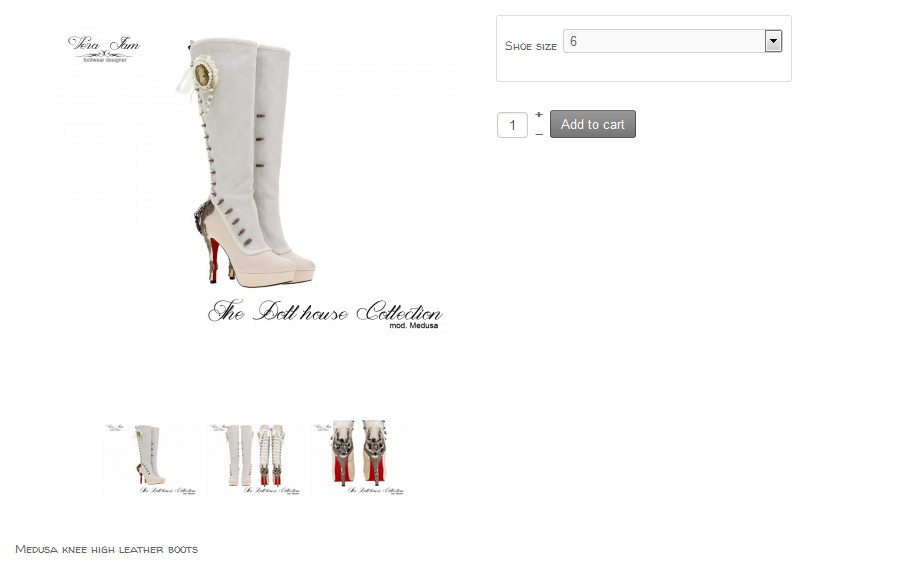
First of all I would like to congratulate you guys on an absolutely awesome product, I have spent a lot of time going through the forum and solving endless problems only to find that most of the solutions were obvious and logical. I am nevertheless stuck with one last problem, is there a "SIMPLE" way to put the description below the shoe sizes? In this case, "Medusa knee high leather boots". I have read the documentation but do not use firebug. I would rather edit the css locally with dreamweaver and replace it via Filezilla. Thank you so much for your great support.
Joomla 3.2.7
HikaShop Starter: 2.3.5
Please Log in or Create an account to join the conversation.
11 years 8 months ago #191062
by pjpnig
Replied by pjpnig on topic Catergory/Product Description
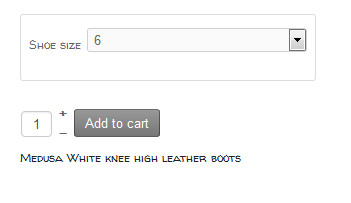
Correction please, DESCRIPTION below add to cart. Is the css file in question media/com_hikashop/css/frontend_default.css?
Please Log in or Create an account to join the conversation.

11 years 8 months ago #191065
by lousyfool
Need help with customisations of layouts, style or other site development? PM me!
(Don't forget to turn on "E-mail notification of new messages" )
Replied by lousyfool on topic Catergory/Product Description
@pjpnig:
If other forum posts have helped you, here is another one for you on moving the product description: www.hikashop.com/forum/product-category-...m-to-right-side.html
You can also use other browser consoles/"inspectors", of course - it doesn't have to be Firebug. By using one you'll be able to analyse HTML, CSS and what not else, but without one you'll be rather helpless.
In any case, for CSS customisation follow at least the first steps of the documentation, so you get HikaShop to load and use a custom CSS file, because if you'd edit original files, you'd lose all your changes when you update HikaShop, or you'll at least need to re-apply everything.
If other forum posts have helped you, here is another one for you on moving the product description: www.hikashop.com/forum/product-category-...m-to-right-side.html
You can also use other browser consoles/"inspectors", of course - it doesn't have to be Firebug. By using one you'll be able to analyse HTML, CSS and what not else, but without one you'll be rather helpless.
In any case, for CSS customisation follow at least the first steps of the documentation, so you get HikaShop to load and use a custom CSS file, because if you'd edit original files, you'd lose all your changes when you update HikaShop, or you'll at least need to re-apply everything.
Need help with customisations of layouts, style or other site development? PM me!
(Don't forget to turn on "E-mail notification of new messages" )
Please Log in or Create an account to join the conversation.
11 years 8 months ago #191088
by pjpnig
 Thanks so much for the quick response lousyfool, it worked like a charm. I also did a quick tutorial on Firebug and it did not bite me.
  :lol:
:lol:
Replied by pjpnig on topic Catergory/Product Description
Thanks so much for the quick response lousyfool, it worked like a charm. I also did a quick tutorial on Firebug and it did not bite me. :lol:Please Log in or Create an account to join the conversation.
Less
More
- Posts: 21
- Thank you received: 0
10 years 4 months ago #243235
by giuseppe123456
Replied by giuseppe123456 on topic Catergory/Product Description
hello , excuse me , I have the same problem :
I have to edit the file : media / com_hikashop / css / frontend_default.css ?
I have to edit the file : media / com_hikashop / css / frontend_default.css ?
Please Log in or Create an account to join the conversation.
Less
More
- Posts: 21
- Thank you received: 0
10 years 4 months ago #243236
by giuseppe123456
Replied by giuseppe123456 on topic Catergory/Product Description
Code:
<?php
/**
* @package HikaShop for Joomla!
* @version 2.6.3
* @author hikashop.com
* @copyright (C) 2010-2016 HIKARI SOFTWARE. All rights reserved.
* @license GNU/GPLv3 http://www.gnu.org/licenses/gpl-3.0.html
*/
defined('_JEXEC') or die('Restricted access');
?><?php
$height = $this->newSizes->height;
$width = $this->newSizes->width;
$mainDivName = $this->params->get('main_div_name','');
$link = hikashop_contentLink('product&task=show&cid='.$this->row->product_id.'&name='.$this->row->alias.$this->itemid.$this->category_pathway,$this->row);
if(!empty($this->row->extraData->top)) { echo implode("\r\n",$this->row->extraData->top); }
?>
<div class="hikashop_listing_img_desc" id="div_<?php echo $mainDivName.'_'.$this->row->product_id; ?>">
<table id="<?php echo $mainDivName.'_'.$this->row->product_id; ?>">
<tr>
<td valign="top">
<div class="hikashop_product_item_left_part">
<!-- PRODUCT IMG -->
<?php if($this->config->get('thumbnail',1)){ ?>
<div class="hikashop_product_image">
<div class="hikashop_product_image_subdiv">
<?php if($this->params->get('link_to_product_page',1)){ ?>
<a href="<?php echo $link;?>" title="<?php echo $this->escape($this->row->product_name); ?>">
<?php }
$image_options = array('default' => true,'forcesize'=>$this->config->get('image_force_size',true),'scale'=>$this->config->get('image_scale_mode','inside'));
$img = $this->image->getThumbnail(@$this->row->file_path, array('width' => $this->image->main_thumbnail_x, 'height' => $this->image->main_thumbnail_y), $image_options);
if($img->success) {
echo '<img class="hikashop_product_listing_image" title="'.$this->escape(@$this->row->file_description).'" alt="'.$this->escape(@$this->row->file_name).'" src="'.$img->url.'"/>';
}
$main_thumb_x = $this->image->main_thumbnail_x;
$main_thumb_y = $this->image->main_thumbnail_y;
if($this->params->get('display_badges',1)){
$this->classbadge->placeBadges($this->image, $this->row->badges, -10, 0);
}
$this->image->main_thumbnail_x = $main_thumb_x;
$this->image->main_thumbnail_y = $main_thumb_y;
if($this->params->get('link_to_product_page',1)){ ?>
</a>
<?php } ?>
</div>
</div>
<?php } ?>
<!-- EO PRODUCT IMG -->
<!-- PRODUCT PRICE -->
<?php
if($this->params->get('show_price','-1')=='-1'){
$config =& hikashop_config();
$this->params->set('show_price',$config->get('show_price'));
}
if($this->params->get('show_price')){
$this->setLayout('listing_price');
echo $this->loadTemplate();
}
?>
<!-- EO PRODUCT PRICE -->
<!-- PRODUCT CUSTOM FIELDS -->
<?php
if(!empty($this->productFields)) {
foreach ($this->productFields as $fieldName => $oneExtraField) {
if(!empty($this->row->$fieldName) || (isset($this->row->$fieldName) && $this->row->$fieldName === '0')) {
?>
<dl class="hikashop_product_custom_<?php echo $oneExtraField->field_namekey;?>_line">
<dt class="hikashop_product_custom_name">
<?php echo $this->fieldsClass->getFieldName($oneExtraField);?>
</dt>
<dd class="hikashop_product_custom_value">
<?php echo $this->fieldsClass->show($oneExtraField,$this->row->$fieldName); ?>
</dd>
</dl>
<?php
}
}
}
?>
<!-- EO PRODUCT CUSTOM FIELDS -->
<!-- PRODUCT VOTE -->
<?php
if($this->params->get('show_vote_product')){
$this->setLayout('listing_vote');
echo $this->loadTemplate();
}
?>
<!-- EO PRODUCT VOTE -->
<!-- ADD TO CART BUTTON AREA -->
<?php
if($this->params->get('add_to_cart') || $this->params->get('add_to_wishlist')){
$this->setLayout('add_to_cart_listing');
echo $this->loadTemplate();
} ?>
<!-- EO ADD TO CART BUTTON AREA -->
<!-- COMPARISON AREA -->
<?php
if(JRequest::getVar('hikashop_front_end_main',0) && JRequest::getVar('task')=='listing' && $this->params->get('show_compare')) { ?>
<br/><?php
if( $this->params->get('show_compare') == 1 ) {
$js = 'setToCompareList('.$this->row->product_id.',\''.$this->escape($this->row->product_name).'\',this); return false;';
echo $this->cart->displayButton(JText::_('ADD_TO_COMPARE_LIST'),'compare',$this->params,$link,$js,'',0,1,'hikashop_compare_button');
} else { ?>
<input type="checkbox" class="hikashop_compare_checkbox" id="hikashop_listing_chk_<?php echo $this->row->product_id;?>" onchange="setToCompareList(<?php echo $this->row->product_id;?>,'<?php echo $this->escape($this->row->product_name); ?>',this);"><label for="hikashop_listing_chk_<?php echo $this->row->product_id;?>"><?php echo JText::_('ADD_TO_COMPARE_LIST'); ?></label>
<?php }
} ?>
<!-- EO COMPARISON AREA -->
</div>
</td>
<td valign="top">
<div class="hikashop_product_item_right_part">
<h2>
<!-- PRODUCT NAME -->
<span class="hikashop_product_name">
<?php if($this->params->get('link_to_product_page',1)){ ?>
<a href="<?php echo $link;?>">
<?php } ?>
<?php
echo $this->row->product_name;
?>
<?php if($this->params->get('link_to_product_page',1)){ ?>
</a>
<?php } ?>
</span>
<!-- EO PRODUCT NAME -->
<!-- PRODUCT CODE -->
<span class='hikashop_product_code_list'>
<?php if ($this->config->get('show_code')) { ?>
<?php if($this->params->get('link_to_product_page',1)){ ?>
<a href="<?php echo $link;?>">
<?php }
echo $this->row->product_code;
if($this->params->get('link_to_product_page',1)){ ?>
</a>
<?php } ?>
<?php } ?>
</span>
<!-- EO PRODUCT CODE -->
</h2>
<?php if(!empty($this->row->extraData->afterProductName)) { echo implode("\r\n",$this->row->extraData->afterProductName); } ?>
<!-- PRODUCT DESCRIPTION -->
<div class="hikashop_product_desc">
<?php
echo preg_replace('#<hr *id="system-readmore" */>.*#is','',$this->row->product_description);
?>
</div>
<!-- EO PRODUCT DESCRIPTION -->
</div>
</td>
</tr>
</table>
</div>
<?php
if(!empty($this->row->extraData->bottom)) { echo implode("\r\n",$this->row->extraData->bottom); }
if($this->rows[0]->product_id == $this->row->product_id){
?>
<style>
#<?php echo $mainDivName; ?> .hikashop_product_image{
height:<?php echo $this->image->main_thumbnail_y;?>px;
text-align:center;
clear:both;
}
#<?php echo $mainDivName; ?> .hikashop_product_image_subdiv{
position:relative;
text-align:center;
clear:both;
width:<?php echo $this->image->main_thumbnail_x;?>px;
margin: auto;
}
#<?php echo $mainDivName; ?> .hikashop_product_desc{
text-align:<?php echo $this->align; ?>;
}
</style>
<?php
}
?>
Please Log in or Create an account to join the conversation.

10 years 4 months ago #243260
by nicolas
Replied by nicolas on topic Catergory/Product Description
Hi,
Editing the file media / com_hikashop / css / frontend_default.css won't help.
You need to edit the file "show_default" via the menu Display>Views as explained in the link provided by loosyfool:
www.hikashop.com/forum/product-category-...ght-side.html#182628
Editing the file media / com_hikashop / css / frontend_default.css won't help.
You need to edit the file "show_default" via the menu Display>Views as explained in the link provided by loosyfool:
www.hikashop.com/forum/product-category-...ght-side.html#182628
Please Log in or Create an account to join the conversation.
Less
More
- Posts: 21
- Thank you received: 0
10 years 4 months ago #243299
by giuseppe123456
Replied by giuseppe123456 on topic Catergory/Product Description
ok
so this file?
but I don't found hikashop_product_bottom_part
so this file?
but I don't found hikashop_product_bottom_part
Code:
<?php
/**
* @package HikaShop for Joomla!
* @version 2.6.3
* @author hikashop.com
* @copyright (C) 2010-2016 HIKARI SOFTWARE. All rights reserved.
* @license GNU/GPLv3 http://www.gnu.org/licenses/gpl-3.0.html
*/
defined('_JEXEC') or die('Restricted access');
?><div id="hikashop_product_top_part" class="hikashop_product_top_part">
<?php if(!empty($this->element->extraData->topBegin)) { echo implode("\r\n",$this->element->extraData->topBegin); } ?>
<h1>
<span id="hikashop_product_name_main" class="hikashop_product_name_main" itemprop="name">
<?php
if (hikashop_getCID('product_id')!=$this->element->product_id && isset ($this->element->main->product_name))
echo $this->element->main->product_name;
else
echo $this->element->product_name;
?>
</span>
<?php if ($this->config->get('show_code')) { ?>
<span id="hikashop_product_code_main" class="hikashop_product_code_main" itemprop="sku">
<?php
echo $this->element->product_code;
?>
</span>
<?php } ?>
</h1>
<?php if(!empty($this->element->extraData->topEnd)) { echo implode("\r\n",$this->element->extraData->topEnd); } ?>
<?php
$this->setLayout('show_block_social');
echo $this->loadTemplate();
?>
</div>
<?php if(HIKASHOP_RESPONSIVE){ ?>
<div class="<?php echo HK_GRID_ROW; ?>">
<?php } ?>
<div id="hikashop_product_left_part" class="hikashop_product_left_part <?php echo HK_GRID_COL_6; ?>">
<?php
if(!empty($this->element->extraData->leftBegin)) { echo implode("\r\n",$this->element->extraData->leftBegin); }
$this->row = & $this->element;
$this->setLayout('show_block_img');
echo $this->loadTemplate();
if(!empty($this->element->extraData->leftEnd)) { echo implode("\r\n",$this->element->extraData->leftEnd); }
?>
</div>
<div id="hikashop_product_right_part" class="hikashop_product_right_part <?php echo HK_GRID_COL_6; ?>">
<?php
if(!empty($this->element->extraData->rightBegin))
echo implode("\r\n",$this->element->extraData->rightBegin);
?>
<div id="hikashop_product_vote_mini" class="hikashop_product_vote_mini">
<?php
$config =& hikashop_config();
if($this->params->get('show_vote_product') == '-1'){
$this->params->set('show_vote_product',$config->get('show_vote_product'));
}
if($this->params->get('show_vote_product')){
$js = '';
$this->params->set('vote_type','product');
if(isset($this->element->main)){
$product_id = $this->element->main->product_id;
}else{
$product_id = $this->element->product_id;
}
$this->params->set('vote_ref_id',$product_id);
echo hikashop_getLayout('vote', 'mini', $this->params, $js);
}
?>
</div>
<span id="hikashop_product_price_main" class="hikashop_product_price_main" itemprop="offers" itemscope itemtype="http://schema.org/Offer">
<?php
if ($this->params->get('show_price')) {
$this->row = & $this->element;
$this->setLayout('listing_price');
echo $this->loadTemplate();
$CurrId = hikashop_getCurrency();
$null = null;
$currency = $this->currencyHelper->getCurrencies($CurrId, $null);
$CurrCode = $currency[$CurrId]->currency_code;
?>
<meta itemprop="priceCurrency" content="<?php echo $CurrCode; ?>" />
<?php
}
?>
</span>
<?php
if(!empty($this->element->extraData->rightMiddle))
echo implode("\r\n",$this->element->extraData->rightMiddle);
?>
<?php
$this->setLayout('show_block_dimensions');
echo $this->loadTemplate();
?><br />
<?php
if($this->params->get('characteristic_display') != 'list') {
$this->setLayout('show_block_characteristic');
echo $this->loadTemplate();
?>
<br />
<?php
}
$form = ',0';
if (!$this->config->get('ajax_add_to_cart', 1)) {
$form = ',\'hikashop_product_form\'';
}
if (hikashop_level(1) && !empty ($this->element->options)) {
?>
<div id="hikashop_product_options" class="hikashop_product_options">
<?php
$this->setLayout('option');
echo $this->loadTemplate();
?>
</div>
<br />
<?php
$form = ',\'hikashop_product_form\'';
if ($this->config->get('redirect_url_after_add_cart', 'stay_if_cart') == 'ask_user') {
?>
<input type="hidden" name="popup" value="1"/>
<?php
}
}
if (!$this->params->get('catalogue') && ($this->config->get('display_add_to_cart_for_free_products') || ($this->config->get('display_add_to_wishlist_for_free_products', 1) && hikashop_level(1) && $this->params->get('add_to_wishlist') && $config->get('enable_wishlist', 1)) || !empty($this->element->prices))) {
if (!empty ($this->itemFields)) {
$form = ',\'hikashop_product_form\'';
if ($this->config->get('redirect_url_after_add_cart', 'stay_if_cart') == 'ask_user') {
?>
<input type="hidden" name="popup" value="1"/>
<?php
}
$this->setLayout('show_block_custom_item');
echo $this->loadTemplate();
}
}
$this->formName = $form;
if($this->params->get('show_price')){ ?>
<span id="hikashop_product_price_with_options_main" class="hikashop_product_price_with_options_main">
</span>
<?php }
if(empty ($this->element->characteristics) || $this->params->get('characteristic_display')!='list'){ ?>
<div id="hikashop_product_quantity_main" class="hikashop_product_quantity_main">
<?php
$this->row = & $this->element;
$this->ajax = 'if(hikashopCheckChangeForm(\'item\',\'hikashop_product_form\')){ return hikashopModifyQuantity(\'' . $this->row->product_id . '\',field,1' . $form . ',\'cart\'); } else { return false; }';
$this->setLayout('quantity');
echo $this->loadTemplate();
?>
</div>
<?php } ?>
<div id="hikashop_product_contact_main" class="hikashop_product_contact_main">
<?php
$contact = $this->config->get('product_contact',0);
if (hikashop_level(1) && ($contact == 2 || ($contact == 1 && !empty ($this->element->product_contact)))) {
$empty = '';
$params = new HikaParameter($empty);
global $Itemid;
$url_itemid='';
if(!empty($Itemid)){
$url_itemid='&Itemid='.$Itemid;
}
echo $this->cart->displayButton(JText :: _('CONTACT_US_FOR_INFO'), 'contact_us', $params, hikashop_completeLink('product&task=contact&cid=' . $this->element->product_id.$url_itemid), 'window.location=\'' . hikashop_completeLink('product&task=contact&cid=' . $this->element->product_id.$url_itemid) . '\';return false;');
}
?>
</div>
<?php
if(!empty($this->fields)){
$this->setLayout('show_block_custom_main');
echo $this->loadTemplate();
}
if(HIKASHOP_J30) {
$this->setLayout('show_block_tags');
echo $this->loadTemplate();
}
?>
<span id="hikashop_product_id_main" class="hikashop_product_id_main">
<input type="hidden" name="product_id" value="<?php echo $this->element->product_id; ?>" />
</span>
<?php
if(!empty($this->element->extraData->rightEnd))
echo implode("\r\n",$this->element->extraData->rightEnd);
?>
</div>
<?php if(HIKASHOP_RESPONSIVE){ ?>
</div>
<?php } ?>
<div id="hikashop_product_bottom_part" class="hikashop_product_bottom_part">
<?php
if(!empty($this->element->extraData->bottomBegin))
echo implode("\r\n",$this->element->extraData->bottomBegin);
?>
<div id="hikashop_product_description_main" class="hikashop_product_description_main" itemprop="description">
<?php
echo JHTML::_('content.prepare',preg_replace('#<hr *id="system-readmore" */>#i','',$this->element->product_description));
?>
</div>
<span id="hikashop_product_url_main" class="hikashop_product_url_main">
<?php
if (!empty ($this->element->product_url)) {
echo JText :: sprintf('MANUFACTURER_URL', '<a href="' . $this->element->product_url . '" target="_blank">' . $this->element->product_url . '</a>');
}
?>
</span>
<?php
$this->setLayout('show_block_product_files');
echo $this->loadTemplate();
?>
<?php
if(!empty($this->element->extraData->bottomMiddle))
echo implode("\r\n",$this->element->extraData->bottomMiddle);
?>
<?php
if(!empty($this->element->extraData->bottomEnd))
echo implode("\r\n",$this->element->extraData->bottomEnd);
?>
</div>
Please Log in or Create an account to join the conversation.
10 years 4 months ago #243301
by lousyfool
Yes, this is the correct file. You'll find the relevant part, as you'd expect, near the bottom of the file.
Do not modify core files, but instead create a proper override by following instructions under the link I gave you in your other thread on the same matter: www.hikashop.com/support/documentation/1...-display.html#layout
This will prevent you losing your changes when updating.
BTW, no need at all to post entire files here. A reference to the file/view location and name will do, obviously.
Need help with customisations of layouts, style or other site development? PM me!
(Don't forget to turn on "E-mail notification of new messages" )
Replied by lousyfool on topic Catergory/Product Description
giuseppe123456 wrote: ok
so this file?
but I don't found hikashop_product_bottom_part
Yes, this is the correct file. You'll find the relevant part, as you'd expect, near the bottom of the file.
Do not modify core files, but instead create a proper override by following instructions under the link I gave you in your other thread on the same matter: www.hikashop.com/support/documentation/1...-display.html#layout
This will prevent you losing your changes when updating.
BTW, no need at all to post entire files here. A reference to the file/view location and name will do, obviously.
Need help with customisations of layouts, style or other site development? PM me!
(Don't forget to turn on "E-mail notification of new messages" )
Please Log in or Create an account to join the conversation.
Less
More
- Posts: 21
- Thank you received: 0
10 years 4 months ago #243304
by giuseppe123456
Replied by giuseppe123456 on topic Catergory/Product Description
ok. sorry.
thanks fo answers..
I don't understad what I need to do. If that's the case, in "show_default" you'll find a div with id/class "hikashop_product_bottom_part", and inside the div with id/class "hikashop_product_description_main". This latter div you want to move to where you want it, in your case further up inside the div with id/class "hikashop_product_right_part".
can you help me please?
thanks fo answers..
I don't understad what I need to do. If that's the case, in "show_default" you'll find a div with id/class "hikashop_product_bottom_part", and inside the div with id/class "hikashop_product_description_main". This latter div you want to move to where you want it, in your case further up inside the div with id/class "hikashop_product_right_part".
can you help me please?
Please Log in or Create an account to join the conversation.
10 years 4 months ago #243305
by lousyfool
To keep this (old) thread "clean" and continue with your specific case, I'm responding in your other, original thread. I'd say let's end this here as it would probably lead too far here.
Need help with customisations of layouts, style or other site development? PM me!
(Don't forget to turn on "E-mail notification of new messages" )
Replied by lousyfool on topic Catergory/Product Description
giuseppe123456 wrote: I don't understad what I need to do.
To keep this (old) thread "clean" and continue with your specific case, I'm responding in your other, original thread. I'd say let's end this here as it would probably lead too far here.
Need help with customisations of layouts, style or other site development? PM me!
(Don't forget to turn on "E-mail notification of new messages" )
Please Log in or Create an account to join the conversation.
Time to create page: 0.463 seconds