

- Posts: 96
- Thank you received: 0
RESOLVED: White screen and file not attached
11 years 8 months ago - 11 years 8 months ago #188818
by piggybank
RESOLVED: White screen and file not attached was created by piggybank
-- url of the page with the problem -- :
boatingwithdawsons.com/dev/
-- HikaShop version -- : 2.3.5
-- Joomla version -- : 3.3.5
-- PHP version -- : 5.3.29
-- Browser(s) name and version -- : Mozilla/5.0 (Windows NT 6.1; WOW64) AppleWebKit/537.36 (KHTML, like Gecko) Chrome/40.0.2214.93 Safari/537.36
-- Error-message(debug-mod must be tuned on) -- : White Screen
When i try to attach a file to a product with the setting specify file location I get a white screen. The files are located in the /media/com_hikashop/upload/safe directory.
-- HikaShop version -- : 2.3.5
-- Joomla version -- : 3.3.5
-- PHP version -- : 5.3.29
-- Browser(s) name and version -- : Mozilla/5.0 (Windows NT 6.1; WOW64) AppleWebKit/537.36 (KHTML, like Gecko) Chrome/40.0.2214.93 Safari/537.36
-- Error-message(debug-mod must be tuned on) -- : White Screen
When i try to attach a file to a product with the setting specify file location I get a white screen. The files are located in the /media/com_hikashop/upload/safe directory.
Last edit: 11 years 8 months ago by piggybank.
Please Log in or Create an account to join the conversation.

11 years 8 months ago #188822
by Jerome
Jerome - Obsidev.com
HikaMarket & HikaSerial developer / HikaShop core dev team.
Replied by Jerome on topic White screen and file not attached
Jerome - Obsidev.com
HikaMarket & HikaSerial developer / HikaShop core dev team.
Please Log in or Create an account to join the conversation.
11 years 8 months ago - 11 years 8 months ago #188963
by piggybank
Replied by piggybank on topic White screen and file not attached
Hi there,
I followed those instructions however the indicated code was not present.
I followed those instructions however the indicated code was not present.
Code:
Attachment removed by a moderator
Last edit: 11 years 8 months ago by Jerome.
Please Log in or Create an account to join the conversation.
11 years 8 months ago #188989
by Jerome
Jerome - Obsidev.com
HikaMarket & HikaSerial developer / HikaShop core dev team.
Replied by Jerome on topic White screen and file not attached
Hi,
Sure ; the file you attached is a file from HikaShop 2.3.4 ; not from HikaShop 2.3.5
Regards,
Sure ; the file you attached is a file from HikaShop 2.3.4 ; not from HikaShop 2.3.5
Regards,
Jerome - Obsidev.com
HikaMarket & HikaSerial developer / HikaShop core dev team.
Please Log in or Create an account to join the conversation.
11 years 8 months ago - 11 years 8 months ago #189299
by piggybank
Replied by piggybank on topic White screen and file not attached
Hi there,
I sorted out what was happening with the file, my fault.
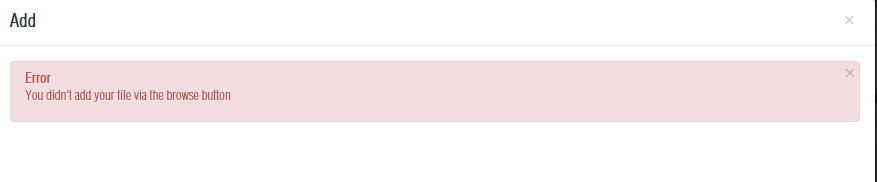
I have encountered an error saying I didn't use the browse button, but I don't see one on the screen?
I sorted out what was happening with the file, my fault.
I have encountered an error saying I didn't use the browse button, but I don't see one on the screen?
Last edit: 11 years 8 months ago by piggybank. Reason: Resolution, and new problem
Please Log in or Create an account to join the conversation.

11 years 8 months ago #189320
by nicolas
Replied by nicolas on topic White screen and file not attached
Hi,
I don't understand what you're saying. Could you provide a screenshot of the problem ?
I don't understand what you're saying. Could you provide a screenshot of the problem ?
Please Log in or Create an account to join the conversation.
11 years 8 months ago #189417
by piggybank
Replied by piggybank on topic White screen and file not attached
Hi sorry for the confusion
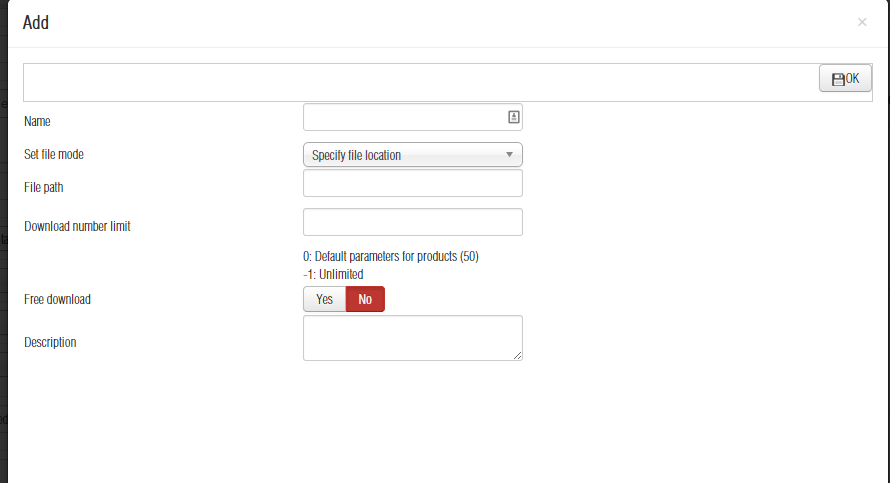
The first attachment is the screen i am trying to attach the file with
the second is the error message
The first attachment is the screen i am trying to attach the file with
the second is the error message
Please Log in or Create an account to join the conversation.
11 years 8 months ago #189441
by Jerome
Jerome - Obsidev.com
HikaMarket & HikaSerial developer / HikaShop core dev team.
Replied by Jerome on topic White screen and file not attached
Hi,
You can't have such error message when you are using the "path" filemode.
Are you sure that you didn't remove the "break;" in the product controller file by inadvertence ?
Regards,
You can't have such error message when you are using the "path" filemode.
Are you sure that you didn't remove the "break;" in the product controller file by inadvertence ?
Regards,
Jerome - Obsidev.com
HikaMarket & HikaSerial developer / HikaShop core dev team.
Please Log in or Create an account to join the conversation.
11 years 8 months ago #189596
by piggybank
Replied by piggybank on topic White screen and file not attached
Oh wow that's exactly what I did -_- thanks so much for your patience on this ticket I usually don't have so many id-10-t errors when trying to resolve a problem!
All fixed!
thanks for your awesome support and patience
All fixed!
thanks for your awesome support and patience
Please Log in or Create an account to join the conversation.
Time to create page: 0.311 seconds