

- Posts: 7
- Thank you received: 0
Not displaying Registration or Products-Help
11 years 8 months ago - 11 years 8 months ago #189726
by autsawin
Not displaying Registration or Products-Help was created by autsawin
-- url of the page with the problem -- :
bondurantmountain.com
-- HikaShop version -- : 2.3.5
-- Joomla version -- : 3.3.6
-- PHP version -- : 5.4.35
-- Browser(s) name and version -- : Firefox 35.0.1
Hello, everyone. I've created a content module for category menu, and have entered products and have been unable to get it to appear on the front-end. I've also added a menu item in my main menu for the registration form for HikaShop and that isn't displaying either. I've been trying to find a resolution, but no luck. Any help would be greatly appreciated.
FYI, In addition to the content module, I have an associated joomla module published.
Thanks in advance,
Autsawin
-- HikaShop version -- : 2.3.5
-- Joomla version -- : 3.3.6
-- PHP version -- : 5.4.35
-- Browser(s) name and version -- : Firefox 35.0.1
Hello, everyone. I've created a content module for category menu, and have entered products and have been unable to get it to appear on the front-end. I've also added a menu item in my main menu for the registration form for HikaShop and that isn't displaying either. I've been trying to find a resolution, but no luck. Any help would be greatly appreciated.
FYI, In addition to the content module, I have an associated joomla module published.
Thanks in advance,
Autsawin
Last edit: 11 years 8 months ago by autsawin.
Please Log in or Create an account to join the conversation.

11 years 8 months ago #189746
by Jerome
Jerome - Obsidev.com
HikaMarket & HikaSerial developer / HikaShop core dev team.
Replied by Jerome on topic Not displaying Registration or Products-Help
Hi,
Please provide screenshots of your configuration.
Your website is not available so we are not able to see anything ; without more details we won't be able to help you correctly.
www.hikashop.com/support/support/documen...splay-front-end.html
Regards,
Please provide screenshots of your configuration.
Your website is not available so we are not able to see anything ; without more details we won't be able to help you correctly.
www.hikashop.com/support/support/documen...splay-front-end.html
Regards,
Jerome - Obsidev.com
HikaMarket & HikaSerial developer / HikaShop core dev team.
Please Log in or Create an account to join the conversation.
11 years 8 months ago #191886
by autsawin
Replied by autsawin on topic Not displaying Registration or Products-Help
Hello Jerome,
Thanks for your response. I didn't wasn't able to easily take a screenshot, but i printed the main configuration to pdf. If this isn't sufficient, please let me know and i'll attach a few screenshots.
Thanks,
Arvin
Thanks for your response. I didn't wasn't able to easily take a screenshot, but i printed the main configuration to pdf. If this isn't sufficient, please let me know and i'll attach a few screenshots.
Thanks,
Arvin
This attachment is hidden for guests.
Please log in or register to see it.
Please log in or register to see it.
Please Log in or Create an account to join the conversation.
11 years 8 months ago #191888
by autsawin
Replied by autsawin on topic Not displaying Registration or Products-Help
Please Log in or Create an account to join the conversation.

11 years 8 months ago #191889
by nicolas
Replied by nicolas on topic Not displaying Registration or Products-Help
Hi,
We actually need screenshots of the settings of your menu items, not about the main settings screen of HikaShop.
Could you do a screenshot of the menu item settings page of the "products1" menu item when editing it from the Joomla menu manager and from the menu Display>Content menus of HikaShop ?
We actually need screenshots of the settings of your menu items, not about the main settings screen of HikaShop.
Could you do a screenshot of the menu item settings page of the "products1" menu item when editing it from the Joomla menu manager and from the menu Display>Content menus of HikaShop ?
Please Log in or Create an account to join the conversation.
11 years 8 months ago #191990
by autsawin
Replied by autsawin on topic Not displaying Registration or Products-Help
Thanks
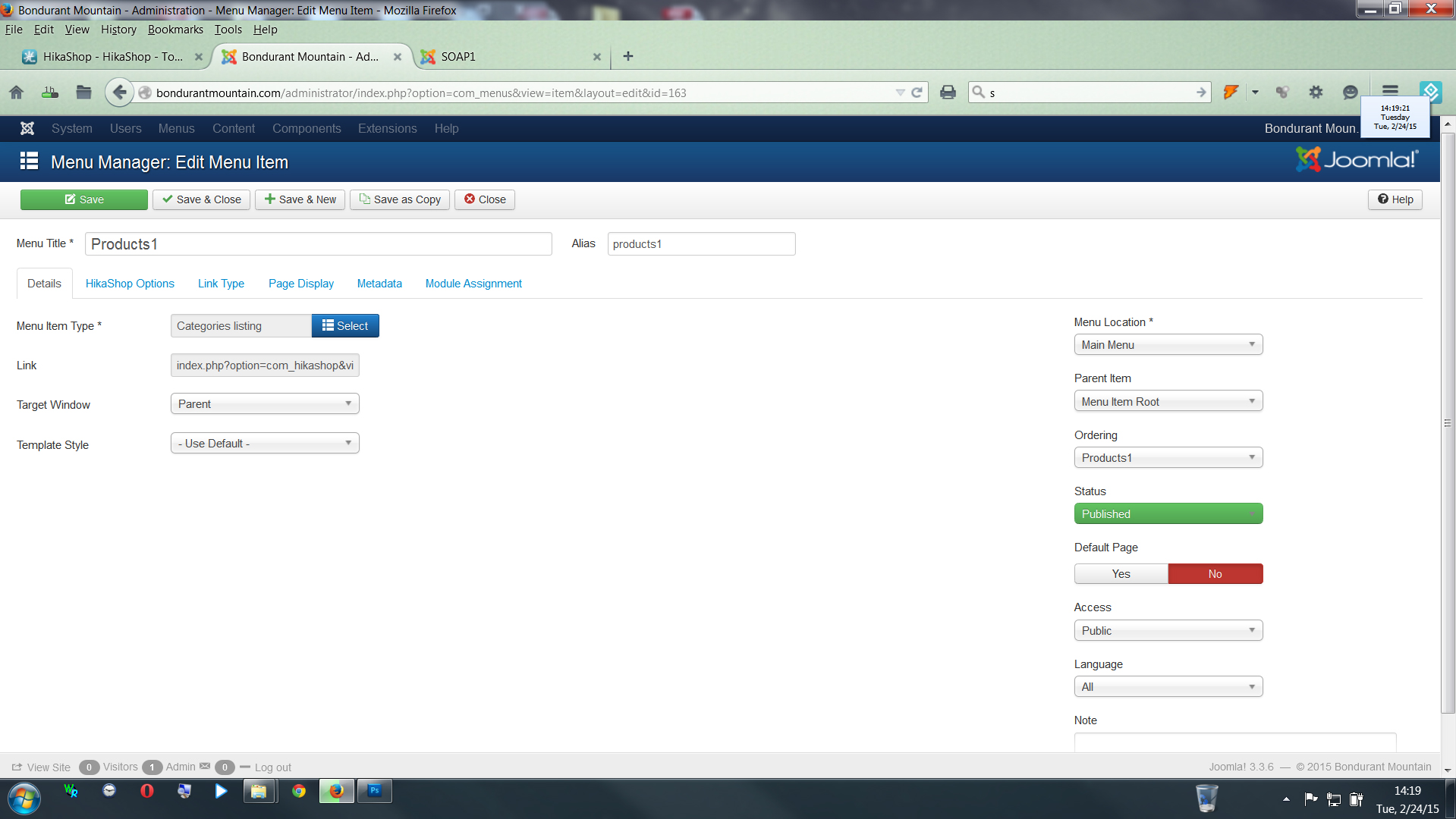
Please Log in or Create an account to join the conversation.
11 years 8 months ago #191991
by autsawin
Replied by autsawin on topic Not displaying Registration or Products-Help
Thanks again
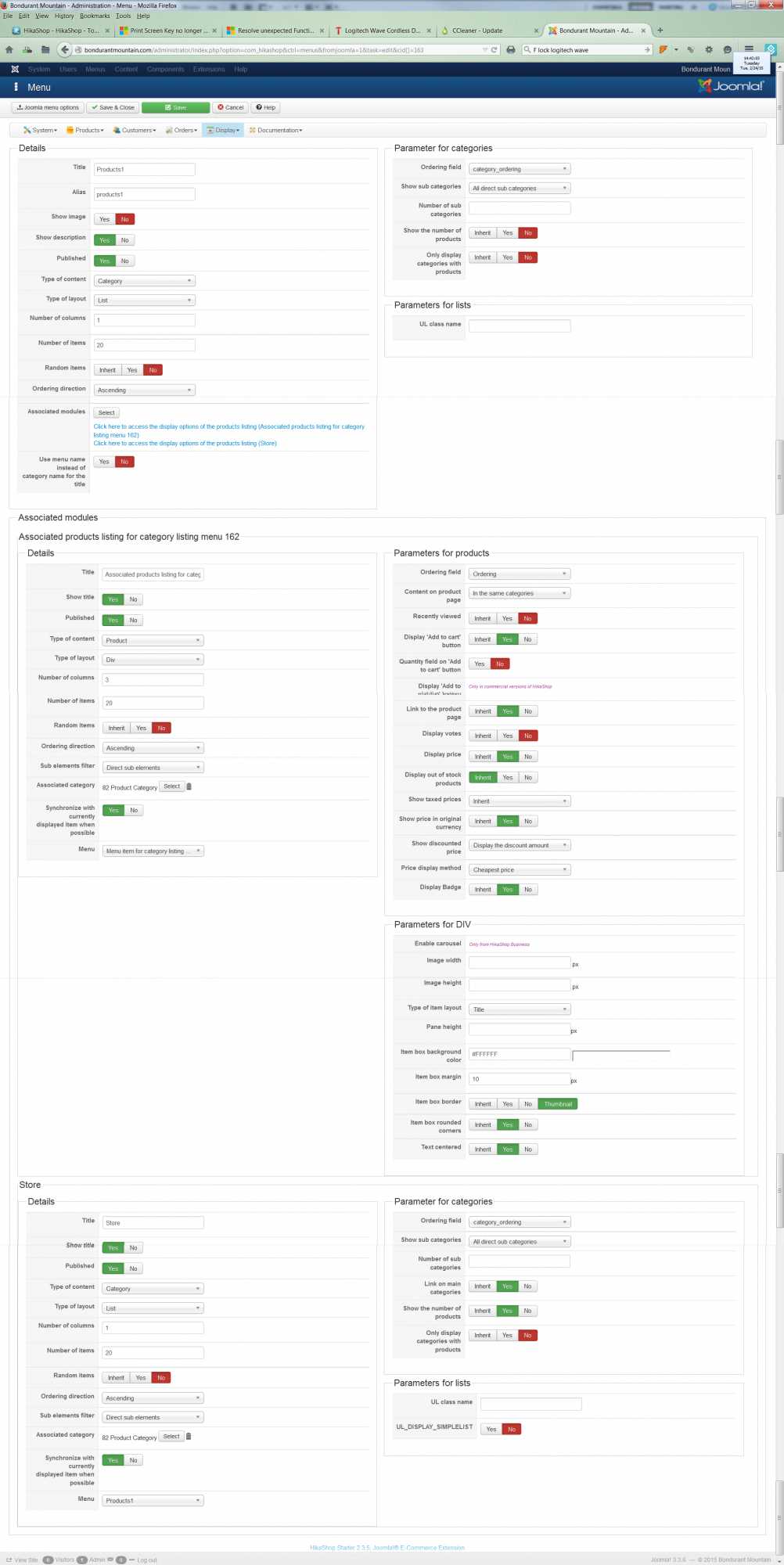
Please Log in or Create an account to join the conversation.
11 years 8 months ago #192151
by Jerome
Jerome - Obsidev.com
HikaMarket & HikaSerial developer / HikaShop core dev team.
Replied by Jerome on topic Not displaying Registration or Products-Help
Hi,
Can you please try to use the default Joomla 3 template (protostar) ?
I want to check if the issue is not related to your template ; because I can't display any content from HikaShop ; even the more than classical views.
Regards,
Can you please try to use the default Joomla 3 template (protostar) ?
I want to check if the issue is not related to your template ; because I can't display any content from HikaShop ; even the more than classical views.
Regards,
Jerome - Obsidev.com
HikaMarket & HikaSerial developer / HikaShop core dev team.
Please Log in or Create an account to join the conversation.
11 years 8 months ago #192156
by autsawin
Replied by autsawin on topic Not displaying Registration or Products-Help
template changed to prostar. thanks
Please Log in or Create an account to join the conversation.
11 years 8 months ago #192219
by nicolas
Replied by nicolas on topic Not displaying Registration or Products-Help
Hi,
I see that the products1 page now displays the listing of categories and the products listing too on your website.
So the issue is apparently with your template which is not displaying the main content area of the pages (at least for the pages of HikaShop). So either that's a setting of your template in its settings page, or maybe something in the template code.
I would recommend to contact your template provider so that they can guide you.
I see that the products1 page now displays the listing of categories and the products listing too on your website.
So the issue is apparently with your template which is not displaying the main content area of the pages (at least for the pages of HikaShop). So either that's a setting of your template in its settings page, or maybe something in the template code.
I would recommend to contact your template provider so that they can guide you.
The following user(s) said Thank You: autsawin
Please Log in or Create an account to join the conversation.
11 years 8 months ago #192263
by autsawin
Replied by autsawin on topic Not displaying Registration or Products-Help
Thanks for your help.
Arvin
Arvin
Please Log in or Create an account to join the conversation.
Time to create page: 0.331 seconds