
- Posts: 9
- Thank you received: 0
how to: 1 option with different prices
- hanibaltrs
-
 Topic Author
- Offline
Less
More
11 years 8 months ago #191993
by hanibaltrs
how to: 1 option with different prices was created by hanibaltrs
-- Joomla version -- : 2.5.28
-- Browser(s) name and version -- : safari
hi,
is there any way to have 1 option dropdown but with e.g. 3 points with each different price.
explanation:
e-bikes, option 1 standard battery, option 2 large battery, option 3 xtra large battery
standard battery has 0 price, large has 199 extra large has 399 which should be added to the price when option is used.
to have this with "normal" option we made large battery yes/no and xtra large battery yes/no.
but then we have 2 option fields and also the user can gamble and switch both fields to yes and has 199+399 on checkout
how to solve this ?
-- Browser(s) name and version -- : safari
hi,
is there any way to have 1 option dropdown but with e.g. 3 points with each different price.
explanation:
e-bikes, option 1 standard battery, option 2 large battery, option 3 xtra large battery
standard battery has 0 price, large has 199 extra large has 399 which should be added to the price when option is used.
to have this with "normal" option we made large battery yes/no and xtra large battery yes/no.
but then we have 2 option fields and also the user can gamble and switch both fields to yes and has 199+399 on checkout
how to solve this ?
Please Log in or Create an account to join the conversation.

11 years 8 months ago #192007
by nicolas
Replied by nicolas on topic how to: 1 option with different prices
Hi,
Yes, you can have options with several values, each one with a different price.
The process is explained here:
www.hikashop.com/support/support/documen...ct-form.html#options
And you can check an example on our demo website:
demo.hikashop.com/index.php/en/hikashop/...ct-page/with-options
Yes, you can have options with several values, each one with a different price.
The process is explained here:
www.hikashop.com/support/support/documen...ct-form.html#options
And you can check an example on our demo website:
demo.hikashop.com/index.php/en/hikashop/...ct-page/with-options
Please Log in or Create an account to join the conversation.
- hanibaltrs
-
Topic Author
- Offline
Less
More
- Posts: 9
- Thank you received: 0
11 years 8 months ago - 11 years 8 months ago #192050
by hanibaltrs
Replied by hanibaltrs on topic how to: 1 option with different prices
ok thanks for this
actually we made some changes to the views therefor the "right" part has a different view-form. now if we change the value from this option field the complete view is empty. can u tell me where to make the changes that it takes the right view instead of blank ?
picture attached
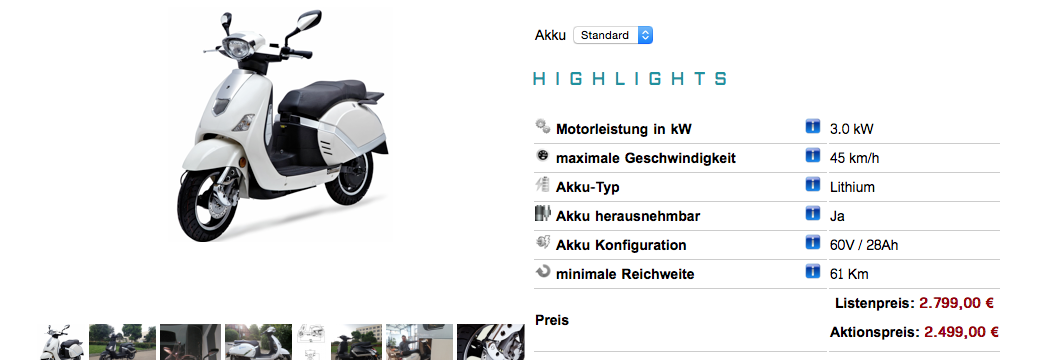
edit:// all fields in this view are custom fields
actually we made some changes to the views therefor the "right" part has a different view-form. now if we change the value from this option field the complete view is empty. can u tell me where to make the changes that it takes the right view instead of blank ?
picture attached
edit:// all fields in this view are custom fields
Last edit: 11 years 8 months ago by hanibaltrs.
Please Log in or Create an account to join the conversation.
11 years 8 months ago #192207
by nicolas
Replied by nicolas on topic how to: 1 option with different prices
Hi,
I'm not following you. Can you give a link to a product page with the issue so that we can see the problem ?
I'm not following you. Can you give a link to a product page with the issue so that we can see the problem ?
Please Log in or Create an account to join the conversation.
- hanibaltrs
-
Topic Author
- Offline
Less
More
- Posts: 9
- Thank you received: 0
11 years 8 months ago - 11 years 8 months ago #192209
by hanibaltrs
Replied by hanibaltrs on topic how to: 1 option with different prices
please see picture, if u choose an option e.g. Akku "L" all custom view/fields are gone
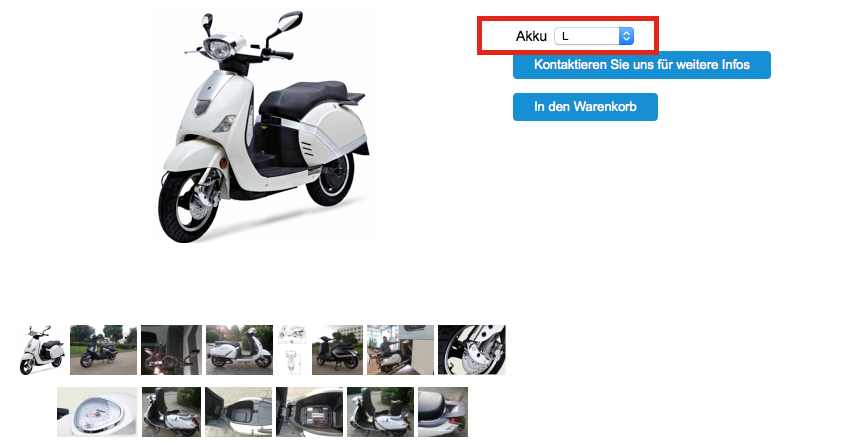
so there must be a setting e.g. "if option change, change innerhtml" and the innerhtml seams be the "standard" view which is actually empty cause all fields are custom fields and the view file is separate made, actually it's called "show_block_custom_main2" instead of show_block_custom_main, so where can i find this to change to show_block_custom_main2
so there must be a setting e.g. "if option change, change innerhtml" and the innerhtml seams be the "standard" view which is actually empty cause all fields are custom fields and the view file is separate made, actually it's called "show_block_custom_main2" instead of show_block_custom_main, so where can i find this to change to show_block_custom_main2
Last edit: 11 years 8 months ago by hanibaltrs.
Please Log in or Create an account to join the conversation.
11 years 8 months ago #192216
by nicolas
Replied by nicolas on topic how to: 1 option with different prices
When you change the characteristic selection, the system will replace the content of the div hikashop_product_custom_info_main with the content of the hikashop_product_custom_info_XXX where XXX is the id of the variant and which is a div hidden on the page and added at the bottom of the product page by the "show" file of the "product" view.
So an easy solution is to delete the code adding the div hikashop_product_custom_info_XXX in that show file so that the system doesn't find it and doesn't replace the hikashop_product_custom_info_main at all.
So an easy solution is to delete the code adding the div hikashop_product_custom_info_XXX in that show file so that the system doesn't find it and doesn't replace the hikashop_product_custom_info_main at all.
Please Log in or Create an account to join the conversation.
Time to create page: 0.225 seconds