

- Posts: 23
- Thank you received: 0
One category - two different links
11 years 8 months ago #192523
by ifenix
One category - two different links was created by ifenix
-- HikaShop version -- : 2.3.5
-- Joomla version -- : 3.3.6
Hi.
Help me please.
I have different links for sub-categories products
for example:
Category - furniture(categories listing)
sub - office(product listing)
link from main menu - site.com/furniture/office
link from NikaShop modules(categories listing) - site.com/furniture/category/office
One category - two different links
How to sync links? I need the same links on the category from main menu and NikaShop modules.
-- Joomla version -- : 3.3.6
Hi.
Help me please.
I have different links for sub-categories products
for example:
Category - furniture(categories listing)
sub - office(product listing)
link from main menu - site.com/furniture/office
link from NikaShop modules(categories listing) - site.com/furniture/category/office
One category - two different links
How to sync links? I need the same links on the category from main menu and NikaShop modules.
Please Log in or Create an account to join the conversation.

11 years 8 months ago #192535
by lousyfool
Need help with customisations of layouts, style or other site development? PM me!
(Don't forget to turn on "E-mail notification of new messages" )
Replied by lousyfool on topic One category - two different links
Hi,
Please study the documentation on canonical URLs, then make use of it: www.hikashop.com/support/documentation/i...ig.html#features_sef
P.S.: What is "NikaShop"? :huh:
Please study the documentation on canonical URLs, then make use of it: www.hikashop.com/support/documentation/i...ig.html#features_sef
P.S.: What is "NikaShop"? :huh:
Need help with customisations of layouts, style or other site development? PM me!
(Don't forget to turn on "E-mail notification of new messages" )
Please Log in or Create an account to join the conversation.
11 years 8 months ago #192556
by ifenix
Replied by ifenix on topic One category - two different links
If I remove the "category" in the CEF?
But if I remove sategory id - get error 404
I need to re-create the category again?
But if I remove sategory id - get error 404
I need to re-create the category again?
Sorry, google auto translationlousyfool wrote: P.S.: What is "NikaShop"? :huh:
Please Log in or Create an account to join the conversation.
11 years 8 months ago #192563
by lousyfool
Need help with customisations of layouts, style or other site development? PM me!
(Don't forget to turn on "E-mail notification of new messages" )
Replied by lousyfool on topic One category - two different links
Canonical URLs are the solution, otherwise you will always have different URLs depending from where you're calling the items.
And it's all explained in the documentation I gave you the link for.
If in doubt, but you want all-new proper URLs:
And it's all explained in the documentation I gave you the link for.
If in doubt, but you want all-new proper URLs:
- First, decide if you want category and product ID's or not. If you change the option later once you have canonical URLs set, you'll get 404s. Same with Category/Product SEF names.
- Next, delete any canonical URLs you have now in your products - just for a safe and clean start towards consistent URLs.
- Then, set the option "Force canonical URLs on listings" to "Use canonical URL and generate it if missing". Now, when you click on categories and products, the canonical URLs will be generated and saved, and then they will always be the same, no matter where you click.
Need help with customisations of layouts, style or other site development? PM me!
(Don't forget to turn on "E-mail notification of new messages" )
The following user(s) said Thank You: ifenix
Please Log in or Create an account to join the conversation.
11 years 8 months ago #193390
by ifenix
Replied by ifenix on topic One category - two different links
Thank you for your detailed instructions.
I did it. But I get a "product not found" on the product card.
What I did wrong
1. I deleted all products
2. SEF URL
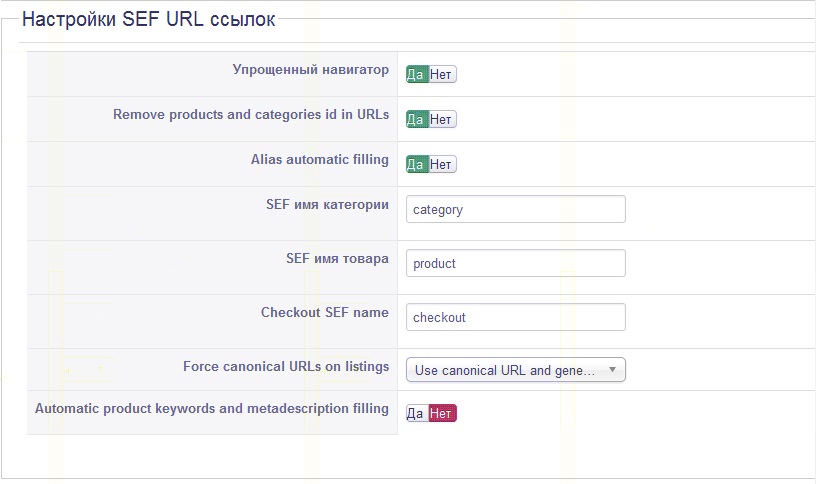
3. import product
products are available in the list of products. they have canonical URLs. But I get a "product not found" on the product card.
This is because do not created alias for imports of products
If I to save product in the backend - alias is created. and the product is available in product card. This is for a single product, but they are many...
I did it. But I get a "product not found" on the product card.
What I did wrong
1. I deleted all products
2. SEF URL
3. import product
products are available in the list of products. they have canonical URLs. But I get a "product not found" on the product card.
This is because do not created alias for imports of products
If I to save product in the backend - alias is created. and the product is available in product card. This is for a single product, but they are many...
Please Log in or Create an account to join the conversation.

11 years 8 months ago #193397
by nicolas
Replied by nicolas on topic One category - two different links
HI,
You should leave the canonical URL and the alias empty in your products and turn off the "remove products and categories ids from URLs" option there and then it will work.
You should leave the canonical URL and the alias empty in your products and turn off the "remove products and categories ids from URLs" option there and then it will work.
Please Log in or Create an account to join the conversation.
11 years 8 months ago #193557
by ifenix
Replied by ifenix on topic One category - two different links
Thank you.
It works. But are not created aliases. I need to save product in the backend to get the alias. If there is alias, I can get canonical URLs and turn on the "remove products and categories ids from URLs"
hikashop.com/forum/product-category-disp...-is-not-working.html
It works. But are not created aliases. I need to save product in the backend to get the alias. If there is alias, I can get canonical URLs and turn on the "remove products and categories ids from URLs"
hikashop.com/forum/product-category-disp...-is-not-working.html
Please Log in or Create an account to join the conversation.
11 years 7 months ago #193571
by nicolas
Replied by nicolas on topic One category - two different links
Hi,
Please don't create several messages for the same question. Let's continue only on that other thread.
Please don't create several messages for the same question. Let's continue only on that other thread.
Please Log in or Create an account to join the conversation.
Time to create page: 0.076 seconds