

- Posts: 90
- Thank you received: 2
In 1 category the products variants column is gone
11 years 7 months ago #194710
by lex131
In 1 category the products variants column is gone was created by lex131
-- HikaShop version -- : 2.4.0
-- Joomla version -- : 3.4.0
-- Browser(s) name and version -- : Chrome, Firefox
-- Error-message(debug-mod must be tuned on) -- : There are no errors
Hello,
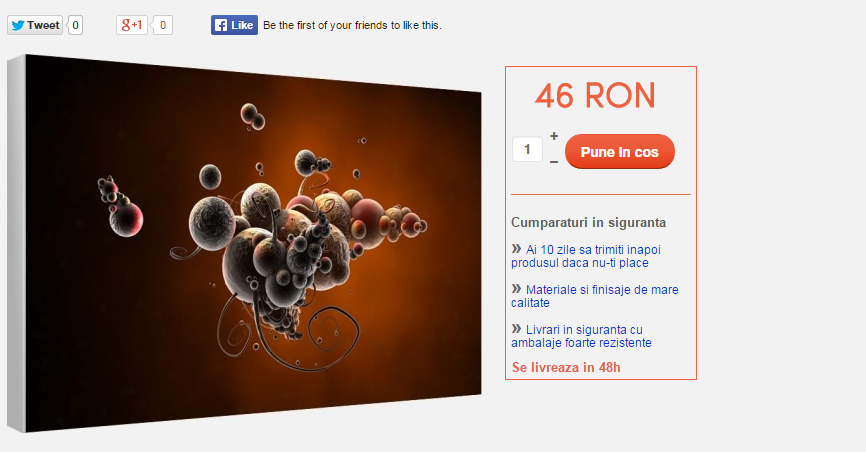
If you go to domain/abstract and click on any product you will only see the picture of the product and the Add to cart box.
If you go to domain/anime and click on any product, between the picture and the add to cart product you will see all the options/variants of the product.
All the categories that you see on the left side menu work well except the abstract category.
I don't know what happened, everything was working ok. I just thought I'd do some work today on it and realised the Abstract category isn't working properly.
Also, I went to the backend and clicked on a product in the abstract category and then clicked on Manage Variants and a message appears:
Message
Successfully Saved
And then nothing else besides the backend hikashop menu bar. It's white under that bar.
The products in other categories work fine - just this category is weird.
Please help me sort this out.
Thank you!
Normal with variants:
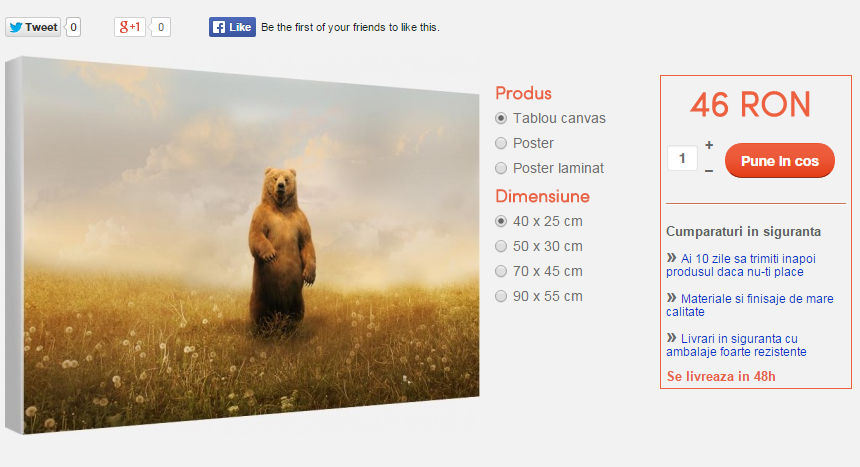
Abstract category product - Missing variants
-- Joomla version -- : 3.4.0
-- Browser(s) name and version -- : Chrome, Firefox
-- Error-message(debug-mod must be tuned on) -- : There are no errors
Hello,
If you go to domain/abstract and click on any product you will only see the picture of the product and the Add to cart box.
If you go to domain/anime and click on any product, between the picture and the add to cart product you will see all the options/variants of the product.
All the categories that you see on the left side menu work well except the abstract category.
I don't know what happened, everything was working ok. I just thought I'd do some work today on it and realised the Abstract category isn't working properly.
Also, I went to the backend and clicked on a product in the abstract category and then clicked on Manage Variants and a message appears:
Message
Successfully Saved
And then nothing else besides the backend hikashop menu bar. It's white under that bar.
The products in other categories work fine - just this category is weird.
Please help me sort this out.
Thank you!
Normal with variants:
Abstract category product - Missing variants
Please Log in or Create an account to join the conversation.

11 years 7 months ago #194755
by nicolas
Replied by nicolas on topic In 1 category the products variants column is gone
Hi,
I don't know what happened but all indicates that the variants and/or characteristics of the products of that category were deleted.
It could have been done manually, but if it is for all the products of a category, then it's more likely to come from an automated process like a mass action. So check whether you have configured mass actions via the menu System>Mass actions which could generate such problem.
The solution will be to add back the characteristics to the products of the category.
I don't know what happened but all indicates that the variants and/or characteristics of the products of that category were deleted.
It could have been done manually, but if it is for all the products of a category, then it's more likely to come from an automated process like a mass action. So check whether you have configured mass actions via the menu System>Mass actions which could generate such problem.
The solution will be to add back the characteristics to the products of the category.
Please Log in or Create an account to join the conversation.
11 years 7 months ago #195828
by lex131
Replied by lex131 on topic In 1 category the products variants column is gone
Hello again,
I have used Mass Actions to erase a lot of thousands of products. And i erased them using the product code, the main code of the product, i don't even have the codes for all the variants.
And I did not erase products one category at a time, I erased them using 10.000 codes at a time, so across many categories at once.
This is a screen shot of the Characteristics tab of the product:
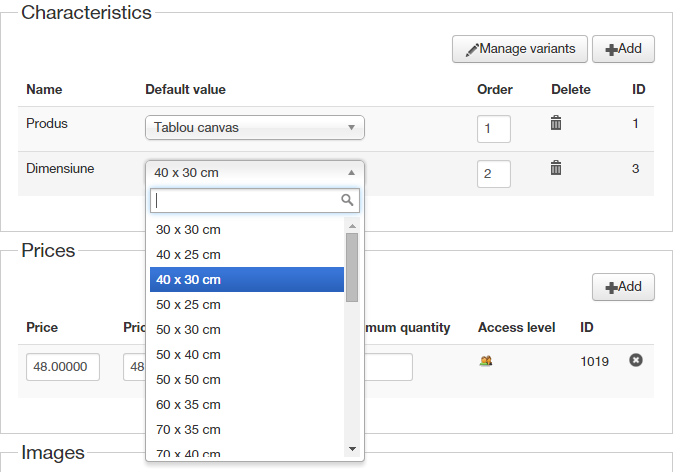
And when I click on Manage Variants this is what appears
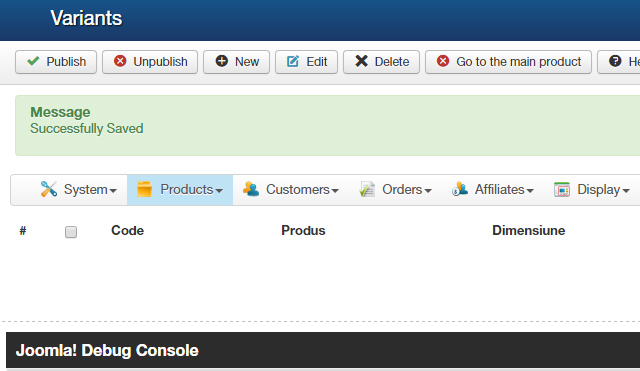
This kind of looks wierd to me. I can see the characteristics but when I click on Manage Variants that message of Succesfully saved appears and no variants. There must be some kind of mixup somewhere.
The "add the variants again" advice is easier said than done. There are 200+ products with around 10-15 variants and I don't have a backup of the way I created the variants (quite some time ago).
Please help!
I have used Mass Actions to erase a lot of thousands of products. And i erased them using the product code, the main code of the product, i don't even have the codes for all the variants.
And I did not erase products one category at a time, I erased them using 10.000 codes at a time, so across many categories at once.
This is a screen shot of the Characteristics tab of the product:
And when I click on Manage Variants this is what appears
This kind of looks wierd to me. I can see the characteristics but when I click on Manage Variants that message of Succesfully saved appears and no variants. There must be some kind of mixup somewhere.
The "add the variants again" advice is easier said than done. There are 200+ products with around 10-15 variants and I don't have a backup of the way I created the variants (quite some time ago).
Please help!
Please Log in or Create an account to join the conversation.
11 years 7 months ago #195838
by nicolas
Replied by nicolas on topic In 1 category the products variants column is gone
Hi,
If the variants have been deleted, they have been deleted. Otherwise, they would show on the variants listing of the product that is displayed when you click on the "manage variants" button.
If you have the "automatically generate variants" option of the HikaShop configuration activated, you can get the variants regenerated automatically. But that will still require reconfiguring the variants.
The only effective solution here would be to extract the hikashop_characteristic/hikashop_product/hikashop_variant tables from a backup from before they were deleted in order to get back the variants data.
If the variants have been deleted, they have been deleted. Otherwise, they would show on the variants listing of the product that is displayed when you click on the "manage variants" button.
If you have the "automatically generate variants" option of the HikaShop configuration activated, you can get the variants regenerated automatically. But that will still require reconfiguring the variants.
The only effective solution here would be to extract the hikashop_characteristic/hikashop_product/hikashop_variant tables from a backup from before they were deleted in order to get back the variants data.
Please Log in or Create an account to join the conversation.
Less
More
- Posts: 1
- Thank you received: 0
11 years 4 months ago #204889
by paltinoweb
Replied by paltinoweb on topic In 1 category the products variants column is gone
Hello:
We are going to start a project using Hikashop for 100.000 productos. Can you send us your shop url .
Thanks
Carlos Arango
We are going to start a project using Hikashop for 100.000 productos. Can you send us your shop url .
Thanks
Carlos Arango
Please Log in or Create an account to join the conversation.
Time to create page: 0.218 seconds