

- Posts: 78
- Thank you received: 0
Cant attach files for download
11 years 6 months ago #195792
by 121261
Cant attach files for download was created by 121261
-- HikaShop version -- : 2.4.0
-- Joomla version -- : 3.4.0
Hi
trying to attach files for download. Clicking ok just gives a white window box, and nothing happens..
Please advise and help
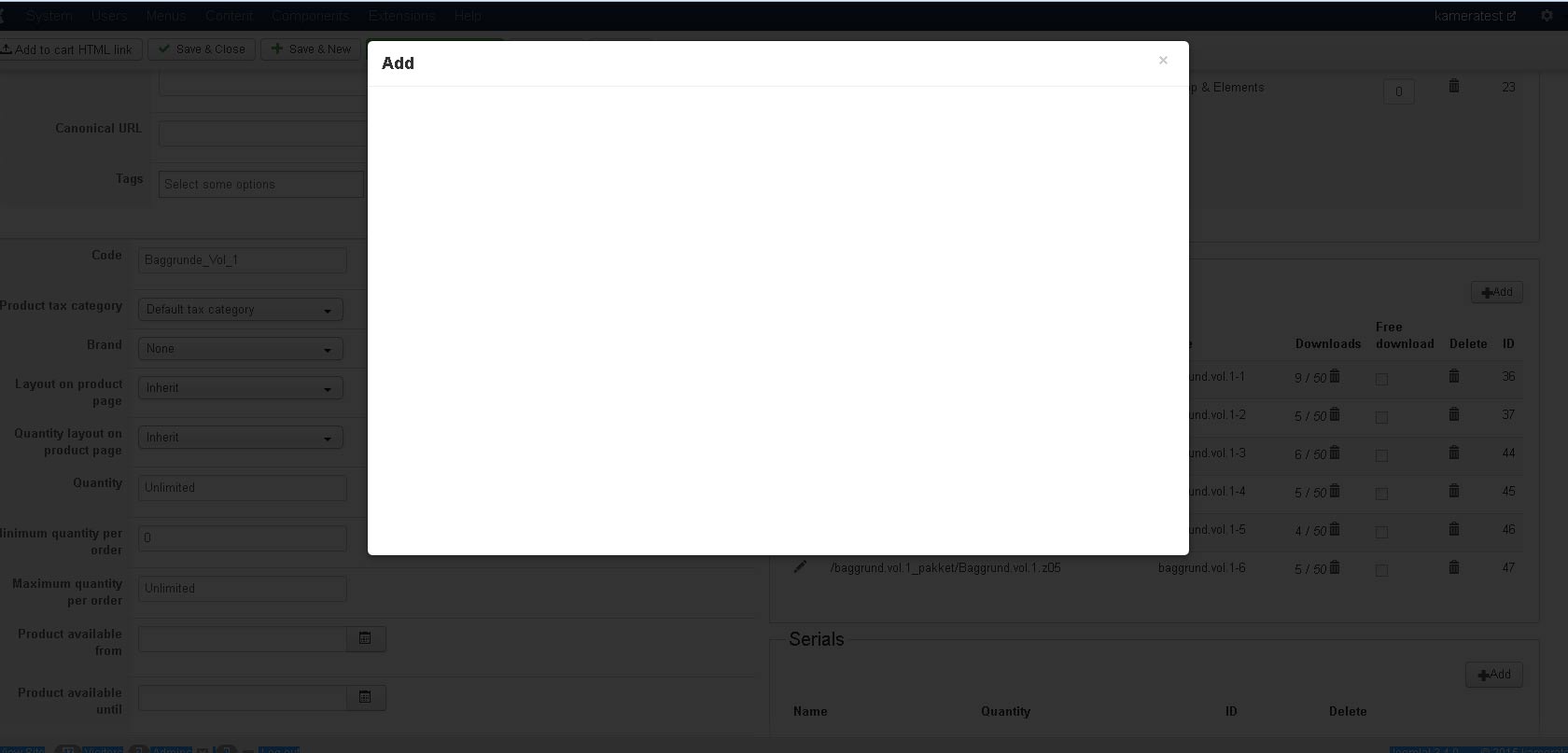
regards
Bison
-- Joomla version -- : 3.4.0
Hi
trying to attach files for download. Clicking ok just gives a white window box, and nothing happens..
Please advise and help
regards
Bison
Please Log in or Create an account to join the conversation.

11 years 6 months ago #195794
by Jerome
Jerome - Obsidev.com
HikaMarket & HikaSerial developer / HikaShop core dev team.
Replied by Jerome on topic Cant attach files for download
Hi,
Would it be possible to have more details about what you are trying to do to attach files for download.
In a previous version of HikaShop, we introduced some new security for attachment so now it will refuse some files which are not in your "upload path" or in your Joomla website path.
But it still accept the upload, the http links, etc.
Regards,
Would it be possible to have more details about what you are trying to do to attach files for download.
In a previous version of HikaShop, we introduced some new security for attachment so now it will refuse some files which are not in your "upload path" or in your Joomla website path.
But it still accept the upload, the http links, etc.
Regards,
Jerome - Obsidev.com
HikaMarket & HikaSerial developer / HikaShop core dev team.
Please Log in or Create an account to join the conversation.
11 years 6 months ago - 11 years 6 months ago #195865
by 121261
Replied by 121261 on topic Cant attach files for download
Hi Jerome
I click on "Add" to select a file for download
I select the file and press "OK"
When doing so the the popup just turns white and nothing happens.
Just as the picture above.
Upload path is fine -
This error just happen with the upgrade to latest version
regards
Bison
I click on "Add" to select a file for download
I select the file and press "OK"
When doing so the the popup just turns white and nothing happens.
Just as the picture above.
Upload path is fine -
This error just happen with the upgrade to latest version
regards
Bison
Last edit: 11 years 6 months ago by 121261.
Please Log in or Create an account to join the conversation.

11 years 6 months ago #195874
by nicolas
Replied by nicolas on topic Cant attach files for download
Hi,
So you mean that it happens all the time, regardless of the name of the file or the content of the file ?
Could try again with the "debug mode" and "error reporting" options of the Joomla configuration activated ?
Do you get any error message on the popup at that point ? If so, what is the exact message ?
So you mean that it happens all the time, regardless of the name of the file or the content of the file ?
Could try again with the "debug mode" and "error reporting" options of the Joomla configuration activated ?
Do you get any error message on the popup at that point ? If so, what is the exact message ?
Please Log in or Create an account to join the conversation.
11 years 6 months ago #195941
by 121261
Replied by 121261 on topic Cant attach files for download
Yes it happens, regardless of the file or the filetype, no message what so ever.
Please advise where to send admin credentials, because something is wrong with the latest hikashop....
regards
Bison
Please advise where to send admin credentials, because something is wrong with the latest hikashop....
regards
Bison
Please Log in or Create an account to join the conversation.
11 years 6 months ago #195954
by Jerome
Jerome - Obsidev.com
HikaMarket & HikaSerial developer / HikaShop core dev team.
Replied by Jerome on topic Cant attach files for download
Hi,
Regards,
"contact us" form, with a link to that thread (otherwise we won't understand why we received some credentials and what to do with them).Please advise where to send admin credentials,
Regards,
Jerome - Obsidev.com
HikaMarket & HikaSerial developer / HikaShop core dev team.
Please Log in or Create an account to join the conversation.
11 years 6 months ago #195961
by 121261
Replied by 121261 on topic Cant attach files for download
admin credentials has been send.
regards
Bison
regards
Bison
Please Log in or Create an account to join the conversation.
11 years 6 months ago #195994
by nicolas
Replied by nicolas on topic Cant attach files for download
Hi,
I did a test on your website and I was able to upload a file without any issue: take.ms/PKOSd
So I suppose that your issue is something else. Like the size of the file you're uploading which is too big, or the format of the file which is not valid, or something like that.
I did a test on your website and I was able to upload a file without any issue: take.ms/PKOSd
So I suppose that your issue is something else. Like the size of the file you're uploading which is too big, or the format of the file which is not valid, or something like that.
Please Log in or Create an account to join the conversation.
11 years 6 months ago #196013
by 121261
Replied by 121261 on topic Cant attach files for download
Hi Nicolas
I didnt say anything about uploading. !!!!
I know I can upload (tried that), but our files is so big, that we upload the files via FTP, and then go to products and select the file.
THATS THE ERROR. -
YOU CANT SELECT A FILE
.....please see above as i described the problem.
Please advise and help.
regards
Bison
I didnt say anything about uploading. !!!!
I know I can upload (tried that), but our files is so big, that we upload the files via FTP, and then go to products and select the file.
THATS THE ERROR. -
YOU CANT SELECT A FILE
.....please see above as i described the problem.
Please advise and help.
regards
Bison
Please Log in or Create an account to join the conversation.
11 years 6 months ago #196017
by Jerome
Jerome - Obsidev.com
HikaMarket & HikaSerial developer / HikaShop core dev team.
Replied by Jerome on topic Cant attach files for download
Hi,
That's why I wrote this message
When I asked you some details about what you are doing ; I didn't expect to have "click on ok button" ; but having details of what you enter for the data and where is the file, what is your upload path, etc.
When you said
So even if you did not mentioned the "upload", the processed you described made us think that you were uploading files ; because that's the only logical though possible regarding the previous questions and your answers.
The best know will be to answer to my previous question, with some useful details about the file, the path and your configuration.
Regards,
That's why I wrote this message
Would it be possible to have more details about what you are trying to do to attach files for download.
In a previous version of HikaShop, we introduced some new security for attachment so now it will refuse some files which are not in your "upload path" or in your Joomla website path.
But it still accept the upload, the http links, etc.
When I asked you some details about what you are doing ; I didn't expect to have "click on ok button" ; but having details of what you enter for the data and where is the file, what is your upload path, etc.
When you said
I'm sorry but it means that you upload a file, not that you entered a file path.I select the file and press "OK"
So even if you did not mentioned the "upload", the processed you described made us think that you were uploading files ; because that's the only logical though possible regarding the previous questions and your answers.
The best know will be to answer to my previous question, with some useful details about the file, the path and your configuration.
Regards,
Jerome - Obsidev.com
HikaMarket & HikaSerial developer / HikaShop core dev team.
Please Log in or Create an account to join the conversation.
11 years 6 months ago #196071
by 121261
Replied by 121261 on topic Cant attach files for download
Hi Jerome
Details:
trying to attach a file, allready uploaded to directory
Clicking "add"
popup opens
Set file mode to "Specify file location"
setting file path
clicking ok
popup box turns white and nothing happens
Configuration:
Allowed files zip,doc,docx,pdf,xls,txt,gz,gzip,rar,jpg,gif,tar.gz,xlsx,pps,csv,bmp,epg,ico,odg,odp,ods,odt,png,ppt,swf,xcf,wmv,avi,mkv,mp3,ogg,flac,wma,fla,flv,mp4,wav,aac,mov,epub,gsd
Upload secure folder
media/com_hikashop/upload/safe/
have tried both with ZIP files and RAR files
Please advise and help
Bison
Details:
trying to attach a file, allready uploaded to directory
Clicking "add"
popup opens
Set file mode to "Specify file location"
setting file path
clicking ok
popup box turns white and nothing happens
Configuration:
Allowed files zip,doc,docx,pdf,xls,txt,gz,gzip,rar,jpg,gif,tar.gz,xlsx,pps,csv,bmp,epg,ico,odg,odp,ods,odt,png,ppt,swf,xcf,wmv,avi,mkv,mp3,ogg,flac,wma,fla,flv,mp4,wav,aac,mov,epub,gsd
Upload secure folder
media/com_hikashop/upload/safe/
have tried both with ZIP files and RAR files
Please advise and help
Bison
Please Log in or Create an account to join the conversation.
11 years 6 months ago #196075
by Jerome
Jerome - Obsidev.com
HikaMarket & HikaSerial developer / HikaShop core dev team.
Replied by Jerome on topic Cant attach files for download
Hi,
Sorry, it still does not answer to my question.
So can you please tell us what location you specified ?
Like I already wrote twice
Regards,
Sorry, it still does not answer to my question.
So can you please tell us what location you specified ?
Like I already wrote twice
It means that your issue is related to the path you specified for the file ; not the extension or the size, just the path and only that.In a previous version of HikaShop, we introduced some new security for attachment so now it will refuse some files which are not in your "upload path" or in your Joomla website path.
Regards,
Jerome - Obsidev.com
HikaMarket & HikaSerial developer / HikaShop core dev team.
Please Log in or Create an account to join the conversation.
11 years 6 months ago #196128
by 121261
Replied by 121261 on topic Cant attach files for download
It cant attach files that are in this path
media/com_hikashop/upload/safe/
or any sub directories here of...
I`ll guess the reason for the safe dir, is that you can put your files in there to make them protected, right.
I`ve done what the doc and the admin screen asks me too.
I`m not gonna put out our dir names here on the fora, but I can send it to you,
or
this could probely have been solved a long time ago, if you had just asked for ftp access.
its NOT the first time, that hikashop dont work as is - the last time, you also had to correct some files via ftp..
KINDLY - say what you need, so we can get this fixed NOW......
Bison
media/com_hikashop/upload/safe/
or any sub directories here of...
I`ll guess the reason for the safe dir, is that you can put your files in there to make them protected, right.
I`ve done what the doc and the admin screen asks me too.
I`m not gonna put out our dir names here on the fora, but I can send it to you,
or
this could probely have been solved a long time ago, if you had just asked for ftp access.
its NOT the first time, that hikashop dont work as is - the last time, you also had to correct some files via ftp..
KINDLY - say what you need, so we can get this fixed NOW......
Bison
Please Log in or Create an account to join the conversation.
11 years 6 months ago #196162
by nicolas
Replied by nicolas on topic Cant attach files for download
Hi,
That's the path of your upload folder. What we wanted to know is an example of what you entered in the "path" field of the popup so that we could reproduce the problem.
As you didn't provide it yet, I went ahead and did a test with a random relative path test_hikashop.zip and was finally able to get the issue on your website.
A FTP access can be great when there is a problem that we are able to reproduce on your website but not on our end. So far, we were not able to see the problem on your website and not on our end either so a FTP access wouldn't have helped or made it faster. What we needed was a precise explanation of how to reproduce the problem.
So now that I knew how to reproduce the issue on your website, I went and tried to reproduce the issue on a test server on our end and found out that the issue was there too. So I actually made a patch and fixed the issue on our end and we generated a new build of the release with the patch included.
Now, you can download the install package via the menu My account>My subscriptions on our website and install it on yours and that will add the patch so you won't have the problem anymore.
That's the path of your upload folder. What we wanted to know is an example of what you entered in the "path" field of the popup so that we could reproduce the problem.
As you didn't provide it yet, I went ahead and did a test with a random relative path test_hikashop.zip and was finally able to get the issue on your website.
A FTP access can be great when there is a problem that we are able to reproduce on your website but not on our end. So far, we were not able to see the problem on your website and not on our end either so a FTP access wouldn't have helped or made it faster. What we needed was a precise explanation of how to reproduce the problem.
So now that I knew how to reproduce the issue on your website, I went and tried to reproduce the issue on a test server on our end and found out that the issue was there too. So I actually made a patch and fixed the issue on our end and we generated a new build of the release with the patch included.
Now, you can download the install package via the menu My account>My subscriptions on our website and install it on yours and that will add the patch so you won't have the problem anymore.
Please Log in or Create an account to join the conversation.
Time to create page: 0.300 seconds