
- Posts: 16
- Thank you received: 0
fixed text on every product page
- bertdynamica
-
 Topic Author
- Offline
Less
More
11 years 6 months ago #196426
by bertdynamica
fixed text on every product page was created by bertdynamica
-- HikaShop version -- : 2.4.0
-- Joomla version -- : 3.4.1
-- PHP version -- : 5.6.3
-- Browser(s) name and version -- : Google Chrome Versie 41.0.2272.101 m
Hello,
I want to display fixed line of text on every product page instead of the button to ask a question. The line of txt will be "Voor meer informatie over dit product bel: +31(0)6 53 347 314" (for more information about this product call....).
The button ask a question led on the current site led to spam, so I had to disable it. If I can use the button on the new site, I want to enable recaptcha.
How can I achieve this?
Greetz,
Bert
-- Joomla version -- : 3.4.1
-- PHP version -- : 5.6.3
-- Browser(s) name and version -- : Google Chrome Versie 41.0.2272.101 m
Hello,
I want to display fixed line of text on every product page instead of the button to ask a question. The line of txt will be "Voor meer informatie over dit product bel: +31(0)6 53 347 314" (for more information about this product call....).
The button ask a question led on the current site led to spam, so I had to disable it. If I can use the button on the new site, I want to enable recaptcha.
How can I achieve this?
Greetz,
Bert
Please Log in or Create an account to join the conversation.

Less
More
- Posts: 12953
- Thank you received: 1778
11 years 6 months ago #196433
by Mohamed Thelji
Replied by Mohamed Thelji on topic fixed text on every product page
Hello,
You can add it :
- Through your product description
- Through a product custom field
- By directly editing the "show_default" file of the "product" view of your front-end template via "Hikashop->Display->Views"
You can add it :
- Through your product description
- Through a product custom field
- By directly editing the "show_default" file of the "product" view of your front-end template via "Hikashop->Display->Views"
Please Log in or Create an account to join the conversation.
- bertdynamica
-
Topic Author
- Offline
Less
More
- Posts: 16
- Thank you received: 0
11 years 6 months ago #196663
by bertdynamica
Replied by bertdynamica on topic fixed text on every product page
Hai there,
Thanks for the answer. And now the inevitable follow-up question.
I want to add the text by directly editing the "show_default" file of the "product" view of your front-end template via "Hikashop->Display->Views" but and don't know which code lines to use. Can you help me out with this?
Greetz, Bert
Thanks for the answer. And now the inevitable follow-up question.
I want to add the text by directly editing the "show_default" file of the "product" view of your front-end template via "Hikashop->Display->Views" but and don't know which code lines to use. Can you help me out with this?
Greetz, Bert
Please Log in or Create an account to join the conversation.
Less
More
- Posts: 12953
- Thank you received: 1778
11 years 6 months ago #196669
by Mohamed Thelji
Replied by Mohamed Thelji on topic fixed text on every product page
Where on your product page do you exactly want to display that text ?
Please Log in or Create an account to join the conversation.
- bertdynamica
-
Topic Author
- Offline
Less
More
- Posts: 16
- Thank you received: 0
11 years 6 months ago - 11 years 6 months ago #196743
by bertdynamica
Replied by bertdynamica on topic fixed text on every product page
Hi Mohamed,
The extact place would be: under
and above
I will deactivate the button whereby the code of the button will disappear
I hope this is specific enough.
Greetz, Bert
The extact place would be: under
Code:
<span id="hikashop_product_price_with_options_main" class="hikashop_product_price_with_options_main"> </span>
and above
Code:
<div id="hikashop_product_quantity_main" class="hikashop_product_quantity_main"> </div>
I will deactivate the button whereby the code of the button will disappear
Code:
<div id="hikashop_product_contact_main" class="hikashop_product_contact_main">
<input type="submit" class=" button hikashop_cart_input_button" name="contact_us" value="Contacteer ons voor meer informatie" onclick="var field=document.getElementById('hikashop_product_quantity_field_1');window.location='/index.php/hikashop-menu-for-module-103/product/contact/cid-188';return false;">
</div>
I hope this is specific enough.
Greetz, Bert
Last edit: 11 years 6 months ago by bertdynamica.
Please Log in or Create an account to join the conversation.

11 years 6 months ago #196751
by Xavier
Replied by Xavier on topic fixed text on every product page
Hi,
So in the view "product /show_default", you have to add you code just before:
And you can use code like:
So in the view "product /show_default", you have to add you code just before:
Code:
if(empty ($this->element->characteristics) || $this->params->get('characteristic_display')!='list'){ ?>
And you can use code like:
Code:
echo "Voor meer informatie over dit product bel: +31(0)6 53 347 314";
Please Log in or Create an account to join the conversation.
- bertdynamica
-
Topic Author
- Offline
Less
More
- Posts: 16
- Thank you received: 0
11 years 6 months ago #196847
by bertdynamica
Replied by bertdynamica on topic fixed text on every product page
Hi,
I entered the code in the file you mentioned, but it didn't show up.
Do you have an idea what I did wrong?
Greetz,
Bert
I entered the code in the file you mentioned, but it didn't show up.
Code:
<span id="hikashop_product_price_with_options_main" class="hikashop_product_price_with_options_main">
</span>
<?php }
echo "Voor meer informatie over dit product bel: +31(0)6 53 347 314";
if(empty ($this->element->characteristics) || $this->params->get('characteristic_display')!='list'){ ?>
<div id="hikashop_product_quantity_main" class="hikashop_product_quantity_main">
Do you have an idea what I did wrong?
Greetz,
Bert
Please Log in or Create an account to join the conversation.

11 years 6 months ago #196864
by Jerome
Jerome - Obsidev.com
HikaMarket & HikaSerial developer / HikaShop core dev team.
Replied by Jerome on topic fixed text on every product page
Hi,
Please be sure that you're editing the view for the right front-end template.
www.hikashop.com/support/support/documen...ize-the-display.html
Regards,
Please be sure that you're editing the view for the right front-end template.
www.hikashop.com/support/support/documen...ize-the-display.html
Regards,
Jerome - Obsidev.com
HikaMarket & HikaSerial developer / HikaShop core dev team.
Please Log in or Create an account to join the conversation.
- bertdynamica
-
Topic Author
- Offline
Less
More
- Posts: 16
- Thank you received: 0
11 years 6 months ago #196924
by bertdynamica
Replied by bertdynamica on topic fixed text on every product page
Hi,
I'm pretty sure that I edit the correct file
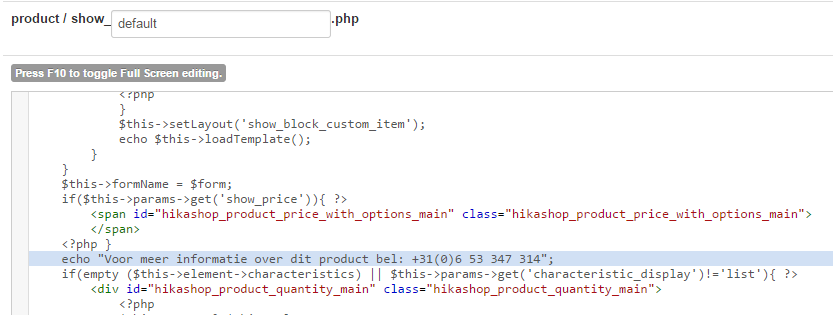

Any ideas?
Greetz, Bert
I'm pretty sure that I edit the correct file
Any ideas?
Greetz, Bert
Please Log in or Create an account to join the conversation.

11 years 6 months ago #196926
by nicolas
Replied by nicolas on topic fixed text on every product page
Hi,
Then either you have some caching on your website (so clear your website cache) or you're using another product layout than the "default" one (so check that option of the configuration and your product).
Then either you have some caching on your website (so clear your website cache) or you're using another product layout than the "default" one (so check that option of the configuration and your product).
Please Log in or Create an account to join the conversation.
- bertdynamica
-
Topic Author
- Offline
Less
More
- Posts: 16
- Thank you received: 0
11 years 6 months ago - 11 years 6 months ago #197164
by bertdynamica
Replied by bertdynamica on topic fixed text on every product page
Hi,
Gotcha!
With default parameters for products (Configuration > display > standard parameters for products > layout on product page) I do not use standard but reversed.
It appears that the sentence I want to display only shows if the option is 'Standard'.
Is it possible to display this sentence I want to use if the option is "reverse"?
Thank you!
Greetz, Bert
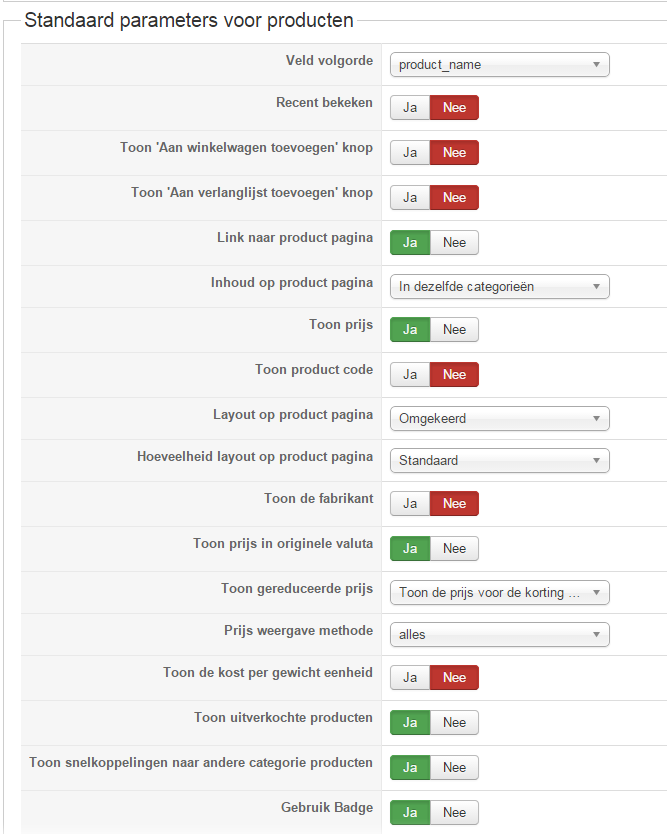
Gotcha!
With default parameters for products (Configuration > display > standard parameters for products > layout on product page) I do not use standard but reversed.
It appears that the sentence I want to display only shows if the option is 'Standard'.
Is it possible to display this sentence I want to use if the option is "reverse"?
Thank you!
Greetz, Bert
Last edit: 11 years 6 months ago by bertdynamica.
Please Log in or Create an account to join the conversation.
11 years 6 months ago #197179
by nicolas
Replied by nicolas on topic fixed text on every product page
Hi,
In that case you need to do the same modification but in the file "show_reversed" instead of the file "show_default".
In that case you need to do the same modification but in the file "show_reversed" instead of the file "show_default".
The following user(s) said Thank You: bertdynamica
Please Log in or Create an account to join the conversation.
- bertdynamica
-
Topic Author
- Offline
Less
More
- Posts: 16
- Thank you received: 0
11 years 6 months ago #197211
by bertdynamica
Replied by bertdynamica on topic fixed text on every product page
Hi HikaShop team,
Thanks for the reply. My problem for this topic is solved.
Greetz and see you at the next challenge!
Bert
Thanks for the reply. My problem for this topic is solved.
Greetz and see you at the next challenge!
Bert
Please Log in or Create an account to join the conversation.
Time to create page: 0.445 seconds