
Product images overlaps prices in mobile view

11 years 6 months ago #199983
by ertmania
ertmania.dk - Elektronik-produkter - gaver til børn
Product images overlaps prices in mobile view was created by ertmania
-- url of the page with the problem -- :
ertmania.dk
-- Joomla version -- : 3.4.4
-- PHP version -- : 5.6.0.
-- Browser(s) name and version -- : Chrome
I have read several posts reminding of this, but not exactly what I need.
Could we take this issue once more, please?
When I look at a product on a mobile phone, the image is too large and overlaps the price an quantity field.
How do I fix this?
And please be specific about files and folders.
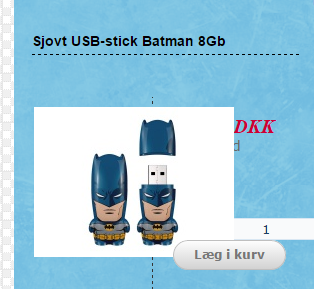
-- Joomla version -- : 3.4.4
-- PHP version -- : 5.6.0.
-- Browser(s) name and version -- : Chrome
I have read several posts reminding of this, but not exactly what I need.
Could we take this issue once more, please?
When I look at a product on a mobile phone, the image is too large and overlaps the price an quantity field.
How do I fix this?
And please be specific about files and folders.
ertmania.dk - Elektronik-produkter - gaver til børn
Please Log in or Create an account to join the conversation.
11 years 6 months ago #200025
by ertmania
ertmania.dk - Elektronik-produkter - gaver til børn
Replied by ertmania on topic Product images overlaps prices in mobile view
I know I can change the product image size in the configuration > images, but iff make the size smaller, the desktop view image is too small
ertmania.dk - Elektronik-produkter - gaver til børn
Please Log in or Create an account to join the conversation.

11 years 6 months ago #200027
by nicolas
Replied by nicolas on topic Product images overlaps prices in mobile view
Hi,
That's normal. The elements are not responsive.
There are two ways to make them responsive:
1. You turn on the "use bootstrap design" setting of the hikashop configuration but this can only work if your template is compatible with bootstrap 2, and looking at your pages, it doesn't seem to be the case, so that won't work.
2. You add custom CSS to your template in order to make these elements responsive. To do that, you can use @media CSS queries in the frontend CSS file of HikaShop.
For example, for your product page, you can add such CSS:
How to add that CSS to your template will depend on your template so it's best to ask them but here is a generic tutorial:
www.htmlgoodies.com/beyond/webmaster/too...h-css-in-joomla.html
That's normal. The elements are not responsive.
There are two ways to make them responsive:
1. You turn on the "use bootstrap design" setting of the hikashop configuration but this can only work if your template is compatible with bootstrap 2, and looking at your pages, it doesn't seem to be the case, so that won't work.
2. You add custom CSS to your template in order to make these elements responsive. To do that, you can use @media CSS queries in the frontend CSS file of HikaShop.
For example, for your product page, you can add such CSS:
Code:
@media (max-width: 780px) {
#hikashop_product_left_part, #hikashop_product_right_part{ width: 100% !important; }
}
www.htmlgoodies.com/beyond/webmaster/too...h-css-in-joomla.html
Please Log in or Create an account to join the conversation.
11 years 5 months ago #200164
by ertmania
ertmania.dk - Elektronik-produkter - gaver til børn
Replied by ertmania on topic Product images overlaps prices in mobile view
Hi, Nicolas.
Thank you for your awesome support. Even if you don't have answers for everything, I think your support is unique.
I got this code from Artisteer which my template is made from:
.responsive .hikashop_product_main_image div
{
width:100%!important;
}
I inserted in template.css. Maybe you can pass it on to other asking the same.
Allan
Thank you for your awesome support. Even if you don't have answers for everything, I think your support is unique.
I got this code from Artisteer which my template is made from:
.responsive .hikashop_product_main_image div
{
width:100%!important;
}
I inserted in template.css. Maybe you can pass it on to other asking the same.
Allan
ertmania.dk - Elektronik-produkter - gaver til børn
The following user(s) said Thank You: nicolas, upstategirl
Please Log in or Create an account to join the conversation.
Time to create page: 0.172 seconds