

- Posts: 6
- Thank you received: 0
Need exact layout and image packaging options
11 years 5 months ago #200524
by ravinder
Need exact layout and image packaging options was created by ravinder
-- HikaShop version -- : 2.3.4
-- Joomla version -- : 3.4.1
-- PHP version -- : 5.3
-- Browser(s) name and version -- : Chrome
I want to setup my product details page like currently showing into private url.
It don't have product details section just image and description then it has main option to choose for customer.
customer can click on right side options and image of product also changed.
Please let me know how I can adopt this layout and functionality into my website.
thanks
-- Joomla version -- : 3.4.1
-- PHP version -- : 5.3
-- Browser(s) name and version -- : Chrome
I want to setup my product details page like currently showing into private url.
It don't have product details section just image and description then it has main option to choose for customer.
customer can click on right side options and image of product also changed.
Please let me know how I can adopt this layout and functionality into my website.
thanks
Please Log in or Create an account to join the conversation.

11 years 5 months ago #200566
by nicolas
Replied by nicolas on topic Need exact layout and image packaging options
Hi,
You can do that with a characteristic:
www.hikashop.com/support/documentation/i...html#characteristics
That will allow you to have a selection mechanism on the product page with the image/price/etc that updates automatically like on your link.
You can do that with a characteristic:
www.hikashop.com/support/documentation/i...html#characteristics
That will allow you to have a selection mechanism on the product page with the image/price/etc that updates automatically like on your link.
Please Log in or Create an account to join the conversation.
11 years 5 months ago #200589
by ravinder
Replied by ravinder on topic Need exact layout and image packaging options
HI
Can this possible with Hikashop starter component ?
I am facing issues while adding variant and value.
It showing as Label price in dropdown.
and How can I adjust image with variant.
Is there any video tutorial to add characteristics ?
Please let me know . Thanks in advance.
Can this possible with Hikashop starter component ?
I am facing issues while adding variant and value.
It showing as Label price in dropdown.
and How can I adjust image with variant.
Is there any video tutorial to add characteristics ?
Please let me know . Thanks in advance.
Please Log in or Create an account to join the conversation.

11 years 5 months ago #200591
by Jerome
Jerome - Obsidev.com
HikaMarket & HikaSerial developer / HikaShop core dev team.
Replied by Jerome on topic Need exact layout and image packaging options
Hi,
Yes the characteristics are available in HikaShop starter ; so it is possible.
We do not have yet video tutorial for characteristics but it will come.
You can take a look at the tutorial "display by color", it should help you.
www.hikashop.com/support/support/documen...isplay-by-color.html
Regards,
Yes the characteristics are available in HikaShop starter ; so it is possible.
We do not have yet video tutorial for characteristics but it will come.
You can take a look at the tutorial "display by color", it should help you.
www.hikashop.com/support/support/documen...isplay-by-color.html
Regards,
Jerome - Obsidev.com
HikaMarket & HikaSerial developer / HikaShop core dev team.
Please Log in or Create an account to join the conversation.
11 years 5 months ago #200779
by ravinder
Replied by ravinder on topic Need exact layout and image packaging options
Thanks for your help and quick reply.
However I want to know how to disable product detail section that is by default showing on product detail page
with having values like size , brand categories.
Is there any way to hide these values except css.
Second How use move charactestic section to move up at center of page as in my case its showing after add and order input box.
Does this also need css to move up or is there any other way to place it under title then characterstic options then add and quantity buttons
Please let me know I am very close to complete this.
However I want to know how to disable product detail section that is by default showing on product detail page
with having values like size , brand categories.
Is there any way to hide these values except css.
Second How use move charactestic section to move up at center of page as in my case its showing after add and order input box.
Does this also need css to move up or is there any other way to place it under title then characterstic options then add and quantity buttons
Please let me know I am very close to complete this.
Please Log in or Create an account to join the conversation.
11 years 5 months ago #200781
by nicolas
Replied by nicolas on topic Need exact layout and image packaging options
Hi,
1. Which area are you talking about ? Could you give a link to the page and a screenshot of the area you're talking about ?
2. Again, we would need to look at what you have at the moment to be able to tell you what to do.
1. Which area are you talking about ? Could you give a link to the page and a screenshot of the area you're talking about ?
2. Again, we would need to look at what you have at the moment to be able to tell you what to do.
Please Log in or Create an account to join the conversation.
11 years 5 months ago #200809
by ravinder
Replied by ravinder on topic Need exact layout and image packaging options
I have attached screen shot of product detail page. Please have a look.
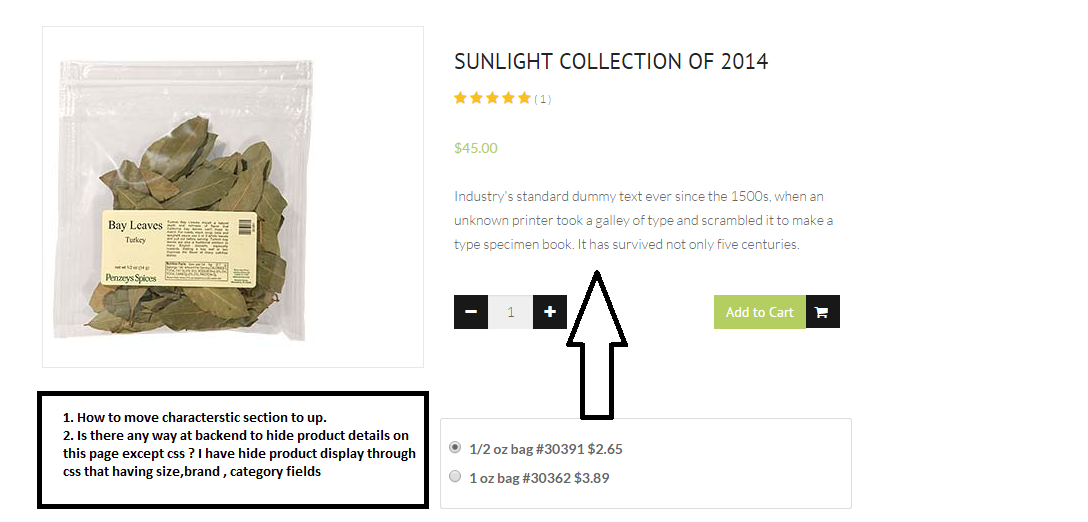
In above image I have hide product detail section that having size , categories and brand fields.
I have tried to disable it from backend but unable to hide it. The label of these fields are showing even these are empty.
Please suggest how to hide this except css , how to move characterstic section between title and add button.
Also please explain the behavior or list option in characterstic section as it just showing values in table format with add buttons only.
Thanks in advance
In above image I have hide product detail section that having size , categories and brand fields.
I have tried to disable it from backend but unable to hide it. The label of these fields are showing even these are empty.
Please suggest how to hide this except css , how to move characterstic section between title and add button.
Also please explain the behavior or list option in characterstic section as it just showing values in table format with add buttons only.
Thanks in advance
Please Log in or Create an account to join the conversation.
11 years 5 months ago #200841
by nicolas
Replied by nicolas on topic Need exact layout and image packaging options
Hi,
1. The characteristics area is already displayed where you want it by default in HikaShop.
So this means that either you modified it or your Joomla template has a view override of the product page doing that.
I would recommend to contact your template provider so that they can provide guidance on that as I don't know what kind of modifications they did to the view to get that result.
2. There is probably. If you don't fill custom fields, they won't display on the page and the category is not displayed by HikaShop by default on the page. If they do, I'm thinking that it might also be related to the override of your template.
3. The list display option of the characteristics will remove the characteristics selection and the normal add to cart areas on the product page. Instead, it will add a listing of all the variants of the product at the bottom, each one with the possibility to add the variant to the cart. This allows for a different use of the characteristics. There is for example the possibility to have one general add to cart button with each element of a listing with its own quantity input on listings in HikaShop. If you activate that option, then it will do that to the variants listing to allowing you to add several variants at the same time on the product page which can be pretty efficient for some use cases.
1. The characteristics area is already displayed where you want it by default in HikaShop.
So this means that either you modified it or your Joomla template has a view override of the product page doing that.
I would recommend to contact your template provider so that they can provide guidance on that as I don't know what kind of modifications they did to the view to get that result.
2. There is probably. If you don't fill custom fields, they won't display on the page and the category is not displayed by HikaShop by default on the page. If they do, I'm thinking that it might also be related to the override of your template.
3. The list display option of the characteristics will remove the characteristics selection and the normal add to cart areas on the product page. Instead, it will add a listing of all the variants of the product at the bottom, each one with the possibility to add the variant to the cart. This allows for a different use of the characteristics. There is for example the possibility to have one general add to cart button with each element of a listing with its own quantity input on listings in HikaShop. If you activate that option, then it will do that to the variants listing to allowing you to add several variants at the same time on the product page which can be pretty efficient for some use cases.
Please Log in or Create an account to join the conversation.
Time to create page: 0.254 seconds