

- Posts: 19
- Thank you received: 0
No product category showing in product details
11 years 5 months ago #200655
by drrakken
No product category showing in product details was created by drrakken
-- url of the page with the problem -- :
www.highwheelerantiques.com
-- HikaShop version -- : 2.4.0
-- Joomla version -- : 3.4.1
-- PHP version -- : 5.5.22
-- Browser(s) name and version -- : CHROME 41.0.2272.101
-- Error-message(debug-mod must be tuned on) -- : No error message
I have a bunch of products that no longer show the "product category" root in their details and therefore no longer show up on my pages, see attached image. Any way to add back in?
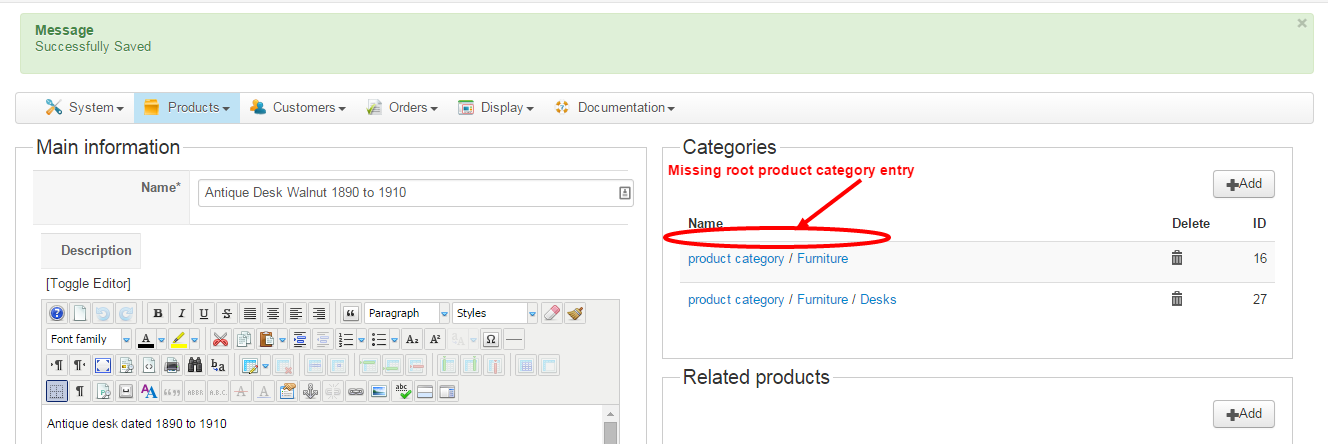
And this may or may not be related but I also find that when I edit products, sometimes other products that I haven't been editing will all of a sudden have unrelated categories added to them without not of my doing?? Very frustrating as I need to go back and edit them to their proper category settings. This has happened several times now.
Thanks
-- HikaShop version -- : 2.4.0
-- Joomla version -- : 3.4.1
-- PHP version -- : 5.5.22
-- Browser(s) name and version -- : CHROME 41.0.2272.101
-- Error-message(debug-mod must be tuned on) -- : No error message
I have a bunch of products that no longer show the "product category" root in their details and therefore no longer show up on my pages, see attached image. Any way to add back in?
And this may or may not be related but I also find that when I edit products, sometimes other products that I haven't been editing will all of a sudden have unrelated categories added to them without not of my doing?? Very frustrating as I need to go back and edit them to their proper category settings. This has happened several times now.
Thanks
Please Log in or Create an account to join the conversation.

11 years 5 months ago #200669
by nicolas
Replied by nicolas on topic No product category showing in product details
Hi,
I've never heard of such problem.
The only reason I can see would be that you have some mass actions configured wrongly via the menu System>Mass actions which would automatically add/remove categories.
I've never heard of such problem.
The only reason I can see would be that you have some mass actions configured wrongly via the menu System>Mass actions which would automatically add/remove categories.
Please Log in or Create an account to join the conversation.
11 years 5 months ago #200735
by drrakken
Replied by drrakken on topic No product category showing in product details
ok, that makes sense, how do I now go about to fix it please? I'm not familiar enough with the database to attempt on my own I don't think. Thanks
Please Log in or Create an account to join the conversation.
11 years 5 months ago #200739
by nicolas
Replied by nicolas on topic No product category showing in product details
Hi,
Look in the menu System>Mass actions. If you have mass actions there, deactivate them.
If not, then I don't see why that would happen so I can't provide a fix.
Look in the menu System>Mass actions. If you have mass actions there, deactivate them.
If not, then I don't see why that would happen so I can't provide a fix.
Please Log in or Create an account to join the conversation.
11 years 5 months ago #200798
by drrakken
Replied by drrakken on topic No product category showing in product details
There was one there and I deleted it. Now what do I need to do?
Please Log in or Create an account to join the conversation.
11 years 5 months ago #200825
by nicolas
Replied by nicolas on topic No product category showing in product details
There should be nothing else to do ?
Do you still have a problem ?
Do you still have a problem ?
Please Log in or Create an account to join the conversation.
11 years 5 months ago #200852
by drrakken
Replied by drrakken on topic No product category showing in product details
Yes it's still giving me problems. My furniture category and sub categories are still not showing the items it should.
Please Log in or Create an account to join the conversation.
11 years 5 months ago #200870
by nicolas
Replied by nicolas on topic No product category showing in product details
So it's normal that it didn't solve that problem.
I thought that your question what about HikaShop misteriously removing the "product category" from the list of categories of the products.
But apparently it's not that. The issue is that the products don't show up anymore on your products listings on the frontend.
And in that case, what we talked about on this thread so far is not related to your problem.
Your problem must be with how you configured the options of your menu item (id 1422). You can check them via the menu Display>Content menus.
If you don't find the issue, please provide a screenshot of the settings of that page.
I thought that your question what about HikaShop misteriously removing the "product category" from the list of categories of the products.
But apparently it's not that. The issue is that the products don't show up anymore on your products listings on the frontend.
And in that case, what we talked about on this thread so far is not related to your problem.
Your problem must be with how you configured the options of your menu item (id 1422). You can check them via the menu Display>Content menus.
If you don't find the issue, please provide a screenshot of the settings of that page.
Please Log in or Create an account to join the conversation.
11 years 5 months ago #200950
by drrakken
Replied by drrakken on topic No product category showing in product details
I don't see it.
Here's the screenshot.
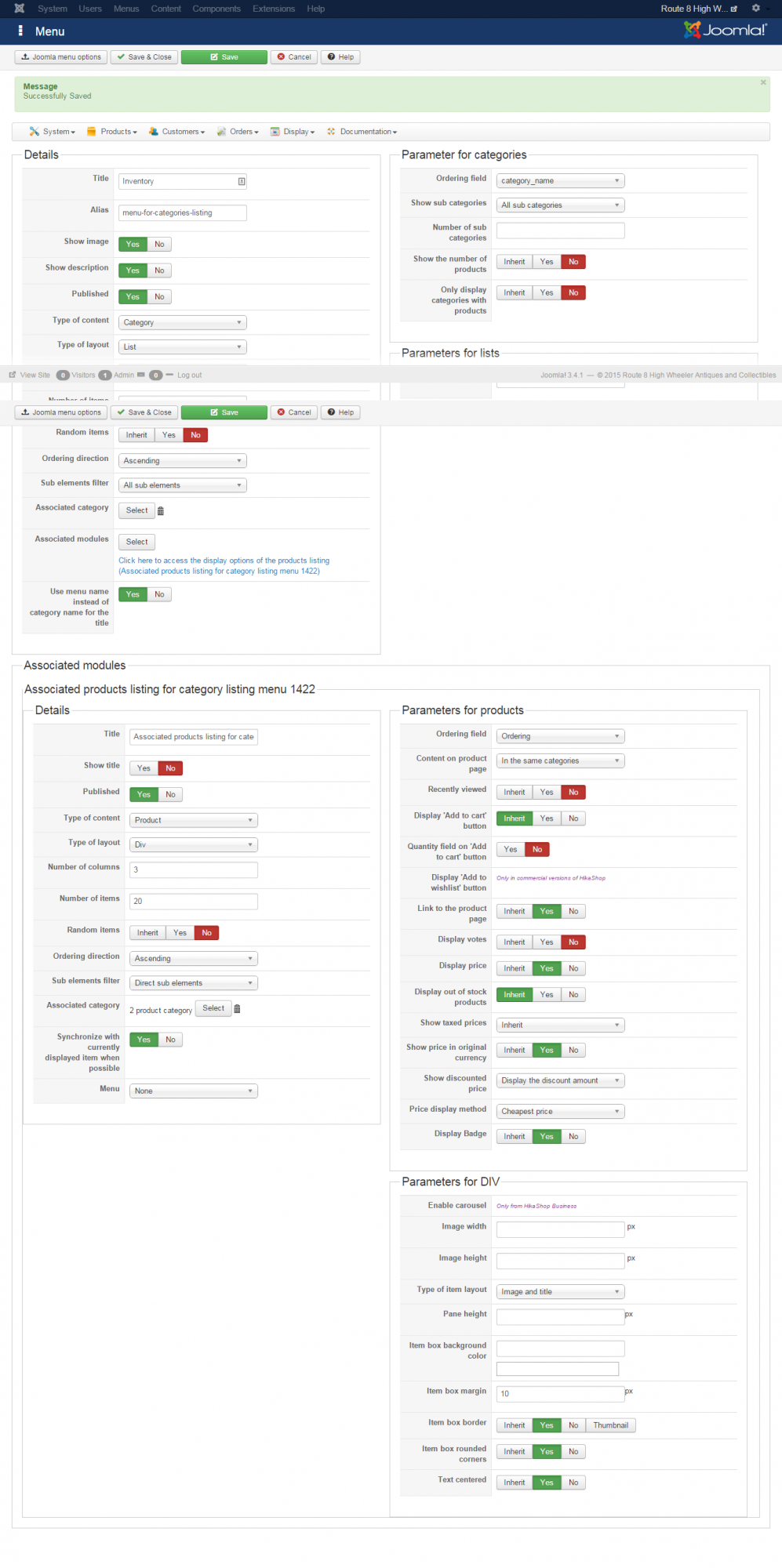
Here's the screenshot.
Please Log in or Create an account to join the conversation.
11 years 4 months ago #200977
by nicolas
Replied by nicolas on topic No product category showing in product details
Hi,
Turn on the "display out of stock products" setting there.
Also, you can set the "sub elements filter" option of the associated module to "all sub elements". That way, you'll only need to specify the direct category of the products when you edit them, not the parent category of the category of the products.
The rest looks correct.
Turn on the "display out of stock products" setting there.
Also, you can set the "sub elements filter" option of the associated module to "all sub elements". That way, you'll only need to specify the direct category of the products when you edit them, not the parent category of the category of the products.
The rest looks correct.
The following user(s) said Thank You: drrakken
Please Log in or Create an account to join the conversation.
Time to create page: 0.225 seconds