

- Posts: 26
- Thank you received: 0
custom field image display
11 years 4 months ago #201374
by Oneplanet
custom field image display was created by Oneplanet
-- HikaShop version -- : 2.4.0
-- Joomla version -- : 3.3.6
-- PHP version -- : 4.39-0+deb7u2
-- Browser(s) name and version -- : Chrome 42.0.2311.135 m
Hi Guys
On the front end I have 7 custom fields under the product specifications which i would like to display with an custom image rather than how it is currently set to display as a single drop down. Is this possible?
Thanks
-- Joomla version -- : 3.3.6
-- PHP version -- : 4.39-0+deb7u2
-- Browser(s) name and version -- : Chrome 42.0.2311.135 m
Hi Guys
On the front end I have 7 custom fields under the product specifications which i would like to display with an custom image rather than how it is currently set to display as a single drop down. Is this possible?
Thanks
Please Log in or Create an account to join the conversation.

Less
More
- Posts: 12953
- Thank you received: 1778
11 years 4 months ago #201393
by Mohamed Thelji
Replied by Mohamed Thelji on topic custom field image display
Hello,
What do you exactly mean by "custom image", can you give me more information about what do you exactly want to do through some screenshots ?
Also checking that documentation will probably help you : www.hikashop.com/support/documentation/1...-display.html#layout
What do you exactly mean by "custom image", can you give me more information about what do you exactly want to do through some screenshots ?
Also checking that documentation will probably help you : www.hikashop.com/support/documentation/1...-display.html#layout
Please Log in or Create an account to join the conversation.
11 years 4 months ago #201490
by Oneplanet
Replied by Oneplanet on topic custom field image display
Hi Mohamed
Thanks for your response.
If you view the link here . Now at the bottom in the specifications you will see 7 drop downs each labelled and has a number assigned to it. We would like to use images which display the different pressures rather than numbers.
Thanks
Thanks for your response.
If you view the link here . Now at the bottom in the specifications you will see 7 drop downs each labelled and has a number assigned to it. We would like to use images which display the different pressures rather than numbers.
Thanks
Please Log in or Create an account to join the conversation.

11 years 4 months ago #201748
by nicolas
Replied by nicolas on topic custom field image display
Hi,
Could you do a screenshot of the settings page of one of the custom fields on use so that we can see how you have it configured at the moment ?
Could you do a screenshot of the settings page of one of the custom fields on use so that we can see how you have it configured at the moment ?
Please Log in or Create an account to join the conversation.
11 years 4 months ago #201751
by Oneplanet
Replied by Oneplanet on topic custom field image display
Hi Nicolas
Please find attached the screengrab.
Thanks
Please find attached the screengrab.
Thanks
Please Log in or Create an account to join the conversation.
11 years 4 months ago - 11 years 4 months ago #201752
by nicolas
Replied by nicolas on topic custom field image display
Hi,
So in the "Title" column of your values, instead of 0, 1, 2, etc enter translation keys like that:
POLLPRESSURE_0
POLLPRESSURE_1
POLLPRESSURE_2
...etc...
Then, edit your language file via the Languages tab of the HikaShop configuration and enter such translation override:
Then, you'll see on your frontend that the numbers will be replaced by the images.
So in the "Title" column of your values, instead of 0, 1, 2, etc enter translation keys like that:
POLLPRESSURE_0
POLLPRESSURE_1
POLLPRESSURE_2
...etc...
Then, edit your language file via the Languages tab of the HikaShop configuration and enter such translation override:
Code:
POLLPRESSURE_0="<img src='http://mywebsite.com/myimage0.jpg'/>"
POLLPRESSURE_1="<img src='http://mywebsite.com/myimage1.jpg'/>"
POLLPRESSURE_2="<img src='http://mywebsite.com/myimage2.jpg'/>"
...etc...
Then, you'll see on your frontend that the numbers will be replaced by the images.
Last edit: 11 years 4 months ago by nicolas.
Please Log in or Create an account to join the conversation.
11 years 4 months ago #201820
by Oneplanet
Replied by Oneplanet on topic custom field image display
Once again you are the man, thanks so much Nicolas. Works like a charm!
Please Log in or Create an account to join the conversation.
11 years 4 months ago #203134
by Oneplanet
Replied by Oneplanet on topic custom field image display
Hi Nicolas
There seems to be an issue with the fix you suggested. When i am in the back end editing a product i cannot configure the drop downs so it displays the correct image. The dropdowns are grey-ed out, please see image attached.
Many Thanks
There seems to be an issue with the fix you suggested. When i am in the back end editing a product i cannot configure the drop downs so it displays the correct image. The dropdowns are grey-ed out, please see image attached.
Many Thanks
Please Log in or Create an account to join the conversation.

11 years 4 months ago #203142
by Xavier
Replied by Xavier on topic custom field image display
Hi,
Please edit the file "administrator/components/com_hikashop/classes/field.php" and replace the functions "trans()" by:
Please edit the file "administrator/components/com_hikashop/classes/field.php" and replace the functions "trans()" by:
Code:
function trans($name) {
//We use JText if there is only uppercase or underscore char
$val = preg_replace('#[^a-z0-9]#i','_',strtoupper($name));
//We use JText on backend only if there is no html tags in the translation
$app = JFactory::getApplication();
if($app->isAdmin() && strcmp(JText::_($val), strip_tags(JText::_($val))) !== 0)
$trans = $val;
else
$trans = JText::_($val);
if($val == $trans)
$trans = $name;
return $trans;
}
Please Log in or Create an account to join the conversation.
11 years 4 months ago - 11 years 4 months ago #203187
by Oneplanet
Replied by Oneplanet on topic custom field image display
Thanks Xavier your fix works.
Such awesome support ... Keep it up lads
Such awesome support ... Keep it up lads
Last edit: 11 years 4 months ago by Oneplanet.
Please Log in or Create an account to join the conversation.
11 years 1 month ago #211336
by johnelny
Replied by johnelny on topic custom field image display
I tired this method you describe -- hoping that the images would show up in a filter for the custom field. But no joy -- get no images in the filter. Is there something I'm missing? the value keynames in the title. See attached.. and then I edited language file. But get nothing in the filter.
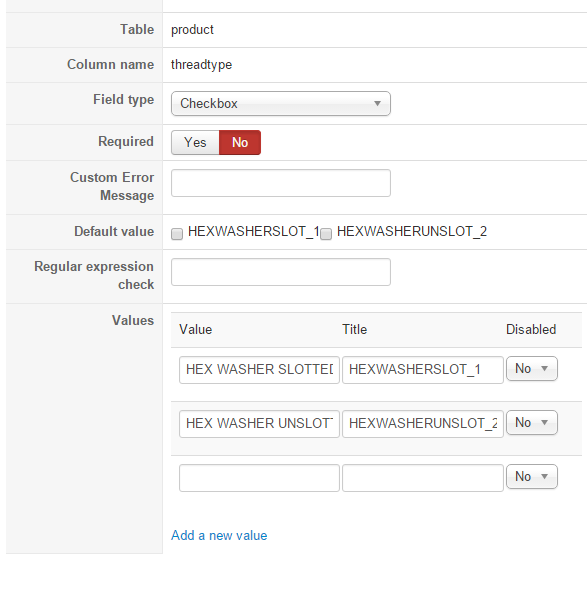
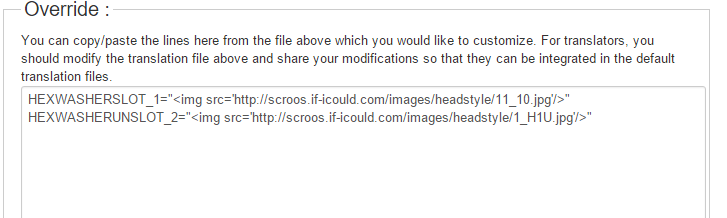
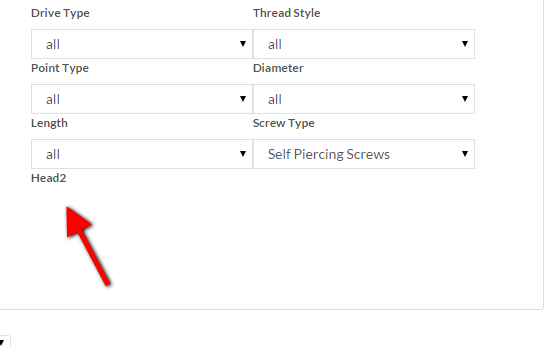
Please Log in or Create an account to join the conversation.
11 years 1 month ago #211339
by nicolas
Replied by nicolas on topic custom field image display
Hi,
Can you provide a screenshot of the settings of your filter and a link to that page with the filters so that we can reproduce the issue ?
Can you provide a screenshot of the settings of your filter and a link to that page with the filters so that we can reproduce the issue ?
Please Log in or Create an account to join the conversation.
11 years 1 month ago #211410
by johnelny
Replied by johnelny on topic custom field image display
Here is the site -- it's the dev site.. the last filter
scroos.if-icould.com/index.php/buy-screw...ilter_ScrewType_2=24
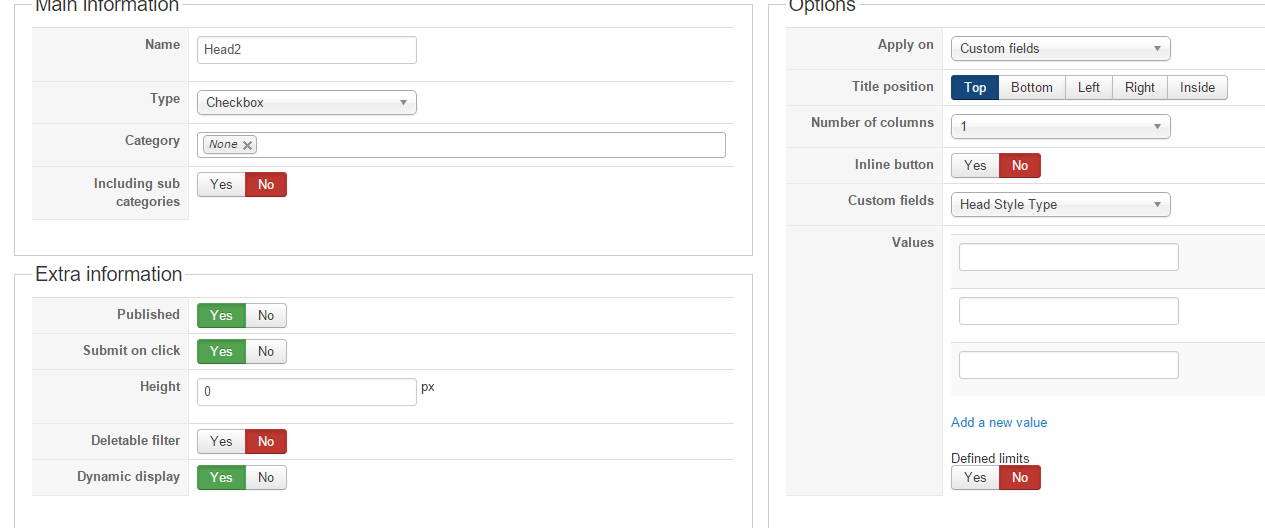
scroos.if-icould.com/index.php/buy-screw...ilter_ScrewType_2=24
Please Log in or Create an account to join the conversation.
11 years 1 month ago #211429
by nicolas
Replied by nicolas on topic custom field image display
Hi,
The issue seems to come from the settings of the custom field, not the translation of the values.
Could you provide a screenshot of all the settings of your custom field ?
The issue seems to come from the settings of the custom field, not the translation of the values.
Could you provide a screenshot of all the settings of your custom field ?
Please Log in or Create an account to join the conversation.
Less
More
- Posts: 5
- Thank you received: 0
5 years 2 weeks ago #335923
by amanda@secureproducts.com
Replied by amanda@secureproducts.com on topic custom field image display
Hello,
I am having this problem as well. I can see the image if I set the custom field to Radio Button but when I change it to Single Dropdown, I can only see a grey box on the front end.
Can you please help me figure out how to make this update?
Thank you!
Amanda
I am having this problem as well. I can see the image if I set the custom field to Radio Button but when I change it to Single Dropdown, I can only see a grey box on the front end.
Can you please help me figure out how to make this update?
Thank you!
Amanda
Please Log in or Create an account to join the conversation.
5 years 2 weeks ago #335925
by nicolas
Replied by nicolas on topic custom field image display
Hi,
That's normal. Dropdowns can't have HTML in their options, and that includes img tags of images.
Not much we can do to avoid that I'm afraid.
That's normal. Dropdowns can't have HTML in their options, and that includes img tags of images.
Not much we can do to avoid that I'm afraid.
Please Log in or Create an account to join the conversation.
Time to create page: 0.329 seconds