
- Posts: 6
- Thank you received: 0
menu listing not allowing navigation
- labaristaperfection
-
 Topic Author
- Offline
Less
More
11 years 3 months ago - 11 years 3 months ago #206863
by labaristaperfection
menu listing not allowing navigation was created by labaristaperfection
-- url of the page with the problem -- :
labaristaperfection.com.au/index.php/cat...lves#category_pane_0
-- HikaShop version -- : 2.5.0
-- Joomla version -- : 3.4.1
-- PHP version -- : 5.3.29
-- Browser(s) name and version -- : chrome v43.0
-- Error-message(debug-mod must be tuned on) -- : none
when navigating through the "online shop" menu,( see below:) , the "arrowhead " dropdown will work until you select an item .
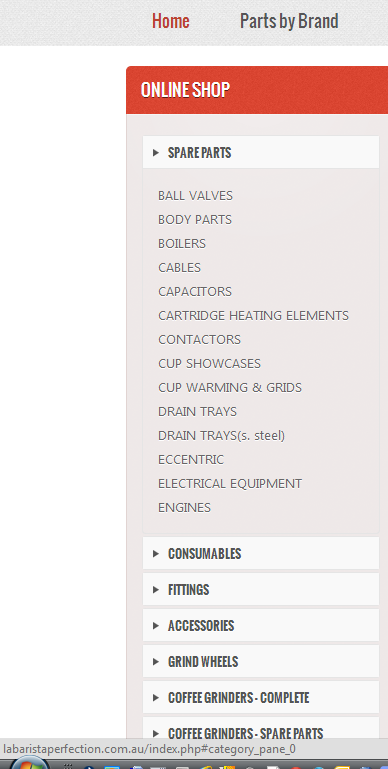
once you go to a category item , you can not use the menu box to navigate to another page,
when you click on the " arrowhead" nothing happens.. you can not collapse the menu item , nor can you select another category
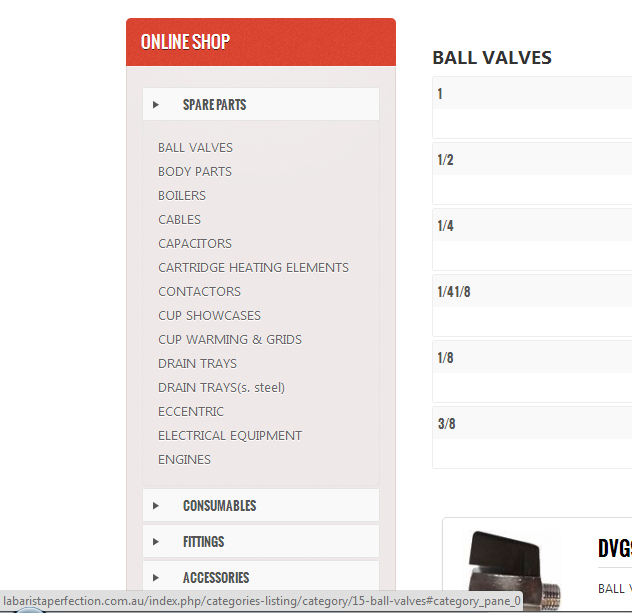
any help please...
-- HikaShop version -- : 2.5.0
-- Joomla version -- : 3.4.1
-- PHP version -- : 5.3.29
-- Browser(s) name and version -- : chrome v43.0
-- Error-message(debug-mod must be tuned on) -- : none
when navigating through the "online shop" menu,( see below:) , the "arrowhead " dropdown will work until you select an item .
once you go to a category item , you can not use the menu box to navigate to another page,
when you click on the " arrowhead" nothing happens.. you can not collapse the menu item , nor can you select another category
any help please...
Last edit: 11 years 3 months ago by labaristaperfection. Reason: typo
Please Log in or Create an account to join the conversation.

11 years 3 months ago #206864
by lousyfool
Need help with customisations of layouts, style or other site development? PM me!
(Don't forget to turn on "E-mail notification of new messages" )
Replied by lousyfool on topic menu listing not allowing navigation
In the settings for the module, try disabling the "Link on main categories".
Need help with customisations of layouts, style or other site development? PM me!
(Don't forget to turn on "E-mail notification of new messages" )
Please Log in or Create an account to join the conversation.
- labaristaperfection
-
Topic Author
- Offline
Less
More
- Posts: 6
- Thank you received: 0
11 years 3 months ago #206873
by labaristaperfection
Replied by labaristaperfection on topic menu listing not allowing navigation
thanks, but problem still persists
Please Log in or Create an account to join the conversation.

11 years 3 months ago #206895
by Xavier
Replied by Xavier on topic menu listing not allowing navigation
Hi,
You don't seem to be having the same code than us. Do you have any override on the view "category / listing_list" ?
If it is, please backup it and remove it.
You don't seem to be having the same code than us. Do you have any override on the view "category / listing_list" ?
If it is, please backup it and remove it.
Please Log in or Create an account to join the conversation.
- labaristaperfection
-
Topic Author
- Offline
Less
More
- Posts: 6
- Thank you received: 0
11 years 3 months ago #207018
by labaristaperfection
Replied by labaristaperfection on topic menu listing not allowing navigation
thanks , there were some overide pages , which I have now deleted , but the problem is the same...
further .. when you try to collapse the menu , the displayed listing jumps down a couple of lines ...
further .. when you try to collapse the menu , the displayed listing jumps down a couple of lines ...
Please Log in or Create an account to join the conversation.

11 years 3 months ago #207114
by nicolas
Replied by nicolas on topic menu listing not allowing navigation
Hi,
This looks like an issue with your template and its support of bootstrap since you activated the "use bootstrap design" setting in the HikaShop configuration.
You can try to add the line:
$this->tabs->mode = "sliders";
after the line:
$this->tabs = hikashop_get('helper.sliders');
in the listing_list file of the category view to fallback to the normal Joomla accordion system instead of bootstrap's.
This looks like an issue with your template and its support of bootstrap since you activated the "use bootstrap design" setting in the HikaShop configuration.
You can try to add the line:
$this->tabs->mode = "sliders";
after the line:
$this->tabs = hikashop_get('helper.sliders');
in the listing_list file of the category view to fallback to the normal Joomla accordion system instead of bootstrap's.
The following user(s) said Thank You: labaristaperfection
Please Log in or Create an account to join the conversation.
- labaristaperfection
-
Topic Author
- Offline
Less
More
- Posts: 6
- Thank you received: 0
11 years 3 months ago #207190
by labaristaperfection
Replied by labaristaperfection on topic menu listing not allowing navigation
Thanks that's fabulous ,fixed the problem,
However , it has created a new one , the size of the individual category boxes in the lightbox list has doubled ..(see below), any ideas ?
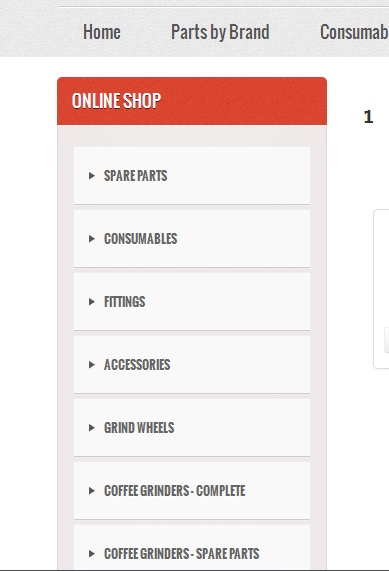
However , it has created a new one , the size of the individual category boxes in the lightbox list has doubled ..(see below), any ideas ?
Please Log in or Create an account to join the conversation.
11 years 3 months ago #207205
by nicolas
Replied by nicolas on topic menu listing not allowing navigation
Hi,
That's also something coming from the template.
Change the CSS:
div.panel h3.title {
margin: 0;
cursor: pointer;
font-size: 1.1em;
padding: 8px 10px;
border-bottom: 1px solid #CCC;
}
To:
div.panel h3.title {
margin: 0;
cursor: pointer;
font-size: 1.1em;
padding: 0;
border-bottom: 1px solid #CCC;
}
in the file templates/jsn_boot_pro/css/template.css of the template and that will fix the issue.
Please contact your template provider for styling issues.
That's also something coming from the template.
Change the CSS:
div.panel h3.title {
margin: 0;
cursor: pointer;
font-size: 1.1em;
padding: 8px 10px;
border-bottom: 1px solid #CCC;
}
To:
div.panel h3.title {
margin: 0;
cursor: pointer;
font-size: 1.1em;
padding: 0;
border-bottom: 1px solid #CCC;
}
in the file templates/jsn_boot_pro/css/template.css of the template and that will fix the issue.
Please contact your template provider for styling issues.
The following user(s) said Thank You: labaristaperfection
Please Log in or Create an account to join the conversation.
- labaristaperfection
-
Topic Author
- Offline
Less
More
- Posts: 6
- Thank you received: 0
11 years 3 months ago #207281
by labaristaperfection
Replied by labaristaperfection on topic menu listing not allowing navigation
Thank you again , this looks better...
Further testing has uncovered a problem still with the menu listing ...
You open a category listing:
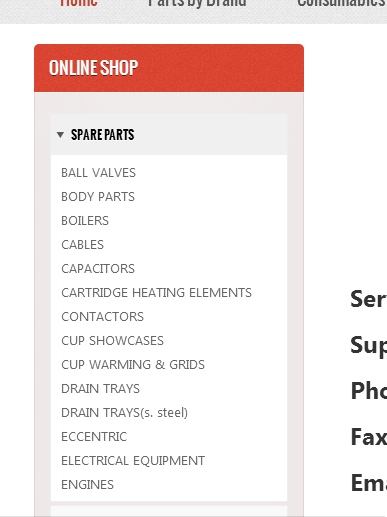
then you collapse the listing:
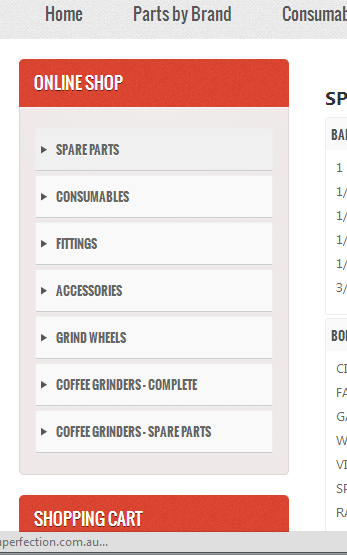
but then it automatically opens up the listing again ( this should not be happening):
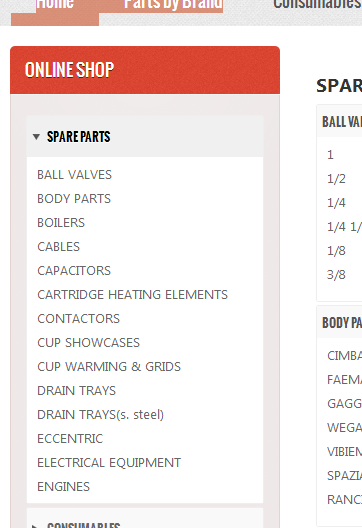
please help again...thanks
Further testing has uncovered a problem still with the menu listing ...
You open a category listing:
then you collapse the listing:
but then it automatically opens up the listing again ( this should not be happening):
please help again...thanks
Please Log in or Create an account to join the conversation.
11 years 3 months ago #207321
by nicolas
Replied by nicolas on topic menu listing not allowing navigation
Hi,
I don't have the behavior on my end.
It's probably because you're clicking on the main category itself, not around it. And thus the system redirects you to the page of that category because you have the "Link on main categories" setting of your module activated.
I don't have the behavior on my end.
It's probably because you're clicking on the main category itself, not around it. And thus the system redirects you to the page of that category because you have the "Link on main categories" setting of your module activated.
The following user(s) said Thank You: labaristaperfection
Please Log in or Create an account to join the conversation.
- labaristaperfection
-
Topic Author
- Offline
Less
More
- Posts: 6
- Thank you received: 0
11 years 3 months ago #207352
by labaristaperfection
Replied by labaristaperfection on topic menu listing not allowing navigation
thanks again, it fixed my issue...
Please Log in or Create an account to join the conversation.
Time to create page: 0.399 seconds