
- Posts: 24
- Thank you received: 4
Minimum qty. no longer shows in add to cart
- beemerrider
-
 Topic Author
- Offline
Less
More
11 years 3 months ago #208866
by beemerrider
Minimum qty. no longer shows in add to cart was created by beemerrider
-- url of the page with the problem -- :
button.formationsdev.com/products/6mm-shanks/1-6mm-silver
-- HikaShop version -- : 2.5.0
-- Joomla version -- : 3.4.3
-- PHP version -- : 5.5.26
-- Browser(s) name and version -- : Chrome 43
I have a minimum order amount for one variant (5) on a product with four variants. Before updating to 2.5 the add to cart amount showed the qty 5 in it, not 1 as it now does. A user can now order 1, 2, etc. of the product with a minimum amount set in the variant of 5. And if they order say qty 3 the price is set to free in the cart. If they choose the minimum amount of 5 or greater then the price displays in the cart correctly.
Is there a new setting I'm missing somewhere for the minimum amount in the variant to work?
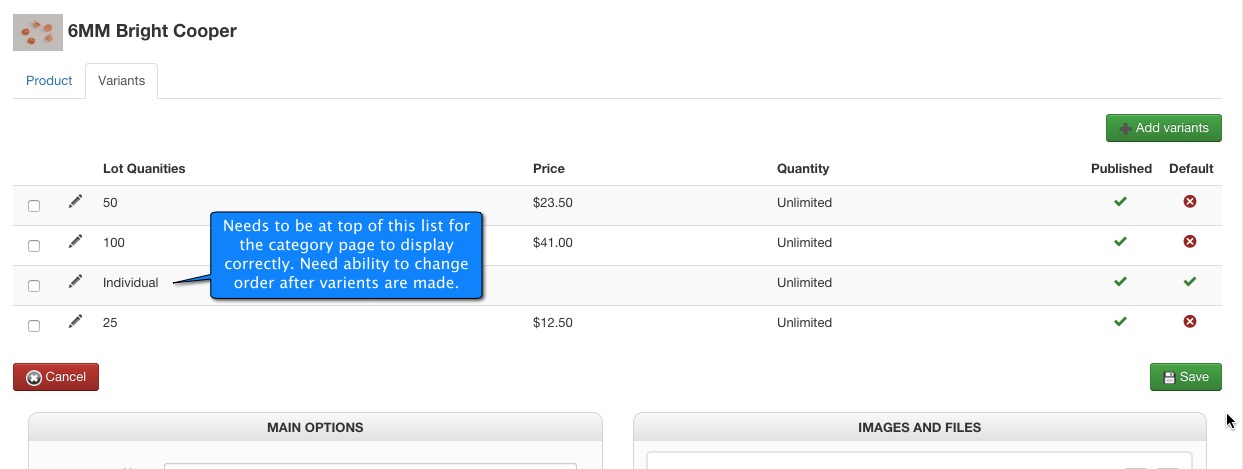
Also is there a way to reorder the variants once they are set? Because if I set the variant of the product with the minimum variant first it displays one way in the category listing. If the first item in the list of variants is not the minimum order variant but any amount can be ordered, then the category listing looks different. I found that the way the product is displayed in the category listing is totally dependent on the order of the variants. So i need to be able to change the order of the variants. The per unit display is when the variant with a minimum order is first in the order of the listing of the variants. If the minimum one is in the 2nd through 4th variant in the list, then the unit display does not show. button.formationsdev.com/6mmshanks
Last item. Thank you so much for the huge improvement in how variants are managed. This is so much quicker and easier to explain to my clients. Once the bugs are fixed this is going to be awesome.
-- HikaShop version -- : 2.5.0
-- Joomla version -- : 3.4.3
-- PHP version -- : 5.5.26
-- Browser(s) name and version -- : Chrome 43
I have a minimum order amount for one variant (5) on a product with four variants. Before updating to 2.5 the add to cart amount showed the qty 5 in it, not 1 as it now does. A user can now order 1, 2, etc. of the product with a minimum amount set in the variant of 5. And if they order say qty 3 the price is set to free in the cart. If they choose the minimum amount of 5 or greater then the price displays in the cart correctly.
Is there a new setting I'm missing somewhere for the minimum amount in the variant to work?
Also is there a way to reorder the variants once they are set? Because if I set the variant of the product with the minimum variant first it displays one way in the category listing. If the first item in the list of variants is not the minimum order variant but any amount can be ordered, then the category listing looks different. I found that the way the product is displayed in the category listing is totally dependent on the order of the variants. So i need to be able to change the order of the variants. The per unit display is when the variant with a minimum order is first in the order of the listing of the variants. If the minimum one is in the 2nd through 4th variant in the list, then the unit display does not show. button.formationsdev.com/6mmshanks
Last item. Thank you so much for the huge improvement in how variants are managed. This is so much quicker and easier to explain to my clients. Once the bugs are fixed this is going to be awesome.
Please Log in or Create an account to join the conversation.

11 years 3 months ago #208871
by nicolas
Replied by nicolas on topic Minimum qty. no longer shows in add to cart
Hi,
1. Is the minimum quantity saved in the variant when you edit it in the backend ?
If not, then it's a bug we already fixed and downloading again the install package and installing it on your website should add the patch.
If yes, then we'll have to look deeper into the issue.
2. Variants are not to be ordered. The ordering is done automatically for all the products based on the ordering of the values in your characteristics and the characteristic ordering method setting of the HikaShop configuration. So it's even better.
3. Thanks for that. Improving the characteristics/variants handling was one of the goals.
1. Is the minimum quantity saved in the variant when you edit it in the backend ?
If not, then it's a bug we already fixed and downloading again the install package and installing it on your website should add the patch.
If yes, then we'll have to look deeper into the issue.
2. Variants are not to be ordered. The ordering is done automatically for all the products based on the ordering of the values in your characteristics and the characteristic ordering method setting of the HikaShop configuration. So it's even better.
3. Thanks for that. Improving the characteristics/variants handling was one of the goals.
Please Log in or Create an account to join the conversation.
- beemerrider
-
Topic Author
- Offline
Less
More
- Posts: 24
- Thank you received: 4
11 years 3 months ago - 11 years 3 months ago #209139
by beemerrider
Replied by beemerrider on topic Minimum qty. no longer shows in add to cart
1. Yes the minimum quantity is set in the variant in the backend. Only one of the four variants has a minimum quantity set.
2. The variants do auto sort in the drop down list correctly on the product page. But when the products are displayed in a category listing, then it is hit and miss as to what quantity is going to show up as the default, See screen shot, all of the products are using the same variants with all of them having the same minimum quantity set for the same variant (individual). The other three variants are for lots of 25, 50 and 100. When the user is buying the item individually we want them to purchase as least quantity 5. Also we want the individual price to show up as the default in the category view.
I tried getting around part of this issue by choosing the setting of "price range" for the page display, but that feature did not work either.
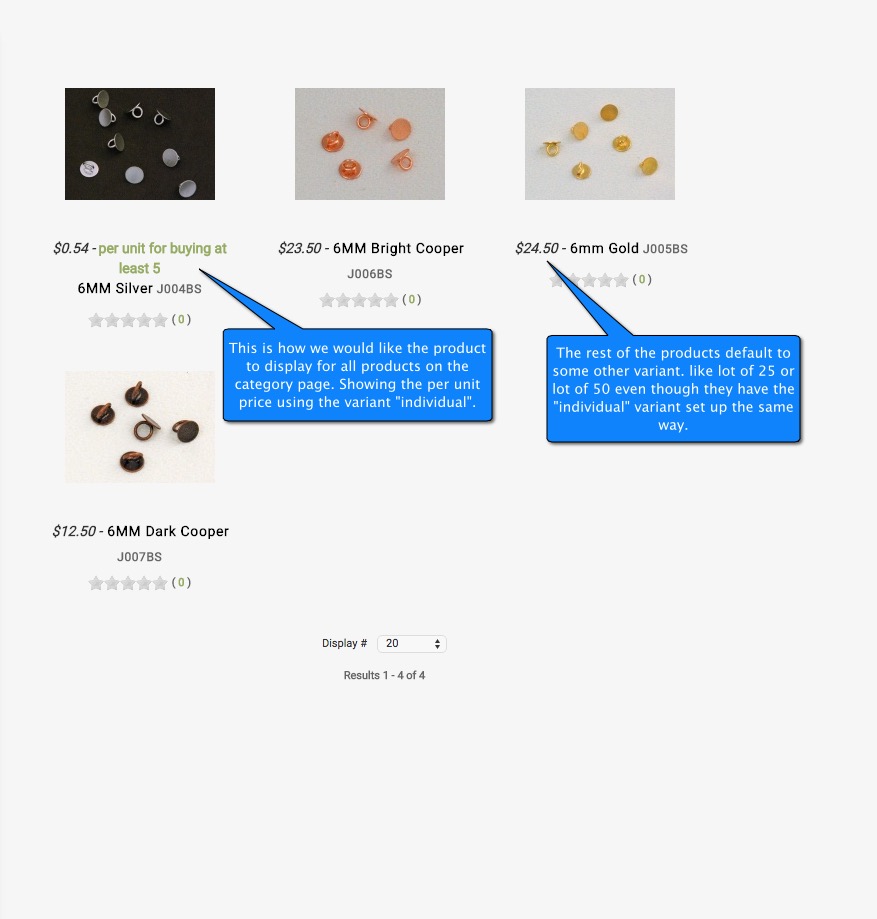
2. The variants do auto sort in the drop down list correctly on the product page. But when the products are displayed in a category listing, then it is hit and miss as to what quantity is going to show up as the default, See screen shot, all of the products are using the same variants with all of them having the same minimum quantity set for the same variant (individual). The other three variants are for lots of 25, 50 and 100. When the user is buying the item individually we want them to purchase as least quantity 5. Also we want the individual price to show up as the default in the category view.
I tried getting around part of this issue by choosing the setting of "price range" for the page display, but that feature did not work either.
Last edit: 11 years 3 months ago by beemerrider. Reason: attachment did not show
Please Log in or Create an account to join the conversation.

11 years 2 months ago #209751
by Jerome
Jerome - Obsidev.com
HikaMarket & HikaSerial developer / HikaShop core dev team.
Replied by Jerome on topic Minimum qty. no longer shows in add to cart
Hi,
1. :blink:
It looks like Nicolas did not understand your message and it looks like I can't understand your answer for it.
I created an issue ticket in order to fix the setting "order min/max qty" for the edition of variants.
2. I'm not able to understand that point either.
I understand the screenshot, for sure, but not the message with it.
And without any information about the product configuration, it will be difficult to tell you if there is a configuration issue ; or to be able to reproduce it in our side.
Regards,
1. :blink:
It looks like Nicolas did not understand your message and it looks like I can't understand your answer for it.
I created an issue ticket in order to fix the setting "order min/max qty" for the edition of variants.
2. I'm not able to understand that point either.
I understand the screenshot, for sure, but not the message with it.
And without any information about the product configuration, it will be difficult to tell you if there is a configuration issue ; or to be able to reproduce it in our side.
Regards,
Jerome - Obsidev.com
HikaMarket & HikaSerial developer / HikaShop core dev team.
Please Log in or Create an account to join the conversation.
- beemerrider
-
Topic Author
- Offline
Less
More
- Posts: 24
- Thank you received: 4
11 years 2 months ago #209932
by beemerrider
Replied by beemerrider on topic Minimum qty. no longer shows in add to cart
Hello,
Items
1. Funny, I thought the first item was pretty straight forward and Nicolas understood the problem. He asked
I want it to work the way it did in the past where when you have a variant with a minimum quantity of 5, that quantity is the default on the front end and you cannot choose a quantity of 1 through 4. It shows 5 or higher only.
1. I can understand you not understanding item two. Probably should have left just the screen shot and not try to explain. Anyhow that problem seems to have resolved itself. I'm thinking caching was the issue? I wanted all items to default to the individual price when a category view was selected, the cheapest price. But the category view was showing individual prices for some products, and the price for qty 25 or qty 50 randomly for other products. All products have the same variants, individual price, qty 25, qty 50 and qty 100 price.
Items
1. Funny, I thought the first item was pretty straight forward and Nicolas understood the problem. He asked
My answer was1. Is the minimum quantity saved in the variant when you edit it in the backend ?
So I have four variants for one product, the variant called individual has a minimum quantity of 5 set for it. The other three variants do not have a minimum amount set for them. When the variant called individual is chosen on the front end it shows quantity one, instead of defaulting to quantity 5 like it did in version 2.4 of hikashop. If a customer tries to buy quantity one of the variant individual, they are allowed to and it shows a price of Free. Once you choose five or more in the quantity field, then the price shows up.1. Yes the minimum quantity is set in the variant in the backend. Only one of the four variants has a minimum quantity set.
I want it to work the way it did in the past where when you have a variant with a minimum quantity of 5, that quantity is the default on the front end and you cannot choose a quantity of 1 through 4. It shows 5 or higher only.
1. I can understand you not understanding item two. Probably should have left just the screen shot and not try to explain.
Anyhow that problem seems to have resolved itself. I'm thinking caching was the issue? I wanted all items to default to the individual price when a category view was selected, the cheapest price. But the category view was showing individual prices for some products, and the price for qty 25 or qty 50 randomly for other products. All products have the same variants, individual price, qty 25, qty 50 and qty 100 price. Please Log in or Create an account to join the conversation.
11 years 2 months ago #210000
by Jerome
Jerome - Obsidev.com
HikaMarket & HikaSerial developer / HikaShop core dev team.
Replied by Jerome on topic Minimum qty. no longer shows in add to cart
Hi,
Regards,
How is it possible that you have an "order minimum quantity" set for the variant when that setting is not displayed in the new product interface ?I have four variants for one product, the variant called individual has a minimum quantity of 5 set for it.
Regards,
Jerome - Obsidev.com
HikaMarket & HikaSerial developer / HikaShop core dev team.
Please Log in or Create an account to join the conversation.
- beemerrider
-
Topic Author
- Offline
Less
More
- Posts: 24
- Thank you received: 4
11 years 2 months ago #210047
by beemerrider
Replied by beemerrider on topic Minimum qty. no longer shows in add to cart
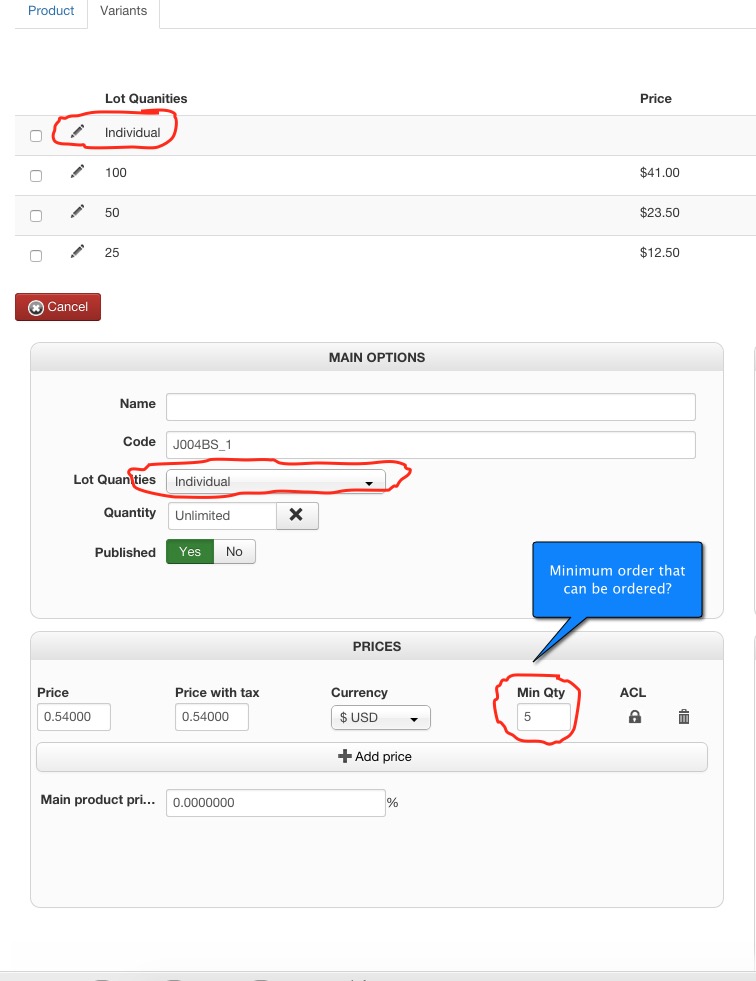
Maybe I have the minimum that someone can order set in the wrong place then. See my screen shot for where I have what I think is the minimum amount of a product that someone can order. It is in the variant settings, with min set to 5. Only this variant of the product needs a minimum order amount. The other three variants the client want the user to be able to order any quantity they want. The only variant of the product he wants a minimum order amount for the user is the variant called "individual" and he wants it so the customer has to order at least a quantity of 5 before they can purchase the product.
Please Log in or Create an account to join the conversation.
11 years 2 months ago #210048
by Jerome
Jerome - Obsidev.com
HikaMarket & HikaSerial developer / HikaShop core dev team.
Replied by Jerome on topic Minimum qty. no longer shows in add to cart
Hi,
That is the minimum quantity in order to have the price ; it is not the setting "order minimal quantity" which define the minimal quantity that a customer can buy for one single order...
Regards,
That is the minimum quantity in order to have the price ; it is not the setting "order minimal quantity" which define the minimal quantity that a customer can buy for one single order...
Regards,
Jerome - Obsidev.com
HikaMarket & HikaSerial developer / HikaShop core dev team.
Please Log in or Create an account to join the conversation.
- beemerrider
-
Topic Author
- Offline
Less
More
- Posts: 24
- Thank you received: 4
11 years 2 months ago #210331
by beemerrider
Replied by beemerrider on topic Minimum qty. no longer shows in add to cart
Okay I understand that now, although I see no use for that feature myself.
But how do I accomplish having a minimum order amount for one variant of a product then?
I need one variant to have a minimum order amount of 5
The other three variants can be bought with a minimum quantity of 1
This is what I'm trying accomplish
But how do I accomplish having a minimum order amount for one variant of a product then?
I need one variant to have a minimum order amount of 5
The other three variants can be bought with a minimum quantity of 1
This is what I'm trying accomplish
Please Log in or Create an account to join the conversation.
11 years 2 months ago #210355
by Jerome
Jerome - Obsidev.com
HikaMarket & HikaSerial developer / HikaShop core dev team.
Replied by Jerome on topic Minimum qty. no longer shows in add to cart
Hi,
Like I wrote in a previous message
The idea is to add the missing code in the backend view "order / variant"
Regards,
Like I wrote in a previous message
The feature is ready to be release in the next HikaShop version.I created an issue ticket in order to fix the setting "order min/max qty" for the edition of variants.
The idea is to add the missing code in the backend view "order / variant"
Code:
<?php
if(hikashop_acl('product/edit/qtyperorder')) { ?>
<dt class="hikashop_product_qtyperorder">
<label for="data_product__product_min_per_order"><?php echo JText::_('QUANTITY_PER_ORDER'); ?></label>
<?php
if(HIKASHOP_BACK_RESPONSIVE)
echo '<div class="hikashop_product_qtyperorder_dt">To</div>';
?>
</dt>
<dd class="hikashop_product_qtyperorder">
<input type="text" id="data_product__product_min_per_order" name="data[product][product_min_per_order]" value="<?php echo (int)@$this->product->product_min_per_order; ?>" /><?php
echo ' <label for="data_product__product_max_per_order" style="font-weight:bold">' . JText::_('HIKA_QTY_RANGE_TO') . '</label> ';
echo $this->quantityType->displayInput('data[product][product_max_per_order]', @$this->product->product_max_per_order);
?></dd>
<?php
}
Regards,
Jerome - Obsidev.com
HikaMarket & HikaSerial developer / HikaShop core dev team.
Please Log in or Create an account to join the conversation.
- beemerrider
-
Topic Author
- Offline
Less
More
- Posts: 24
- Thank you received: 4
11 years 2 months ago #210414
by beemerrider
Replied by beemerrider on topic Minimum qty. no longer shows in add to cart
Thanks for the code, we will implement something using this until the fix is out. We wrote some javascript to get around the issue for the time being, but that created an unwanted side effect. Although the side affect we could live with for awhile. This should help us a lot.
I did not understand that you were fixing the minimum order amount, I was a little confused since you said you didn't understand my question, but were going to enter a issue ticket. I wasn't sure about your answer as the two statements seemed to contradict each other.
Anyhow we got through the problem of not understanding each other, thanks for the effort.
I did not understand that you were fixing the minimum order amount, I was a little confused since you said you didn't understand my question, but were going to enter a issue ticket. I wasn't sure about your answer as the two statements seemed to contradict each other.
Anyhow we got through the problem of not understanding each other, thanks for the effort.
Code:
1. :blink:
It looks like Nicolas did not understand your message and it looks like I can't understand your answer for it.
I created an issue ticket in order to fix the setting "order min/max qty" for the edition of variants.
Please Log in or Create an account to join the conversation.
Time to create page: 0.325 seconds