

- Posts: 62
- Thank you received: 0
Hikashop Category Then Going to a Product Listing
11 years 2 months ago #210321
by ninjab
Hikashop Category Then Going to a Product Listing was created by ninjab
-- HikaShop version -- : 2.5.0
HI there,
I am wanting to know if I can set the Category layout from a menu link, and then it loads the catregory layout. When a user chooses a category, that the next category is a 'Product Listing' layout.
Is there a way to do this? If so, how?
Many thank for your help!
HI there,
I am wanting to know if I can set the Category layout from a menu link, and then it loads the catregory layout. When a user chooses a category, that the next category is a 'Product Listing' layout.
Is there a way to do this? If so, how?
Many thank for your help!
Please Log in or Create an account to join the conversation.

11 years 2 months ago #210322
by Jerome
Jerome - Obsidev.com
HikaMarket & HikaSerial developer / HikaShop core dev team.
Replied by Jerome on topic Hikashop Category Then Going to a Product Listing
Hi,
Did you take a look at that tutorial page ?
www.hikashop.com/support/support/documen...splay-front-end.html
Best is to use a category listing menu with a product listing module.
If the first category do not have any product inside and you display "direct sub elements" for the product listing ; you won't see the product listing on the first page but you will see it on the next pages (on the sub categories).
Regards,
Did you take a look at that tutorial page ?
www.hikashop.com/support/support/documen...splay-front-end.html
Best is to use a category listing menu with a product listing module.
If the first category do not have any product inside and you display "direct sub elements" for the product listing ; you won't see the product listing on the first page but you will see it on the next pages (on the sub categories).
Regards,
Jerome - Obsidev.com
HikaMarket & HikaSerial developer / HikaShop core dev team.
Please Log in or Create an account to join the conversation.
11 years 2 months ago #210365
by ninjab
Replied by ninjab on topic Hikashop Category Then Going to a Product Listing
Hi Jerome, Yes I have but I find a lot of the documentation a bit confusing when it comes down to certain things 
Perhaps my reading or comprehensions skills are not good, I do not know.
I will do as what you suggested above and hopefully I will get that result. Thanks!
Perhaps my reading or comprehensions skills are not good, I do not know.
I will do as what you suggested above and hopefully I will get that result. Thanks!
Please Log in or Create an account to join the conversation.
11 years 2 months ago #210402
by ninjab
Replied by ninjab on topic Hikashop Category Then Going to a Product Listing
I have attached how it is outputting now.
At the moment it is still outputting 'catregories_listing' but it is having the Products listing under the DIV submodules. Is this what is supposed to do?
because I am not wanting the categories_listing (I tohugh it should be 'products_listing) as it is displaying the title. I could hide that by CSS but I would prefer to make sure I have it setup correctly. As there is no way that I can see that I can turn off the Categories title as I have my own specific content that I am displaying in the category information.
Thanks.
At the moment it is still outputting 'catregories_listing' but it is having the Products listing under the DIV submodules. Is this what is supposed to do?
because I am not wanting the categories_listing (I tohugh it should be 'products_listing) as it is displaying the title. I could hide that by CSS but I would prefer to make sure I have it setup correctly. As there is no way that I can see that I can turn off the Categories title as I have my own specific content that I am displaying in the category information.
Thanks.
Please Log in or Create an account to join the conversation.

11 years 2 months ago #210423
by nicolas
Replied by nicolas on topic Hikashop Category Then Going to a Product Listing
Hi,
If you want to turn off the display of the page heading of a menu item, you can edit that menu item via the Joomla menu manager and turn off the "show page heading" setting there.
If you want to turn off the display of the page heading of a menu item, you can edit that menu item via the Joomla menu manager and turn off the "show page heading" setting there.
Please Log in or Create an account to join the conversation.
11 years 2 months ago #210444
by ninjab
Replied by ninjab on topic Hikashop Category Then Going to a Product Listing
Thanks for the reply. However I need the title for the category above it, but not under its child. I a assuming it is inheriting that it requires a title from the parent.
Because if you click the menu item of the category listing, and then on that page click the next category it will not be relevant to a menu listing.
I guess I would need to do it in the category Iinformation then if thats the case?
Because if you click the menu item of the category listing, and then on that page click the next category it will not be relevant to a menu listing.
I guess I would need to do it in the category Iinformation then if thats the case?
Please Log in or Create an account to join the conversation.
11 years 2 months ago #210445
by ninjab
Replied by ninjab on topic Hikashop Category Then Going to a Product Listing
I actually have 'title' in the menu settings for that category turned off. If I change the menu name, the title is being generated from the category name because if I change the category name it changes.
So I have no way of being able to turn off the content generated from Hikashop from 'category-view box bigtitle'
Thanks.
So I have no way of being able to turn off the content generated from Hikashop from 'category-view box bigtitle'
Thanks.
Please Log in or Create an account to join the conversation.
11 years 2 months ago #210480
by nicolas
Replied by nicolas on topic Hikashop Category Then Going to a Product Listing
Hi,
And you can still hide the title for only some categories with simple CSS like this:
.hikashop_category_listing_XXX h1{ display:none; }
Where XXX is the id of the category for which you want to hide the title.
Note that looking at your HTML, this won't work on your website has your template has customized the listing view files and doesn't include the hikashop_category_listing_XXX class in the main div of your listings like HikaShop does by default.
You do. As I said in my previous message, if you turn off the "show page heading" setting of the menu item, that will remove the title from the menu item pages.So I have no way of being able to turn off the content generated from Hikashop from 'category-view box bigtitle'
The system will either use the menu item title or the current category name for the title. This depends on the "Use menu name instead of category name for the title" setting of the menu item.I actually have 'title' in the menu settings for that category turned off. If I change the menu name, the title is being generated from the category name because if I change the category name it changes.
And you can still hide the title for only some categories with simple CSS like this:
.hikashop_category_listing_XXX h1{ display:none; }
Where XXX is the id of the category for which you want to hide the title.
Note that looking at your HTML, this won't work on your website has your template has customized the listing view files and doesn't include the hikashop_category_listing_XXX class in the main div of your listings like HikaShop does by default.
Please Log in or Create an account to join the conversation.
11 years 2 months ago #210516
by ninjab
Replied by ninjab on topic Hikashop Category Then Going to a Product Listing
Hi Nicholas
I believe for that View file I didnt touch that part of the DIV giving the category_listing a XXX. But the ID category_information_menu is getting a XXX however. Is this not correct?
I was trying to avoiid doing it by CSS, but I will try just doing your 'show page heading' to on with it blank instead, thanks
One last thing, is it possible to use SVG for images because the quality of my images on mobile devices is awful as I am using line drawings (similar to icons and technical drawings) and they look not very good. Thanks.
I believe for that View file I didnt touch that part of the DIV giving the category_listing a XXX. But the ID category_information_menu is getting a XXX however. Is this not correct?
I was trying to avoiid doing it by CSS, but I will try just doing your 'show page heading' to on with it blank instead, thanks
One last thing, is it possible to use SVG for images because the quality of my images on mobile devices is awful as I am using line drawings (similar to icons and technical drawings) and they look not very good. Thanks.
Please Log in or Create an account to join the conversation.
11 years 2 months ago #210526
by ninjab
Replied by ninjab on topic Hikashop Category Then Going to a Product Listing
In follow up to what I said above, what I did was remove the image for the sub category images, and replace it with a custom field for categories to be able to add my own SVG images in there instead.
However the problem I am having is that Hikashop's HTML field for entering in data is deleting my OBJECT code to be able to insert the SVG when I save it. I also tried EMBED but it also does it.
Is there somewhere in the Hikashop code I can remove it doing this? I am using Text editor only and in the 'Descreiption' field it doesnt remove the code. Just in the custom field I created with WSIYG editor.
Thanks!
However the problem I am having is that Hikashop's HTML field for entering in data is deleting my OBJECT code to be able to insert the SVG when I save it. I also tried EMBED but it also does it.
Is there somewhere in the Hikashop code I can remove it doing this? I am using Text editor only and in the 'Descreiption' field it doesnt remove the code. Just in the custom field I created with WSIYG editor.
Thanks!
Please Log in or Create an account to join the conversation.
11 years 2 months ago #210535
by Jerome
Jerome - Obsidev.com
HikaMarket & HikaSerial developer / HikaShop core dev team.
Replied by Jerome on topic Hikashop Category Then Going to a Product Listing
Hi,
Each menu will have his menu ID in his html ID.
HikaShop can handle SVG images but you need to update your HikaShop configuration in order to add the "svg" as an authorized image format :
www.hikashop.com/support/support/documen...fig.html#main_images
Regards,
Each menu will have his menu ID in his html ID.
HikaShop can handle SVG images but you need to update your HikaShop configuration in order to add the "svg" as an authorized image format :
www.hikashop.com/support/support/documen...fig.html#main_images
Regards,
Jerome - Obsidev.com
HikaMarket & HikaSerial developer / HikaShop core dev team.
Please Log in or Create an account to join the conversation.
11 years 2 months ago #210589
by ninjab
Replied by ninjab on topic Hikashop Category Then Going to a Product Listing
Hi Jerome, your link comes up with a page not found error? I will try and find it by search but if you could perhaps update the link it would be good. Thanks.
Please Log in or Create an account to join the conversation.
11 years 2 months ago #210638
by Jerome
Jerome - Obsidev.com
HikaMarket & HikaSerial developer / HikaShop core dev team.
Replied by Jerome on topic Hikashop Category Then Going to a Product Listing
Just click on the link in the forum ; not in your email.
Jerome - Obsidev.com
HikaMarket & HikaSerial developer / HikaShop core dev team.
Please Log in or Create an account to join the conversation.
11 years 2 months ago #210864
by ninjab
Replied by ninjab on topic Hikashop Category Then Going to a Product Listing
At first I did that and thought was why but then I tried it in here before you posted and the link is still not valid.
However I assume you are referring to the options in configuration to add the SVG file extension. I didnt actually know you could add anything in there, and I done that and is working fine......now my drawings are nice and clear in tabs/phones Thanks.
However I assume you are referring to the options in configuration to add the SVG file extension. I didnt actually know you could add anything in there, and I done that and is working fine......now my drawings are nice and clear in tabs/phones
Thanks. Please Log in or Create an account to join the conversation.
11 years 2 months ago #211527
by ninjab
Replied by ninjab on topic Hikashop Category Then Going to a Product Listing
Hi there, I added a custom field for an image in products, however the SVG is coming up with an error on the upload even though I added the support for it and it works in categories. Any ideas?
Thanks.
Thanks.
Please Log in or Create an account to join the conversation.
11 years 2 months ago #211528
by Jerome
Jerome - Obsidev.com
HikaMarket & HikaSerial developer / HikaShop core dev team.
Replied by Jerome on topic Hikashop Category Then Going to a Product Listing
Hi,
Are you sure that is a custom field for images ?
Because the message indicates that you have a "file" custom field, not an image one.
Regards,
Are you sure that is a custom field for images ?
Because the message indicates that you have a "file" custom field, not an image one.
Regards,
Jerome - Obsidev.com
HikaMarket & HikaSerial developer / HikaShop core dev team.
Please Log in or Create an account to join the conversation.
11 years 2 months ago #211593
by ninjab
Replied by ninjab on topic Hikashop Category Then Going to a Product Listing
Hi Jerome, yes definitely using Image as a custom field.
Please Log in or Create an account to join the conversation.
11 years 2 months ago #211636
by nicolas
Replied by nicolas on topic Hikashop Category Then Going to a Product Listing
Hi,
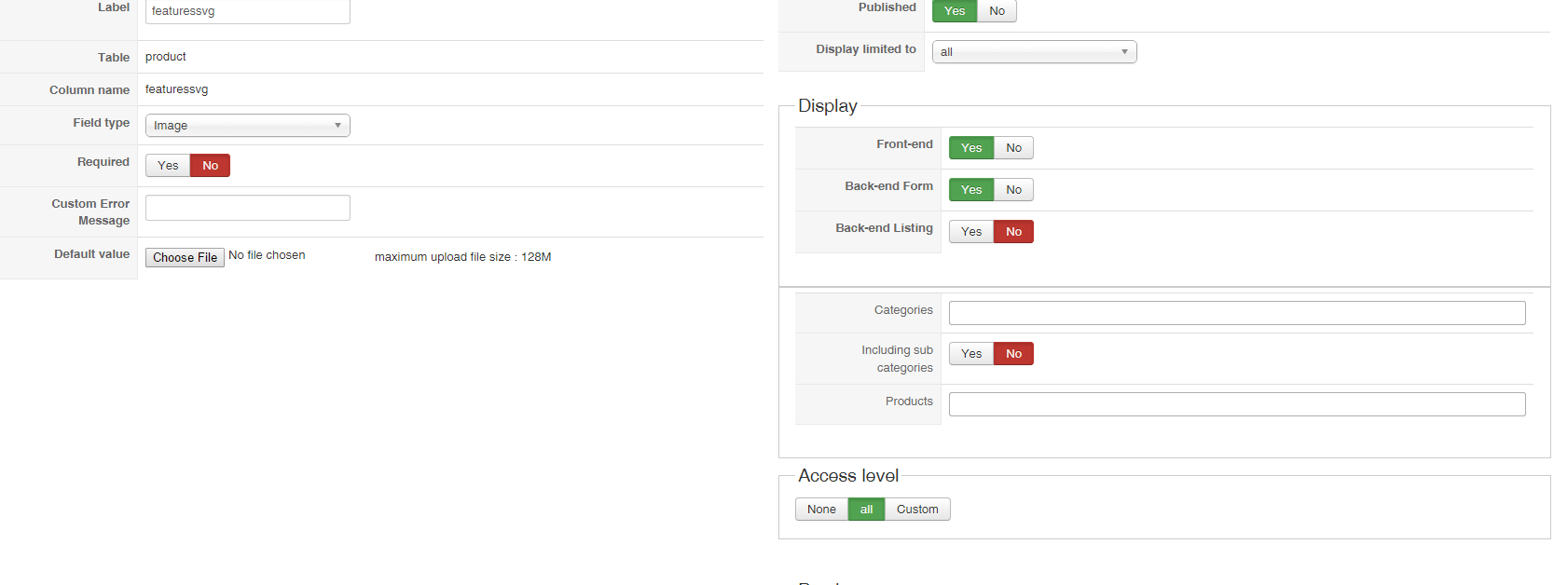
We're not able to reproduce the issue.
Can you provide a screenshot of the settings of that custom field and a screenshot of the "Files" area of your HikaShop configuration?
We're not able to reproduce the issue.
Can you provide a screenshot of the settings of that custom field and a screenshot of the "Files" area of your HikaShop configuration?
Please Log in or Create an account to join the conversation.
11 years 2 months ago - 11 years 2 months ago #211647
by ninjab

Replied by ninjab on topic Hikashop Category Then Going to a Product Listing
Last edit: 11 years 2 months ago by ninjab.
Please Log in or Create an account to join the conversation.
11 years 2 months ago #211679
by nicolas
Replied by nicolas on topic Hikashop Category Then Going to a Product Listing
Hi,
Ok I see the issue.
Can you also add the svg extension to the "Allowed files" setting of the HikaShop configuration and try again ?
Ok I see the issue.
Can you also add the svg extension to the "Allowed files" setting of the HikaShop configuration and try again ?
Please Log in or Create an account to join the conversation.
Time to create page: 0.603 seconds