

- Posts: 54
- Thank you received: 0
Displaying Add to wishlist instead of Add to Cart
11 years 2 months ago #211289
by QureshiMo
Displaying Add to wishlist instead of Add to Cart was created by QureshiMo
-- HikaShop version -- : 2.5.0
-- Joomla version -- : 3.4.3
-- PHP version -- : 5.5.12
-- Browser(s) name and version -- : Chrome
Hello:
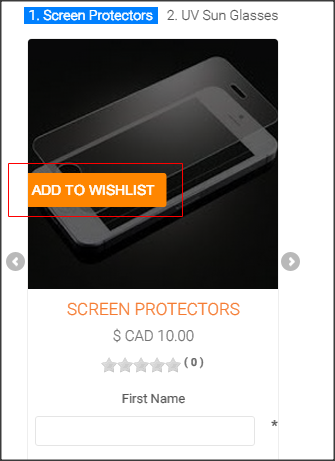
The quantity of the product in the attached image is set to unlimited. I am still getting "Add to Wishlist" instead of "Add To Cart" on the the product listing page displaying product list in carousel display with one product at a time.
-- Joomla version -- : 3.4.3
-- PHP version -- : 5.5.12
-- Browser(s) name and version -- : Chrome
Hello:
The quantity of the product in the attached image is set to unlimited. I am still getting "Add to Wishlist" instead of "Add To Cart" on the the product listing page displaying product list in carousel display with one product at a time.
Please Log in or Create an account to join the conversation.

11 years 2 months ago #211290
by Jerome
Jerome - Obsidev.com
HikaMarket & HikaSerial developer / HikaShop core dev team.
Replied by Jerome on topic Displaying Add to wishlist instead of Add to Cart
Hi,
I think that you're having both buttons but the "add to wishlist" is hover the "add to cart".
Due to the fact that you're using the carousel, I think that the CSS from the JSN template had some missing rules ; because it has not been test in that specific condition/configuration.
You can see in our demo website the different configuration where you can be sure the display is fine :
demo.hikashop.com/index.php/en/hikashop/...display-with-effects
I think it will be easier, otherwise it means that you have to see with JoomlaShine how fix the CSS for that specific setting.
Regards,
I think that you're having both buttons but the "add to wishlist" is hover the "add to cart".
Due to the fact that you're using the carousel, I think that the CSS from the JSN template had some missing rules ; because it has not been test in that specific condition/configuration.
You can see in our demo website the different configuration where you can be sure the display is fine :
demo.hikashop.com/index.php/en/hikashop/...display-with-effects
I think it will be easier, otherwise it means that you have to see with JoomlaShine how fix the CSS for that specific setting.
Regards,
Jerome - Obsidev.com
HikaMarket & HikaSerial developer / HikaShop core dev team.
Please Log in or Create an account to join the conversation.
Time to create page: 0.046 seconds