

- Posts: 24
- Thank you received: 0
Product Variants - Access Level Issues
11 years 1 month ago #215060
by Fishwise
Product Variants - Access Level Issues was created by Fishwise
-- HikaShop version -- : 2.5.0
-- Joomla version -- : 3.4.4
-- PHP version -- : 5.4.36-0+deb7u1
-- Browser(s) name and version -- : Chrome
Hopefully this is just me getting a bit confused and mixing things up!
I have two sets of prices - wholesale prices, which I intend to assign to all "Business" users, and retail prices, for guests, registered users etc.
These are the site's user groups:
Public
- Business
- Guest
- Manager
- Registered
- - Author
- - - Editor
- - - - Publisher
- - Super Users
Let's say the wholesale price is $15 inc GST - the following I have checked for the variant's ACLs:
Public - Yes
- Business - Yes
- Guest - No
- Manager - No
- Registered - No
- - Author - No
- - - Editor - No
- - - - Publisher - No
- - Super Users - No
And the retail price may be $20 inc GST - the following I have checked for the variant's ACLs:
Public - Yes
- Business - No
- Guest - Yes
- Manager - Yes
- Registered - Yes
- - Author - Yes
- - - Editor - Yes
- - - - Publisher - Yes
- - Super Users - Yes
My test business account is part of the following user groups:
Business and Registered
However - when looking at the page - the Business account is still only seeing the $20 Retail price, and not the $15 Wholesale price.
Is there any issue with my access level ordering, or is it perhaps an issue with the user having multiple access levels?
Thanks heaps
-- Joomla version -- : 3.4.4
-- PHP version -- : 5.4.36-0+deb7u1
-- Browser(s) name and version -- : Chrome
Hopefully this is just me getting a bit confused and mixing things up!
I have two sets of prices - wholesale prices, which I intend to assign to all "Business" users, and retail prices, for guests, registered users etc.
These are the site's user groups:
Public
- Business
- Guest
- Manager
- Registered
- - Author
- - - Editor
- - - - Publisher
- - Super Users
Let's say the wholesale price is $15 inc GST - the following I have checked for the variant's ACLs:
Public - Yes
- Business - Yes
- Guest - No
- Manager - No
- Registered - No
- - Author - No
- - - Editor - No
- - - - Publisher - No
- - Super Users - No
And the retail price may be $20 inc GST - the following I have checked for the variant's ACLs:
Public - Yes
- Business - No
- Guest - Yes
- Manager - Yes
- Registered - Yes
- - Author - Yes
- - - Editor - Yes
- - - - Publisher - Yes
- - Super Users - Yes
My test business account is part of the following user groups:
Business and Registered
However - when looking at the page - the Business account is still only seeing the $20 Retail price, and not the $15 Wholesale price.
Is there any issue with my access level ordering, or is it perhaps an issue with the user having multiple access levels?
Thanks heaps
Please Log in or Create an account to join the conversation.

11 years 1 month ago #215077
by nicolas
Replied by nicolas on topic Product Variants - Access Level Issues
Hi,
That's a bug of the current release I think.
We've added a patch since the release to fix that.
Please download the install package of the current version via the menu My account>My subscriptions on our website and install it on your and that will add the patch to fix that.
That's a bug of the current release I think.
We've added a patch since the release to fix that.
Please download the install package of the current version via the menu My account>My subscriptions on our website and install it on your and that will add the patch to fix that.
Please Log in or Create an account to join the conversation.
11 years 1 month ago #215175
by Fishwise
Replied by Fishwise on topic Product Variants - Access Level Issues
Good to know that it might be a bug
Unfortunately I get this error whenever I try to update:
" Table 'fw.pftvd_falang_content' doesn't exist SQL=UPDATE pftvd_falang_content SET published=0 WHERE reference_field IN ('size','type','freshwatersaltwater','floatingsinking') AND reference_table='hikashop_product'"
Any thoughts?
Unfortunately I get this error whenever I try to update:
" Table 'fw.pftvd_falang_content' doesn't exist SQL=UPDATE pftvd_falang_content SET published=0 WHERE reference_field IN ('size','type','freshwatersaltwater','floatingsinking') AND reference_table='hikashop_product'"
Any thoughts?
Please Log in or Create an account to join the conversation.

11 years 1 month ago #215203
by Jerome
Jerome - Obsidev.com
HikaMarket & HikaSerial developer / HikaShop core dev team.
Replied by Jerome on topic Product Variants - Access Level Issues
Hi,
Please edit the file "administrator/components/com_hikashop/helpers/update.php" and replace
By
It will fix your issue.
In the same time, we will create the appropriate patch and include it as an "hot fix" in HikaShop 2.6.0.
Regards,
Please edit the file "administrator/components/com_hikashop/helpers/update.php" and replace
Code:
if(!empty($unpublish)){
foreach($unpublish as $k => $v){
$unpublish[$k] = $db->Quote($v);
}
$db->setQuery('UPDATE #__falang_content SET published=0 WHERE reference_field IN ('.implode(',',$unpublish).') AND reference_table='.$db->Quote('hikashop_'.$types[$file]['type']));
$db->query();
}
if(!empty($publish)){
foreach($publish as $k => $v){
$publish[$k] = $db->Quote($v);
}
$db->setQuery('UPDATE #__falang_content SET published=1 WHERE reference_field IN ('.implode(',',$publish).') AND reference_table='.$db->Quote('hikashop_'.$types[$file]['type']));
$db->query();
}
Code:
if(false) {
if(!empty($unpublish)){
foreach($unpublish as $k => $v){
$unpublish[$k] = $db->Quote($v);
}
$db->setQuery('UPDATE #__falang_content SET published=0 WHERE reference_field IN ('.implode(',',$unpublish).') AND reference_table='.$db->Quote('hikashop_'.$types[$file]['type']));
$db->query();
}
if(!empty($publish)){
foreach($publish as $k => $v){
$publish[$k] = $db->Quote($v);
}
$db->setQuery('UPDATE #__falang_content SET published=1 WHERE reference_field IN ('.implode(',',$publish).') AND reference_table='.$db->Quote('hikashop_'.$types[$file]['type']));
$db->query();
}
}
In the same time, we will create the appropriate patch and include it as an "hot fix" in HikaShop 2.6.0.
Regards,
Jerome - Obsidev.com
HikaMarket & HikaSerial developer / HikaShop core dev team.
Please Log in or Create an account to join the conversation.
11 years 1 month ago #215216
by Fishwise
Replied by Fishwise on topic Product Variants - Access Level Issues
Hmm - it doesn't seem to be having any effect. Can I please confirm that the code (including surrounding code) will look like this?
Thanks for all your help, by the way
Code:
}
if($oneExtraField->field_type == 'wysiwyg') {
$field = $xml->reference->table->addChild('field', $fieldTitle);
$field->addAttribute('type', 'htmltext');
$field->addAttribute('name', $fieldName);
$field->addAttribute('translate', '1');
}
}
if(false) {
if(!empty($unpublish)){
foreach($unpublish as $k => $v){
$unpublish[$k] = $db->Quote($v);
}
$db->setQuery('UPDATE #__falang_content SET published=0 WHERE reference_field IN ('.implode(',',$unpublish).') AND reference_table='.$db->Quote('hikashop_'.$types[$file]['type']));
$db->query();
}
if(!empty($publish)){
foreach($publish as $k => $v){
$publish[$k] = $db->Quote($v);
}
$db->setQuery('UPDATE #__falang_content SET published=1 WHERE reference_field IN ('.implode(',',$publish).') AND reference_table='.$db->Quote('hikashop_'.$types[$file]['type']));
$db->query();
}
}
$xml->asXML($destination);
}
function addUpdateSite(){
if(version_compare(JVERSION,'1.6.0','<')) return false;
$config = hikashop_config();
$newconfig = new stdClass();
$newconfig->website = HIKASHOP_LIVE;
$config->save($newconfig);
$query="SELECT update_site_id FROM #__update_sites WHERE location LIKE '%hikashop%' AND type LIKE 'extension'";
$this->db->setQuery($query);
$update_site_id = $this->db->loadResult();
$object = new stdClass();
$object->name='Hikashop';
$object->type='extension';
Thanks for all your help, by the way
Please Log in or Create an account to join the conversation.
11 years 1 month ago #215219
by Jerome
Jerome - Obsidev.com
HikaMarket & HikaSerial developer / HikaShop core dev team.
Replied by Jerome on topic Product Variants - Access Level Issues
Hi,
Please redownload HikaShop 2.6 it will be easier.
Regards,
Please redownload HikaShop 2.6 it will be easier.
Regards,
Jerome - Obsidev.com
HikaMarket & HikaSerial developer / HikaShop core dev team.
Please Log in or Create an account to join the conversation.
11 years 1 month ago #215273
by Fishwise
Replied by Fishwise on topic Product Variants - Access Level Issues
Unfortunately I still get the error ( 1146 Table 'fw.pftvd_falang_content' doesn't exist SQL=UPDATE pftvd_falang_content SET published=0 WHERE reference_field IN ('size','type','freshwatersaltwater','floatingsinking') AND reference_table='hikashop_product') when installing it (regardless of whether I change the code - which seems to be overridden once I install it again, despite the error).
Please Log in or Create an account to join the conversation.
11 years 1 month ago #215306
by nicolas
Replied by nicolas on topic Product Variants - Access Level Issues
Hi,
You don't need to change any code.
The fix was added in the install package on our website. That's why you need to redownload it in order to get the patch in the back/helpers/update.php file of the package so that when you install the new version of the package, you don't get the error.
If you still have it, there is a high chance that you're not using the new package we put on the website after you reported the issue.
You don't need to change any code.
The fix was added in the install package on our website. That's why you need to redownload it in order to get the patch in the back/helpers/update.php file of the package so that when you install the new version of the package, you don't get the error.
If you still have it, there is a high chance that you're not using the new package we put on the website after you reported the issue.
Please Log in or Create an account to join the conversation.
11 years 1 month ago #215310
by Fishwise
Replied by Fishwise on topic Product Variants - Access Level Issues
Can I please confirm whether you mean Hikashop Starter or Hikashop Business? I have downloaded the Hikashop business again however am still getting the error.
Please Log in or Create an account to join the conversation.
11 years 1 month ago #215315
by Jerome
Jerome - Obsidev.com
HikaMarket & HikaSerial developer / HikaShop core dev team.
Replied by Jerome on topic Product Variants - Access Level Issues
Hi,
Do you have Joomfish or Falang installed in your website ?
Or does one of these components has been installed before ?
Regards,
Do you have Joomfish or Falang installed in your website ?
Or does one of these components has been installed before ?
Regards,
Jerome - Obsidev.com
HikaMarket & HikaSerial developer / HikaShop core dev team.
Please Log in or Create an account to join the conversation.
11 years 1 month ago #215453
by Fishwise
Replied by Fishwise on topic Product Variants - Access Level Issues
Hi there - as far as I am aware, neither of those extensions have been installed on the website.
Thanks
Thanks
Please Log in or Create an account to join the conversation.
11 years 4 weeks ago #215456
by nicolas
Replied by nicolas on topic Product Variants - Access Level Issues
Hi,
If you have that error, it means that you have either the folder administrator/components/com_falang or administrator/components/com_joomfish on your website. So you probably had one of them installed before, one way or another.
Rename the folder via FTP and try again and you shouldn't get the problem.
If you have that error, it means that you have either the folder administrator/components/com_falang or administrator/components/com_joomfish on your website. So you probably had one of them installed before, one way or another.
Rename the folder via FTP and try again and you shouldn't get the problem.
Please Log in or Create an account to join the conversation.
11 years 4 weeks ago #215500
by Fishwise
Replied by Fishwise on topic Product Variants - Access Level Issues
Hi there - thanks heaps That appears to have fixed it!
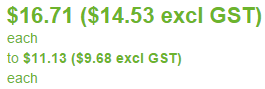
It now shows two prices instead of one (so shows both the retail and wholesale price) - is it possible to get it to only show the wholesale price to a business user (even if the user is in multiple groups)?
That appears to have fixed it!It now shows two prices instead of one (so shows both the retail and wholesale price) - is it possible to get it to only show the wholesale price to a business user (even if the user is in multiple groups)?
Please Log in or Create an account to join the conversation.
11 years 4 weeks ago #215501
by Jerome
Jerome - Obsidev.com
HikaMarket & HikaSerial developer / HikaShop core dev team.
Replied by Jerome on topic Product Variants - Access Level Issues
Hi,
The "retail price" is just an informative price and does not replace the product prices.
Regards,
The "retail price" is just an informative price and does not replace the product prices.
Regards,
Jerome - Obsidev.com
HikaMarket & HikaSerial developer / HikaShop core dev team.
Please Log in or Create an account to join the conversation.
11 years 3 weeks ago #215983
by Fishwise
Replied by Fishwise on topic Product Variants - Access Level Issues
Do you have any suggestions on how to make it appear less confusing? As for the wholesale user there is no indication as to what the two different prices mean.
Please Log in or Create an account to join the conversation.
11 years 3 weeks ago #216025
by nicolas
Replied by nicolas on topic Product Variants - Access Level Issues
Hi,
You can edit the file "listing_price" of the view "product" via the menu Display>Views in order to customize the price display the way you want and make it clearer for your need.
You can edit the file "listing_price" of the view "product" via the menu Display>Views in order to customize the price display the way you want and make it clearer for your need.
Please Log in or Create an account to join the conversation.
Time to create page: 0.377 seconds