

- Posts: 27
- Thank you received: 0
Add cart to product listing
11 years 1 week ago - 10 years 11 months ago #215685
by Ziggy
Add cart to product listing was created by Ziggy
-- HikaShop version -- : 2.6.0
-- Joomla version -- : 3.4.4
-- PHP version -- : 5.4.43
-- Browser(s) name and version -- : Opera Beta
After updating to the newest version i could find any option that effect my frontend product page.
By example menu->samsung->S6.
I tried by making changes in
menus->main menu->samsung->product options
hikahop->configuration->main->product
hikahop->configuration->display
What I am trying is to add a cart button to the product listing

Thanks in advance
-- Joomla version -- : 3.4.4
-- PHP version -- : 5.4.43
-- Browser(s) name and version -- : Opera Beta
After updating to the newest version i could find any option that effect my frontend product page.
By example menu->samsung->S6.
I tried by making changes in
menus->main menu->samsung->product options
hikahop->configuration->main->product
hikahop->configuration->display
What I am trying is to add a cart button to the product listing
Thanks in advance
Last edit: 10 years 11 months ago by Ziggy.
Please Log in or Create an account to join the conversation.

11 years 6 days ago #215700
by Jerome
Jerome - Obsidev.com
HikaMarket & HikaSerial developer / HikaShop core dev team.
Replied by Jerome on topic Add cart to product listing
Hi,
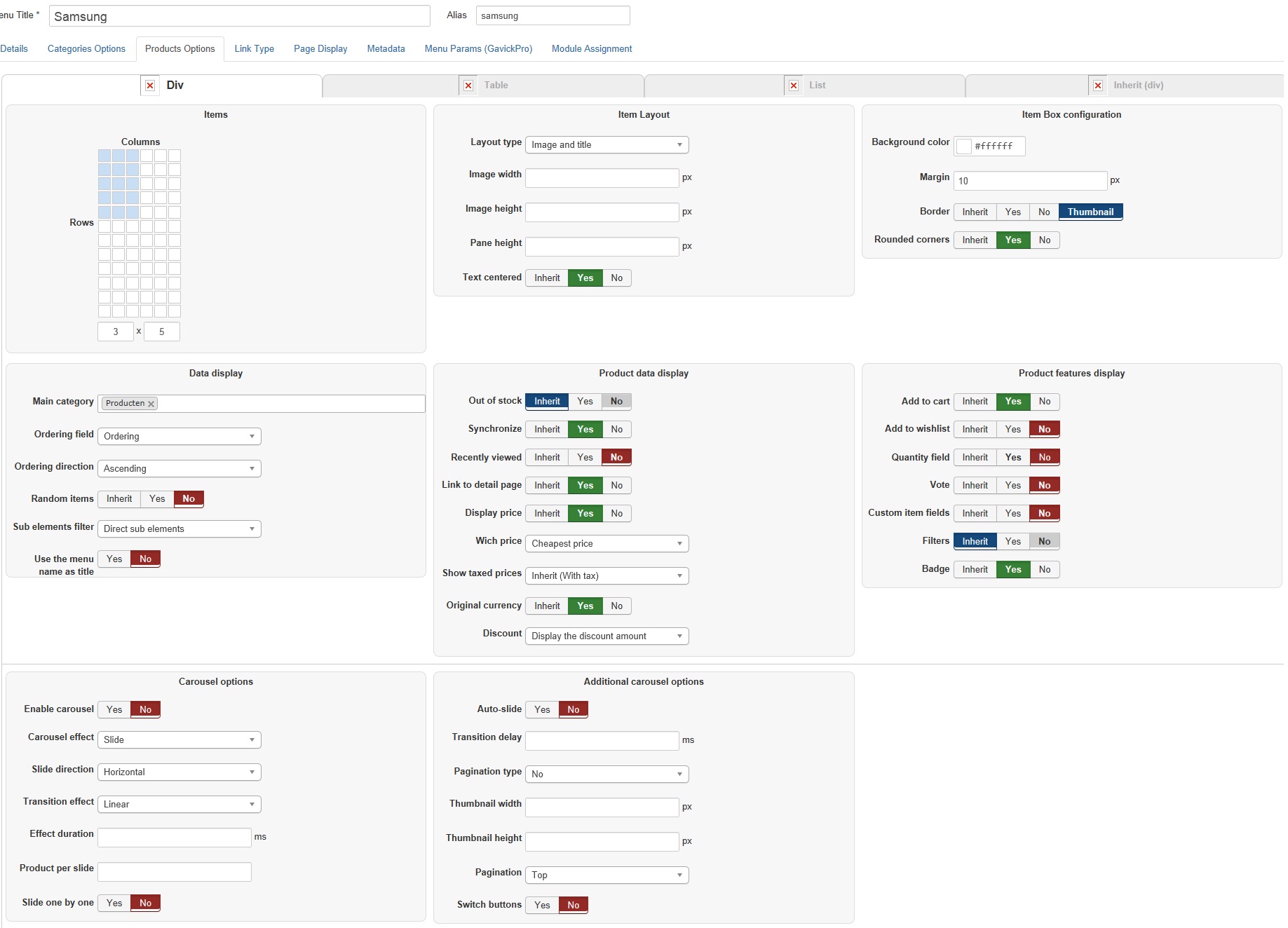
Would it be possible to know more about your menu configuration ("Joomla > menus > samsung > product options") ?
If you can provide a screenshot it will be great.
Regards,
Would it be possible to know more about your menu configuration ("Joomla > menus > samsung > product options") ?
If you can provide a screenshot it will be great.
Regards,
Jerome - Obsidev.com
HikaMarket & HikaSerial developer / HikaShop core dev team.
Please Log in or Create an account to join the conversation.
11 years 6 days ago #215776
by Ziggy
Replied by Ziggy on topic Add cart to product listing
Offcourse 
Please Log in or Create an account to join the conversation.

11 years 6 days ago #215786
by Xavier
Replied by Xavier on topic Add cart to product listing
Hi,
The configuration seems to be correct, just to be sure is that the settings for the menu with the id "845" ?
If you try to edit the settings of the module with the id "823" does that have any effect on the product listing ?
The configuration seems to be correct, just to be sure is that the settings for the menu with the id "845" ?
If you try to edit the settings of the module with the id "823" does that have any effect on the product listing ?
Please Log in or Create an account to join the conversation.
11 years 6 days ago - 11 years 6 days ago #215824
by Ziggy
Replied by Ziggy on topic Add cart to product listing
Not even a single change effects the layout.
As you can see the items column is set to three columns wide. But the products are four columns wide.
The menu id is 845 indeed, 823 is not a valid menu id in the menu structure.
I am out of options. Hopefully you guys can solve this issue.
As you can see the items column is set to three columns wide. But the products are four columns wide.
The menu id is 845 indeed, 823 is not a valid menu id in the menu structure.
I am out of options. Hopefully you guys can solve this issue.
Last edit: 11 years 6 days ago by Ziggy.
Please Log in or Create an account to join the conversation.
11 years 5 days ago #215878
by Xavier
Replied by Xavier on topic Add cart to product listing
Hi,
I was talking about the module with the id "823"
I was talking about the module with the id "823"
Please Log in or Create an account to join the conversation.
11 years 5 days ago - 11 years 5 days ago #215881
by Ziggy
Replied by Ziggy on topic Add cart to product listing
The changes now have effect, but i still dont have "add to cart" button?
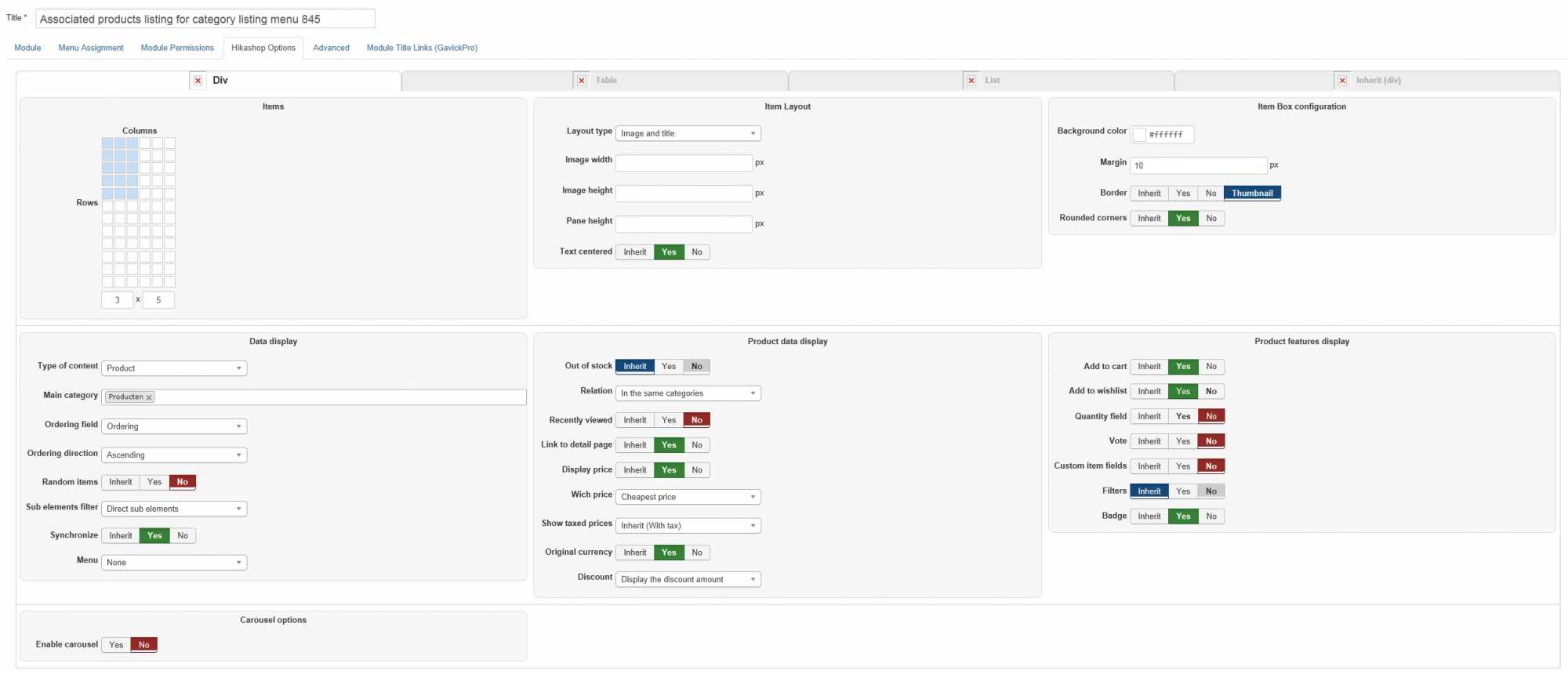
...and I am curious. What am I changing when i make changes in the product options of the previous screenshot?
...and I am curious. What am I changing when i make changes in the product options of the previous screenshot?
Last edit: 11 years 5 days ago by Ziggy.
Please Log in or Create an account to join the conversation.
11 years 5 days ago #215903
by Xavier
Replied by Xavier on topic Add cart to product listing
Hi,
It seems that there is an issue.
We just uploaded a package with the latest fixes, please download it and install it over your current version.
A backend and FTP access to your website could help us to debug entirely that issue.
You can send these informations via our contact form, please give the url of that topic in the message.
It seems that there is an issue.
We just uploaded a package with the latest fixes, please download it and install it over your current version.
A backend and FTP access to your website could help us to debug entirely that issue.
You can send these informations via our contact form, please give the url of that topic in the message.
Please Log in or Create an account to join the conversation.
11 years 5 days ago - 11 years 5 days ago #215952
by Ziggy
Replied by Ziggy on topic Add cart to product listing
Downloaded and installed the package, but no result
I will provide you this credentials!
I will provide you this credentials!
Last edit: 11 years 5 days ago by Ziggy.
Please Log in or Create an account to join the conversation.
11 years 4 days ago #215991
by Xavier
Replied by Xavier on topic Add cart to product listing
Hi,
Ok for the FTP, but I don't have informations for the backend access.
Ok for the FTP, but I don't have informations for the backend access.
Please Log in or Create an account to join the conversation.
11 years 4 days ago #216023
by Ziggy
Replied by Ziggy on topic Add cart to product listing
Sent it using the contact form as requested
Please Log in or Create an account to join the conversation.
11 years 4 days ago #216035
by Jerome
Jerome - Obsidev.com
HikaMarket & HikaSerial developer / HikaShop core dev team.
Replied by Jerome on topic Add cart to product listing
Hi,
Like Xavier said ; we received your FTP access but in your message there was no Joomla backend access.
Please provide that access.
Regards,
Like Xavier said ; we received your FTP access but in your message there was no Joomla backend access.
Please provide that access.
Regards,
Jerome - Obsidev.com
HikaMarket & HikaSerial developer / HikaShop core dev team.
Please Log in or Create an account to join the conversation.
11 years 4 days ago #216093
by Ziggy
Replied by Ziggy on topic Add cart to product listing
Lol,
stupid my bad. I created an account with the same credentials
stupid my bad. I created an account with the same credentials
Please Log in or Create an account to join the conversation.

11 years 3 days ago #216137
by nicolas
Replied by nicolas on topic Add cart to product listing
Hi,
There is a htaccess on your backend and you didn't provide the credentials for the htaccess, so again, we're not able to access your backend.
Could you provide the htacess credentials via our contact form along with a link to this thread ?
www.hikashop.com/support/contact-us.html
There is a htaccess on your backend and you didn't provide the credentials for the htaccess, so again, we're not able to access your backend.
Could you provide the htacess credentials via our contact form along with a link to this thread ?
www.hikashop.com/support/contact-us.html
Please Log in or Create an account to join the conversation.
11 years 1 day ago #216274
by Ziggy
Replied by Ziggy on topic Add cart to product listing
Hopefully I provided the right credentials this time.
Please Log in or Create an account to join the conversation.
11 years 1 day ago #216293
by Xavier
Replied by Xavier on topic Add cart to product listing
Hi,
We are not able to reach the whole website now.
Part of the message is hidden for the guests. Please log in or register to see it.
We are not able to reach the whole website now.
Part of the message is hidden for the guests. Please log in or register to see it.
Please Log in or Create an account to join the conversation.
11 years 1 day ago #216306
by Ziggy
Replied by Ziggy on topic Add cart to product listing
Error is fixed. I sent you some information using the contact form.
Please Log in or Create an account to join the conversation.
11 years 1 day ago #216318
by Xavier
Replied by Xavier on topic Add cart to product listing
Hi,
Problem solved, the content of the view "product / quantity" was empty so nothing was displayed.
I added code back.
Problem solved, the content of the view "product / quantity" was empty so nothing was displayed.
I added code back.
The following user(s) said Thank You: Ziggy
Please Log in or Create an account to join the conversation.
11 years 1 day ago #216321
by Ziggy
Replied by Ziggy on topic Add cart to product listing
Thnx for your quick support.
What did you change, cause most of the products are in stock
What did you change, cause most of the products are in stock
Please Log in or Create an account to join the conversation.
11 years 1 day ago #216329
by Xavier
Replied by Xavier on topic Add cart to product listing
I changed the content of the view "product / quantity".
www.hikashop.com/support/support/documen...ize-the-display.html
www.hikashop.com/support/support/documen...ize-the-display.html
Please Log in or Create an account to join the conversation.
Time to create page: 0.327 seconds