

- Posts: 78
- Thank you received: 1
Was 10$ now only 5$
11 years 1 week ago #217600
by Geor
Was 10$ now only 5$ was created by Geor
-- HikaShop version -- : 2.6.0
Hi everyone.
Is it possible to tweak hikashop in such way to get this on the products ? (see attachment

)
Hi everyone.
Is it possible to tweak hikashop in such way to get this on the products ? (see attachment
)
Please Log in or Create an account to join the conversation.

11 years 1 week ago #217602
by Jerome
Jerome - Obsidev.com
HikaMarket & HikaSerial developer / HikaShop core dev team.
Replied by Jerome on topic Was 10$ now only 5$
Hi,
Yes.
In HikaShop you can activate a setting to display the original price with the discounted price.
Then, thanks to language override, you can tweak the text before and after each part of the price.
If using language override, you can reach your goal ; it is still possible to create a view override for the "product | listing_price" and change directly how the price is displayed in HTML.
Regards,
Yes.
In HikaShop you can activate a setting to display the original price with the discounted price.
Then, thanks to language override, you can tweak the text before and after each part of the price.
If using language override, you can reach your goal ; it is still possible to create a view override for the "product | listing_price" and change directly how the price is displayed in HTML.
Regards,
Jerome - Obsidev.com
HikaMarket & HikaSerial developer / HikaShop core dev team.
Please Log in or Create an account to join the conversation.
11 years 1 week ago #217651
by Geor
Replied by Geor on topic Was 10$ now only 5$
Thank you for your help.
Where is this option in the configuration ? I found the setting "Show discounted price" but no matter which option I choose I get this nonsense: $-1.00 and then the price of the item exactly next to the discount, for example: $-1.00 5.99$.
Where is this option in the configuration ? I found the setting "Show discounted price" but no matter which option I choose I get this nonsense: $-1.00 and then the price of the item exactly next to the discount, for example: $-1.00 5.99$.
Please Log in or Create an account to join the conversation.

11 years 1 week ago #217662
by nicolas
Replied by nicolas on topic Was 10$ now only 5$
Hi,
Go in the Joomla menu manager and edit your menu item. There, in the product options tab, you'll have a "Discount" setting in order to change that.
Go in the Joomla menu manager and edit your menu item. There, in the product options tab, you'll have a "Discount" setting in order to change that.
Please Log in or Create an account to join the conversation.
11 years 1 week ago #217707
by Geor
Replied by Geor on topic Was 10$ now only 5$
Hi Nicolas,
I found those settings and I did change the discount tab to all the available options. This is what I get
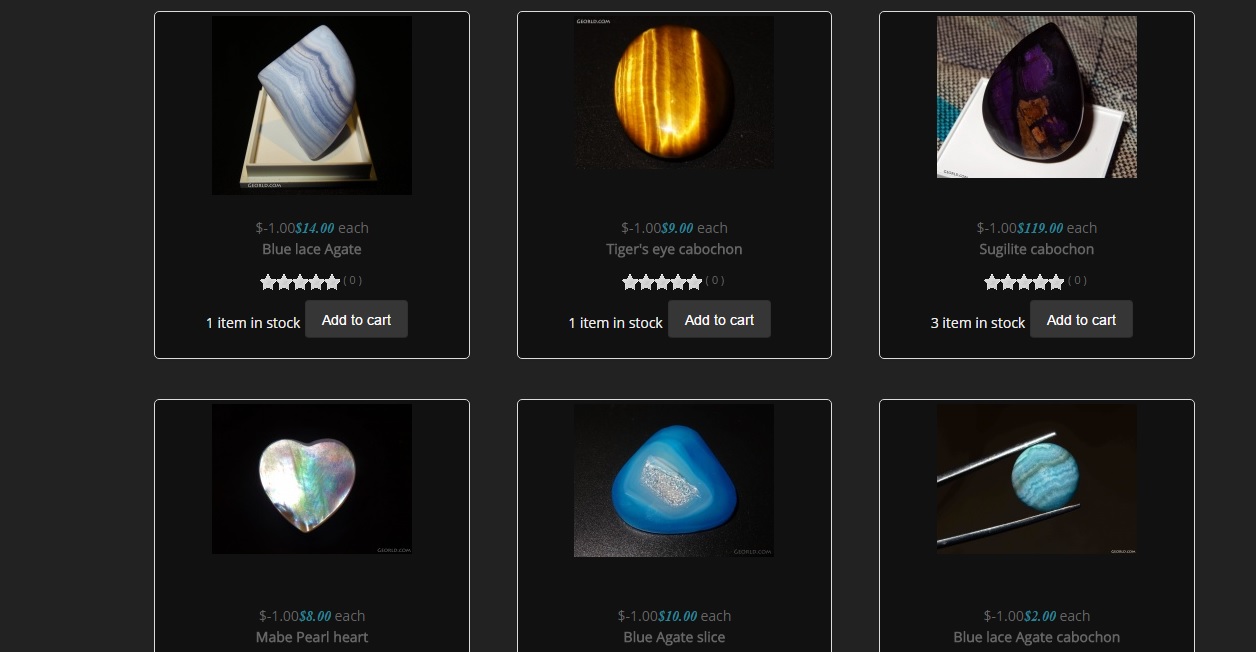
I found those settings and I did change the discount tab to all the available options. This is what I get
Please Log in or Create an account to join the conversation.

Less
More
- Posts: 12953
- Thank you received: 1778
11 years 1 week ago #217715
by Mohamed Thelji
Replied by Mohamed Thelji on topic Was 10$ now only 5$
Hello,
You should check that you went to the good product listing menu's configuration page, because setting the "Discount" option to "Display the price before the discount is applied" should have done the job.
You should check that you went to the good product listing menu's configuration page, because setting the "Discount" option to "Display the price before the discount is applied" should have done the job.
Please Log in or Create an account to join the conversation.
11 years 1 week ago #217787
by Geor
Replied by Geor on topic Was 10$ now only 5$
I only use one menu for hikashop, and I did the change on the option that particular menu. :side:
Please Log in or Create an account to join the conversation.
Less
More
- Posts: 12953
- Thank you received: 1778
11 years 1 week ago #217842
by Mohamed Thelji
Replied by Mohamed Thelji on topic Was 10$ now only 5$
Hello,
That's weird, changing the value of that option SHOULD do the job, can you give me a link to the page where you are having your issue so that I can check it and give you the ID of the module/menu to edit ?
Thanks.
That's weird, changing the value of that option SHOULD do the job, can you give me a link to the page where you are having your issue so that I can check it and give you the ID of the module/menu to edit ?
Thanks.
Please Log in or Create an account to join the conversation.
11 years 1 week ago #217886
by Geor
Replied by Geor on topic Was 10$ now only 5$
Sure no problem. However I dont have the discount on because it works on all products on the whole website which is unwanted. Would it be possible to apply different discounts on different items?
Here is the link. Any category you click has the same issue: www.georld.com/store
Here is the link. Any category you click has the same issue: www.georld.com/store
Please Log in or Create an account to join the conversation.
11 years 6 days ago #217974
by nicolas
Replied by nicolas on topic Was 10$ now only 5$
Hi,
It sure is possible to have different discounts for different products but only with the Essential or the Business edition of HikaShop.
With the Starter edition, the discounts will apply to all the products, regardless of how you configure the price display options.
It sure is possible to have different discounts for different products but only with the Essential or the Business edition of HikaShop.
With the Starter edition, the discounts will apply to all the products, regardless of how you configure the price display options.
Please Log in or Create an account to join the conversation.
11 years 6 days ago #218010
by Geor
Replied by Geor on topic Was 10$ now only 5$
So I cannot show the effect I need, even with all products?
Please Log in or Create an account to join the conversation.
11 years 4 days ago #218264
by Geor
Replied by Geor on topic Was 10$ now only 5$
Anybody there???
Please Log in or Create an account to join the conversation.
11 years 3 days ago #218270
by nicolas
Replied by nicolas on topic Was 10$ now only 5$
Hi,
You sure can.
There is no secret. You just have to edit your menu item via the Joomla menu manager and change the "Discount" setting to "Display the price before the discount is applied" and that will do it.
You sure can.
There is no secret. You just have to edit your menu item via the Joomla menu manager and change the "Discount" setting to "Display the price before the discount is applied" and that will do it.
Please Log in or Create an account to join the conversation.
Time to create page: 0.401 seconds