

- Posts: 54
- Thank you received: 0
"Add To Cart" Button Showing Up + Icons On Backend
10 years 11 months ago #218550
by QureshiMo
"Add To Cart" Button Showing Up + Icons On Backend was created by QureshiMo
-- HikaShop version -- : 2.6.0
-- Joomla version -- : 3.4.5
-- PHP version -- : 5.5.12
Hello:
There are two issues. First, background.
I have a menu "Ornaments" which is of type category listing. The category "Ornaments" have sub-categories and also three products under it.
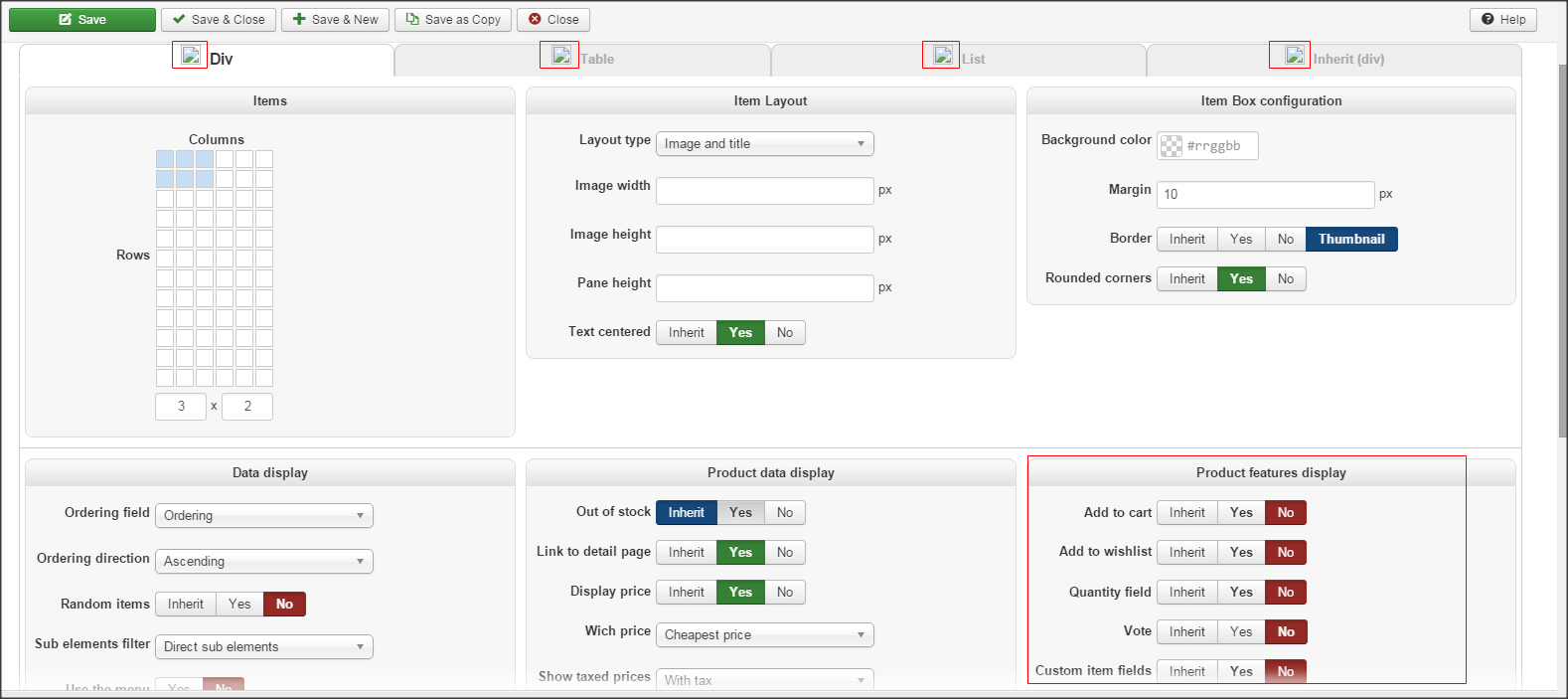
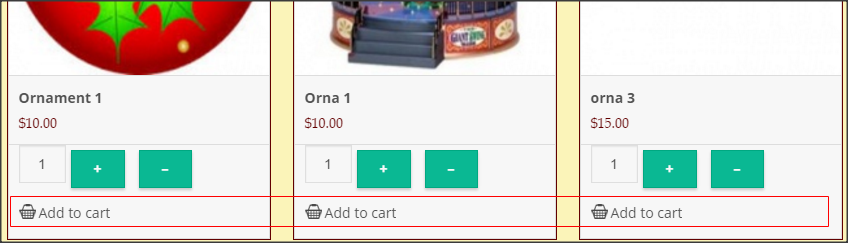
Issue 1: Once Clicked on the Ornament menu, the sub-category shows up and also the three product under it. However, the product list also displays "Add to Cart" Button when within Menus --> Main Menu --> Ornaments --> Product Options --> Product Feature Display, I have turned-off "Add To Cart" Button. How can I remove "Add To Cart" Button in Product listing (Not on Product Page).
Issue 2: If we look in the image, we will notice that the icons are missing. These images are to be found in media/com_hikashop/images/icons folder which does exist and does have these icons. However, they are spelled differently in the folder and in the code. For example, in the folder, the icon for DIV selected is called
The word "DIV" is spelled in lower case in the code and in upper case in the code. Since, I am using unix based hosting, this is causing icons not be found.
Thanks,
<<< Ali >>>
-- Joomla version -- : 3.4.5
-- PHP version -- : 5.5.12
Hello:
There are two issues. First, background.
I have a menu "Ornaments" which is of type category listing. The category "Ornaments" have sub-categories and also three products under it.
Issue 1: Once Clicked on the Ornament menu, the sub-category shows up and also the three product under it. However, the product list also displays "Add to Cart" Button when within Menus --> Main Menu --> Ornaments --> Product Options --> Product Feature Display, I have turned-off "Add To Cart" Button. How can I remove "Add To Cart" Button in Product listing (Not on Product Page).
Issue 2: If we look in the image, we will notice that the icons are missing. These images are to be found in media/com_hikashop/images/icons folder which does exist and does have these icons. However, they are spelled differently in the folder and in the code. For example, in the folder, the icon for DIV selected is called
But in the code, this icon is refer to as:icon-24-Div-selected.png
Code:
src="../media/com_hikashop/images/icons/icon-24-div-selected.png
The word "DIV" is spelled in lower case in the code and in upper case in the code. Since, I am using unix based hosting, this is causing icons not be found.
Thanks,
<<< Ali >>>
Please Log in or Create an account to join the conversation.

10 years 11 months ago #218585
by Xavier
Replied by Xavier on topic "Add To Cart" Button Showing Up + Icons On Backend
Hi,
We have made a quick release, still on 2.6.0 but with hot fixes.
So we invite you to download the latest version of HikaShop from our website and install it over your current version.
This should solve all your issues.
We have made a quick release, still on 2.6.0 but with hot fixes.
So we invite you to download the latest version of HikaShop from our website and install it over your current version.
This should solve all your issues.
Please Log in or Create an account to join the conversation.
10 years 11 months ago #218601
by QureshiMo
Replied by QureshiMo on topic "Add To Cart" Button Showing Up + Icons On Backend
Hello:
I downloaded the latest version. It solved isssue#2 but issue #1 still exists.
Thanks,
<<< Ali >>>
I downloaded the latest version. It solved isssue#2 but issue #1 still exists.
Thanks,
<<< Ali >>>
Please Log in or Create an account to join the conversation.
10 years 11 months ago #218606
by Xavier
Replied by Xavier on topic "Add To Cart" Button Showing Up + Icons On Backend
Hi,
1. The "add to cart" button should indeed not be displayed in the listing with that option disabled.
Are you sure that the correct menu is edited ? If it is, so it is maybe an issue due to an override, do you have overrided the view "product / listing" ?
1. The "add to cart" button should indeed not be displayed in the listing with that option disabled.
Are you sure that the correct menu is edited ? If it is, so it is maybe an issue due to an override, do you have overrided the view "product / listing" ?
Please Log in or Create an account to join the conversation.
Time to create page: 0.184 seconds