

- Posts: 96
- Thank you received: 0
404 errors on product details
10 years 10 months ago #220168
by piggybank
404 errors on product details was created by piggybank
-- HikaShop version -- : 2.6.0
-- Joomla version -- : 3.4.3
-- PHP version -- : 5.5.27
-- Browser(s) name and version -- : Mozilla/5.0 (Windows NT 10.0; WOW64) AppleWebKit/537.36 (KHTML, like Gecko) Chrome/46.0.2490.80 Safari/537.36
Hi there,
on my website I have a store with several products in it. However when I click on the products they are going to a 404 page. I had this problem before and was told to delete the Canonical URL from the product. I did this, and it seemed to work however I came back to it moments later and the url was back, and the 404 pages were occurring again.
Thanks for your time.
-- Joomla version -- : 3.4.3
-- PHP version -- : 5.5.27
-- Browser(s) name and version -- : Mozilla/5.0 (Windows NT 10.0; WOW64) AppleWebKit/537.36 (KHTML, like Gecko) Chrome/46.0.2490.80 Safari/537.36
Hi there,
on my website I have a store with several products in it. However when I click on the products they are going to a 404 page. I had this problem before and was told to delete the Canonical URL from the product. I did this, and it seemed to work however I came back to it moments later and the url was back, and the 404 pages were occurring again.
Thanks for your time.
Please Log in or Create an account to join the conversation.

10 years 10 months ago #220173
by nicolas
Replied by nicolas on topic 404 errors on product details
Hi,
Turn off the "force canonical URLs on listings" setting of the HikaShop configuration (it's turned off by default) and this won't happen.
Turn off the "force canonical URLs on listings" setting of the HikaShop configuration (it's turned off by default) and this won't happen.
Please Log in or Create an account to join the conversation.
10 years 10 months ago #220275
by piggybank
Replied by piggybank on topic 404 errors on product details
Excellent that seems to have solved the issue on the other pages however one of my products at the following url (
www.awakentheguruinyou.com/store/product/7-i-am-calm.html
) is persisting to have a problem
You can find it by going to store->cds->I am calm.
thanks again for your time.
You can find it by going to store->cds->I am calm.
thanks again for your time.
Please Log in or Create an account to join the conversation.
10 years 10 months ago #220278
by nicolas
Replied by nicolas on topic 404 errors on product details
I don't see why that would be a problem.
Could you do a screenshot of the settings of that product ?
Could you do a screenshot of the settings of that product ?
Please Log in or Create an account to join the conversation.
10 years 10 months ago #220427
by piggybank
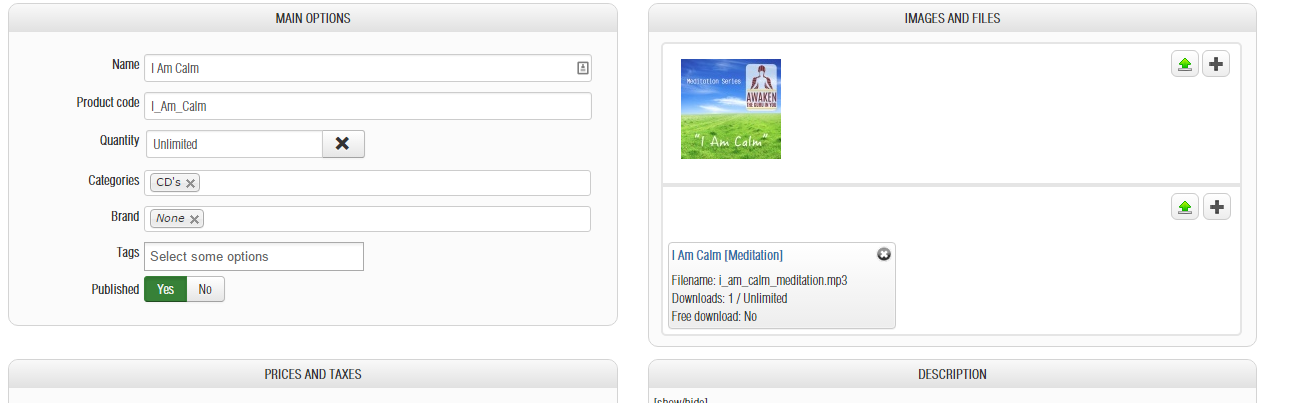
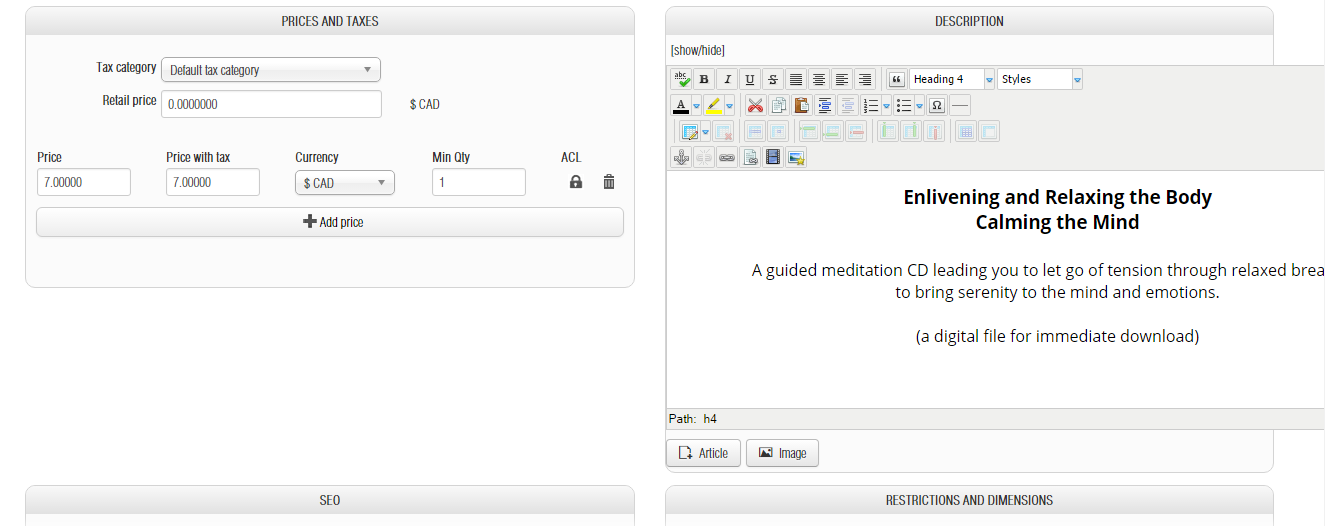
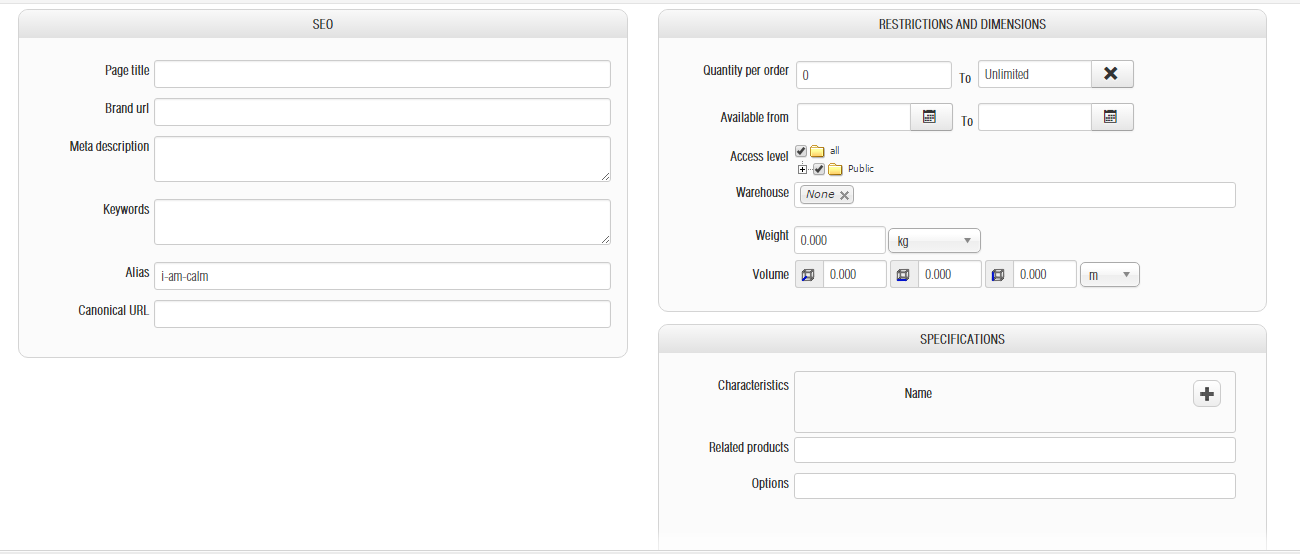
Replied by piggybank on topic 404 errors on product details
Please Log in or Create an account to join the conversation.
10 years 10 months ago #220469
by nicolas
Replied by nicolas on topic 404 errors on product details
Hi,
I don't see any issue with it.
The settings look fine and I don't see why it would work for all the other products and not this one.
Try deleting it and recreating it.
I don't see any issue with it.
The settings look fine and I don't see why it would work for all the other products and not this one.
Try deleting it and recreating it.
Please Log in or Create an account to join the conversation.
10 years 10 months ago #220754
by piggybank
Replied by piggybank on topic 404 errors on product details
Unfortunately I am still unable to access that product even after re-creating it. I really don't understand why that specific url (and as previously posted the other ones) stopped working seemingly randomly.
thanks for your time.
thanks for your time.
Please Log in or Create an account to join the conversation.

10 years 10 months ago #220801
by Xavier
Replied by Xavier on topic 404 errors on product details
Hi,
Even with another id, it is not working as expected ?
Do you have another product with the same alias ?
What is happening if you disable the option "Remove products and categories id in URLs" in Configuration > Features > SEF Url options
Even with another id, it is not working as expected ?
Do you have another product with the same alias ?
What is happening if you disable the option "Remove products and categories id in URLs" in Configuration > Features > SEF Url options
Please Log in or Create an account to join the conversation.
10 years 10 months ago #221206
by piggybank
Replied by piggybank on topic 404 errors on product details
So I was able to go through and find a few more pages that are causing issues
- www.awakentheguruinyou.com/store/checkout/step/step-1.html (which is the first step in the checkout process after information)
- Deleting items from the cart 404s
- using coupons doesn't work
- updating cart doesn't work
Please Log in or Create an account to join the conversation.
10 years 10 months ago #221209
by piggybank
Replied by piggybank on topic 404 errors on product details
I've turned sef urls off and it seems to be working however I don't fully understand why sef urls wouldn't work and why they would randomly break at certain times only on particular products.
Please Log in or Create an account to join the conversation.
10 years 10 months ago #221217
by nicolas
Replied by nicolas on topic 404 errors on product details
Hi,
That's hard to say. Do you use a third party SEF extension ?
Do you use some kind of 404, redirect, or SEO extensions ?
They could potentially be linked to these issues.
That's hard to say. Do you use a third party SEF extension ?
Do you use some kind of 404, redirect, or SEO extensions ?
They could potentially be linked to these issues.
Please Log in or Create an account to join the conversation.
10 years 10 months ago #221353
by piggybank
Replied by piggybank on topic 404 errors on product details
I do use sh404, but i've used this on Hika in the past without issue.
Please Log in or Create an account to join the conversation.
10 years 10 months ago #221364
by nicolas
Replied by nicolas on topic 404 errors on product details
What if you temporarily disable it ?
Does that fix the problem ?
Did you configure it to use the Joomla router for HikaShop ?
Maybe clearing the URL caching of sh404 could help ?
Does that fix the problem ?
Did you configure it to use the Joomla router for HikaShop ?
Maybe clearing the URL caching of sh404 could help ?
Please Log in or Create an account to join the conversation.
Time to create page: 0.232 seconds