

- Posts: 209
- Thank you received: 18
Missing quantity box on product page
10 years 11 months ago - 10 years 11 months ago #220673
by JIK
Missing quantity box on product page was created by JIK
-- HikaShop version -- : 2.5.0
-- Joomla version -- : 3.4.5
I cannot get a quantity input box to display on a product that has characteristics&variants.
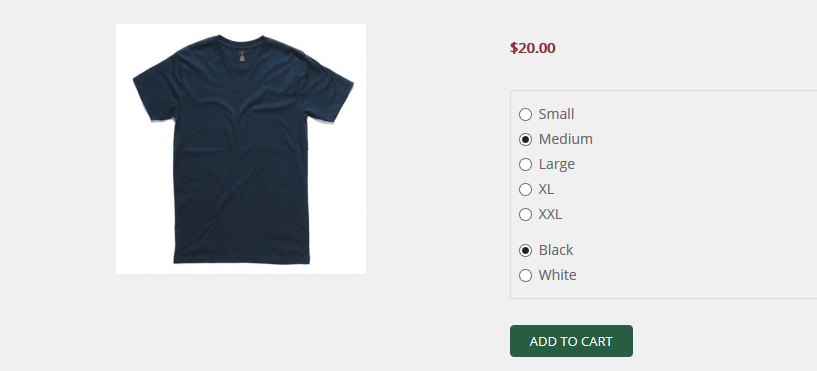
How do I get a quantity box to show above the Add to cart button?
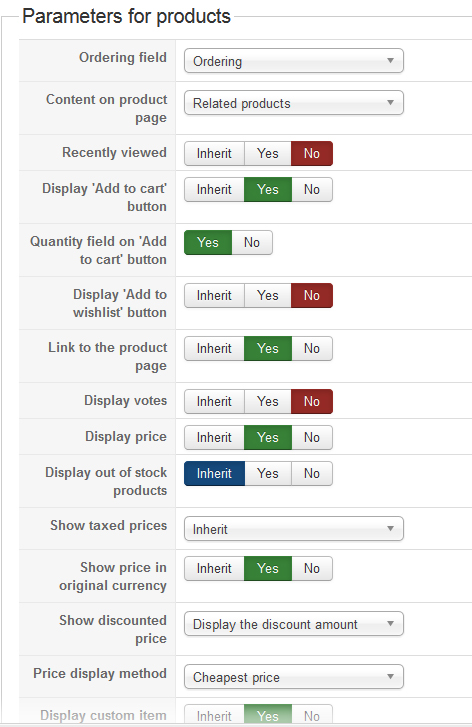
My module settings
-- Joomla version -- : 3.4.5
I cannot get a quantity input box to display on a product that has characteristics&variants.
- The product is a t-shirt and is accessible only as a "related product" on another product. I have set up the t-shirt product as a "related" module and set that module to show at the bottom of the parent's product page. The module has "Quantity field on 'Add to cart' button" set to YES.
- The t-shirt product has variants - 5 sizes and 2 colors.
- All variants are the same price but have different images.
- On the product page for the t-shirt, the size and color variants show as radio buttons and there is an "Add to cart" button.
- However there is no quantity box, therefore a customer can only buy 1 t-shirt in a particular size/color combo. In order to buy more of the same size/combo it must be done in the checkout.
How do I get a quantity box to show above the Add to cart button?
My module settings
Last edit: 10 years 11 months ago by JIK. Reason: added image of module setting
Please Log in or Create an account to join the conversation.

10 years 11 months ago #220674
by lousyfool
Need help with customisations of layouts, style or other site development? PM me!
(Don't forget to turn on "E-mail notification of new messages" )
Replied by lousyfool on topic Missing quantity box on product page
Hi,
Check "Display the quantity field on the product page" ( www.hikashop.com/support/support/documen...ig.html#main_product )
Just FYI, for the input method you also have:
"Quantity input method" ( www.hikashop.com/support/support/documen...tml#display_products )
and, for individual products, "Quantity input" ( www.hikashop.com/support/documentation/i...ct-form.html#display )
And in 2.6.0 you then have an Inherit/Yes/No button group for "Quantity input" in product & category listing menu items and modules, too.
There you go. And you see, the product documentation works wonder, also for someone who's as long around as you are, lol! Entering "quantity input" in the search there would have given you the results you needed...
Check "Display the quantity field on the product page" ( www.hikashop.com/support/support/documen...ig.html#main_product )
Just FYI, for the input method you also have:
"Quantity input method" ( www.hikashop.com/support/support/documen...tml#display_products )
and, for individual products, "Quantity input" ( www.hikashop.com/support/documentation/i...ct-form.html#display )
And in 2.6.0 you then have an Inherit/Yes/No button group for "Quantity input" in product & category listing menu items and modules, too.
There you go. And you see, the product documentation works wonder, also for someone who's as long around as you are, lol! Entering "quantity input" in the search there would have given you the results you needed...
Need help with customisations of layouts, style or other site development? PM me!
(Don't forget to turn on "E-mail notification of new messages" )
Please Log in or Create an account to join the conversation.
10 years 11 months ago #220757
by JIK
Replied by JIK on topic Missing quantity box on product page
I have the "Display the quantity field on the product page" set to "On a per product basis" in config as I have some products that I don't want to show the quantity input on. The display setting for quantity input on the product page appears to have no effect and the documentation for that setting appears incomplete.
Just FYI, I did spend quite a bit of time searching the forum/documentation and also googling same - this forum is not the only place that discusses Hikashop solutions - and I do prefer to only annoy the Hikashop guys if all else has failed and particularly when threads in the search result have been around as long as I have!
Vive le France!
Just FYI, I did spend quite a bit of time searching the forum/documentation and also googling same - this forum is not the only place that discusses Hikashop solutions - and I do prefer to only annoy the Hikashop guys if all else has failed and particularly when threads in the search result have been around as long as I have!
Vive le France!
Please Log in or Create an account to join the conversation.
10 years 11 months ago #220788
by amoozinc
Replied by amoozinc on topic Missing quantity box on product page
Having exactly the same problem. Everything is turned on but can't display a quantity box on product page. Looking forward to a solution.
Please Log in or Create an account to join the conversation.

10 years 11 months ago - 10 years 11 months ago #220786
by Xavier
Replied by Xavier on topic Missing quantity box on product page
Hi,
This option is deprecated, we have to remove it. Thank you for this report.
Now there is the possibility to set the "Quantity input method" for each products, so this option can be used instead.
I just added an option to not have quantity input, please edit the file "administrator/components/com_hikashop/types/quantitydisplay.php" and replace:
By:
Add the following translation override:
And finally replace the view "product / show_quantity" by:
Then you just have to select "None" in the global configuration of HikaShop and select the desired value for the products.
This option is deprecated, we have to remove it. Thank you for this report.
Now there is the possibility to set the "Quantity input method" for each products, so this option can be used instead.
I just added an option to not have quantity input, please edit the file "administrator/components/com_hikashop/types/quantitydisplay.php" and replace:
Code:
var $default = array(
'show_default',
'show_regrouped',
'show_select',
'show_simple',
'show_leftright',
'show_simplified',
'show_default_div'
);
Code:
var $default = array(
'show_none',
'show_default',
'show_regrouped',
'show_select',
'show_simple',
'show_leftright',
'show_simplified',
'show_default_div'
);
Add the following translation override:
SHOW_NONE="None"
And finally replace the view "product / show_quantity" by:
Code:
<?php
$i = $this->params->get('i');
$min_quantity = $this->params->get('min_quantity');
$max_quantity = $this->params->get('max_quantity');
$html = $this->params->get('html');
$qLayout = JRequest::getVar('quantitylayout','show_default');
switch($qLayout){
case 'show_none':
?>
<div class="hikashop_product_quantity_div hikashop_product_quantity_add_to_cart_div hikashop_product_quantity_add_to_cart_div_regrouped">
<?php echo $html; ?>
</div>
<?php
break;
case 'show_regrouped':
?>
<div class="input-append hikashop_product_quantity_div hikashop_product_quantity_input_div_regrouped">
<input id="hikashop_product_quantity_field_<?php echo $i; ?>" type="text" value="<?php echo JRequest::getInt('quantity',$min_quantity); ?>" class="hikashop_product_quantity_field" name="quantity" onchange="hikashopCheckQuantityChange('hikashop_product_quantity_field_<?php echo $i; ?>',<?php echo $max_quantity; ?>,<?php echo $min_quantity; ?>);" />
<div class="add-on hikashop_product_quantity_div hikashop_product_quantity_change_div_regrouped">
<div class="hikashop_product_quantity_change_div_plus_regrouped">
<a id="hikashop_product_quantity_field_change_plus_<?php echo $i; ?>" class="hikashop_product_quantity_field_change_plus hikashop_product_quantity_field_change" href="#" onclick="return hikashopQuantityChange('hikashop_product_quantity_field_<?php echo $i; ?>',1,<?php echo $max_quantity; ?>,<?php echo $min_quantity; ?>);">+</a>
</div>
<div class="hikashop_product_quantity_change_div_plus_regrouped">
<a id="hikashop_product_quantity_field_change_minus_<?php echo $i; ?>" class="hikashop_product_quantity_field_change_minus hikashop_product_quantity_field_change" href="#" onclick="return hikashopQuantityChange('hikashop_product_quantity_field_<?php echo $i; ?>',0,<?php echo $max_quantity; ?>,<?php echo $min_quantity; ?>);">–</a>
</div>
</div>
</div>
<div class="hikashop_product_quantity_div hikashop_product_quantity_add_to_cart_div hikashop_product_quantity_add_to_cart_div_regrouped">
<?php echo $html; ?>
</div>
<?php
break;
case 'show_select':
if($min_quantity == 0)
$min_quantity = 1;
if($max_quantity == 0)
$max_quantity = (int)$min_quantity * 15;
?>
<div class="hikashop_product_quantity_div hikashop_product_quantity_input_div_select">
<select id="hikashop_product_quantity_select_<?php echo $i; ?>" onchange="var id = this.id.replace('select','field'); document.getElementById(id).value = this.value;">
<?php
for($j = $min_quantity; $j <= $max_quantity; $j += $min_quantity){
echo '<option value="'.$j.'">'.$j.'</option>';
}
?>
</select>
<input id="hikashop_product_quantity_field_<?php echo $i; ?>" type="hidden" value="<?php echo JRequest::getInt('quantity',$min_quantity); ?>" class="hikashop_product_quantity_field" name="quantity" onchange="hikashopCheckQuantityChange('hikashop_product_quantity_field_<?php echo $i; ?>',<?php echo $max_quantity; ?>,<?php echo $min_quantity; ?>);" />
</div>
<div class="hikashop_product_quantity_div hikashop_product_quantity_add_to_cart_div hikashop_product_quantity_add_to_cart_div_select">
<?php echo $html; ?>
</div>
<?php
break;
case 'show_simple':
?>
<input id="hikashop_product_quantity_field_<?php echo $i; ?>" type="hidden" value="<?php echo JRequest::getInt('quantity',$min_quantity); ?>" class="hikashop_product_quantity_field" name="quantity" />
<div class="hikashop_product_quantity_div hikashop_product_quantity_add_to_cart_div hikashop_product_quantity_add_to_cart_div_simple">
<?php echo $html; ?>
</div>
<?php
break;
case 'show_leftright':
?>
<div class="input-prepend input-append hikashop_product_quantity_div hikashop_product_quantity_change_div_leftright">
<span class="add-on">
<a id="hikashop_product_quantity_field_change_plus_<?php echo $i; ?>" class="hikashop_product_quantity_field_change_plus hikashop_product_quantity_field_change" href="#" onclick="return hikashopQuantityChange('hikashop_product_quantity_field_<?php echo $i; ?>',1,<?php echo $max_quantity; ?>,<?php echo $min_quantity; ?>);">+</a>
</span>
<input id="hikashop_product_quantity_field_<?php echo $i; ?>" type="text" value="<?php echo JRequest::getInt('quantity',$min_quantity); ?>" class="hikashop_product_quantity_field" name="quantity" onchange="hikashopCheckQuantityChange('hikashop_product_quantity_field_<?php echo $i; ?>',<?php echo $max_quantity; ?>,<?php echo $min_quantity; ?>);" />
<span class="add-on">
<a id="hikashop_product_quantity_field_change_minus_<?php echo $i; ?>" class="hikashop_product_quantity_field_change_minus hikashop_product_quantity_field_change" href="#" onclick="return hikashopQuantityChange('hikashop_product_quantity_field_<?php echo $i; ?>',0,<?php echo $max_quantity; ?>,<?php echo $min_quantity; ?>);">–</a>
</span>
</div>
<div class="hikashop_product_quantity_div hikashop_product_quantity_add_to_cart_div hikashop_product_quantity_add_to_cart_div_leftright">
<?php echo $html; ?>
</div>
<?php
break;
case 'show_simplified':
?>
<div class="hikashop_product_quantity_div hikashop_product_quantity_input_div_simplified">
<input id="hikashop_product_quantity_field_<?php echo $i; ?>" type="text" value="<?php echo JRequest::getInt('quantity',$min_quantity); ?>" class="hikashop_product_quantity_field" name="quantity" onchange="hikashopCheckQuantityChange('hikashop_product_quantity_field_<?php echo $i; ?>',<?php echo $max_quantity; ?>,<?php echo $min_quantity; ?>);" />
</div>
<div class="hikashop_product_quantity_div hikashop_product_quantity_add_to_cart_div hikashop_product_quantity_add_to_cart_div_simplified">
<?php echo $html; ?>
</div>
<?php
break;
case 'show_default_div':
?>
<div class="hikashop_product_quantity_div hikashop_product_quantity_input_div_default">
<input id="hikashop_product_quantity_field_<?php echo $i; ?>" type="text" value="<?php echo JRequest::getInt('quantity',$min_quantity); ?>" class="hikashop_product_quantity_field" name="quantity" onchange="hikashopCheckQuantityChange('hikashop_product_quantity_field_<?php echo $i; ?>',<?php echo $max_quantity; ?>,<?php echo $min_quantity; ?>);" />
</div>
<div class="hikashop_product_quantity_div hikashop_product_quantity_change_div_default">
<div class="hikashop_product_quantity_change_div_plus_default">
<a id="hikashop_product_quantity_field_change_plus_<?php echo $i; ?>" class="hikashop_product_quantity_field_change_plus hikashop_product_quantity_field_change" href="#" onclick="return hikashopQuantityChange('hikashop_product_quantity_field_<?php echo $i; ?>',1,<?php echo $max_quantity; ?>,<?php echo $min_quantity; ?>);">+</a>
</div>
<div class="hikashop_product_quantity_change_div_minus_default">
<a id="hikashop_product_quantity_field_change_minus_<?php echo $i; ?>" class="hikashop_product_quantity_field_change_minus hikashop_product_quantity_field_change" href="#" onclick="return hikashopQuantityChange('hikashop_product_quantity_field_<?php echo $i; ?>',0,<?php echo $max_quantity; ?>,<?php echo $min_quantity; ?>);">–</a>
</div>
</div>
<div class="hikashop_product_quantity_div hikashop_product_quantity_add_to_cart_div hikashop_product_quantity_add_to_cart_div_default">
<?php echo $html; ?>
</div>
<?php
break;
case 'show_default':
?>
<table>
<tr>
<td rowspan="2">
<input id="hikashop_product_quantity_field_<?php echo $i; ?>" type="text" value="<?php echo JRequest::getInt('quantity',$min_quantity); ?>" class="hikashop_product_quantity_field" name="quantity" onchange="hikashopCheckQuantityChange('hikashop_product_quantity_field_<?php echo $i; ?>',<?php echo $max_quantity; ?>,<?php echo $min_quantity; ?>);" />
</td>
<td>
<a id="hikashop_product_quantity_field_change_plus_<?php echo $i; ?>" class="hikashop_product_quantity_field_change_plus hikashop_product_quantity_field_change" href="#" onclick="return hikashopQuantityChange('hikashop_product_quantity_field_<?php echo $i; ?>',1,<?php echo $max_quantity; ?>,<?php echo $min_quantity; ?>);">+</a>
</td>
<td rowspan="2">
<?php echo $html; ?>
</td>
</tr>
<tr>
<td>
<a id="hikashop_product_quantity_field_change_minus_<?php echo $i; ?>" class="hikashop_product_quantity_field_change_minus hikashop_product_quantity_field_change" href="#" onclick="return hikashopQuantityChange('hikashop_product_quantity_field_<?php echo $i; ?>',0,<?php echo $max_quantity; ?>,<?php echo $min_quantity; ?>);">–</a>
</td>
</tr>
</table>
<?php
break;
default:
if(substr($qLayout,0,14) == 'show_quantity_'){
$doc = JFactory::getDocument();
$app = JFactory::getApplication();
$quantityDisplayType = hikashop_get('type.quantitydisplay');
if($quantityDisplayType->check( $qLayout, $app->getTemplate())){
$controller = new hikashopBridgeController(array('name'=>'product'));
$viewType = $doc->getType();
if(!HIKASHOP_PHP5) {
$view = & $controller->getView( '', $viewType, '');
} else {
$view = $controller->getView( '', $viewType, '');
}
$view->setLayout($qLayout);
echo $view->loadTemplate();
break;
}
}
?>
<div class="hikashop_product_quantity_div hikashop_product_quantity_input_div_default">
<input id="hikashop_product_quantity_field_<?php echo $i; ?>" type="text" value="<?php echo JRequest::getInt('quantity',$min_quantity); ?>" class="hikashop_product_quantity_field" name="quantity" onchange="hikashopCheckQuantityChange('hikashop_product_quantity_field_<?php echo $i; ?>',<?php echo $max_quantity; ?>,<?php echo $min_quantity; ?>);" />
</div>
<div class="hikashop_product_quantity_div hikashop_product_quantity_change_div_default">
<div class="hikashop_product_quantity_change_div_plus_default">
<a id="hikashop_product_quantity_field_change_plus_<?php echo $i; ?>" class="hikashop_product_quantity_field_change_plus hikashop_product_quantity_field_change" href="#" onclick="return hikashopQuantityChange('hikashop_product_quantity_field_<?php echo $i; ?>',1,<?php echo $max_quantity; ?>,<?php echo $min_quantity; ?>);">+</a>
</div>
<div class="hikashop_product_quantity_change_div_minus_default">
<a id="hikashop_product_quantity_field_change_minus_<?php echo $i; ?>" class="hikashop_product_quantity_field_change_minus hikashop_product_quantity_field_change" href="#" onclick="return hikashopQuantityChange('hikashop_product_quantity_field_<?php echo $i; ?>',0,<?php echo $max_quantity; ?>,<?php echo $min_quantity; ?>);">–</a>
</div>
</div>
<div class="hikashop_product_quantity_div hikashop_product_quantity_add_to_cart_div hikashop_product_quantity_add_to_cart_div_default">
<?php echo $html; ?>
</div>
<?php
break;
}
Then you just have to select "None" in the global configuration of HikaShop and select the desired value for the products.
Last edit: 10 years 11 months ago by Xavier.
Please Log in or Create an account to join the conversation.
10 years 11 months ago #221415
by amoozinc
Replied by amoozinc on topic Missing quantity box on product page
Hello,
Mine looks different but I still think I have everything correctly checked.
Mine looks different but I still think I have everything correctly checked.
Please Log in or Create an account to join the conversation.

10 years 11 months ago #221484
by nicolas
Replied by nicolas on topic Missing quantity box on product page
Hi,
Did you change the code snippets as Xavier explained ?
Did you change the code snippets as Xavier explained ?
Please Log in or Create an account to join the conversation.
10 years 11 months ago #221949
by amoozinc
Replied by amoozinc on topic Missing quantity box on product page
Well it looks as though I'm using a different version and didn't want to go messing with the code. Wondering if there's anyone who can go and have a look for me as I'm positive Ive got everything on that's meant to on and I just cant get a box there. Could someone from Hikashop have a look?
Please Log in or Create an account to join the conversation.
10 years 11 months ago #221984
by Xavier
Replied by Xavier on topic Missing quantity box on product page
Hi,
Your version can support the modifications given.
So you can give it a try This will not broke anything and if it does, so you just have to remove the overrides.
www.hikashop.com/support/documentation/s...ize-the-display.html
Your version can support the modifications given.
So you can give it a try
This will not broke anything and if it does, so you just have to remove the overrides.www.hikashop.com/support/documentation/s...ize-the-display.html
Please Log in or Create an account to join the conversation.
10 years 11 months ago #222087
by amoozinc
Replied by amoozinc on topic Missing quantity box on product page
OK I'm stuck on the second part.
Add the following translation override:
SHOW_NONE="None"
And after that I'll be stuck on the third part :}
Where do I add the translation override?
Add the following translation override:
SHOW_NONE="None"
And after that I'll be stuck on the third part :}
Where do I add the translation override?
Please Log in or Create an account to join the conversation.
10 years 11 months ago #222089
by Xavier
Replied by Xavier on topic Missing quantity box on product page
Hi,
Here is how to translate in HikaShop: hikashop.com/support/faq.html#tran
But this is not mandatory.
For the third part, you have to go through HikaShop > Display > Views, then edit the view "product / show_quantity" and remove all the current code, then paste the given one.
This is explained in this tutorial:
www.hikashop.com/support/documentation/s...ize-the-display.html
Here is how to translate in HikaShop: hikashop.com/support/faq.html#tran
But this is not mandatory.
For the third part, you have to go through HikaShop > Display > Views, then edit the view "product / show_quantity" and remove all the current code, then paste the given one.
This is explained in this tutorial:
www.hikashop.com/support/documentation/s...ize-the-display.html
Please Log in or Create an account to join the conversation.
10 years 11 months ago #222181
by amoozinc
Replied by amoozinc on topic Missing quantity box on product page
Got there but then came across this.

Please Log in or Create an account to join the conversation.
10 years 11 months ago #222183
by Xavier
Replied by Xavier on topic Missing quantity box on product page
Hi,
You seems to have restrictions due to your server.
But there is another way to edit a view, by using the template override in Joomla directly or via FTP.
Joomla method: In Extensions > Templates click on your template name in the "Templates" column, then "Create an overrride" tab, select com_hikashop > product. Go in the "Editor" tab and click on "html/com_hikashop/product/show_quantity". Paste the modifications and save. The bad thing with this method is that it creates an override for all the product views and not only on the desired one.
FTP method: Go in the folder templates/YOUR_TEMPLATE/html/ and create a folder "com_hikashop", then a folder "product" and finally the file "show_quantity.php" and paste the code in that file.
You seems to have restrictions due to your server.
But there is another way to edit a view, by using the template override in Joomla directly or via FTP.
Joomla method: In Extensions > Templates click on your template name in the "Templates" column, then "Create an overrride" tab, select com_hikashop > product. Go in the "Editor" tab and click on "html/com_hikashop/product/show_quantity". Paste the modifications and save. The bad thing with this method is that it creates an override for all the product views and not only on the desired one.
FTP method: Go in the folder templates/YOUR_TEMPLATE/html/ and create a folder "com_hikashop", then a folder "product" and finally the file "show_quantity.php" and paste the code in that file.
Please Log in or Create an account to join the conversation.
10 years 11 months ago #222302
by amoozinc
Replied by amoozinc on topic Missing quantity box on product page
Pretty sure I did everything as instructed.
The first image is my admin panel after going to system>configuration and the second image is my product page.
The first image is my admin panel after going to system>configuration and the second image is my product page.
Please Log in or Create an account to join the conversation.
10 years 11 months ago #222337
by nicolas
Replied by nicolas on topic Missing quantity box on product page
Hi,
Can you do a screenshot of the code that you have in the quantitydisplay view file so that we can check what you did ?
You must have made a mistake there.
Can you do a screenshot of the code that you have in the quantitydisplay view file so that we can check what you did ?
You must have made a mistake there.
Please Log in or Create an account to join the conversation.
10 years 11 months ago #222372
by amoozinc
Replied by amoozinc on topic Missing quantity box on product page
Can I send you login details to have a look!?
Please Log in or Create an account to join the conversation.
10 years 11 months ago #222423
by Xavier
Replied by Xavier on topic Missing quantity box on product page
Hi,
The issue is in the file "administrator/components/com_hikashop/types/quantitydisplay.php" at the line 14 there is a missing simple quote. I guess that your current code is:
Instead of:
Please add this quote, or copy and paste all this code instead your current code:
If that still doesn't work, so yes you can send us a backend and FTP access via our contact form (with a link to that topic).
hikashop.com/support/contact-us.html
The issue is in the file "administrator/components/com_hikashop/types/quantitydisplay.php" at the line 14 there is a missing simple quote. I guess that your current code is:
Code:
var $default = array(
'show_none',
show_default',
'show_regrouped',
'show_select',
'show_simple',
'show_leftright',
'show_simplified',
'show_default_div'
);
Code:
var $default = array(
'show_none',
'show_default',
'show_regrouped',
'show_select',
'show_simple',
'show_leftright',
'show_simplified',
'show_default_div'
);
Code:
<?php
class hikashopQuantitydisplayType {
var $default = array(
'show_none',
'show_default',
'show_regrouped',
'show_select',
'show_simple',
'show_leftright',
'show_simplified',
'show_default_div'
);
function load(){
$this->values = array();
if(JRequest::getCmd('from_display',false) == false)
$this->values[] = JHTML::_('select.option', '', JText::_('HIKA_INHERIT'));
$this->values[] = JHTML::_('select.optgroup', '-- '.JText::_('FROM_HIKASHOP').' --');
foreach($this->default as $d) {
$this->values[] = JHTML::_('select.option', $d, JText::_(strtoupper($d)));
}
if(version_compare(JVERSION,'1.6.0','>=')){
$this->values[] = JHTML::_('select.optgroup', '-- '.JText::_('FROM_HIKASHOP').' --');
}
$closeOpt = '';
$values = $this->getLayout();
foreach($values as $value) {
if(substr($value,0,1) == '#') {
if(version_compare(JVERSION,'1.6.0','>=') && !empty($closeOpt)){
$this->values[] = JHTML::_('select.optgroup', $closeOpt);
}
$value = substr($value,1);
$closeOpt = '-- ' . JText::sprintf('FROM_TEMPLATE',basename($value)) . ' --';
$this->values[] = JHTML::_('select.optgroup', $closeOpt);
} else {
$this->values[] = JHTML::_('select.option', $value, $value);
}
}
if(version_compare(JVERSION,'1.6.0','>=') && !empty($closeOpt)){
$this->values[] = JHTML::_('select.optgroup', $closeOpt);
}
}
function display($map,$value) {
$this->load();
return JHTML::_('select.genericlist', $this->values, $map, 'class="inputbox" size="1"', 'value', 'text', $value );
}
function getLayout($template = '') {
jimport('joomla.filesystem.folder');
jimport('joomla.filesystem.file');
static $values = null;
if($values !== null)
return $values;
$client = JApplicationHelper::getClientInfo(0); // 0: Front client
$tplDir = $client->path.DS.'templates'.DS;
$values = array();
if(empty($template)) {
$templates = JFolder::folders($tplDir);
if(empty($templates))
return null;
} else {
$templates = array($template);
}
$groupAdded = false;
foreach($templates as $tpl) {
$t = $tplDir.$tpl.DS.'html'.DS.HIKASHOP_COMPONENT.DS;
if(!JFolder::exists($t))
continue;
$folders = JFolder::folders($t);
if(empty($folders))
continue;
foreach($folders as $folder) {
$files = JFolder::files($t.$folder.DS);
if(empty($files))
continue;
foreach($files as $file) {
if(substr($file,-4) == '.php')
$file = substr($file,0,-4);
if(substr($file,0,14) == 'show_quantity_' && !in_array($file,$this->default)) {
if(!$groupAdded) {
$values[] = '#'.$tpl;
$groupAdded = true;
}
$values[] = $file;
}
}
}
}
return $values;
}
function check($name,$template) {
if($name == '' || in_array($name, $this->default))
return true;
$values = $this->getLayout($template);
return in_array($name,$values);
}
}
?>
hikashop.com/support/contact-us.html
Please Log in or Create an account to join the conversation.
10 years 11 months ago #222457
by amoozinc
Replied by amoozinc on topic Missing quantity box on product page
So strange as I copied and pasted the first time! But obviously did something wrong. It's worked. Thank you so much for your patience 
Please Log in or Create an account to join the conversation.
Time to create page: 0.194 seconds