

- Posts: 5
- Thank you received: 0
Guidance for creating product catalog please?
10 years 11 months ago - 10 years 11 months ago #221823
by Creotom
Guidance for creating product catalog please? was created by Creotom
-- HikaShop version -- : 2.6.0
-- Joomla version -- : 3.4.5
-- PHP version -- : 5.3.13
-- Browser(s) name and version -- : CHROME 46.0.2490.86
-- Error-message(debug-mod must be tuned on) -- : None.
Hello, I'm new to Hika and I see there are many ways to do things.
I have limited time and resources and I am hoping that someone could outline the best method to implement what I want to achieve. Maybe saving me from going down a lot of wrong roads and possibly my job
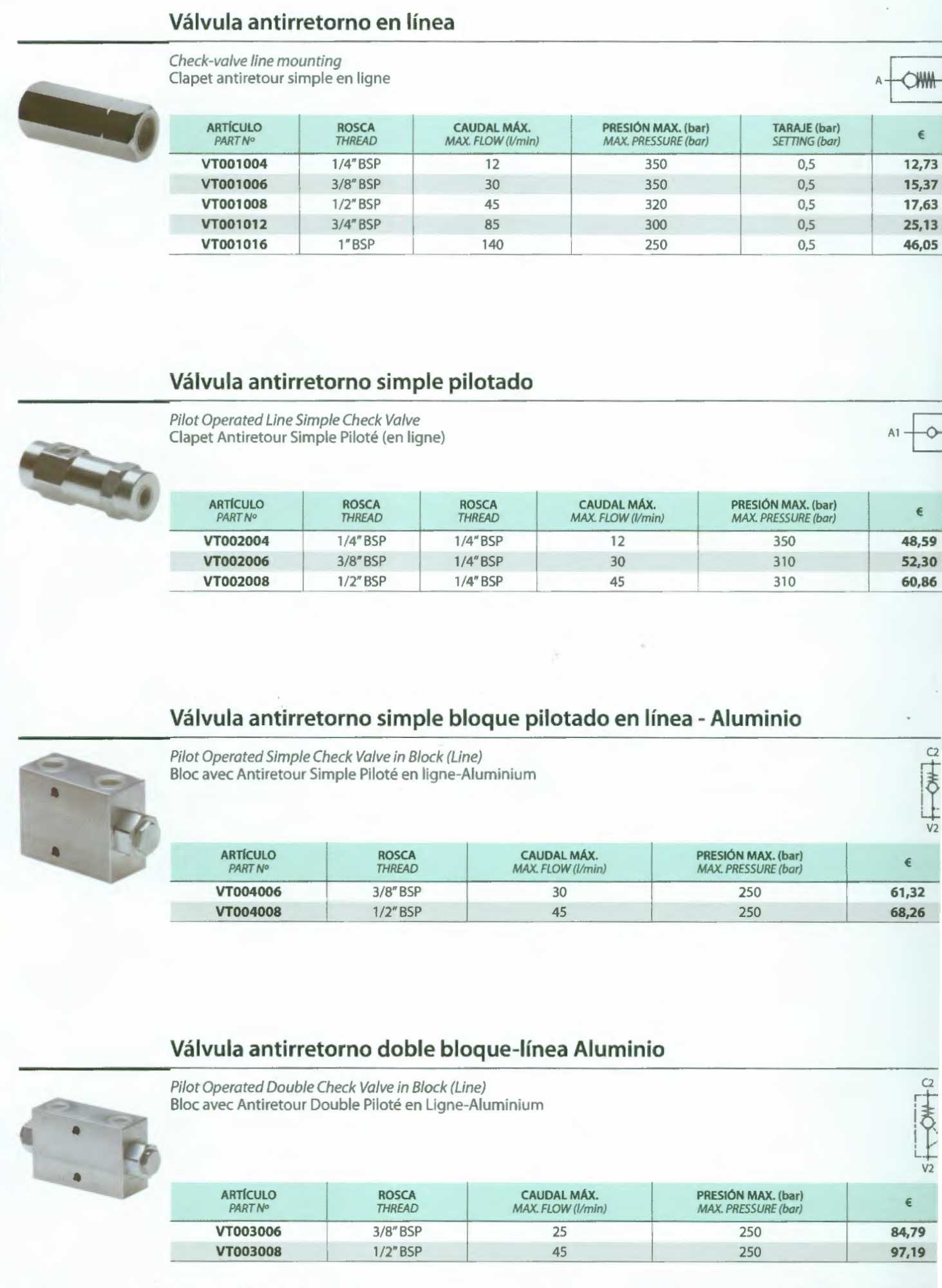
I am trying to create an online catalog of valves, I have attached a sample of my source material below.
I have many valves of which there are different sizes.
I would like to present them in a similar fashion to the image attached.
A heading some images and then a table showing the different sizes, part numbers, dimensions and prices.
(At first i will be publishing this without prices, the shop feature I plan to enable at a later date)
As I see it to achieve it I have a number of options.
1. I could create a category for each valve and and a product for each size and somehow list them all under the category as a table.
2. Characteristics. I could use a brief walk-through to achieve my goal with this method.
3. Custom Fields. Again I could use a brief walk-through to achieve my goal with this method.
4. My final option is to create the tables as graphics and place them in with the product. I would lose my future shop and pricing functionality but it could get me going for now. I would rather not do this.
Thanks in advance to anyone prepared to help me.
C.
-- Joomla version -- : 3.4.5
-- PHP version -- : 5.3.13
-- Browser(s) name and version -- : CHROME 46.0.2490.86
-- Error-message(debug-mod must be tuned on) -- : None.
Hello, I'm new to Hika and I see there are many ways to do things.
I have limited time and resources and I am hoping that someone could outline the best method to implement what I want to achieve. Maybe saving me from going down a lot of wrong roads and possibly my job
I am trying to create an online catalog of valves, I have attached a sample of my source material below.
I have many valves of which there are different sizes.
I would like to present them in a similar fashion to the image attached.
A heading some images and then a table showing the different sizes, part numbers, dimensions and prices.
(At first i will be publishing this without prices, the shop feature I plan to enable at a later date)
As I see it to achieve it I have a number of options.
1. I could create a category for each valve and and a product for each size and somehow list them all under the category as a table.
2. Characteristics. I could use a brief walk-through to achieve my goal with this method.
3. Custom Fields. Again I could use a brief walk-through to achieve my goal with this method.
4. My final option is to create the tables as graphics and place them in with the product. I would lose my future shop and pricing functionality but it could get me going for now. I would rather not do this.
Thanks in advance to anyone prepared to help me.
C.
Last edit: 10 years 11 months ago by Creotom.
Please Log in or Create an account to join the conversation.

10 years 11 months ago #221883
by nicolas
Replied by nicolas on topic Guidance for creating product catalog please?
Hi,
I would recommend option 1.
It's the simplest to implement.
Just configure your categories and products, and then in the settings of your products listing menu item, set the "sub element filter" setting to "group by category" and the "layout" to "table" and that will display something similar.
Then, you can just customize the file "listing_table" of the view "product" via the menu Display>Views if you need to add additional columns of custom product fields to the display of the tables like on your screenshot.
I would recommend option 1.
It's the simplest to implement.
Just configure your categories and products, and then in the settings of your products listing menu item, set the "sub element filter" setting to "group by category" and the "layout" to "table" and that will display something similar.
Then, you can just customize the file "listing_table" of the view "product" via the menu Display>Views if you need to add additional columns of custom product fields to the display of the tables like on your screenshot.
The following user(s) said Thank You: Creotom
Please Log in or Create an account to join the conversation.
10 years 11 months ago #221900
by Creotom
Replied by Creotom on topic Guidance for creating product catalog please?
Thank you,
The first part was clear to me but the second requires modification of php files?
"Then, you can just customize the file "listing_table" of the view "product" via the menu Display>Views if you need to add additional columns of custom product fields to the display of the tables like on your screenshot"
I think this may be beyond my skill set. Would those changes be global? as some products will have different columns, eg not all would use the flow column but may require different data.
Thanks in advance.
The first part was clear to me but the second requires modification of php files?
"Then, you can just customize the file "listing_table" of the view "product" via the menu Display>Views if you need to add additional columns of custom product fields to the display of the tables like on your screenshot"
I think this may be beyond my skill set. Would those changes be global? as some products will have different columns, eg not all would use the flow column but may require different data.
Thanks in advance.
Please Log in or Create an account to join the conversation.
10 years 11 months ago #221916
by nicolas
Replied by nicolas on topic Guidance for creating product catalog please?
Hi,
The changes will be global, but with the correct code, there is no problem in having different columns for different categories of products.
Here is a thread explaining how to add such columns to the table products listing:
www.hikashop.com/forum/2-general-talk-ab...fields-possible.html
The changes will be global, but with the correct code, there is no problem in having different columns for different categories of products.
Here is a thread explaining how to add such columns to the table products listing:
www.hikashop.com/forum/2-general-talk-ab...fields-possible.html
The following user(s) said Thank You: Creotom
Please Log in or Create an account to join the conversation.
Time to create page: 0.054 seconds