

- Posts: 82
- Thank you received: 1
Add to cart popup - 404 error with SEF enabled
10 years 11 months ago #222371
by jmbgreen
Add to cart popup - 404 error with SEF enabled was created by jmbgreen
-- HikaShop version -- : 2.6.0
-- Joomla version -- : 3.4.5
This has been asked many times, but I can't find what causes the 404 error on the add to cart pop-up in my case.
There are 2 main menu items:
1 that navigates to the e-shop section of the site, that is a products page from all categories.
1 that is for showing categories products when selecting a category from the categories tree module.
Adding to cart from the second menu item (category's products), it works ok.
But when I try to add to cart a product from the first menu item, it shows 404 error in the popup.
The same is for when I arrive at the product page. If my path is from the main eshop menu item, it throws 404, but it works fine when I arrive to a product through its category page.
-- Joomla version -- : 3.4.5
This has been asked many times, but I can't find what causes the 404 error on the add to cart pop-up in my case.
There are 2 main menu items:
1 that navigates to the e-shop section of the site, that is a products page from all categories.
1 that is for showing categories products when selecting a category from the categories tree module.
Adding to cart from the second menu item (category's products), it works ok.
But when I try to add to cart a product from the first menu item, it shows 404 error in the popup.
The same is for when I arrive at the product page. If my path is from the main eshop menu item, it throws 404, but it works fine when I arrive to a product through its category page.
Please Log in or Create an account to join the conversation.
10 years 11 months ago #222517
by jmbgreen
Replied by jmbgreen on topic Add to cart popup - 404 error with SEF enabled
Any feedback on this?
Please Log in or Create an account to join the conversation.

10 years 11 months ago - 10 years 11 months ago #222677
by Jerome
Jerome - Obsidev.com
HikaMarket & HikaSerial developer / HikaShop core dev team.
Replied by Jerome on topic Add to cart popup - 404 error with SEF enabled
Hi,
Please notice that you did not provide any information which allow the support team to see/understand your issue ; like a link to your website.
If we don't have any information about the links which gave you 404 errors ; we are not able to provide you any useful answer or solution.
The best I can tell you is to check your SEF configuration, the "canonical" settings and the "canonical" configuration of your products.
Regards,
Please notice that you did not provide any information which allow the support team to see/understand your issue ; like a link to your website.
If we don't have any information about the links which gave you 404 errors ; we are not able to provide you any useful answer or solution.
The best I can tell you is to check your SEF configuration, the "canonical" settings and the "canonical" configuration of your products.
Regards,
Jerome - Obsidev.com
HikaMarket & HikaSerial developer / HikaShop core dev team.
Last edit: 10 years 11 months ago by Jerome.
Please Log in or Create an account to join the conversation.
10 years 11 months ago #222737
by jmbgreen
Replied by jmbgreen on topic Add to cart popup - 404 error with SEF enabled
Hello Jerome,
I emailed using the form on this website, the details of how to access the site and included a link to this thread here.
I emailed using the form on this website, the details of how to access the site and included a link to this thread here.
Please Log in or Create an account to join the conversation.

10 years 11 months ago #222851
by nicolas
Replied by nicolas on topic Add to cart popup - 404 error with SEF enabled
Hi,
Try to turn off the "Use AJAX when possible for add to cart buttons" setting of the HikaShop configuration.
If that doesn't help, there must be a problem with the settings in the SEF section of the Features tab of the HikaShop configuration.
Please provide as screenshot of these settings.
Try to turn off the "Use AJAX when possible for add to cart buttons" setting of the HikaShop configuration.
If that doesn't help, there must be a problem with the settings in the SEF section of the Features tab of the HikaShop configuration.
Please provide as screenshot of these settings.
Please Log in or Create an account to join the conversation.
10 years 11 months ago #222861
by jmbgreen
Replied by jmbgreen on topic Add to cart popup - 404 error with SEF enabled
I have tried that but it didn't solve the issue.
Here is the screenshot:
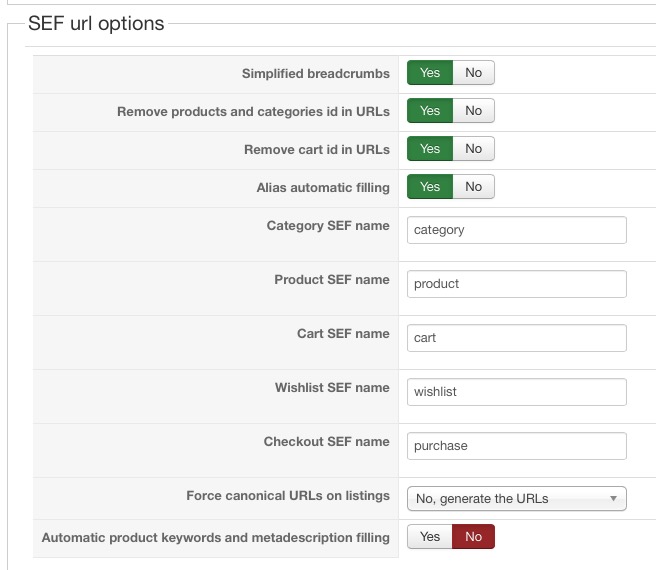
Here is the screenshot:
Please Log in or Create an account to join the conversation.
10 years 11 months ago #223116
by jmbgreen
Replied by jmbgreen on topic Add to cart popup - 404 error with SEF enabled
Friendly bump...
Please Log in or Create an account to join the conversation.
10 years 11 months ago #223120
by nicolas
Replied by nicolas on topic Add to cart popup - 404 error with SEF enabled
Hi,
The problem is with the "Checkout SEF name" setting.
The popup notice still tries to use the "checkout" controller even though you changed it.
I think that it could be liked to a customization but hard to say what.
Put back "checkout" in that setting and that should fix the problem.
The problem is with the "Checkout SEF name" setting.
The popup notice still tries to use the "checkout" controller even though you changed it.
I think that it could be liked to a customization but hard to say what.
Put back "checkout" in that setting and that should fix the problem.
Please Log in or Create an account to join the conversation.
10 years 11 months ago #223162
by jmbgreen
Replied by jmbgreen on topic Add to cart popup - 404 error with SEF enabled
Hi Nicolas,
I changed the Checkout SEF name setting to what you see in the screenshot, in an effort to make it work, because the original "checkout" name had the exact same issue giving the 404 error on the add to cart popup.
When you say customizations you mean template overrides likely? Because I am disabling completely the template overrides for hikashop by renaming the com_hikashop dir inside the html dir of the template and still I the 404 error occurs.
I changed the Checkout SEF name setting to what you see in the screenshot, in an effort to make it work, because the original "checkout" name had the exact same issue giving the 404 error on the add to cart popup.
When you say customizations you mean template overrides likely? Because I am disabling completely the template overrides for hikashop by renaming the com_hikashop dir inside the html dir of the template and still I the 404 error occurs.
Please Log in or Create an account to join the conversation.
10 years 11 months ago #223392
by jmbgreen
Replied by jmbgreen on topic Add to cart popup - 404 error with SEF enabled
Any update ?
Please Log in or Create an account to join the conversation.
10 years 11 months ago #223529
by jmbgreen
Replied by jmbgreen on topic Add to cart popup - 404 error with SEF enabled
Guys ... anybody there?
Please Log in or Create an account to join the conversation.
10 years 11 months ago #223628
by jmbgreen
Replied by jmbgreen on topic Add to cart popup - 404 error with SEF enabled
Any chance to get some kind of support?
Please Log in or Create an account to join the conversation.
10 years 11 months ago #223741
by jmbgreen
Replied by jmbgreen on topic Add to cart popup - 404 error with SEF enabled
Days are passing and it seems to be no light in the tunnel - no response from Hikashop and the issue is still there.
How many days should I wait for a solution? It's now almost 2 weeks and the add to cart popup displays a 404error.
May I have some kind of prompt answer and the proper help to fix this?
How many days should I wait for a solution? It's now almost 2 weeks and the add to cart popup displays a 404error.
May I have some kind of prompt answer and the proper help to fix this?
Please Log in or Create an account to join the conversation.
10 years 11 months ago #223861
by jmbgreen
Replied by jmbgreen on topic Add to cart popup - 404 error with SEF enabled
This is ridiculous... you guys are totally unprofessional.
Please Log in or Create an account to join the conversation.
Time to create page: 0.105 seconds