

- Posts: 30
- Thank you received: 0
Wrong price shown in product variation
10 years 9 months ago #223662
by MGFM
Wrong price shown in product variation was created by MGFM
-- HikaShop version -- : 2.6.0
-- Joomla version -- : 3.4.5
-- PHP version -- : 5.6.14
-- Browser(s) name and version -- : all browsers
-- Error-message(debug-mod must be tuned on) -- : wrong price in product variation
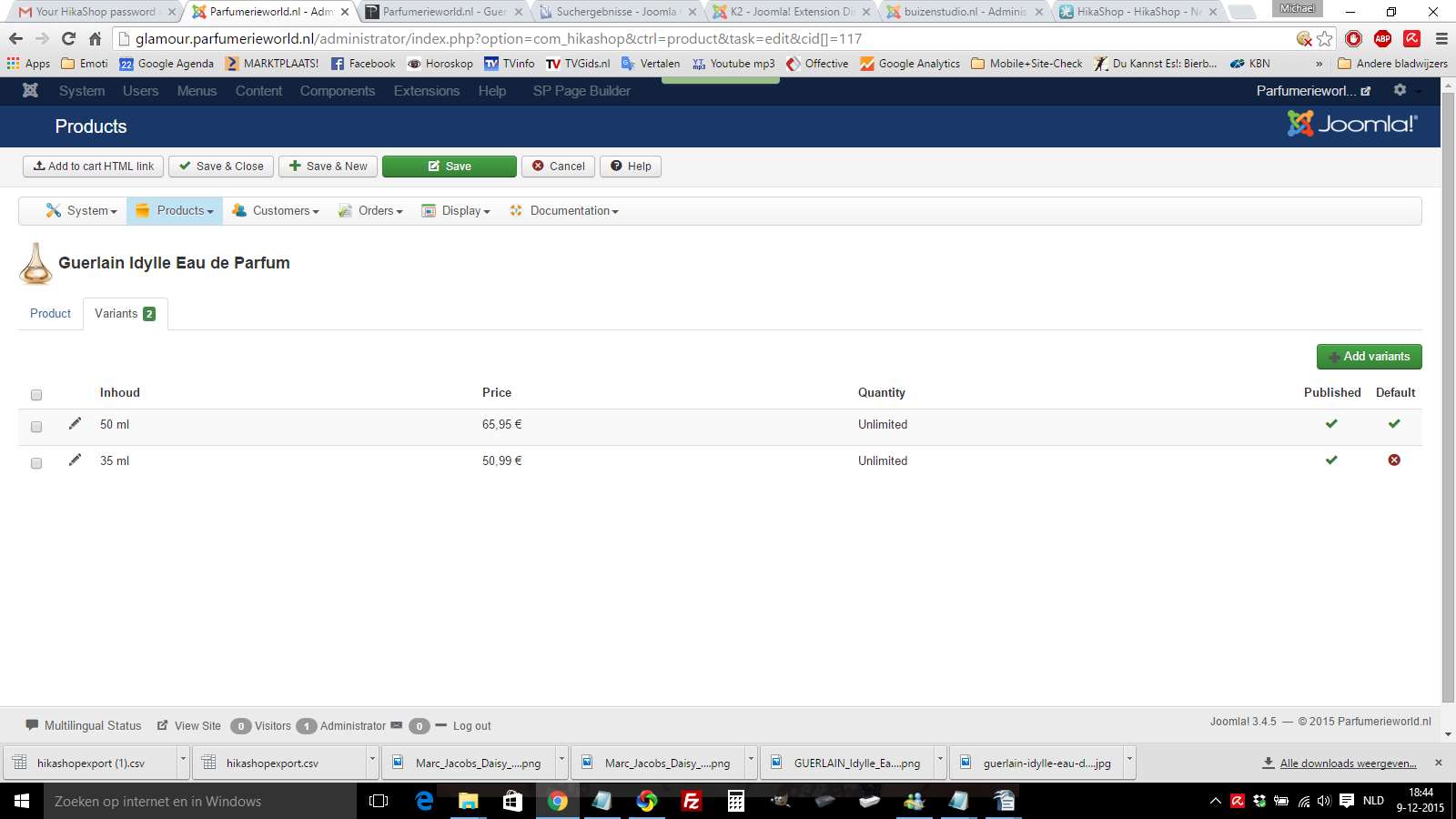
We have 2 product variations here:
glamour.parfumerieworld.nl/nl/geuren/pro...e-eau-de-parfum.html
50 ml
35 ml
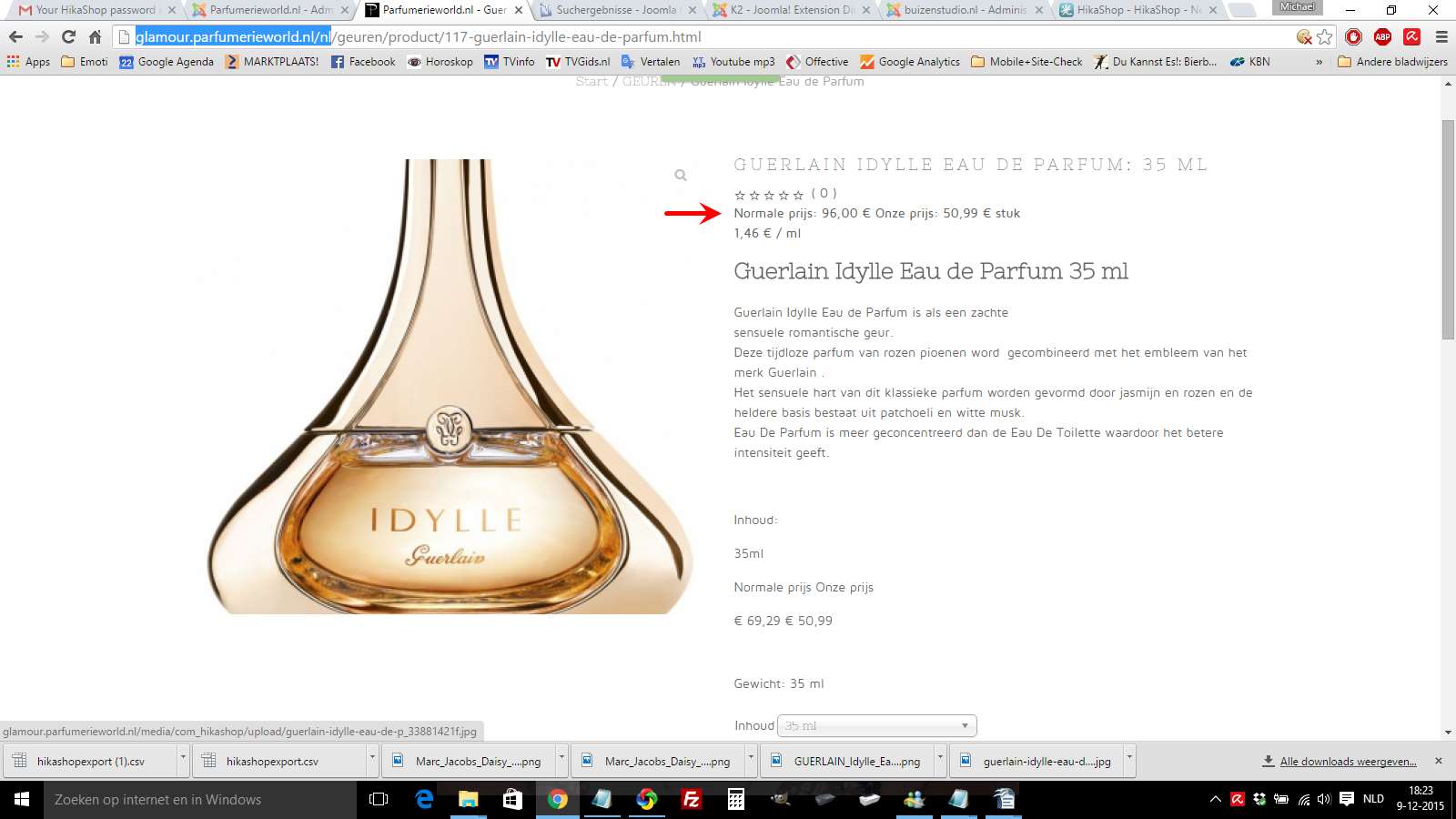
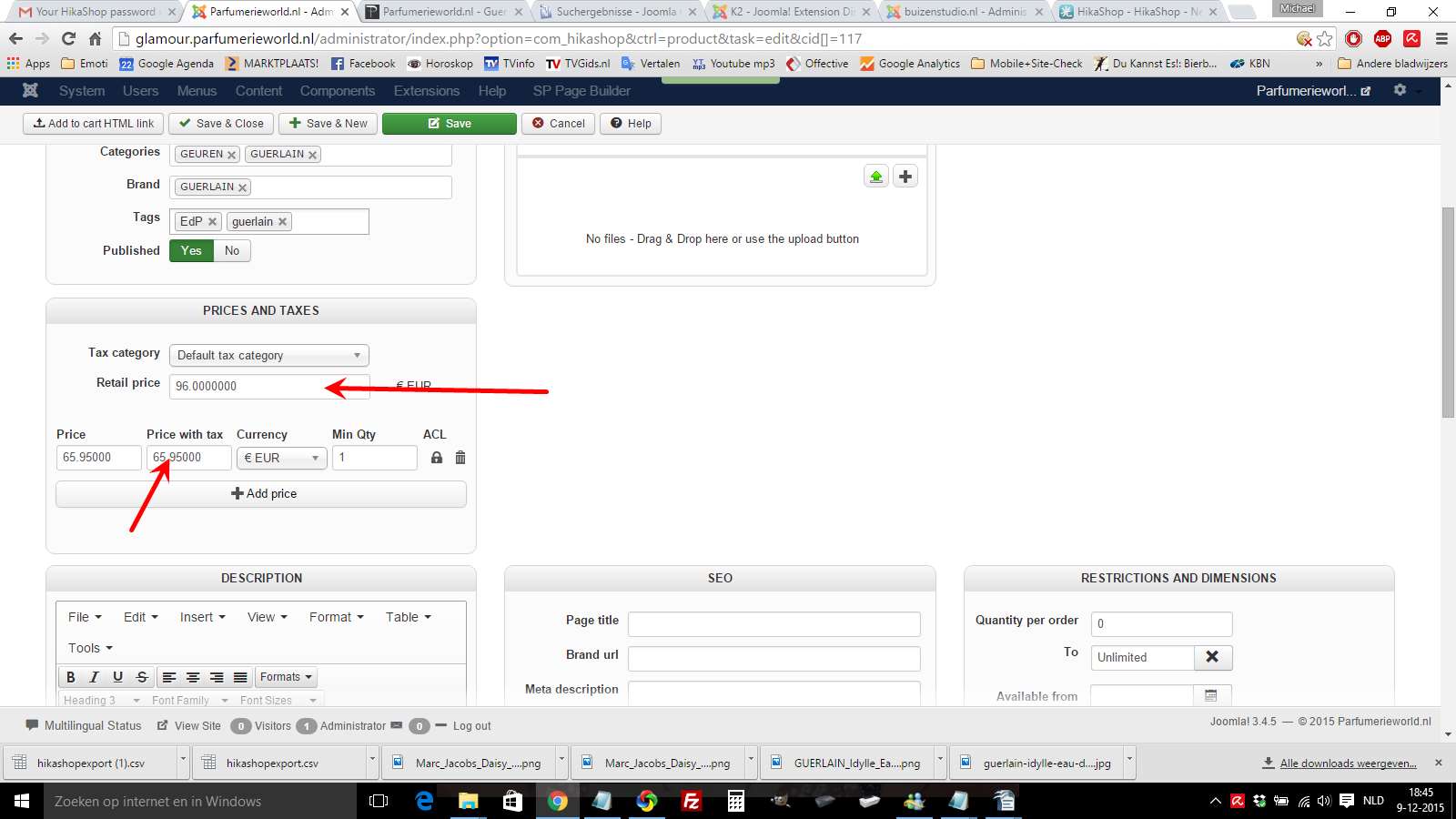
while the main product is showing correct price, the variant of 35 ml says 'Normal price: 96,--' , which is actulally the price of the 50 ml product. The sales price 'Our price 50,99'is ok.
What I am doing wrong?
-- Joomla version -- : 3.4.5
-- PHP version -- : 5.6.14
-- Browser(s) name and version -- : all browsers
-- Error-message(debug-mod must be tuned on) -- : wrong price in product variation
We have 2 product variations here:
glamour.parfumerieworld.nl/nl/geuren/pro...e-eau-de-parfum.html
50 ml
35 ml
while the main product is showing correct price, the variant of 35 ml says 'Normal price: 96,--' , which is actulally the price of the 50 ml product. The sales price 'Our price 50,99'is ok.
What I am doing wrong?
Please Log in or Create an account to join the conversation.

10 years 9 months ago #223714
by nicolas
Replied by nicolas on topic Wrong price shown in product variation
Hi,
I'm not sure I understand the issue. But if I got it right, the issue is that the retail price doesn't change when you change the selected characteristic value. Is that right ?
In that case, make sure that you set your retail price in each variant and that you don't set it in the main product.
I'm not sure I understand the issue. But if I got it right, the issue is that the retail price doesn't change when you change the selected characteristic value. Is that right ?
In that case, make sure that you set your retail price in each variant and that you don't set it in the main product.
Please Log in or Create an account to join the conversation.
10 years 9 months ago #223882
by MGFM
Replied by MGFM on topic Wrong price shown in product variation
First tip helps, as whenI take out the retail price from main product it shows the right price : Thank you;-)
But if I want to add the 'normal' price to a variation, it only gives me the opportunity to fill in a percentage?
Is there not an option to show the normal retail price, as percentages differ depending on size.
But if I want to add the 'normal' price to a variation, it only gives me the opportunity to fill in a percentage?
Is there not an option to show the normal retail price, as percentages differ depending on size.
Please Log in or Create an account to join the conversation.
10 years 9 months ago #223913
by nicolas
Replied by nicolas on topic Wrong price shown in product variation
Hi,
Ah, I see that there is no retail price for variants.
Change the code:
to:
in the file "form" of the view "product" for your backend template via the menu Display>Views and that should allow you to set the retail price for each variant.
Ah, I see that there is no retail price for variants.
Change the code:
Code:
if(@$this->product->product_type != 'variant') {
$curr = '';
$mainCurr = $this->currencyClass->getCurrencies($this->main_currency_id, $curr);
Code:
if(true) {
$curr = '';
$mainCurr = $this->currencyClass->getCurrencies($this->main_currency_id, $curr);
Please Log in or Create an account to join the conversation.
10 years 9 months ago #223991
by MGFM
Replied by MGFM on topic Wrong price shown in product variation
Problem is, I can't find this line
if(@$this->product->product_type != 'variant') {
within backend template isis, view product, form.php ?
see attachment
if(@$this->product->product_type != 'variant') {
within backend template isis, view product, form.php ?
see attachment
Please Log in or Create an account to join the conversation.
10 years 9 months ago #224019
by nicolas
Replied by nicolas on topic Wrong price shown in product variation
Well, I do see it in the file you gave...
take.ms/dJwt7
take.ms/dJwt7
Please Log in or Create an account to join the conversation.
10 years 9 months ago #224072
by MGFM
Replied by MGFM on topic Wrong price shown in product variation
sorry, it seems Iwas blind :blush:
However I change the line as you can see from screenshot 1, but nothing changes: main product is still only in percentage?
where I am still wrong?;-(
However I change the line as you can see from screenshot 1, but nothing changes: main product is still only in percentage?
where I am still wrong?;-(
Please Log in or Create an account to join the conversation.
10 years 9 months ago #224075
by nicolas
Replied by nicolas on topic Wrong price shown in product variation
Hi,
You're correct. It seems that this modification is not enough.
Add the code:
before the code:
in the file "variant" of the view "product", and change the line:
to:
in the file administrator/components/com_hikashop/classes/product.php and that should do it.
You're correct. It seems that this modification is not enough.
Add the code:
Code:
<?php
$curr = '';
$mainCurr = $this->currencyClass->getCurrencies($this->main_currency_id, $curr);
?>
<dt class="hikashop_product_msrp"><label for="data_variant__product_msrp"><?php echo JText::_('PRODUCT_MSRP'); ?></label></dt>
<dd class="hikashop_product_msrp">
<input type="text" id="data_variant__product_msrp" name="data[variant][product_msrp]" value="<?php echo $this->escape(@$this->product->product_msrp); ?>"/> <?php echo $mainCurr[$this->main_currency_id]->currency_symbol.' '.$mainCurr[$this->main_currency_id]->currency_code;?>
</dd>
Code:
<?php if(hikashop_acl('product/variant/price')) { ?>
Code:
'manufacturer_id', 'page_title', 'url', 'meta_description', 'keywords', 'alias', 'msrp', 'canonical',
Code:
'manufacturer_id', 'page_title', 'url', 'meta_description', 'keywords', 'alias', 'canonical',
The following user(s) said Thank You: MGFM
Please Log in or Create an account to join the conversation.
10 years 9 months ago #224351
by MGFM
Replied by MGFM on topic Wrong price shown in product variation
First it seemed to help partly, as now there is a field for retailprice indeed in both variants
but it did not save the price when filled in and as a consquence it does not show the retail price.
Every time I reopend the product variants, the field of Retail price showed me 0.000000 :evil:
Finally I changed the rights of the file classes/product.php to 777 and it worked fine
but it did not save the price when filled in and as a consquence it does not show the retail price.
Every time I reopend the product variants, the field of Retail price showed me 0.000000 :evil:
Finally I changed the rights of the file classes/product.php to 777 and it worked fine
Please Log in or Create an account to join the conversation.
Time to create page: 0.216 seconds