

- Posts: 48
- Thank you received: 1
Product showing multiple prices
10 years 8 months ago #226694
by Llarian
Product showing multiple prices was created by Llarian
-- url of the page with the problem -- :
www.weareecs.com/shop/categories/product...-ecs-membership-2016
-- HikaShop version -- : 2.6.1
-- Joomla version -- : 3.4.8
For some reason one of our products (and only this one) is displaying two prices.
We have our configuration set to display the cheapest price, and the price when the user enters it into their cart is correct, but it would be nice to remove the higher price.
The lower price is restricted to certain user groups, the higher price is all other groups. (Standard ACL that was working fine in 2.5.0)
The variants inherit their price from the base item.
Any ideas?
-- HikaShop version -- : 2.6.1
-- Joomla version -- : 3.4.8
For some reason one of our products (and only this one) is displaying two prices.
We have our configuration set to display the cheapest price, and the price when the user enters it into their cart is correct, but it would be nice to remove the higher price.
The lower price is restricted to certain user groups, the higher price is all other groups. (Standard ACL that was working fine in 2.5.0)
The variants inherit their price from the base item.
Any ideas?
Please Log in or Create an account to join the conversation.

10 years 8 months ago #226695
by Jerome
Jerome - Obsidev.com
HikaMarket & HikaSerial developer / HikaShop core dev team.
Replied by Jerome on topic Product showing multiple prices
Hi,
There is just one single price displayed for your product.
But I guess that you misunderstand the page ; because you have options for that product, the product page also display the "price with options".
So there is the product price.. And the product price with the prices of the selected options.
Regards,
There is just one single price displayed for your product.
But I guess that you misunderstand the page ; because you have options for that product, the product page also display the "price with options".
So there is the product price.. And the product price with the prices of the selected options.
Regards,
Jerome - Obsidev.com
HikaMarket & HikaSerial developer / HikaShop core dev team.
Please Log in or Create an account to join the conversation.
10 years 8 months ago #226729
by Llarian
I assume you see a single price at $22.00?
There is a second price with a user group based ACL. All users in that ACL are seeing the attached screenshot.
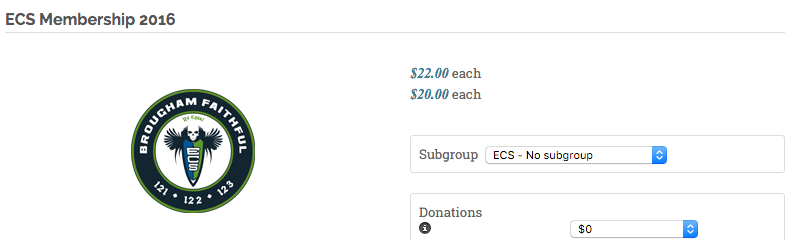
This is new behavior in 2.6.x, this product has been available with no changes since 2.5.0.
Replied by Llarian on topic Product showing multiple prices
Jerome wrote: Hi,
There is just one single price displayed for your product.
But I guess that you misunderstand the page ; because you have options for that product, the product page also display the "price with options".
So there is the product price.. And the product price with the prices of the selected options.
Regards,
I assume you see a single price at $22.00?
There is a second price with a user group based ACL. All users in that ACL are seeing the attached screenshot.
This is new behavior in 2.6.x, this product has been available with no changes since 2.5.0.
Please Log in or Create an account to join the conversation.
10 years 8 months ago #226731
by Jerome
Jerome - Obsidev.com
HikaMarket & HikaSerial developer / HikaShop core dev team.
Replied by Jerome on topic Product showing multiple prices
Hi,
I do not have that display when I display the page.
You can just take a look at the page you gave with a browser where you are not log-in.
So I suppose that you created prices with ACL.
Please check your product price configuration.
Regards,
I do not have that display when I display the page.
You can just take a look at the page you gave with a browser where you are not log-in.
So I suppose that you created prices with ACL.
Please check your product price configuration.
Regards,
Jerome - Obsidev.com
HikaMarket & HikaSerial developer / HikaShop core dev team.
Please Log in or Create an account to join the conversation.

10 years 8 months ago - 10 years 8 months ago #227717
by arveni
Replied by arveni on topic Product showing multiple prices
Hi,
I have the same problem. It seems it appear after 2.6.1 update.
The "problem" is :
I have different user categories like:
- A
- -a1
- -a2
- - - a3
- B...
And I applied a general price 22 $ for example for all "A" then I add a specific price for a3 = 20$
So if the user is a "a3" he can see both price.
I checked the options and checked all possibilities (the cheaper, all prices...) but nothing change. It works this way before
I attached my problem : firstly 59€ has a class "display : none" and next there is a new 59 €
Thanks for your help
I have the same problem. It seems it appear after 2.6.1 update.
The "problem" is :
I have different user categories like:
- A
- -a1
- -a2
- - - a3
- B...
And I applied a general price 22 $ for example for all "A" then I add a specific price for a3 = 20$
So if the user is a "a3" he can see both price.
I checked the options and checked all possibilities (the cheaper, all prices...) but nothing change. It works this way before
I attached my problem : firstly 59€ has a class "display : none" and next there is a new 59 €
Thanks for your help
Last edit: 10 years 8 months ago by arveni.
Please Log in or Create an account to join the conversation.
10 years 8 months ago #227770
by Llarian
Replied by Llarian on topic Product showing multiple prices
Thanks. This probably still persists for me as well, but I haven't had the time to pursue it since it is effectively a cosmetic bug.
Please Log in or Create an account to join the conversation.
10 years 8 months ago #227775
by Jerome
Jerome - Obsidev.com
HikaMarket & HikaSerial developer / HikaShop core dev team.
Replied by Jerome on topic Product showing multiple prices
Hi,
@arveni
You're using the microdata plugin and that plugin need to add some content in the page to let the microdata be available.
Regards,
@arveni
You're using the microdata plugin and that plugin need to add some content in the page to let the microdata be available.
Regards,
Jerome - Obsidev.com
HikaMarket & HikaSerial developer / HikaShop core dev team.
Please Log in or Create an account to join the conversation.
10 years 8 months ago - 10 years 8 months ago #227859
by arveni
Replied by arveni on topic Product showing multiple prices
I disable microdata plugin but nothing change...except I lost a few css proprieties on my template
Picture in attached files.
I always use this ACL configuration and microdata plugin before and I had not this problem??
Edit :
I checked on the plugin and there is difference betwenn hikashop version
2.5.0
2.6.1
$3 ??
Picture in attached files.
I always use this ACL configuration and microdata plugin before and I had not this problem??
Edit :
I checked on the plugin and there is difference betwenn hikashop version
2.5.0
Code:
$product_page_parts[1] = preg_replace($pattern,$replacement,$product_page_parts[1],1);
$pattern='/class="hikashop_product_price_main"(.*)class="hikashop_product_price hikashop_product_price_0/msU';
$replacement='class="hikashop_product_price_main" $1 itemprop="price" class="hikashop_product_price hikashop_product_price_0';
$product_page_parts[1] = preg_replace($pattern,$replacement,$product_page_parts[1],1);
Code:
$product_page_parts[1] = preg_replace($pattern,$replacement,$product_page_parts[1],1);
$pattern='/class="hikashop_product_price_main"(.*)class="hikashop_product_price hikashop_product_price_0(.*)>(.*)<\/span>/msU';
preg_match($pattern, $product_page_parts[1] , $matches);
if(isset($matches[3])){
$mainPrice = str_replace(array(' ',$data->currency_symbol),'',preg_replace('/\((.*)\)/','',$matches[3]));
$replacement = 'class="hikashop_product_price_main" $1 class="hikashop_product_price hikashop_product_price_0$2><span itemprop="price" style="display: none;">'.$mainPrice.'</span>$3</span>';
$product_page_parts[1] = preg_replace($pattern,$replacement,$product_page_parts[1],1);
}
$3 ??
Last edit: 10 years 8 months ago by arveni.
Please Log in or Create an account to join the conversation.

10 years 8 months ago #227897
by Xavier
Replied by Xavier on topic Product showing multiple prices
Hi,
Do you have a view override on the view "product / listing_price" ? This is the view which handle the prices.
The microdata plugin is not causing your issue, it is just adding a hidden span to give the price correctly formatted.
But this is not adding a price, it is just handling the already displayed prices on the page, and theses prices are displayed by the "listing_price" view.
The $3 is just there to fill the html with the html get in the "pattern". so put back the html at his original place.
Regarding the settings you have indeed to select the option to display the "Cheapest price" for the "Price display method".
Do you have a view override on the view "product / listing_price" ? This is the view which handle the prices.
The microdata plugin is not causing your issue, it is just adding a hidden span to give the price correctly formatted.
But this is not adding a price, it is just handling the already displayed prices on the page, and theses prices are displayed by the "listing_price" view.
The $3 is just there to fill the html with the html get in the "pattern". so put back the html at his original place.
Regarding the settings you have indeed to select the option to display the "Cheapest price" for the "Price display method".
Please Log in or Create an account to join the conversation.
10 years 8 months ago - 10 years 8 months ago #228000
by arveni
Replied by arveni on topic Product showing multiple prices
Hi,
Yes I have a override but I tried again to delete it but nothing change (see picture 1)
I configure the menu display with the cheaper price (pict2) and the main configuration for show products with cheaper price (see pict3) but nothing changed too. is there anyhting I can do?
PS : When I add a product to cart, it keep the good price
Edit 1 : I send you an access to the website via your contact form if you want to have a look
Yes I have a override but I tried again to delete it but nothing change (see picture 1)
I configure the menu display with the cheaper price (pict2) and the main configuration for show products with cheaper price (see pict3) but nothing changed too. is there anyhting I can do?
PS : When I add a product to cart, it keep the good price
Edit 1 : I send you an access to the website via your contact form if you want to have a look
Last edit: 10 years 8 months ago by arveni.
Please Log in or Create an account to join the conversation.
10 years 8 months ago #228012
by Xavier
Replied by Xavier on topic Product showing multiple prices
Hi,
Thanks you for this report, we will do a package with the hotfix for this issue.
So I invite you to download the latest version from our website (still 2.6.1 but with hot fix) and install it over your current install.
Thanks you for this report, we will do a package with the hotfix for this issue.
So I invite you to download the latest version from our website (still 2.6.1 but with hot fix) and install it over your current install.
The following user(s) said Thank You: arveni
Please Log in or Create an account to join the conversation.
10 years 8 months ago #228157
by arveni
Replied by arveni on topic Product showing multiple prices
It works! Thanks
Please Log in or Create an account to join the conversation.
10 years 8 months ago #228174
by Llarian
Replied by Llarian on topic Product showing multiple prices
That resolved things for our site as well!
Thank you!
Thank you!
Please Log in or Create an account to join the conversation.
Time to create page: 0.251 seconds